
1. Introduction
Thank you for choosing the BAOFENG DM32 DMR GPS Walkie Talkie. This advanced two-way radio is designed for reliable and versatile communication, featuring Digital Mobile Radio (DMR) technology, integrated GPS for positioning, and a robust set of functions for various applications. Please read this manual thoroughly to understand the proper operation and maintenance of your device.
2. Product Overview & Key Features
The BAOFENG DM32 offers a comprehensive communication solution with the following highlights:
- Built-in GPS: Real-time positioning and location sharing for enhanced safety and coordination.
- Digital Recording: Up to 10 hours of voice recording with integrated management.
- Text Messaging: Supports text communication with a large contact directory.
- APRS & Fall Detection: Automatic Position Reporting System and an alarm for fall detection, crucial for personal safety.
- 4,000 Channels: Extensive channel capacity for flexible communication.
- High Ingress Protection: Designed for durability and reliability in diverse environments.
- TDMA Dual Time Slot Technology: Efficient use of frequency resources.
- U/V Dual Frequency: Dual display and dual standby for versatile usage.
- 2.00" Screen Display & Full Keyboard: Intuitive interface for easy operation.
- Multiple Charging Methods: Includes Type-C interface for convenient charging.

Image: The BAOFENG DM32 radio highlighting its powerful functions including numerical and analog compatibility, dual frequency band, TDMA, 2.00" screen, full keyboard, digital monitoring, and more.

Image: The BAOFENG DM32 showcasing its TDMA Dual Time Slot technology, enabling two groups of calls simultaneously on the same frequency point.

Image: The BAOFENG DM32 illustrating its U/V Dual Frequency capability, providing dual display and dual standby for various environments.
3. Package Contents
Upon opening your BAOFENG DM32 package, please verify that all the following items are included:
- BAOFENG DM32 Radio Unit
- Rechargeable Lithium-Ion Battery
- Antenna (VHF/UHF)
- Desktop Charger Base
- Power Adapter
- USB Type-C Charging Cable
- Belt Clip
- Wrist Strap
- User Manual (this document)
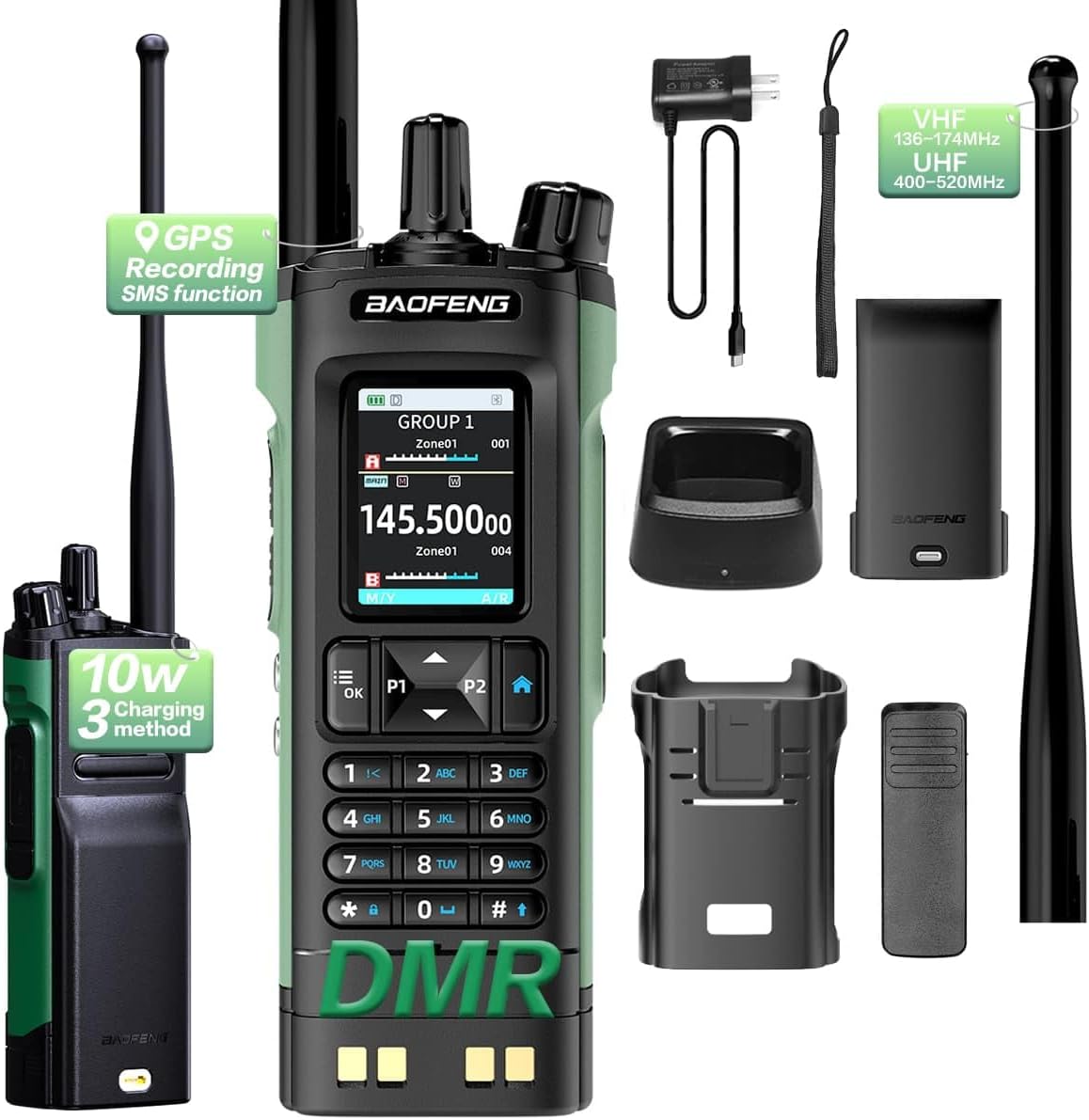
Image: The BAOFENG DM32 radio displayed with all its standard accessories, including the antenna, battery, charging base, power adapter, USB cable, belt clip, and wrist strap.

Image: A closer view of the BAOFENG DM32 radio alongside its detachable antenna, rechargeable battery, and USB Type-C charging cable.
4. Setup
4.1 Battery Installation
- Align the battery pack with the grooves on the back of the radio.
- Slide the battery upwards until it clicks into place securely.
- To remove, push the battery release latch (usually at the bottom of the battery) and slide the battery downwards.
4.2 Antenna Attachment
- Screw the antenna clockwise into the connector on the top of the radio until it is finger-tight. Do not overtighten.
4.3 Charging the Battery
Before first use, fully charge the battery. The DM32 supports multiple charging methods:
- Using the Desktop Charger: Place the radio (with battery installed) into the desktop charger. Ensure the charging contacts align. The indicator light will show charging status (e.g., red for charging, green for fully charged).
- Using Type-C USB: Connect the Type-C USB cable directly to the radio's Type-C port and to a compatible USB power source (e.g., computer, wall adapter).

Image: The BAOFENG DM32 radio showcasing its convenient Type-C charging interface, allowing for intelligent and easy charging.
5. Operating Instructions
5.1 Power On/Off and Volume
- Power On: Rotate the Power/Volume knob (top-left) clockwise until you hear a click. The display will light up.
- Adjust Volume: Continue rotating the Power/Volume knob to increase or decrease the audio volume.
- Power Off: Rotate the Power/Volume knob counter-clockwise until you hear a click.
5.2 Channel Selection
The DM32 supports 4,000 channels. You can navigate channels using the Up/Down arrow keys on the keypad or by entering the channel number directly.

Image: A detailed view of the BAOFENG DM32's 2.00-inch screen display and full alphanumeric keyboard, designed for easy navigation and input.
5.3 Transmitting and Receiving
- Receiving: When a signal is detected on the current channel, the radio will automatically receive the transmission.
- Transmitting: Press and hold the Push-To-Talk (PTT) button on the side of the radio. Speak clearly into the microphone (located below the PTT button). Release the PTT button to stop transmitting and return to receive mode.
5.4 GPS Functionality
The built-in GPS allows for real-time location tracking. Refer to the radio's menu system for GPS status, coordinates display, and options for sharing your location. This feature is particularly useful for outdoor activities and emergency situations.
5.5 Digital Recording
The DM32 can record important conversations for up to 10 hours. Access the recording function through the radio's menu. Recordings can be reviewed and managed directly on the device.
5.6 Text Messaging
The radio supports sending and receiving text messages. Use the keypad to compose messages and select contacts from the extensive directory. This feature provides an alternative communication method when voice calls are not feasible or preferred.
5.7 APRS Automatic Position Reporting System
The APRS feature automatically transmits your location data at set intervals, enhancing situational awareness for groups or central stations. Configure APRS settings via the radio's menu.
5.8 Fall Detection Alarm
For personal safety, the DM32 includes a fall detection alarm. If the radio detects a sudden fall, it can automatically alert pre-programmed contacts. Ensure this feature is enabled and configured correctly, especially for users in hazardous environments.
5.9 Programming
Advanced programming of channels, contacts, and other features typically requires dedicated programming software and a programming cable (sold separately). Refer to the software's instructions for detailed programming procedures. This allows for customization beyond the radio's on-device menu options.

Image: Two BAOFENG DM32 radios illustrating their capability for stable transmission of digital signals, supporting individual, group, all, one-click, and emergency calls.
6. Maintenance
6.1 Cleaning
Wipe the radio's surface with a soft, damp cloth. Do not use harsh chemicals or abrasive cleaners. Ensure the radio is dry before use or charging.
6.2 Battery Care
- Avoid overcharging or completely discharging the battery.
- Store batteries in a cool, dry place when not in use.
- If the radio will not be used for an extended period, remove the battery.
6.3 Storage
Store the radio in a dry, dust-free environment, away from direct sunlight and extreme temperatures. Keep it out of reach of children.
7. Troubleshooting
| Problem | Possible Cause | Solution |
|---|---|---|
| Radio does not power on | Battery is low or not installed correctly. | Charge the battery. Reinstall the battery securely. |
| Cannot transmit or receive | Incorrect channel/frequency. Antenna not attached. Battery low. | Verify channel settings. Attach antenna securely. Charge battery. |
| Poor audio quality | Weak signal. Obstructions. Volume too low/high. | Move to an open area. Adjust volume. |
| GPS not acquiring signal | Indoors or obstructed view of sky. | Move to an open outdoor area with clear sky view. |
8. Specifications
| Feature | Detail |
|---|---|
| Model Number | DM-32 |
| Brand | BAOFENG |
| Item Weight | 1.63 pounds |
| Package Dimensions | 10.59 x 8.54 x 2.4 inches |
| Batteries | 1 Lithium Ion battery (included) |
| Number of Channels | 4000 |
| Frequency Range | 400-470 MHz (UHF), 136-174 MHz (VHF) |
| Talking Range Maximum | 10 Kilometer (approximate, depends on terrain) |
| Tuner Technology | UHF |
| Water Resistance Level | Not Water Resistant |
| Special Feature | Digital Display, GPS, DMR, Recording, Text Messaging, APRS, Fall Detection |
| Manufacturer | Fujian Baofeng Electronics Co.,Ltd. |
9. Warranty and Support
9.1 Warranty Information
The BAOFENG DM32 comes with a manufacturer's warranty. Please refer to the warranty card included in your package or contact your point of purchase for specific details regarding warranty duration and coverage. Keep your proof of purchase for warranty claims.
9.2 Customer Support
For technical assistance, troubleshooting, or any questions regarding your BAOFENG DM32 radio, please contact BAOFENG customer support or visit the official BAOFENG website. Contact information can typically be found on the product packaging or the manufacturer's website.