
1. Introduction
This manual provides essential instructions for the safe and effective operation, maintenance, and troubleshooting of your Dongcheng Cordless Air Blower and Electric Drill, model DCPB358. Please read this manual thoroughly before using the tool to ensure proper handling and to prevent injury or damage.
2. Safety Instructions
WARNING: Read all safety warnings and instructions. Failure to follow the warnings and instructions may result in electric shock, fire, and/or serious injury.
- Always wear appropriate personal protective equipment, including eye protection, hearing protection, and gloves.
- Keep the work area clean and well-lit. Cluttered or dark areas invite accidents.
- Do not operate power tools in explosive atmospheres, such as in the presence of flammable liquids, gases, or dust.
- Keep children and bystanders away while operating a power tool. Distractions can cause you to lose control.
- Ensure the battery pack is fully charged before use and removed when not in use or during maintenance.
- Avoid unintentional starting. Ensure the switch is in the off-position before connecting to battery pack, picking up or carrying the tool.
- Do not force the power tool. Use the correct power tool for your application.
- Maintain power tools. Check for misalignment or binding of moving parts, breakage of parts, and any other condition that may affect the power tool’s operation.
3. Product Overview
The Dongcheng DCPB358 is a versatile cordless tool combining the functions of an air blower and an electric drill. It is designed for various tasks, from clearing debris to drilling into wood and metal. Its high-performance motor ensures powerful and consistent operation, while the ergonomic design provides comfort during extended use.
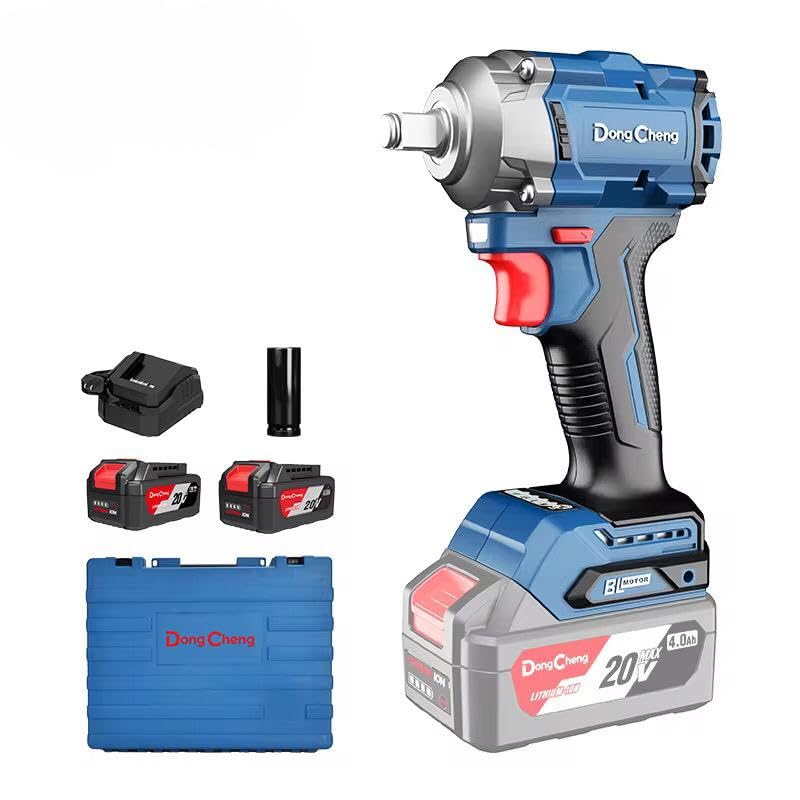
Image showing the Dongcheng Cordless Air Blower and Electric Drill DCPB358, highlighting its compact design and ergonomic grip.
Key Features:
- High-Speed Motor: Provides powerful and stable air thrust for efficient cleaning.
- Long-Lasting Lithium-ion Battery: High-capacity rechargeable battery for extended runtime.
- Adjustable Speed Control: Allows customization of speed for various applications.
- Comfortable and Lightweight Design: Ergonomic, non-slip grip reduces fatigue.
- Durable Construction: Made of high-quality, shock-resistant materials for longevity.
4. Setup
4.1 Battery Installation and Charging
- Ensure the tool is switched off before installing or removing the battery.
- Align the battery pack with the battery port on the tool.
- Slide the battery pack into the tool until it clicks securely into place.
- To charge, remove the battery from the tool. Connect the charger to a power outlet and then connect the battery pack to the charger. Follow the charger's instructions for charging time.
4.2 Attaching Accessories
Depending on the function you intend to use:
- For Blower Function: Attach the appropriate nozzle to the air outlet. Ensure it is firmly secured.
- For Drill Function: Open the drill chuck by rotating it counter-clockwise. Insert the desired drill bit into the chuck and tighten it securely by rotating clockwise. Ensure the bit is centered and firmly gripped.
5. Operating Instructions
5.1 Using the Air Blower
- Ensure the battery is installed and fully charged.
- Point the nozzle towards the area to be cleared.
- Press the power switch to start the blower.
- Adjust the speed using the variable speed control to match the task. Lower speeds are suitable for delicate surfaces, while higher speeds are for heavy debris.
- Release the power switch to turn off the blower.
5.2 Using the Electric Drill
- Ensure the correct drill bit is securely installed.
- Select the desired torque setting (if applicable) for drilling into different materials.
- Position the drill bit on the workpiece.
- Press the power switch to start drilling. Apply steady, even pressure.
- Release the power switch to stop drilling.
6. Maintenance
6.1 Cleaning
- Always disconnect the battery pack before cleaning.
- Wipe the tool with a clean, damp cloth. Do not use harsh chemicals or abrasive cleaners.
- Keep ventilation openings clear of dust and debris to prevent overheating.
6.2 Battery Care
- Store batteries in a cool, dry place away from direct sunlight and extreme temperatures.
- Do not store batteries in a discharged state for extended periods. Recharge them periodically.
- Dispose of old or damaged batteries according to local regulations.
7. Troubleshooting
| Problem | Possible Cause | Solution |
|---|---|---|
| Tool does not start | Battery not installed correctly or discharged | Ensure battery is fully inserted. Charge the battery. |
| Reduced power/airflow | Low battery charge, blocked air intake/outlet | Recharge battery. Clear any obstructions from air vents. |
| Drill bit slips in chuck | Chuck not tightened sufficiently, worn drill bit | Tighten chuck firmly. Replace worn drill bit. |
| Tool overheats | Blocked ventilation, prolonged heavy use | Clear vents. Allow tool to cool down before resuming use. |
8. Specifications
| Feature | Specification |
|---|---|
| Model | DCPB358 |
| Power Source | Battery Powered |
| Current | 4 Amps |
| Maximum Rotational Torque | 358 Newton meters |
| Drill Type | Basic Drill |
| Wood Drilling Capacity | 12.7 mm |
| Metal Drilling Capacity | 12.7 mm |
| Special Features | Variable Speed |
| Material | Metal |
| Product Dimensions | 10 x 20 x 37 cm |
| Item Weight | 500 grams |
9. Warranty and Support
Warranty information for your Dongcheng DCPB358 tool is typically provided with your purchase documentation. Please refer to the warranty card or contact your retailer for specific details regarding coverage and duration.
For technical support, spare parts, or service inquiries, please contact the manufacturer or your authorized Dongcheng service center. Keep your purchase receipt and product model number (DCPB358) handy when seeking support.