
Introduction
Thank you for choosing the Dongcheng DCPL04-8 12V Screwdriver. This manual provides essential information for the safe and effective operation, maintenance, and troubleshooting of your new tool. Please read this manual thoroughly before use and keep it for future reference.
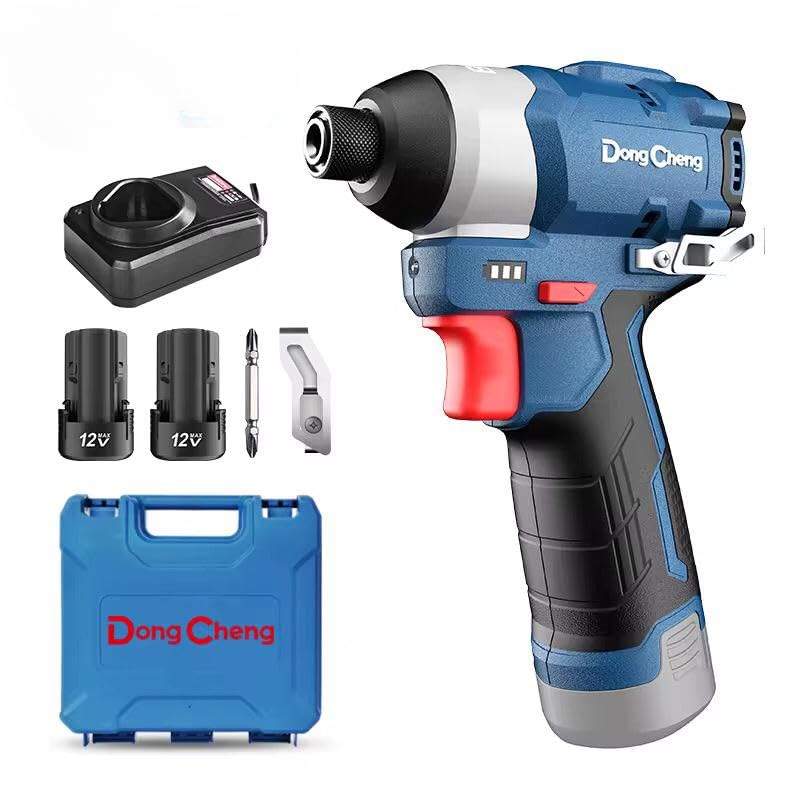
Image: The Dongcheng DCPL04-8 12V Screwdriver, featuring its compact design and ergonomic handle.
Safety Information
Always follow basic safety precautions to reduce the risk of fire, electric shock, and personal injury when operating power tools.
- Wear Eye Protection: Always wear appropriate eye protection when operating the screwdriver.
- Keep Work Area Clean: Cluttered areas invite accidents. Ensure your workspace is well-lit and free of obstructions.
- Avoid Dangerous Environments: Do not use power tools in damp or wet locations, or expose them to rain.
- Secure Workpiece: Always secure the workpiece with clamps or a vise to free both hands to operate the tool.
- Do Not Overreach: Maintain proper footing and balance at all times.
- Disconnect Power: Disconnect the battery pack from the tool before making any adjustments, changing accessories, or storing the tool.
- Use Correct Tool: Do not force a small tool or attachment to do the job of a heavy-duty tool.
- Store Idle Tools: When not in use, tools should be stored in a dry, high, or locked-up place, out of reach of children.
Package Contents
Your Dongcheng DCPL04-8 12V Screwdriver package typically includes:
- Dongcheng DCPL04-8 12V Screwdriver Unit
- Two 12V Battery Packs
- Battery Charger
- Instruction Manual
Setup
1. Charging the Battery
- Connect the charger to a standard power outlet.
- Slide the battery pack onto the charger until it clicks into place.
- Allow the battery to charge fully. The indicator light on the charger will change to show a full charge.
- Once charged, remove the battery from the charger.
2. Installing the Battery
- Align the charged battery pack with the battery slot on the bottom of the screwdriver handle.
- Slide the battery into the slot until it locks securely into place. Ensure it is firmly seated to prevent accidental dislodgement during operation.
3. Installing Screwdriver Bits
- Ensure the tool is off and the battery is removed for safety.
- Twist the chuck counter-clockwise to open the jaws.
- Insert the desired screwdriver bit into the chuck.
- Twist the chuck clockwise to tighten the jaws around the bit until it is securely held.
Operating Instructions
1. Powering On/Off and Speed Control
- To turn the screwdriver on, press the trigger switch. The motor speed increases as you press the trigger further.
- To turn the screwdriver off, release the trigger switch.
2. Forward/Reverse Rotation
- The forward/reverse switch is located above the trigger.
- Push the switch to the left for forward rotation (for driving screws).
- Push the switch to the right for reverse rotation (for removing screws).
- When the switch is in the center position, the trigger is locked, preventing accidental startup.
3. Torque Adjustment
- The torque adjustment collar is located behind the chuck.
- Rotate the collar to select the desired torque setting. Lower numbers are for smaller screws and softer materials, while higher numbers are for larger screws and harder materials.
- The drill setting bypasses the clutch for drilling applications.
4. Driving Screws
- Select the appropriate bit and torque setting.
- Place the tip of the bit onto the screw head.
- Apply firm, steady pressure to the back of the screwdriver.
- Slowly press the trigger to start driving the screw, increasing speed as needed.
- Release the trigger once the screw is fully driven or the clutch engages.
Maintenance
1. Cleaning
- Regularly clean the ventilation openings on the tool to prevent overheating.
- Use a soft, damp cloth to wipe down the tool's exterior. Do not use harsh chemicals or abrasive cleaners.
- Keep the chuck jaws free of debris for optimal bit gripping.
2. Battery Care
- Store batteries in a cool, dry place away from direct sunlight and extreme temperatures.
- Do not store fully discharged batteries for extended periods. Charge them periodically if not in use.
- Avoid dropping or physically damaging battery packs.
3. Bit Replacement
- Replace worn or damaged screwdriver bits promptly to ensure efficient and safe operation.
- Always use bits designed for impact drivers if applicable, or standard hex shank bits for general use.
Troubleshooting
| Problem | Possible Cause | Solution |
|---|---|---|
| Tool does not start | Battery not charged or improperly installed; Forward/reverse switch in center (locked) position. | Charge battery and ensure it is securely installed; Move forward/reverse switch to forward or reverse position. |
| Reduced power or speed | Low battery charge; Worn carbon brushes (if applicable); Overload. | Recharge battery; Have brushes inspected/replaced by a qualified technician; Reduce load on the tool. |
| Bit slips in chuck | Chuck not tightened sufficiently; Damaged chuck jaws; Incorrect bit shank. | Tighten chuck firmly; Inspect chuck for damage, replace if necessary; Ensure correct bit type is used. |
| Tool overheats | Blocked ventilation slots; Continuous heavy use. | Clean ventilation slots; Allow tool to cool down during prolonged use. |
Specifications
| Feature | Detail |
|---|---|
| Model Number | DCPL04-8 |
| Brand Name | Dongcheng |
| Power Source | Battery Powered (12V) |
| Item Weight | 500 grams |
| Product Dimensions | 10 x 20 x 37 cm |
| Material | Wood (Note: This likely refers to intended use, not tool material. Tool is typically metal/plastic.) |
| Color | Multi-color |
| Included Components | Power Tool (Screwdriver, 12V, Two Batteries) |
Warranty and Support
Dongcheng products are manufactured to high-quality standards. For specific warranty information, please refer to the warranty card included with your purchase or contact Dongcheng customer support. Keep your proof of purchase for any warranty claims.
For technical assistance, spare parts, or service, please contact your local Dongcheng dealer or authorized service center. You can find contact information on the official Dongcheng website or through your retailer.