
1. Introduction
The Losfom WD1 Body Camera is a compact and versatile recording device designed for various applications, including law enforcement, security patrols, and outdoor monitoring. It features a 2100mAh battery for extended recording times, clear night vision capabilities, and supports external memory for flexible storage management. This manual provides detailed instructions for the proper setup, operation, and maintenance of your WD1 body camera.
2. Package Contents
Before proceeding, please verify that all items are present in your package:
- WD1 Body Camera
- Long Clip (180° Rotatable)
- Short Clip (360° Rotatable)
- USB Cable
- User Manual

Figure 2.1: Package contents of the Losfom WD1 Body Camera.
3. Device Overview
Familiarize yourself with the main components and controls of the WD1 body camera.

Figure 3.1: Front and rear views of the WD1 Body Camera.
4. Setup
4.1 Charging the Battery
The WD1 body camera is equipped with a 2100mAh battery. For optimal performance, fully charge the device before first use.
- Connect the provided USB cable to the camera's charging port (Type-C).
- Connect the other end of the USB cable to a compatible USB power adapter (not included) or a computer's USB port.
- The charging indicator light will illuminate. Once fully charged, the light will turn off.
Note: A full charge provides up to 10 hours of continuous 1080P video recording (with screen and IR off). Use the supplied USB cable and a compatible charging block for proper charging.
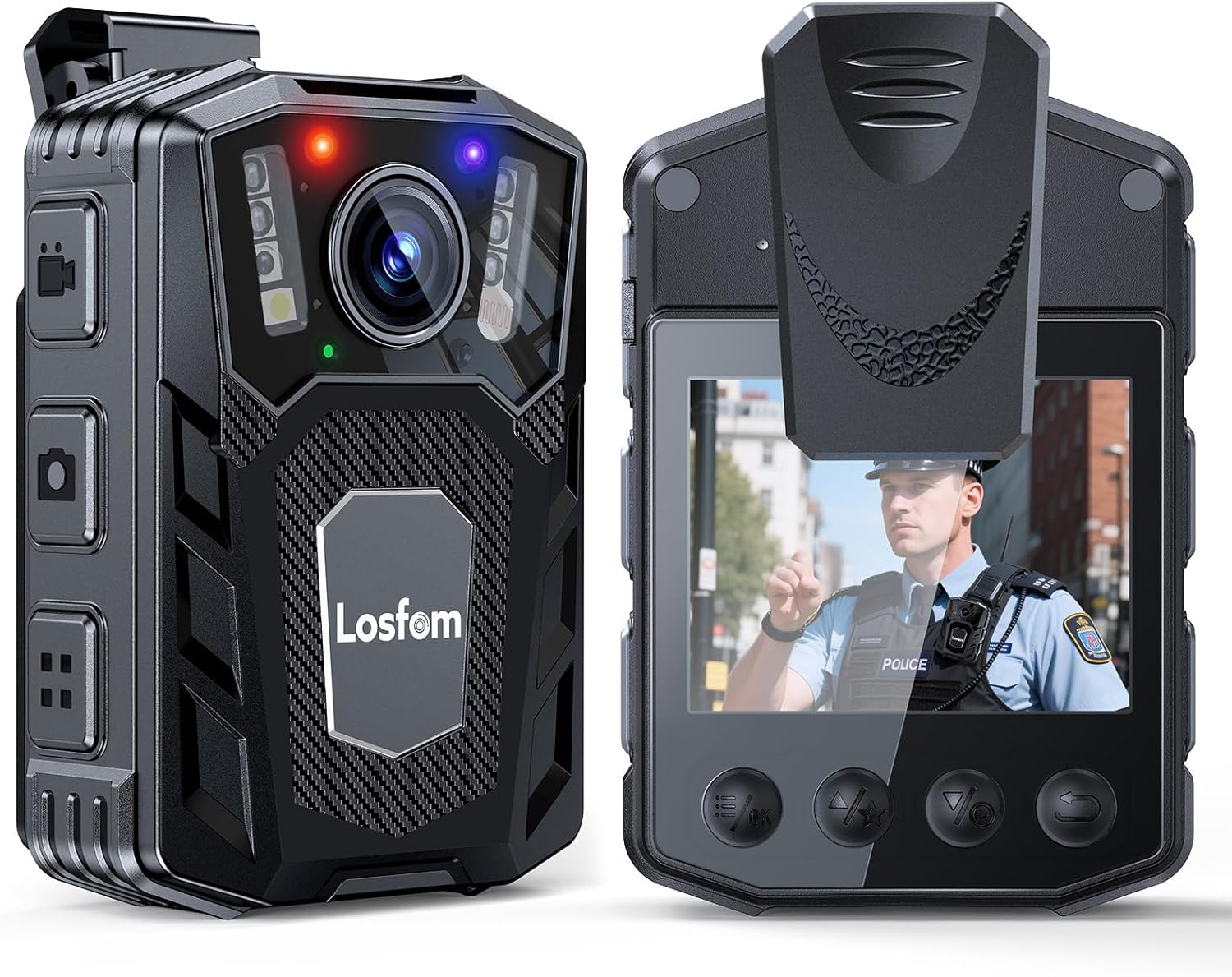
Figure 4.1: Charging the WD1 Body Camera.
4.2 Inserting/Replacing the Memory Card
The WD1 body camera supports external Micro SD cards for storage. A Micro SD card is included.
- Locate the Micro SD card slot on the side of the camera.
- Gently insert the Micro SD card into the slot with the gold contacts facing down until it clicks into place.
- To remove, push the card inward until it springs out.
Important: Ensure the camera is powered off before inserting or removing the memory card to prevent data loss or damage. The camera supports up to 256GB Micro SD cards.

Figure 4.2: Inserting a Micro SD card.
4.3 Attaching the Clips
The camera comes with two types of clips for versatile attachment: a long clip (180° rotatable) and a short clip (360° rotatable).
- Select the appropriate clip for your intended use (e.g., long clip for uniform pockets, short clip for lapels or straps).
- Align the clip with the mounting slot on the back of the camera and slide it in until it securely locks.
- Ensure the clip is firmly attached before wearing the camera.

Figure 4.3: Attaching the short and long clips.
5. Operating Instructions
5.1 Powering On/Off
- Power On: Press and hold the Power button for a few seconds until the screen illuminates.
- Power Off: Press and hold the Power button for a few seconds until the device shuts down.
5.2 Video Recording
The WD1 body camera features one-button control for quick recording activation.
- Ensure the camera is powered on.
- Press the dedicated Record button once to start video recording. A red indicator light will typically flash, and a recording icon will appear on the screen.
- Press the Record button again to stop recording.
Note: The camera supports continuous recording with adjustable video segment lengths (e.g., 5, 10, 15, 20 minutes). Refer to the on-screen menu for settings.

Figure 5.1: WD1 Body Camera in use for various activities.
5.3 Night Vision
The camera is equipped with infrared (IR) 6 LED lights for clear night vision recording up to 10 meters.
- Night vision mode can typically be activated or set to automatic via the camera's menu settings.
- When active, the IR lights will illuminate, allowing the camera to capture footage in low-light or total darkness.

Figure 5.2: Night vision feature in operation.
5.4 Loop Recording
The loop recording function ensures continuous recording by automatically overwriting the oldest files when the memory card reaches its capacity. This prevents recording from stopping due to a full card.
- This feature is typically enabled by default. You can adjust settings for loop recording duration in the camera's menu.

Figure 5.3: Loop recording functionality.
5.5 Connecting to a Computer
To view or transfer recorded files, connect the camera to a computer using the provided USB cable.
- Power on the camera.
- Connect the camera to your computer using the USB cable.
- The camera should appear as a removable disk drive on your computer.
- Navigate to the camera's storage to access video and audio files.
Tip: If files are not playing correctly on your computer's default player, try using a universal media player like VLC.
6. Maintenance
6.1 Cleaning the Camera
- Use a soft, dry cloth to clean the camera body.
- For the lens, use a specialized lens cleaning cloth and solution to avoid scratches.
- Do not use harsh chemicals or abrasive cleaners.
6.2 Storage
- Store the camera in a cool, dry place away from direct sunlight and extreme temperatures.
- If storing for an extended period, ensure the battery is partially charged (around 50%) to prolong its lifespan.
7. Troubleshooting
- Camera does not power on:
- Ensure the battery is charged. Connect the camera to a power source using the provided USB cable and charging block.
- If the camera freezes, locate the reset button (if available, often a small pinhole) and use a thin object to press it.
- Cannot transfer files to computer:
- Ensure the camera is powered on and properly connected to the computer via the USB cable.
- Try a different USB port or computer.
- Verify the Micro SD card is correctly inserted.
- Video files are unreadable:
- Some video players may have compatibility issues. Try using a different media player, such as VLC Media Player, which supports a wide range of formats.
- Poor video quality at night:
- Ensure night vision (IR lights) is enabled in the camera settings.
- Clean the camera lens to remove any obstructions or smudges.
8. Specifications
| Feature | Specification |
|---|---|
| Brand | Losfom |
| Model Number | WD1 |
| Video Capture Resolution | 1080p |
| Photo Sensor Technology | CMOS |
| Battery Capacity | 2100mAh |
| Battery Average Life | Up to 10 hours (1080P video recording, screen & IR off) |
| Night Vision Range | Up to 10 meters (with 6 IR LEDs) |
| Flash Memory Type | Micro SD (supports up to 256GB) |
| Video Capture Format | MOV |
| Supported Audio Format | AAC |
| Screen Size | 2 Inches |
| Connectivity Technology | USB |
| Color | Black |
| Water Resistance Level | Not Water Resistant |
9. Warranty and Support
9.1 Warranty Information
The Losfom WD1 Body Camera comes with a 2-year warranty from the date of purchase. This warranty covers manufacturing defects and malfunctions under normal use. It does not cover damage caused by misuse, accidents, unauthorized modifications, or natural disasters. Please retain your proof of purchase for warranty claims.
9.2 Customer Support
For technical assistance, troubleshooting, or warranty inquiries, please contact Losfom customer support. Refer to the contact information provided on the official Losfom website or the packaging.
10. Official Product Video
This video provides a visual overview of the Losfom WD1 Body Camera's features and usage scenarios, including its long battery life, one-button control, and various mounting options.


