

1. Introduction
Thank you for choosing the Sofirn SK1 Tactical Flashlight. This high-performance LED flashlight is designed for reliability and versatility, offering powerful illumination for outdoor adventures, tactical operations, emergency situations, and daily use. Featuring a dual-switch interface, multiple lighting modes, USB-C rechargeable battery, and a durable, waterproof design, the SK1 is built to perform in demanding environments. Please read this manual carefully before using your flashlight to ensure proper operation and maintenance.

Image: A person holding the Sofirn SK1 flashlight, illuminating a long distance in a dark, industrial setting, demonstrating its 1572ft beam throw and 1300 lumens output.

Image: An overview of the Sofirn SK1's key features including Max Output 1300 Lumen, Max Throw 1571ft, Max Runtime 200H, 6 Modes, and Rotary Switch, with a long beam in a dark environment.
2. Safety Instructions
- Eye Safety: Do not shine the flashlight directly into eyes or at other people or animals. The powerful beam can cause temporary vision impairment or permanent eye damage.
- Heat Warning: The flashlight head may become hot during prolonged use at high output levels. Handle with care to avoid burns.
- Battery Safety: Use only the recommended battery type. Do not mix old and new batteries, or different types of batteries. Do not dispose of batteries in fire. Keep batteries away from children.
- Children: Keep the flashlight out of reach of children to prevent accidental activation or misuse.
- Disassembly: Do not disassemble the flashlight head or body. Doing so may damage the flashlight and void the warranty.
3. Package Contents
Please check the package contents upon receipt:
- Sofirn SK1 Tactical Flashlight
- Rechargeable Lithium Polymer Battery (pre-installed or separate)
- USB-C Charging Cable
- Reversible Pocket Clip
- Lanyard
- User Manual
- Spare O-rings
4. Setup
- Battery Installation: If the battery is not pre-installed, unscrew the tail cap, insert the battery with the positive (+) terminal facing towards the head of the flashlight, and screw the tail cap back on tightly.
- Initial Charge: For optimal performance, fully charge the battery before first use. Refer to the 'Charging' section for instructions.
- Attach Clip/Lanyard: Attach the reversible pocket clip or lanyard as desired for convenient carrying.
5. Operating Instructions
The Sofirn SK1 features a dual-switch interface: a tail switch for momentary/constant on/off, and a rotary switch for mode selection and instant strobe.
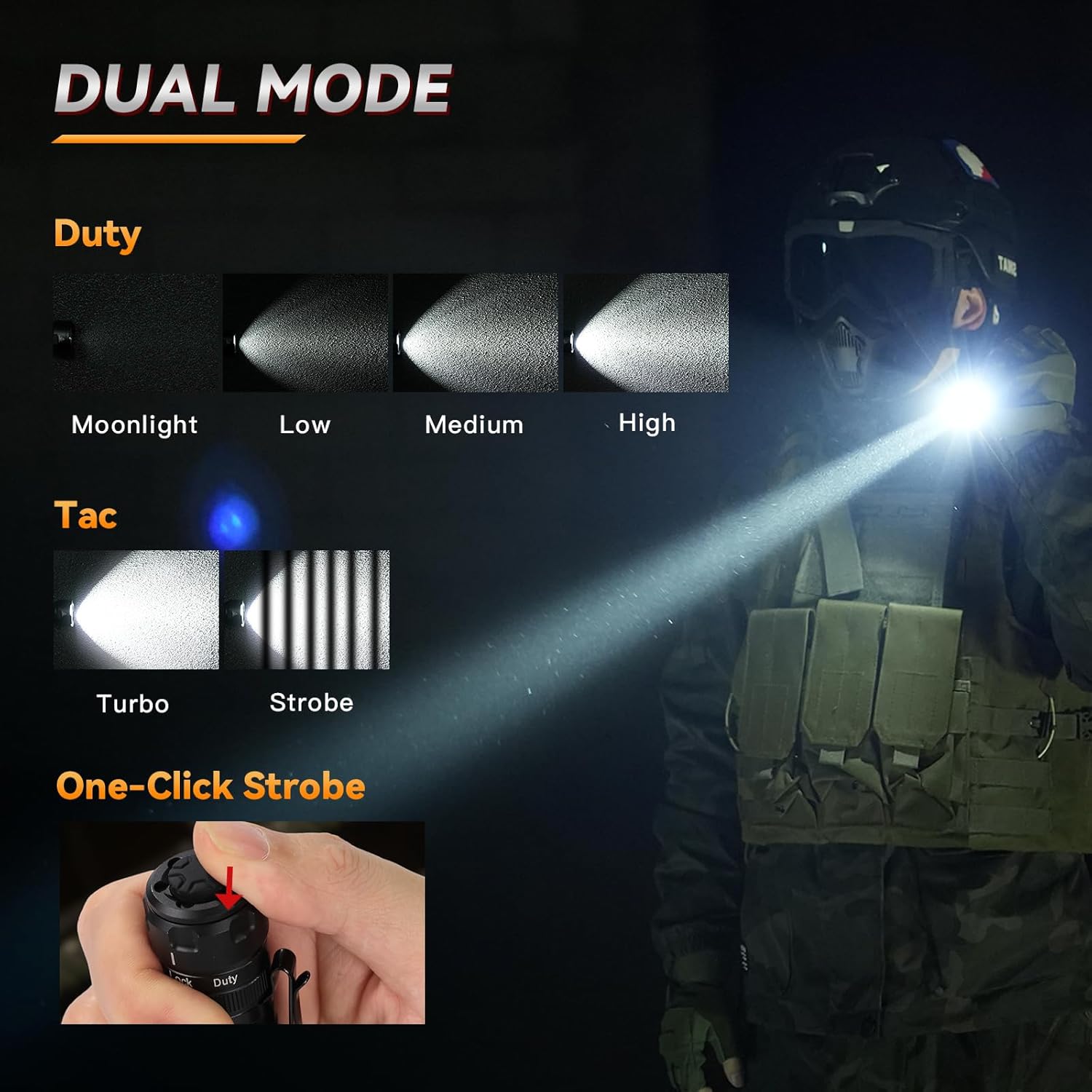
Image: Illustration of the Sofirn SK1's Dual Mode operation, showing 'Duty' modes (Moonlight, Low, Medium, High) and 'Tac' modes (Turbo, Strobe), along with a detail of the one-click strobe activation.
5.1 Tail Switch Operation
- Momentary On: Half-press the tail switch. Release to turn off.
- Constant On/Off: Fully press the tail switch until it clicks to turn the flashlight on or off.
5.2 Rotary Switch Operation
The rotary switch allows you to select between different lighting modes and lock the flashlight.
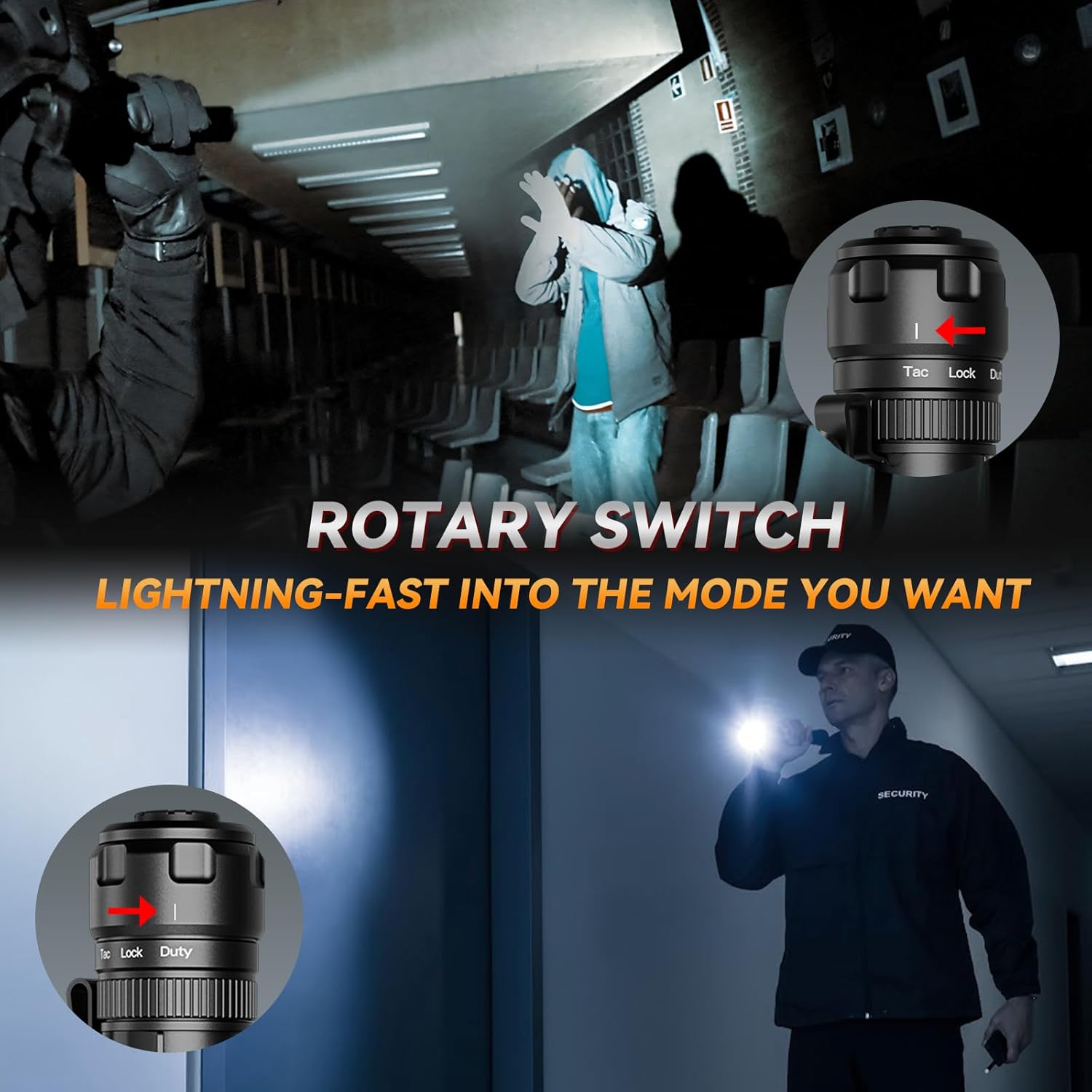
Image: Close-up of the Sofirn SK1's rotary switch with indicators for 'Tac', 'Lock', and 'Duty' modes, shown in action during tactical use.
- Mode Selection: Rotate the switch to select your desired mode group:
- Duty Mode: Provides Moonlight, Low, Medium, and High outputs. Cycle through these modes by quickly turning the flashlight off and on with the tail switch, or by rotating the switch to a different position within the Duty range.
- Tactical (Tac) Mode: Provides instant Turbo output.
- Lock Function: Rotate the switch to the 'Lock' position to prevent accidental activation. The flashlight will not turn on when the rotary switch is in the 'Lock' position.
- Instant Strobe: From any mode (Duty or Tac), quickly rotate the switch to the 'Strobe' position (usually indicated by a lightning bolt icon or a specific detent) and back. This will activate strobe. Some models may have a dedicated strobe position or a quick double-twist action. Refer to the diagram on the flashlight body if available.

Image: A hand demonstrating the one-click strobe activation on the Sofirn SK1's rotary switch, with a tactical scenario in the background.
6. Charging
The Sofirn SK1 features a built-in USB-C charging port for convenient recharging.
- Connect Cable: Open the rubber cover protecting the USB-C port on the flashlight body.
- Plug In: Insert the USB-C end of the charging cable into the flashlight's port and the USB-A end into a compatible USB power source (e.g., wall adapter, power bank, computer USB port).
- Indicator Light: Observe the LED indicator light near the charging port:
- Red Light: Indicates the battery is currently charging.
- Green Light: Indicates the battery is fully charged.
- Charging Time: Charging time varies depending on the power source and battery level.
- Disconnect: Once fully charged, disconnect the USB-C cable and securely close the rubber cover to maintain water resistance.
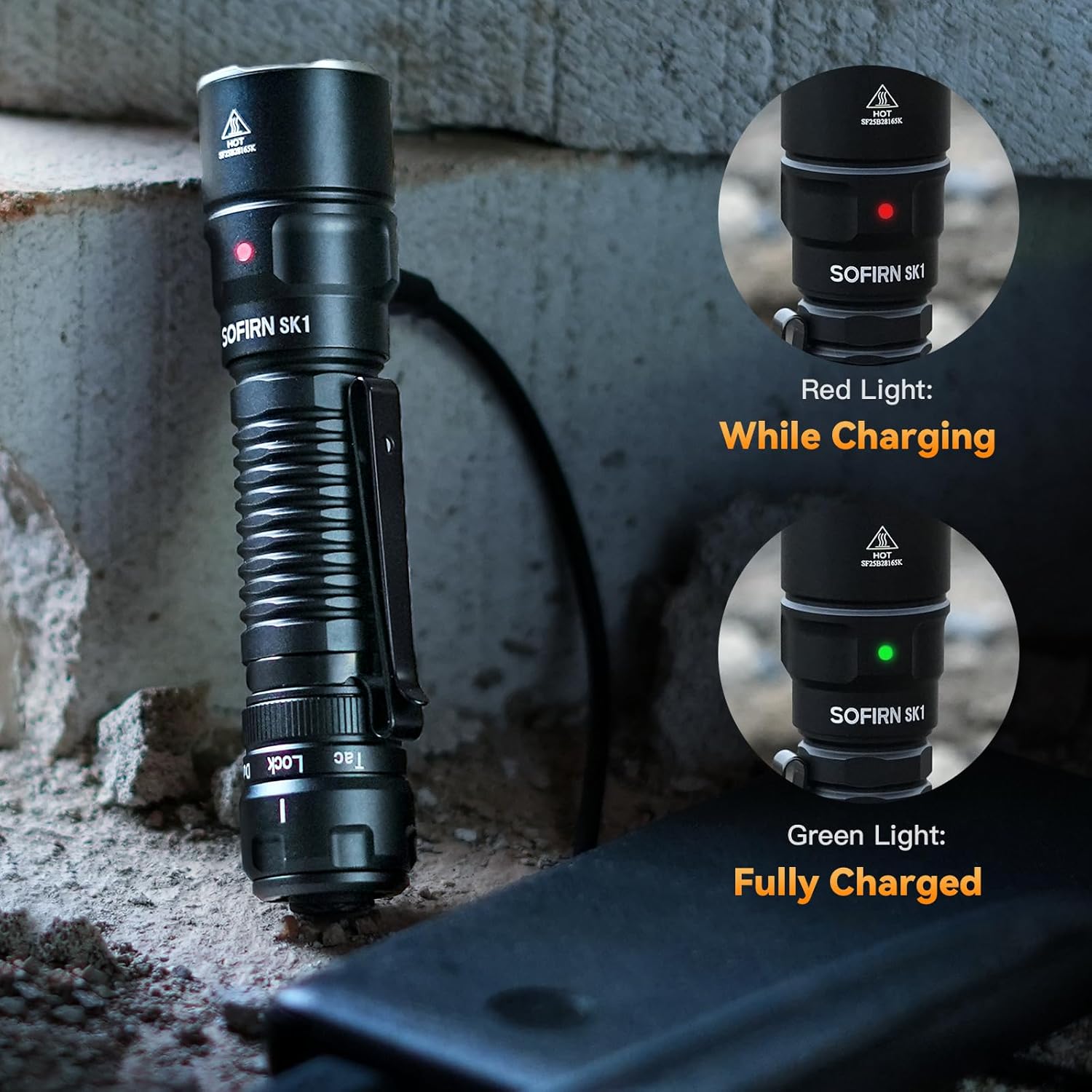
Image: The Sofirn SK1 flashlight connected to a power bank via USB-C, showing the LED indicator light in red (while charging) and green (fully charged).
7. Maintenance
- Cleaning: Clean the flashlight body with a soft, damp cloth. Do not use abrasive cleaners or solvents.
- Threads and O-rings: Periodically lubricate the screw threads and O-rings with silicone grease to maintain smooth operation and water resistance. Replace O-rings if they become damaged.
- Battery Care: If the flashlight will not be used for an extended period, remove the battery to prevent potential leakage. Store batteries in a cool, dry place.
- Contacts: Keep the battery contacts and the flashlight's internal contacts clean. Use a cotton swab with rubbing alcohol if necessary.
8. Troubleshooting
| Problem | Possible Cause | Solution |
|---|---|---|
| Flashlight does not turn on | Battery is dead or low Battery inserted incorrectly Tail cap loose Rotary switch in 'Lock' position Dirty contacts | Recharge or replace battery Ensure positive (+) end faces head Tighten tail cap Rotate switch out of 'Lock' Clean battery and flashlight contacts |
| Light is dim or flickers | Low battery Loose tail cap Dirty contacts | Recharge battery Tighten tail cap Clean contacts |
| Flashlight gets hot quickly | Prolonged use on Turbo/High mode | This is normal for high-output flashlights. Reduce output level or turn off to cool down. |
| Charging indicator not working | Charging cable or adapter faulty Battery already full | Try a different cable/adapter Indicator will show green if full |
9. Specifications

Image: A table detailing the Sofirn SK1's performance across different modes: Moonlight, Low, Medium, High, Turbo, and Strobe, showing Output (lm), Beam Distance (m), Runtime (h/min), and Peak Intensity (cd).
| Feature | Detail |
|---|---|
| Model | SK1 |
| LED | High-performance LED |
| Max Output | 1300 Lumens |
| Max Beam Distance | 479 meters (approx. 1571 feet) |
| Max Runtime | Up to 200 hours (Moonlight mode) |
| Modes | 6 (Moonlight, Low, Medium, High, Turbo, Strobe) |
| Battery Type | Rechargeable Lithium Polymer (1 included) |
| Charging | USB-C Port |
| Waterproof Rating | IPX8 (Submersible up to 2 meters for 30 minutes) |
| Impact Resistance | 1 meter |
| Material | High-strength 6061 Aluminum Alloy |
| Dimensions (L x W x H) | Approx. 14 cm x 6 cm x 6 cm (5.5 x 2.4 x 2.4 inches) |
| Weight | Not specified (lightweight and compact) |

Image: The Sofirn SK1 flashlight shown with water droplets, emphasizing its IPX8 waterproof rating, resting on a tactical helmet.

Image: A banner highlighting the Sofirn SK1's IP68 waterproof rating, with the flashlight shown in a wet environment.
10. Warranty and Support
Sofirn products are manufactured to high-quality standards. This product is covered by a manufacturer's warranty against defects in materials and workmanship. Please refer to the official Sofirn website or your purchase documentation for specific warranty terms and conditions.
For technical support, warranty claims, or any questions regarding your Sofirn SK1 flashlight, please contact Sofirn customer service through their official website or the retailer from whom you purchased the product. Please have your model number and purchase date available when contacting support.