
1. Introduction
This manual provides essential information for the safe and effective use of your Losfom WD1 Body Camera. Please read these instructions carefully before operating the device to ensure optimal performance and longevity.
2. What's in the Box
Upon unboxing, verify that all components listed below are present:
- WD1 Camera
- Long Clip
- Short Clip
- USB Cable
- User Manual

Figure 2.1: Package Contents. The image displays the Losfom WD1 Body Camera, a long clip, a short clip, a USB-C charging cable, and the user manual, all neatly arranged on a wooden surface.
3. Product Overview
The Losfom WD1 Body Camera is a compact and versatile recording device designed for various monitoring needs. It features a durable build and intuitive controls.
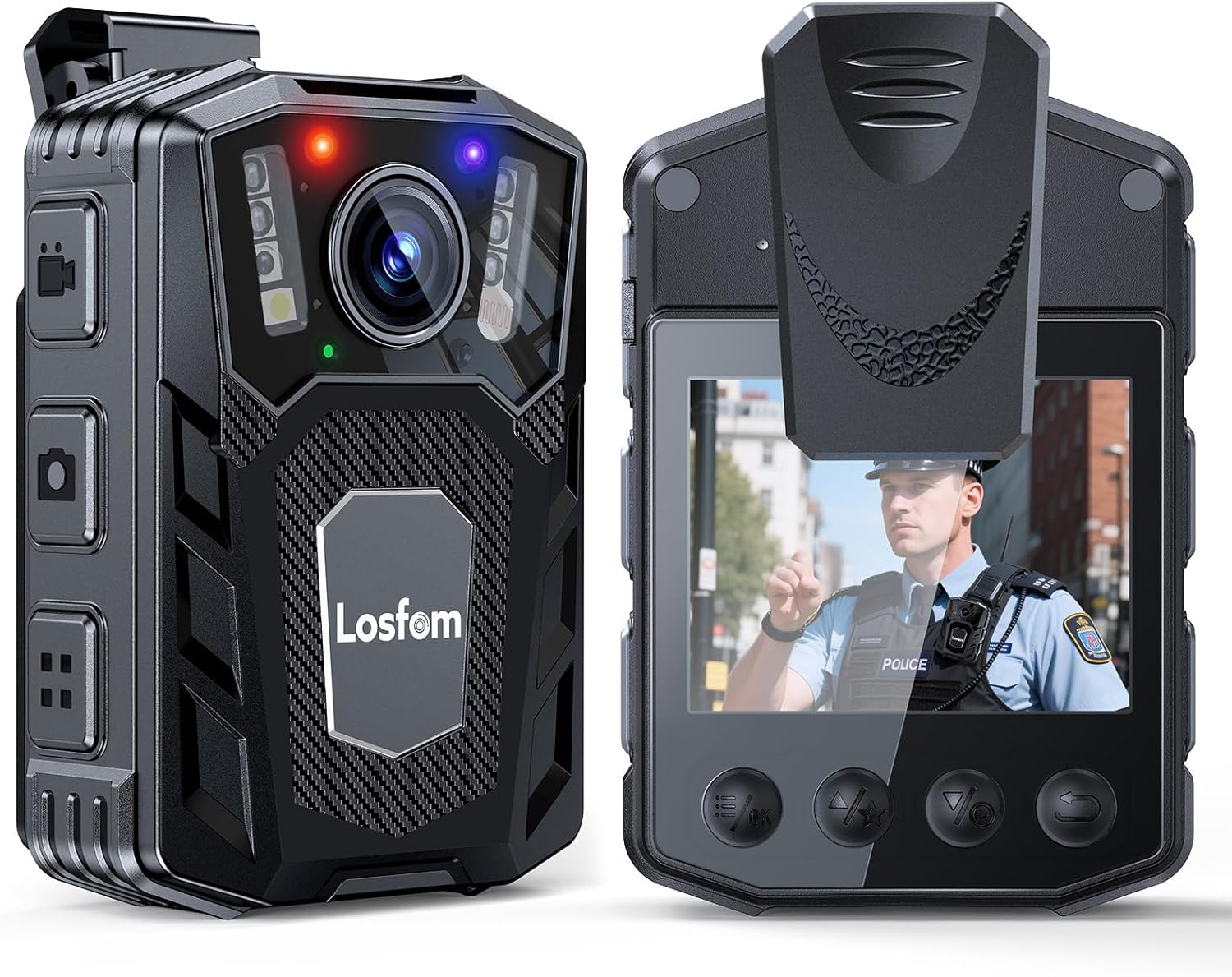
Figure 3.1: Front and Rear Views. This image illustrates the front of the Losfom WD1 Body Camera, featuring the camera lens, infrared LEDs, and visible brand logo. The rear view displays the integrated screen and control buttons, with an image of a police officer on the screen.
4. Setup
4.1 Charging the Device
Before first use, fully charge the WD1 Body Camera. The device is equipped with a 2100mAh battery, supporting up to 10 hours of continuous 1080P video recording (with screen and IR off). Use the provided USB cable for charging.

Figure 4.1: Charging the Camera. The image shows the Losfom WD1 Body Camera plugged into a laptop via its USB cable, indicating the charging process. The camera is placed on a wooden desk.
4.2 Memory Card Installation
The WD1 Body Camera supports external micro SD cards for storage. Insert the micro SD card into the designated slot before operation. The device supports user replacement of memory cards, allowing for flexible storage management.

Figure 4.2: External Memory Card. This image displays the Losfom WD1 Body Camera alongside several micro SD cards, highlighting its external memory card design for easy storage expansion and data transfer.
4.3 Attaching Clips
The camera comes with both long and short clips for versatile attachment. Choose the appropriate clip based on your intended use (e.g., shirt, backpack, belt).

Figure 4.3: Mounting Options. The image shows the Losfom WD1 Body Camera with its included long and short clips, illustrating how the device can be securely attached to clothing or gear for various applications.
5. Operating Instructions
5.1 Basic Operation
The WD1 Body Camera is designed for easy one-button control for recording. Refer to the included user manual for detailed instructions on powering on/off, initiating video or audio recording, and taking photos.
Video 5.1: Losfom WD1 Body Camera Overview. This video provides a brief demonstration of the Losfom WD1 Body Camera, showcasing its design and some basic functionalities.
5.2 Night Vision
The camera features 6 infrared LED lights, enabling clear image capture up to 10 meters in total darkness. This ensures reliable footage during low-light conditions or night patrols.

Figure 5.2: Night Vision Capability. The image illustrates the Losfom WD1 Body Camera's night vision feature, emphasizing its 6 IR LEDs and ability to capture clear footage up to 10 meters in dark environments.
Video 5.3: Night Vision Demonstration. This video demonstrates the night vision capabilities of a 1080P FHD body camera, showing its performance in low-light conditions.
5.3 Loop Recording
The loop recording function ensures continuous operation. When the memory card reaches its capacity, the camera automatically overwrites the oldest files, preventing interruption of critical recordings.

Figure 5.4: Loop Recording Feature. The image highlights the loop recording feature of the Losfom WD1 Body Camera, ensuring continuous capture by overwriting older files when storage is full.
5.4 Car Dash Cam Mode
The WD1 Body Camera can be configured for Car Dash Cam Mode. In this mode, the camera can be continuously powered by the car's power supply and will automatically record when the vehicle is on. This feature is ideal for continuous monitoring during commutes or professional driving.
Video 5.5: Dash Cam Mode Demonstration. This video illustrates the dash cam mode functionality of a wearable body camera, showing how it can be used for continuous recording in a vehicle.
6. Maintenance
To ensure the longevity and optimal performance of your Losfom WD1 Body Camera, follow these maintenance guidelines:
- Cleaning: Use a soft, dry cloth to clean the camera body and lens. Avoid abrasive materials or harsh chemicals.
- Storage: Store the camera in a cool, dry place away from direct sunlight and extreme temperatures.
- Battery Care: For extended storage, charge the battery to approximately 50% every three months to prevent deep discharge.
- Firmware Updates: Periodically check the Losfom official website for any available firmware updates to enhance performance and features.
7. Troubleshooting
If you encounter any issues with your Losfom WD1 Body Camera, refer to the following common troubleshooting steps:
- Camera Not Powering On: Ensure the battery is fully charged. If the issue persists, try resetting the device using the reset button (if available, refer to the user manual for location).
- Recording Issues: Check if the memory card is properly inserted and has sufficient free space. Ensure the memory card is formatted correctly (FAT32 is often recommended).
- Poor Video Quality: Clean the camera lens. Ensure adequate lighting for optimal recording, especially if night vision is not active.
- Device Freezing: Perform a soft reset by pressing and holding the power button, or use the dedicated reset button if the device becomes unresponsive.
For further assistance, please contact Losfom customer support.
8. Specifications
| Feature | Detail |
|---|---|
| Brand | Losfom |
| Model Number | WD1 |
| Item Weight | 8.3 ounces |
| Package Dimensions | 4.72 x 3.94 x 3.15 inches |
| Battery | 2100mAh (1 A battery included) |
| Color | Black |
| Special Features | Night Vision |
| Photo Sensor Technology | CMOS |
| Video Capture Resolution | 1080p |
| Maximum Focal Length | 20 |
| Maximum Aperture | 20 Millimeters |
| Flash Memory Type | Micro SD |
| Video Capture Format | MOV |
| Supported Audio Format | AAC |
| Screen Size | 2 Inches |
| Connectivity Technology | USB |
9. Warranty and Support
For warranty information and customer support, please refer to the warranty card included in your product packaging or visit the official Losfom Store.


