
Introduction
The Sony BRAVIA Theater Rear 8 SA-RS8 are wireless rear speakers designed to enhance your home theater audio experience. These speakers integrate seamlessly with compatible Sony soundbars and AV receivers, providing immersive surround sound with technologies like 360 Spatial Sound Mapping and Dolby Atmos. This manual provides instructions for setup, operation, maintenance, and troubleshooting to ensure optimal performance of your SA-RS8 speakers.

Image: A pair of Sony BRAVIA Theater Rear 8 SA-RS8 wireless speakers.
Safety Information
- Do not expose the speakers to water or moisture.
- Ensure proper ventilation to prevent overheating.
- Use only the provided power cable.
- Keep speakers away from heat sources and direct sunlight.
- Do not attempt to open or repair the speakers yourself. Refer to qualified service personnel.
Package Contents
- Sony BRAVIA Theater Rear 8 SA-RS8 Wireless Rear Speakers (2 units)
- Power Cables (2 units)
- Instruction Manual (this document)
Setup
1. Speaker Placement
Position the SA-RS8 wireless rear speakers behind your primary listening area. For optimal surround sound, ensure they are placed equidistant from the listener and at a similar height to your main soundbar or front speakers. Avoid placing them in enclosed spaces that may obstruct sound or wireless signals.

Image: Recommended placement of rear speakers in a home theater environment.
2. Power Connection
Connect each SA-RS8 speaker to a power outlet using the provided power cables. The speakers are designed for wireless audio communication with compatible Sony soundbars or AV receivers, eliminating the need for audio cables between the speakers and the main unit.

Image: Rear view of the SA-RS8 speaker, highlighting the power connection point.
3. Wireless Connection with Compatible Devices
The SA-RS8 speakers connect wirelessly to compatible Sony soundbars (BRAVIA Theater Bar 9, BRAVIA Theater Bar 8, HT-A7000, HT-A5000, HT-A3000) and AV receivers (STR-AN1000). The connection process is typically initiated through the compatible soundbar or receiver's setup menu or a dedicated mobile application.
- Ensure your compatible Sony soundbar or AV receiver is powered on and in pairing mode.
- Refer to your soundbar/receiver's manual for specific instructions on adding wireless rear speakers.
- The speakers will automatically attempt to connect. A status indicator on the speakers will confirm a successful connection.

Image: Illustration of wireless connectivity between a soundbar and a rear speaker.
4. Using the BRAVIA Connect App
For easy setup and control, download the BRAVIA Connect App on your smartphone or tablet. The app guides you through the speaker placement and connection process, and allows for fine-tuning of audio settings.
- Download the "BRAVIA Connect" app from your device's app store.
- Follow the on-screen instructions within the app to connect and configure your SA-RS8 speakers with your compatible Sony sound system.

Image: The BRAVIA Connect app interface demonstrating easy setup steps.
Operating Instructions
1. Enhancing Surround Sound
Once connected, the SA-RS8 speakers work in conjunction with your compatible Sony soundbar or AV receiver to create an immersive surround sound field. They are designed to deliver rear channel audio, significantly enhancing the 360 Spatial Sound Mapping experience and supporting formats like Dolby Atmos.

Image: Visual representation of 360 Spatial Sound Mapping technology.
2. Audio Quality
Each SA-RS8 speaker features a two-way design, incorporating both a woofer and a tweeter. This configuration ensures a rich, expansive, and clear sound reproduction, contributing to a detailed and dynamic audio experience.
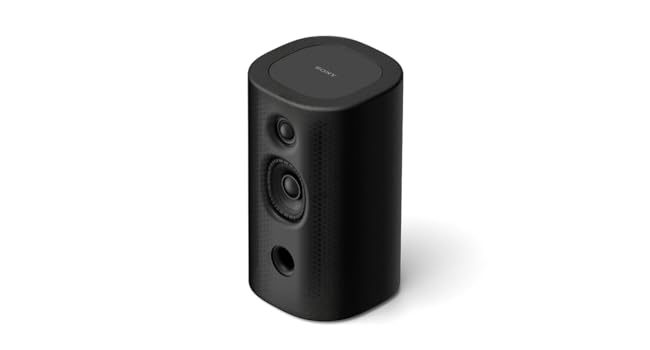
Image: Internal view of a speaker highlighting the woofer and tweeter for clear sound.
3. Adjusting Settings
Audio settings for the rear speakers, including volume levels, can typically be adjusted through your connected Sony soundbar or AV receiver's menu, or via the BRAVIA Connect App. This allows for customization based on your room acoustics and personal preferences.

Image: Example of on-screen audio settings for a Sony system, including rear speaker volume control.
Maintenance
To ensure the longevity and optimal performance of your SA-RS8 speakers, follow these maintenance guidelines:
- Cleaning: Gently wipe the speaker surfaces with a soft, dry cloth. Do not use liquid cleaners, aerosols, or abrasive materials, as these can damage the finish or internal components.
- Ventilation: Ensure that the speaker grilles and ventilation ports are not obstructed. Proper airflow prevents overheating.
- Storage: If storing the speakers for an extended period, disconnect them from power and store them in a cool, dry place, away from direct sunlight and extreme temperatures.
- Power Cables: Regularly inspect power cables for any signs of damage. Do not use damaged cables.
Troubleshooting
If you encounter issues with your SA-RS8 speakers, refer to the following common troubleshooting steps:
No Sound from Speakers
- Power Check: Ensure both speakers are properly connected to a power outlet and powered on. Check if the power indicator lights are active.
- Wireless Connection: Verify that the speakers are wirelessly connected to your compatible soundbar or AV receiver. Re-initiate the pairing process if necessary, following the instructions in your soundbar/receiver's manual or the BRAVIA Connect App.
- Source Content: Confirm that the audio content you are playing contains rear channel information. Some stereo content may not utilize rear speakers.
- Volume Levels: Check the rear speaker volume settings on your soundbar/receiver or the BRAVIA Connect App. Ensure they are not muted or set too low.
Static or Intermittent Sound
- RF Channel Interference: Wireless interference can cause static. If your compatible Sony AV receiver (e.g., STR-AN1000) has an "RF Channel" setting, try changing it to "Off". This can often resolve static issues. Access this setting via Home > Setup > Wireless Speaker Settings > RF Channel.
- Proximity to Routers/Devices: Keep the speakers and your soundbar/receiver away from other wireless devices like Wi-Fi routers, microwaves, or cordless phones, which can cause interference.
- Obstructions: Ensure there are no physical obstructions between the speakers and the soundbar/receiver that could block the wireless signal.
- Restart Devices: Power cycle both the speakers and the main sound system (soundbar/receiver) by unplugging them from the power outlet for a few minutes, then plugging them back in.
Speakers Lose Connection
- Power Cycle: If speakers frequently lose connection, try unplugging and re-plugging them from the power source. This often re-establishes the connection.
- Firmware Update: Ensure your soundbar/receiver and speakers have the latest firmware updates. Check the Sony support website for your specific model.
- Wireless Environment: A crowded wireless environment can cause disconnections. Try to minimize other 5GHz wireless activity in the vicinity if possible.
Specifications
| Feature | Detail |
|---|---|
| Model Name | SA-RS8 |
| Speaker Type | Surround Sound |
| Compatible Devices | Sony AV Amplifiers, Sony Soundbars (BRAVIA Theater Bar 9, BRAVIA Theater Bar 8, HT-A7000, HT-A5000, HT-A3000, STR-AN1000) |
| Surround Sound Channel Configuration | 7.1.2 (when paired with compatible system) |
| Color | Black |
| Product Dimensions (D x W x H) | 15.35" x 7.08" x 12.13" |
| Item Weight | 2.2 Kilograms (4.84 pounds) |
| Included Components | Power Cable |
| Control Method | App (BRAVIA Connect) |
| Wireless Communication Technology | Bluetooth (for initial setup/control), Proprietary Wireless (for audio transmission) |
| Speaker Size (Driver) | 15.5 Centimeters |
| Power Source | AC Power (Wireless audio transmission) |
| Audio Driver Type | Dynamic Driver (Two-way: Woofer + Tweeter) |
| Speaker Maximum Output Power | 100 Watts |
| Mounting Type | Wall Mount (optional) |
| UPC | 027242931749 |
| Item Model Number | SARS8.UC2 |
Warranty Information
The Sony BRAVIA Theater Rear 8 SA-RS8 speakers come with a Limited Warranty. For specific terms, conditions, and duration of your warranty, please refer to the warranty card included with your product or visit the official Sony support website for your region. Keep your proof of purchase for warranty claims.
Customer Support
For further assistance, technical support, or service inquiries, please visit the official Sony support website or contact Sony customer service in your region. You can find contact information and frequently asked questions on the Sony website: