
Introduction
This manual provides instructions for the RadioShack Mechanical Wired Gaming Keyboard, Model 2607155. It covers setup, operation, maintenance, and troubleshooting to ensure optimal performance and longevity of your device. Please read this manual thoroughly before using the keyboard.
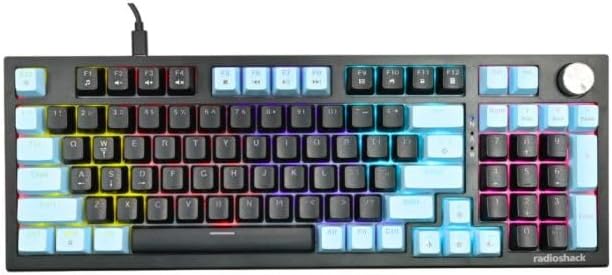
Image: Top-down view of the RadioShack Mechanical Wired Gaming Keyboard, showcasing its 96-key layout and rainbow backlighting.
Package Contents
Verify that all items are present in the package:
- RadioShack Mechanical Wired Gaming Keyboard (Model 2607155)
- 1.5-meter Type-C to USB Cable
- User Manual (this document)
Setup
- Unpack the Keyboard: Carefully remove the keyboard and its accessories from the packaging.
- Connect the Cable: Insert the Type-C end of the provided cable into the port on the keyboard.
- Connect to Computer: Plug the USB-A end of the cable into an available USB port on your computer.
- System Compatibility: The keyboard is compatible with operating systems including Windows XP, Vista, Windows 7, Windows 8, and Windows 10. No additional drivers are typically required for basic functionality.
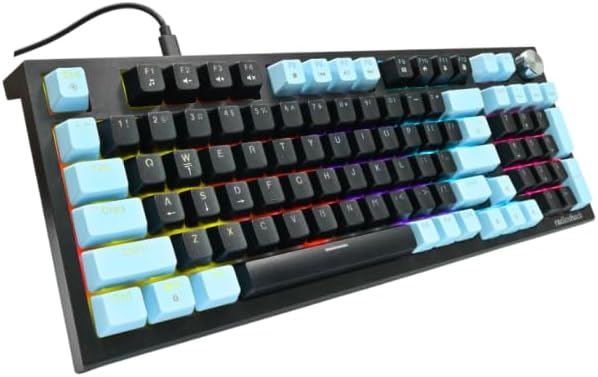
Image: Side view of the keyboard, illustrating the Type-C cable connection point.
Operating Instructions
Basic Key Functions
The keyboard features a 96-key layout, including a numeric keypad and function keys. Standard key functions operate as expected.
Dynamic RGB Lighting
The keyboard features rainbow LED lighting on all keys. There are also three LED light modes for the side lights.
- Key Backlighting: Displays a fixed rainbow pattern across the keys.
- Side Light Modes:
- Light On: Side lights remain steadily illuminated.
- Breath: Side lights slowly fade in and out.
- Light Off: Side lights are turned off.
Specific key combinations (often involving the Fn key) are used to cycle through or adjust lighting modes. Refer to the keycaps for printed icons indicating lighting controls.

Image: Angled view of the keyboard, highlighting the illuminated rainbow backlighting on the keys and side panels.
Rotary Knob Functionality
The keyboard includes a rotary knob and a single rotary knob button, typically located in the upper right corner. This knob is designed for enhanced control, commonly used for volume adjustment or multimedia functions. Pressing the knob button may mute/unmute audio or switch between different control modes.

Image: Angled view of the keyboard, focusing on the rotary knob and its button in the top right section.
Maintenance
- Cleaning: Use a soft, dry cloth to wipe the surface of the keyboard. For deeper cleaning, use compressed air to remove dust and debris from between the keycaps. Avoid using liquid cleaners directly on the keyboard.
- Cable Care: Do not bend or crimp the USB-C cable excessively. Store the cable neatly when not in use to prevent damage.
- Storage: Store the keyboard in a cool, dry place away from direct sunlight and extreme temperatures.
- Durability: The mechanical switches are designed for a lifespan of 50 million keystrokes. Avoid excessive force when typing.
Troubleshooting
| Problem | Possible Cause | Solution |
|---|---|---|
| Keyboard not responding | Loose cable connection, incorrect USB port, system driver issue. |
|
| Backlighting not working | Lighting mode turned off, software conflict. |
|
| Rotary knob not functioning | Software conflict, specific application settings. |
|
Specifications
| Model Number | 2607155 |
| Brand | RadioShack |
| Connectivity Technology | USB-C (Wired) |
| Number of Keys | 96 |
| Switch Type | Mechanical |
| Key Lifespan | 50 million keystrokes |
| Backlighting | Rainbow LED (keys), 3 modes (side lights) |
| Compatible Devices | Laptop (and other devices supporting USB keyboards) |
| Operating System Compatibility | Win XP, Vista, Win 7/8/10 |
| Material | Acrylonitrile Butadiene Styrene (ABS top cover) |
| Cable Length | 1.5 meters |
| Item Weight | 1.9 pounds |
| Package Dimensions | 16.9 x 5.9 x 1.96 inches |
Warranty Information
For detailed warranty information, please refer to the warranty card included with your product or visit the official RadioShack website. Keep your proof of purchase for warranty claims.
Support
If you encounter issues not covered in this manual or require further assistance, please contact RadioShack customer support. Contact details can typically be found on the product packaging or the official RadioShack support website.
Online Resources: Visit the RadioShack Store on Amazon