Product Overview
The RadioShack Transparent Wired RGB Gaming Mouse is designed for enhanced control and precision in gaming and multitasking. Featuring a durable braided cable, advanced 7D buttons, and customizable RGB lighting, this mouse offers responsive performance and extended durability.

Image: The transparent design of the RadioShack Wired RGB Gaming Mouse showcasing its internal components and vibrant RGB lighting.
Key Features:
- Durable Braided Cable: Equipped with a resistant white braided USB cable of 1.5 meters for long-lasting use.
- Advanced 7D Buttons: Features 7 programmable buttons for enhanced control and precision.
- Customizable RGB Lighting: Offers 14 modes of RGB light to personalize your gaming setup.
- High Performance: Built with an Instant 725F chipset and a polling rate of 125Hz for smooth and responsive performance.
- Extended Lifespan: Designed with a keystroke life of up to 5 million clicks for reliable and enduring use.
Setup Instructions
To begin using your RadioShack Transparent Wired RGB Gaming Mouse, follow these simple steps:
- Connect the USB Cable: Plug the 1.5-meter braided USB cable directly into an available USB port on your personal computer.
- Driver Installation: Your operating system (Windows) should automatically detect and install the necessary drivers. Allow a few moments for this process to complete.
- Verify Connection: Once drivers are installed, the mouse's RGB lighting should illuminate, indicating a successful connection.
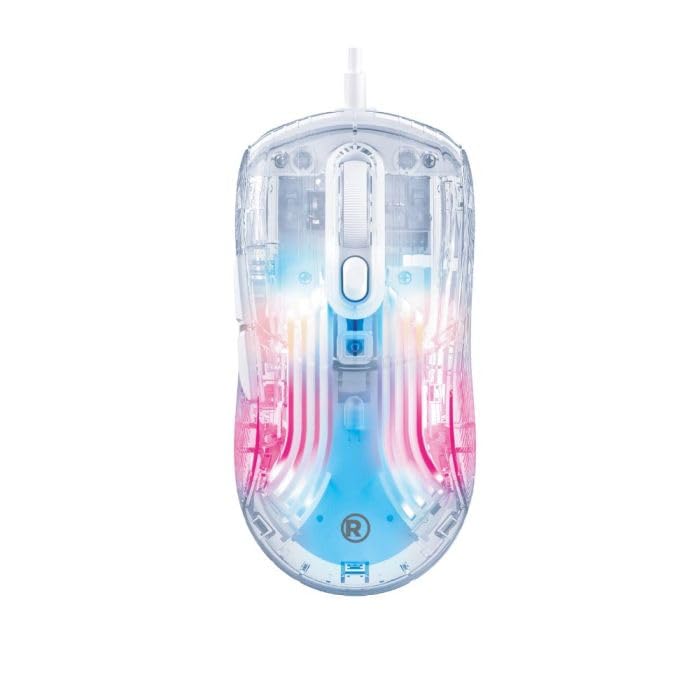
Image: The transparent gaming mouse with its braided USB cable, ready for connection to a computer.
Operating Instructions
The RadioShack Transparent Wired RGB Gaming Mouse features 7 programmable buttons and customizable RGB lighting to enhance your user experience.
Button Functions:
- Left Click Button: Standard primary function.
- Right Click Button: Standard secondary function.
- Scroll Wheel: Scroll up/down, and clickable for middle-click function.
- DPI Adjustment Buttons: Typically located near the scroll wheel, these buttons allow you to cycle through different DPI (dots per inch) settings to adjust cursor sensitivity.
- Forward/Back Buttons: Located on the side, these buttons are commonly used for navigation in web browsers or file explorers.
- RGB Mode Button: A dedicated button (often on the bottom or top) to cycle through 14 different RGB lighting modes.
Customizing RGB Lighting:
Press the dedicated RGB mode button to switch between the 14 available lighting effects. Some models may also feature a button to select specific colors.
Video: A demonstration of the transparent gaming mouse showcasing its various RGB lighting effects and sleek design.
Maintenance
To ensure the longevity and optimal performance of your gaming mouse, regular maintenance is recommended:
- Cleaning: Use a soft, dry cloth to wipe down the mouse surface. For stubborn dirt, a slightly damp cloth can be used, ensuring no moisture enters the internal components.
- Cable Care: Avoid sharp bends or excessive pulling on the braided USB cable to prevent damage.
- Storage: Store the mouse in a clean, dry environment away from extreme temperatures and direct sunlight when not in use.
Troubleshooting
If you encounter any issues with your RadioShack Transparent Wired RGB Gaming Mouse, please refer to the following common solutions:
- Mouse Not Responding: Ensure the USB cable is securely plugged into a functional USB port. Try a different USB port or restart your computer.
- RGB Lights Not Working: Check if the RGB mode button has been pressed to activate lighting effects. Ensure the mouse is properly connected.
- Cursor Movement Issues: Clean the optical sensor on the bottom of the mouse. Ensure you are using the mouse on a suitable surface (e.g., a mouse pad). Adjust DPI settings using the dedicated buttons.
Specifications
| Feature | Detail |
|---|---|
| Brand | RadioShack |
| Model Number | 2607149 |
| Color | Transparent |
| Connectivity Technology | USB (Wired) |
| Special Feature | RGB Lights (14 modes) |
| Movement Detection Technology | Optical (Instant 725F chipset) |
| Polling Rate | 125Hz |
| Button Quantity | 7D Buttons |
| Hand Orientation | Right |
| Compatible Devices | Personal Computer |
| Operating System | Windows |
| Cable Length | 1.5 meters |
| Keystroke Lifespan | Up to 5 million clicks |
| Item Weight | 1.5 Pounds |
| Enclosure Material | Plastic |
Warranty and Support
This product does not include a specific warranty description as per available information. For technical support or further assistance, please refer to the official RadioShack customer service channels or visit their website.


