1. Introduction
The GODOX Litemons C30BI is a compact and versatile LED video panel light designed for photography, videography, and vlogging. It offers adjustable color temperature (CCT) from 2800K to 6500K and dimmable brightness from 0% to 100%. Featuring a built-in 3350mAh rechargeable battery, it provides portable illumination for various creative needs. This manual provides detailed instructions for the safe and effective use of your C30BI light.
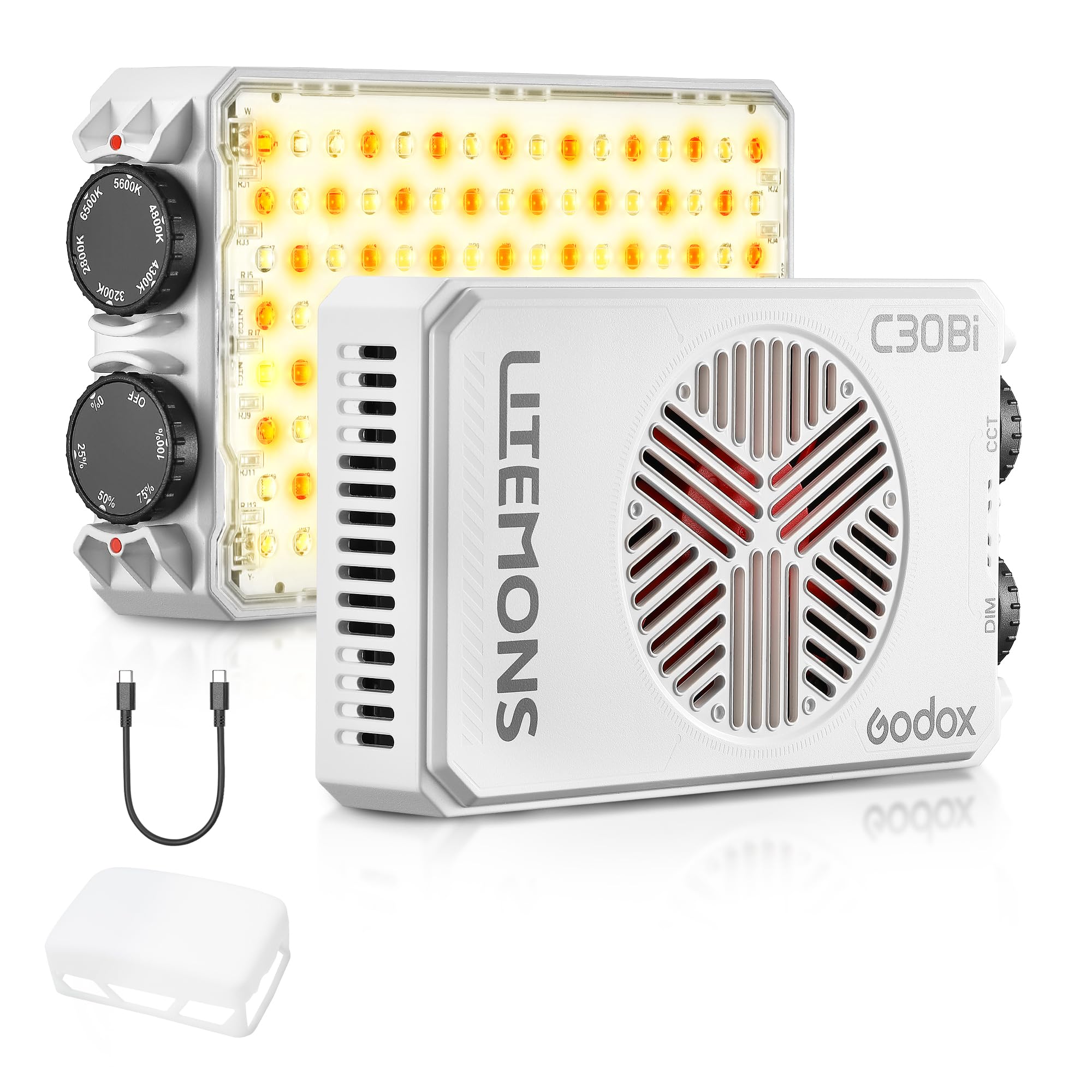
Figure 1: GODOX Litemons C30BI LED Video Panel Light
2. Safety Precautions
- Do not disassemble or modify the product. Repairs should only be performed by authorized service personnel.
- Keep the product dry. Do not handle with wet hands or immerse in water.
- Do not use the product in the presence of flammable gases, chemicals, or other materials.
- The product contains a built-in lithium battery. Do not expose to high temperatures, fire, or direct sunlight.
- Avoid direct eye exposure to the LED light.
- Ensure proper ventilation during use to prevent overheating.
- Keep out of reach of children.
3. Package Contents
Please check to ensure all items are included in your package:
- Light body (C30BI) x1
- Diffusion dome x1
- Charging cable x1

Figure 2: Package Contents
4. Product Features
- Wide CCT Range: Adjust color temperature from 2800K (warm) to 6500K (cool) to match ambient light or create desired moods.
- Dimmable Brightness: Output can be adjusted from 0% to 100%.
- High Color Accuracy: Features a Color Rendering Index (CRI) of 94 and Television Lighting Consistency Index (TLCI) of 96, ensuring accurate color reproduction.
- Compact and Lightweight: Weighing approximately 248g, its palm-sized design makes it highly portable.
- Built-in Rechargeable Battery: Equipped with a 3350mAh battery, providing approximately 45 minutes of runtime at full power or 276 minutes at 50% brightness. Supports charging while in use.
- Efficient Cooling: Aerospace-grade packaging technology ensures efficient heat dissipation and quiet operation.
- Versatile Mounting: Includes a standard 1/4-inch screw hole for mounting on cameras, light stands, or tripods.
- Multiple Lighting Modes: Supports CCT Mode, HSI Color Mode, and various Special Effects (FX) Modes for creative lighting.

Figure 3: Compact and Portable Design

Figure 4: High Color Accuracy (CRI ≥ 94 | TLCI ≥ 96)
5. Setup
5.1 Attaching the Diffusion Dome
The included diffusion dome can be easily attached to the front of the light to soften the light output. Gently stretch the silicone dome over the edges of the light panel for a secure friction fit.
5.2 Mounting the Light
The C30BI features a 1/4-inch threaded screw hole on its base, allowing for flexible mounting options:
- On-Camera: Attach to a camera's hot shoe using an appropriate adapter (not included).
- Light Stand/Tripod: Mount directly onto a light stand or tripod with a 1/4-inch screw.
- Handheld: The compact size allows for comfortable handheld use.

Figure 5: Flexible Mounting Options
6. Operating Instructions
6.1 Power On/Off
Locate the power button or knob on the device. Press and hold to power on or off. Some models may require scrolling a wheel after pressing the power button to prevent accidental activation (Anti-False Touch feature, configurable in settings).
6.2 Adjusting Brightness (DIM)
Use the 'DIM' control knob to adjust the light output intensity from 0% to 100%. Rotate the knob clockwise to increase brightness and counter-clockwise to decrease it.
6.3 Adjusting Color Temperature (CCT)
Use the 'CCT' control knob to change the color temperature from 2800K (warm, yellowish light) to 6500K (cool, bluish light). Rotate the knob to select the desired Kelvin value.

Figure 6: CCT Adjustment Range
6.4 HSI and FX (Special Effects) Modes
The C30BI supports additional lighting modes for creative applications:
- HSI Color Mode: Allows adjustment of Hue, Saturation, and Intensity for a wide spectrum of colors.
- FX (Special Effects) Mode: Provides various pre-programmed lighting effects such as Flash, Lightning, TV, Candle, Cop Car, etc. Refer to the on-screen menu for available effects and their parameters.
Navigate between modes using the dedicated 'Mode' button or through the menu interface. Adjust parameters within each mode using the control knobs.
6.5 Bluetooth App Control
The GODOX Litemons C30BI can be controlled remotely via the Godox Light app on your smartphone (available for iOS and Android). Ensure Bluetooth is enabled on your device and follow the app's instructions to connect and control the light's settings, including brightness, CCT, HSI, and FX modes.
7. Battery and Charging
The C30BI is equipped with a 3350mAh lithium-ion battery. To charge the device, connect the provided USB-C charging cable to the USB-C port on the light and to a suitable USB power adapter (not included).
- Charging Time: Approximately 2 hours for a full charge.
- Runtime: Approximately 45 minutes at 100% brightness, or 276 minutes at 50% brightness.
- Charge While in Use: The light can be used while charging. However, please note that when connected to a power source for charging, the light's output may be capped at 10% brightness to protect the battery and ensure stable charging.

Figure 7: Charging the C30BI
8. Maintenance
- Cleaning: Use a soft, dry cloth to clean the light body. Do not use harsh chemicals or abrasive materials.
- Storage: Store the light in a cool, dry place away from direct sunlight and extreme temperatures. If storing for an extended period, ensure the battery is partially charged (around 50%) and recharge every few months to maintain battery health.
- Fan Maintenance: Ensure the cooling vents are not obstructed to allow for proper heat dissipation.
9. Troubleshooting
- Light not turning on: Ensure the battery is charged. If using the Anti-False Touch feature, ensure you scroll the wheel after pressing the power button.
- Light output is dim while charging: This is normal behavior. The light's output is capped at 10% brightness when connected to a power source for charging. Disconnect the charging cable for full brightness.
- Bluetooth connection issues: Ensure the light is powered on and within range. Restart the Godox Light app and the light itself. Check your phone's Bluetooth settings.
- Overheating: If the light becomes excessively hot, it may automatically reduce power or shut down. Ensure cooling vents are clear and the fan is operating (if set to Auto or High).
10. Specifications
| Feature | Specification |
|---|---|
| Model | C30BI |
| Lithium Battery | DC7.4V 3350mAh 24.8Wh |
| USB-C Port Input | 5V–3A, 9V–3A, 12V–3A |
| Brightness Range | 0%–100% |
| CCT Range | 2800K–6500K |
| Charging Time | ≈2h |
| Working Time (100% brightness) | ≈45min |
| Working Time (50% brightness) | ≈276min |
| CRI | Average ≥ 94 |
| TLCI | Average ≥ 96 |
| Working Environment Temperature | -10℃ – 40℃ |
| Bare Light Dimension | ≈5.24" * 3.07" * 1.02" |
| Bare Light Net Weight | ≈248g |
| Connectivity Technology | Bluetooth |

Figure 8: Technical Data
11. Warranty and Support
For warranty information, technical support, or service inquiries, please refer to the warranty card included with your product or contact GODOX customer service directly through their official website or authorized distributors. Keep your purchase receipt as proof of purchase for warranty claims.