
Introduction
This user manual provides comprehensive instructions for the ECONTROLLY replacement remote control, designed for seamless compatibility with the Onn 100015716 36" 2.1 Channel Sound Bar Speaker 2.1CH Home Theatre System. Please read this manual thoroughly before use to ensure proper operation and longevity of your remote control.
Setup
Battery Installation
The remote control requires two (2) 1.5V AAA alkaline batteries (not included). Follow these steps to install the batteries:
- Locate the battery compartment cover on the back of the remote control.
- Press down on the tab and slide the cover downwards to open the compartment.
- Insert two AAA batteries, ensuring the positive (+) and negative (-) terminals align correctly with the markings inside the compartment.
- Slide the battery compartment cover back into place until it clicks securely.

Image: Back of the remote control with the battery compartment cover. This shows the location of the battery cover before removal.

Image: Back of the remote control with the battery compartment open, showing two AAA batteries inserted with correct polarity.
Initial Use
This replacement remote control is pre-programmed for the Onn 100015716 soundbar. No additional programming or pairing is required. Once batteries are installed, the remote is ready for immediate use with compatible devices.
Operating Instructions
Familiarize yourself with the buttons on your remote control:
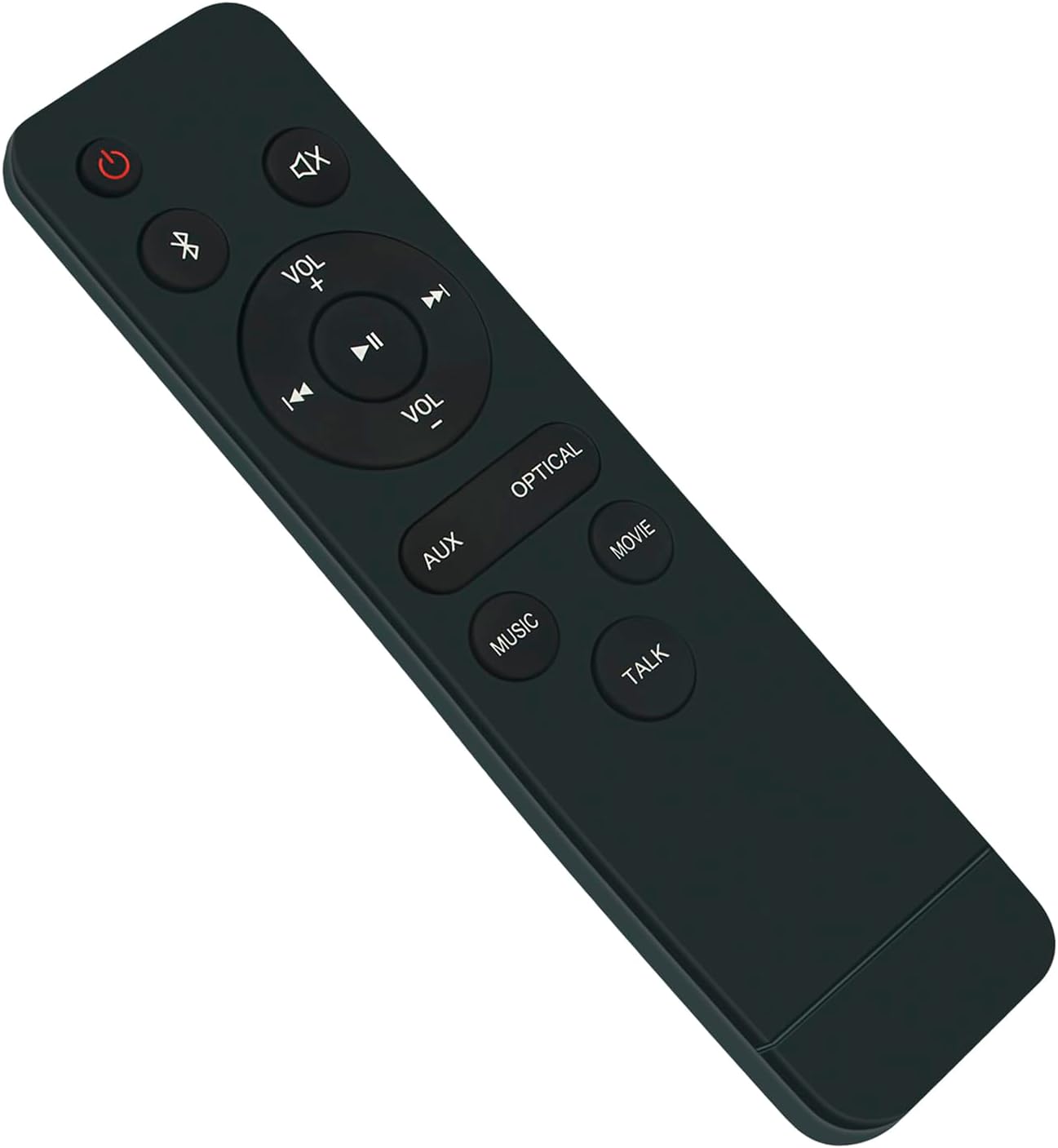
Image: Front view of the remote control, displaying all functional buttons.
- Power (⏻): Turns the soundbar on or off.
- Mute (🔇): Mutes or unmutes the sound.
- Bluetooth (➿): Switches the soundbar to Bluetooth input mode.
- VOL + / VOL -: Increases or decreases the volume level.
- Play/Pause (⏸): Plays or pauses audio playback.
- Previous Track (⏮): Skips to the previous audio track.
- Next Track (⏭): Skips to the next audio track.
- AUX: Selects Auxiliary input mode.
- OPTICAL: Selects Optical input mode.
- MUSIC: Activates Music sound mode.
- MOVIE: Activates Movie sound mode.
- TALK: Activates Talk (dialogue enhancement) sound mode.
General Usage Tips
- Point the remote control directly at the soundbar's infrared receiver for optimal performance.
- Ensure there are no obstructions between the remote control and the soundbar.
- The effective range of the remote control is typically up to 20 feet (6 meters).
Maintenance
Cleaning
To clean the remote control, gently wipe it with a soft, dry cloth. Do not use liquid cleaners, abrasive pads, or chemical solvents, as these may damage the remote's surface or internal components.
Battery Replacement
Replace the batteries when the remote control's response becomes inconsistent or stops working. Always replace both batteries at the same time with new 1.5V AAA alkaline batteries. Do not mix old and new batteries, or different types of batteries.
Troubleshooting
- Remote not responding:
- Check if the batteries are inserted correctly with the correct polarity.
- Replace the batteries with new ones.
- Ensure there are no obstructions between the remote and the soundbar.
- Confirm the remote is pointed directly at the soundbar's IR receiver.
- Intermittent response:
- This often indicates low battery power. Replace the batteries.
- Ensure the remote is within the effective operating range.
- Specific buttons not working:
- Clean the remote control surface, especially around the buttons, to remove any dirt or debris that might be obstructing button presses.
- If only certain buttons fail, and others work, the remote might be damaged. Consider replacing the remote.
Specifications

Image: The remote control with its length and width dimensions indicated.
| Feature | Detail |
|---|---|
| Product Dimensions | 5.91 x 1.57 x 0.59 inches (14.8 cm x 4 cm x 1.5 cm) |
| Item Weight | 3.2 ounces |
| Compatible Devices | Onn 100015716 36" 2.1 Channel Sound Bar Speaker 2.1CH Home Theatre System |
| Power Source | 2 x 1.5V AAA Alkaline Batteries (not included) |
| Color | Black |
| Special Feature | Ergonomic design |
Warranty and Support
Warranty information for this product is typically provided at the point of purchase or included with the product packaging. For specific warranty details or technical support, please refer to the documentation provided with your purchase or visit the official ECONTROLLY website.
