1. Introduction
Thank you for purchasing the Vinsetto Office Chair with 6-point Vibration Massage and Heat. This chair is designed to provide comfort and support during work or relaxation, featuring adjustable height, a reclining backrest, and an integrated footrest. Please read this manual thoroughly before assembly and use to ensure proper operation and safety.

Image 1.1: The Vinsetto Office Chair with its footrest extended, positioned in a modern office environment next to a desk and computer.
2. Safety Information
- Ensure all components are securely fastened before use.
- Do not stand on the chair.
- Do not use the massage or heat functions if the power cord or remote control is damaged.
- Keep children and pets away from the chair during operation, especially when reclining or adjusting height.
- Maximum weight capacity: 120 kg (264 lbs). Do not exceed this limit.
- Unplug the chair from the power outlet when not in use or before cleaning.
- This chair is designed for indoor use only.

Image 2.1: Certification indicating the chair materials are fire-retardant (BS5852 certified), ensuring safety standards are met.
3. Package Contents
Verify that all parts are present before beginning assembly:
- 1 x Office Chair (disassembled components)
- 1 x Power Adapter for Massage/Heat Function
- 1 x Remote Control
- 1 x Assembly Manual
- Necessary Assembly Tools (e.g., Allen wrench)
4. Assembly Instructions
Assembly is required for this product. Please refer to the separate detailed assembly manual included in your package for step-by-step instructions. Ensure all screws and bolts are tightened securely before using the chair.
5. Operating Instructions
5.1. Massage and Heat Function
The chair features six vibrating massage points and three lumbar heat settings, controlled by a wired remote. Plug the power adapter into a standard wall outlet and connect it to the chair's power input.
- Power Button: Press to turn the massage and heat functions ON/OFF.
- Mode (M): Cycle through three massage modes (M1, M2, M3).
- Intensity (SSS): Adjust massage intensity (Low, Medium, High).
- Heat (Lumbar): Activate or deactivate the lumbar heat function.
- Timer (30/60): Set the massage duration to 30 or 60 minutes. The function will automatically shut off after the selected time.
- Zone Selection (BACK/LUMBAR/THIGH): Select specific massage zones.

Image 5.1: Close-up of the remote control for the chair's massage and heating functions, showing buttons for power, mode, intensity, heat, timer, and zone selection.
5.2. Height Adjustment
To adjust the seat height, locate the lever on the right side of the chair, beneath the seat. While seated, pull the lever upwards to lower the seat. To raise the seat, stand up slightly and pull the lever upwards. Release the lever at the desired height to lock it in place.

Image 5.2: Illustration demonstrating the lever used to adjust the seat height of the office chair, with arrows indicating upward and downward movement.
5.3. Reclining Function and Footrest
The chair features a 135° reclining backrest and an extendable footrest for enhanced comfort.
- Recline: Pull the recline lever (typically on the left side) upwards and lean back to your desired angle. Release the lever to lock the backrest position.
- Footrest: Pull the footrest handle located under the front of the seat to extend the footrest. Push it back in when not needed.

Image 5.3: Diagram showing the office chair reclined to a 135-degree angle with the footrest extended, illustrating its use for working, watching, and relaxing.
6. Maintenance
- Cleaning: Wipe clean with a damp cloth. Avoid harsh chemicals or abrasive cleaners that may damage the PU leather.
- Inspection: Periodically check all bolts and screws to ensure they remain tight. Retighten if necessary.
- Wheels: The PU wheels are designed to be safe for various floor types, including wooden, carpet, and marble floors. Keep the wheels free of debris for smooth movement.

Image 6.1: Visual representation of the chair's PU wheels, highlighting their 360° swivel and quiet operation, suitable for different floor surfaces.
7. Troubleshooting
- Chair not adjusting height: Ensure the gas lift lever is fully engaged and that there is no obstruction. If the issue persists, the gas lift cylinder may need replacement.
- Massage/Heat not working: Check if the power adapter is securely plugged into both the chair and the wall outlet. Ensure the remote control is connected and not damaged.
- Squeaking noises: Check and tighten all assembly bolts. Applying a small amount of lubricant to moving parts (e.g., wheel axles, recline mechanism) may help.
8. Specifications
| Brand | Vinsetto |
| Model Number | 921-684V70BK |
| Color | Black |
| Material | PU Leather, Foam, Steel |
| Overall Dimensions | 66W x 67D x 118-126H cm (25.98"D x 26.38"W x 49.61"H) |
| Reclining Dimensions | 67W x 148D x 97-105H cm |
| Seat Size | 54W x 49D x 48-56H cm |
| Back Size | 52W x 73H cm |
| Weight Capacity | 120 kg (264 lbs) |
| Input Voltage | 100-240V, 50/60Hz |
| Output Voltage | 12V/1A, 12W |
| Cord Length | 1.8 m |
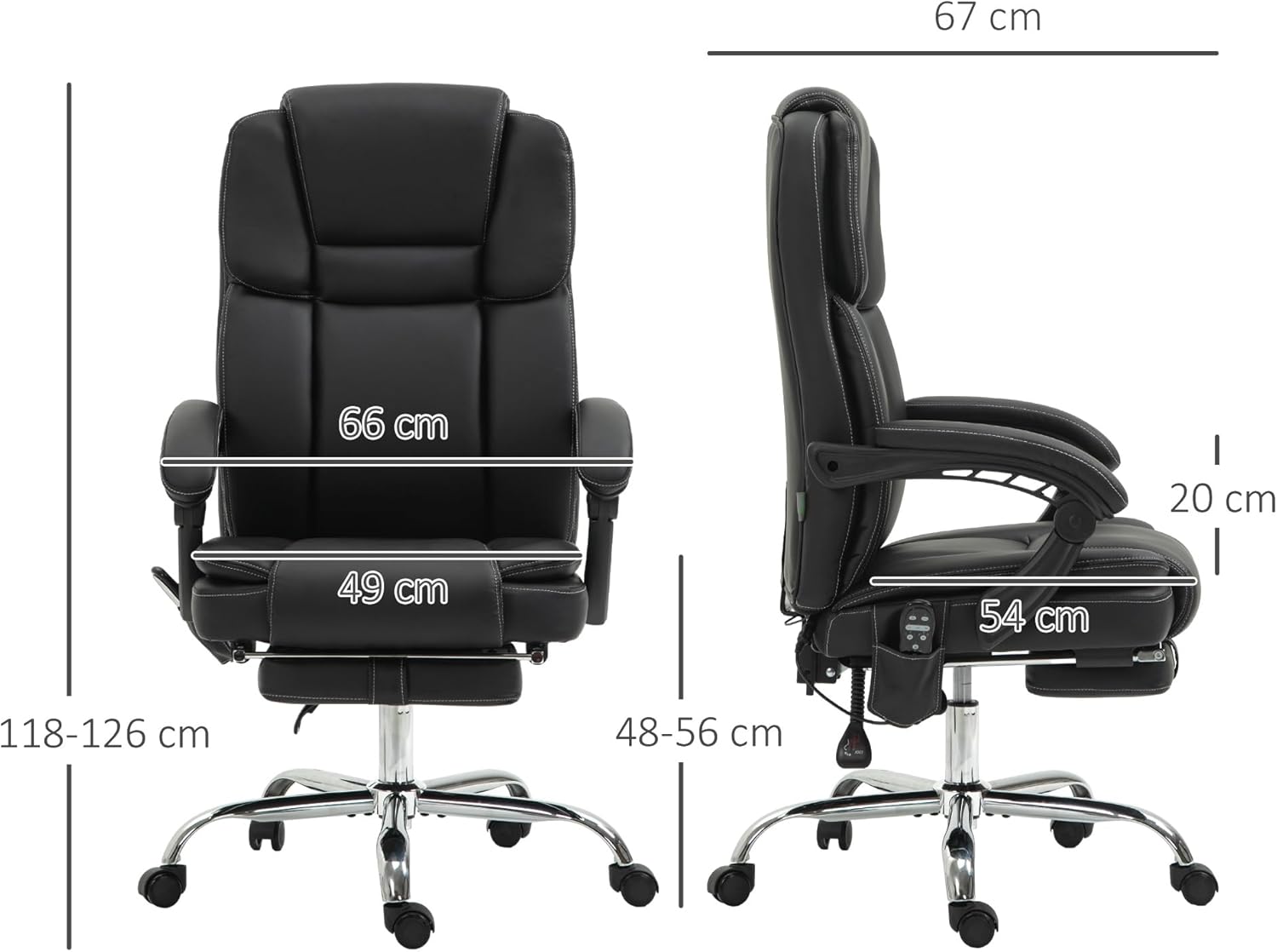
Image 8.1: Technical drawing displaying the key dimensions of the Vinsetto Office Chair, including height, width, and depth measurements.
9. Warranty and Support
For warranty information or technical support, please refer to the documentation provided with your purchase or contact Vinsetto customer service. Keep your purchase receipt for warranty claims.


