
CCA AN01
Contents
CCA KZ AN01 Wireless IEM Bluetooth Adapter User Manual
Model: AN01
1. Introduction
Thank you for choosing the CCA KZ AN01 Wireless IEM Bluetooth Adapter. This module is designed to upgrade your existing wired In-Ear Monitors (IEMs) to a wireless experience, offering advanced features such as Active Noise Cancellation (ANC), Transparency Mode, and high-fidelity audio decoding. Please read this manual carefully to ensure proper use and optimal performance of your device.
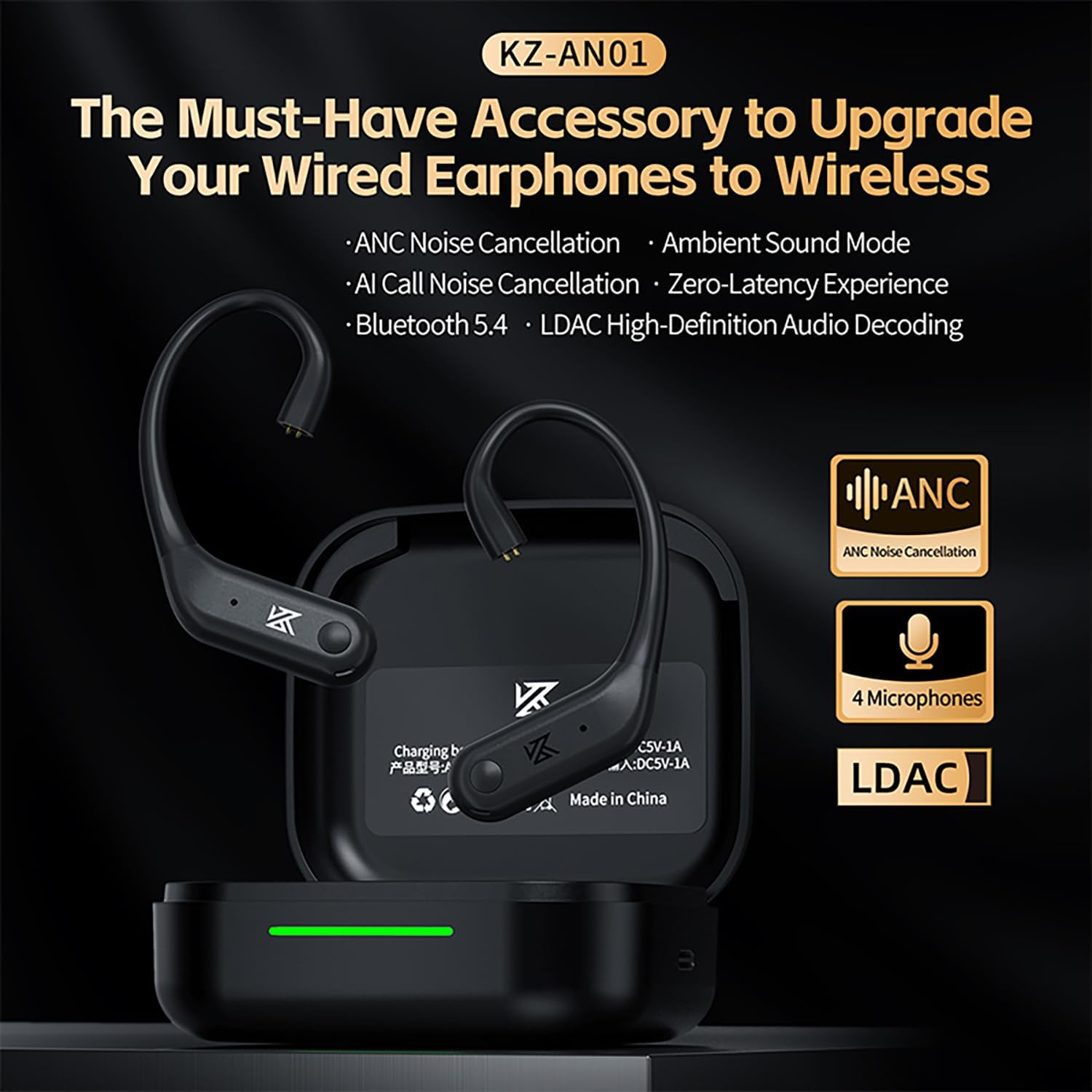
Image: The KZ-AN01 Bluetooth Adapter ear hooks and their charging case, highlighting its purpose to upgrade wired earphones to wireless.
2. Package Contents
- CCA KZ AN01 Wireless IEM Bluetooth Adapter (Left and Right ear hooks)
- Charging Case
- USB Charging Cable
- User Manual
3. Setup
3.1 Attaching to IEMs
The AN01 adapter is compatible with most KZ-branded and other 2-pin connector earphones (0.78mm pin). Ensure the correct orientation when attaching your IEMs to the ear hooks. The buttons on the ear hooks should face outwards from your head once attached.

Image: A visual representation of how to connect a wired IEM to the AN01 Bluetooth ear hook, illustrating the transformation to a wireless setup.
3.2 Initial Charging
Before first use, fully charge the AN01 adapters and the charging case. Place the ear hooks into the charging case. Connect the USB charging cable to the case and a power source. The charging indicator on the case will show charging status.
3.3 Pairing with a Device
- Open the charging case. The ear hooks will automatically enter pairing mode.
- On your device (smartphone, tablet, computer), go to Bluetooth settings.
- Select "KZ-AN01" from the list of available devices.
- Once connected, a voice prompt will confirm successful pairing.
4. Operating Instructions
4.1 Touch Controls
The AN01 features intuitive touch controls on each ear hook. Refer to the table below for specific functions:

Image: A detailed diagram illustrating the touch control functions of the AN01 ear hooks, including single click, double click, triple tap, and long press actions.
| Action | Function |
|---|---|
| Click once (either ear) | Play/Pause, Answer/Hang up Call |
| Double-click left ear | Previous Song |
| Double-click right ear | Next Song |
| Triple-tap any earbud | Switch between Game/Standard modes |
| Press and hold left ear for 2 seconds | Switch between Transparency / ANC modes |
| Long press for 2 seconds | Activate Voice Assistant (Siri, Google Assistant) |
| Long press (during incoming call) | Reject Call |
4.2 ANC & Transparency Modes
The AN01 features Active Noise Cancellation (ANC) to reduce ambient noise and Transparency Mode to allow you to hear your surroundings. Toggle between these modes by pressing and holding the left ear hook for 2 seconds.

Image: Illustrations of individuals using the AN01 in Transparency Mode during commuting, cycling, and daily communication, emphasizing awareness of surroundings.
4.3 Gaming Mode
Activate the ultra-low latency Gaming Mode by triple-tapping any earbud. This mode provides a lightning-fast 50ms latency for perfect audio-visual synchronization, ideal for gaming.

Image: A graphic demonstrating the AN01's low-latency feature for gaming, showing seamless audio and video synchronization during gameplay.
4.4 Call Functionality
The AN01 is equipped with a 4-microphone system for clear calls, even in noisy environments. The AI-powered noise reduction ensures your voice is captured effectively while filtering out ambient noise.

Image: A cutaway view of the AN01 ear hook, highlighting the placement of its four noise-cancelling microphones for enhanced call clarity.
5. Battery Life & Charging
The AN01 ear hooks provide up to 8 hours of continuous playback on a single charge. The 400mAh charging case extends the total playback time to approximately 40 hours. Place the ear hooks into the charging case to recharge them.

Image: A graphic detailing the battery life of the AN01, showing 8 hours for single earhook use and a total of 40 hours with the charging case.
6. Specifications
| Feature | Detail |
|---|---|
| Model Name | AN01 |
| Connectivity Technology | Wireless (Bluetooth 5.4) |
| Bluetooth Range | 15 Meters |
| Audio Decoding Protocol | LDAC (up to 990kbps), SBC, AAC |
| Noise Control | Adaptive Noise Cancellation (ANC) |
| Microphones | 4-Mic Noise Reduction for Calls |
| Gaming Mode Latency | 50ms |
| Earhook Battery Life | 8 Hours (single charge) |
| Charging Case Capacity | 400mAh |
| Total Playback Time | Up to 40 Hours (with charging case) |
| Control Method | Touch |
| Compatible Devices | Laptops, Desktops, Tablets, Telephones, Gaming Consoles, Smartphones |
| Material | Plastic, Silicone |
| Weight | 3.84 ounces (total item weight) |
7. Maintenance
- Clean the ear hooks and charging case regularly with a soft, dry cloth.
- Avoid exposing the device to extreme temperatures, humidity, or liquids.
- Store the device in its charging case when not in use to protect it and keep it charged.
8. Troubleshooting
8.1 Device Not Pairing
- Ensure the ear hooks are charged and out of the case.
- Turn off and on Bluetooth on your device.
- Forget "KZ-AN01" from your device's Bluetooth list and try pairing again.
- Ensure no other devices are currently connected to the AN01.
8.2 No Sound or Low Volume
- Check the volume levels on both the AN01 (via touch controls) and your connected device.
- Ensure the IEMs are properly connected to the ear hooks.
- Re-pair the device.
8.3 ANC Not Effective
- Ensure ANC mode is activated (press and hold left ear hook for 2 seconds).
- Check that the IEMs are properly seated in your ears to create a good seal, as passive noise isolation is crucial for effective ANC.
9. Warranty and Support
For warranty information and technical support, please refer to the official CCA website or contact your retailer. Keep your purchase receipt as proof of purchase.
Ask a question about this manual
Ask about setup, troubleshooting, compatibility, parts, safety, or missing instructions. Manuals+ will review the question and use this page’s manual context to help answer it.