
Warmdance ZQ06201
Warmdance ZQ06201 LED COB Wall Washer Light Instruction Manual
Model: ZQ06201 | Brand: Warmdance
1. Introduction
The Warmdance ZQ06201 LED COB Wall Washer Light is a versatile lighting fixture designed for various applications including stage performances, concerts, bars, nightclubs, and events. It features powerful COB (Chip-on-Board) and RGB LEDs, offering a wide range of color combinations and dynamic effects. This manual provides essential information for safe and effective operation.
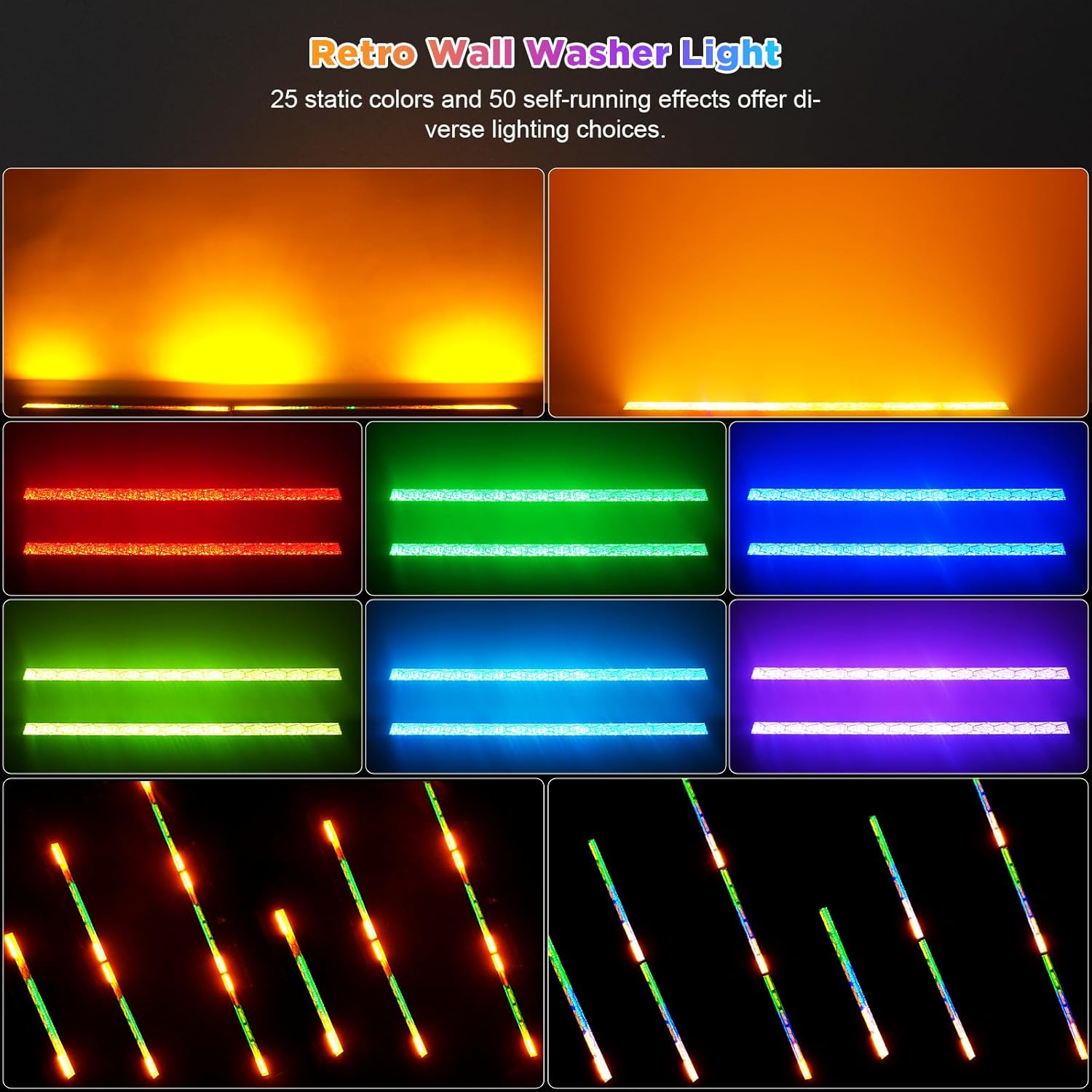
Image 1.1: The Warmdance ZQ06201 LED COB Wall Washer Light, showcasing its sleek design and powerful light output.
2. What's in the Box
Upon unpacking, please verify that all items listed below are present and in good condition:
- 1 x Warmdance ZQ06201 LED COB Wall Washer Light Unit
- 1 x Power Cord
- 1 x Signal Cable
- 2 x Mounting Brackets
- 2 x Knob Gaskets
- 1 x Instruction Manual (this document)

Image 2.1: Contents of the product package, including the light unit, power cord, signal cable, mounting brackets, and gaskets.
3. Setup and Installation
The ZQ06201 LED COB Wall Washer Light is designed for easy setup. Follow these steps for installation:
- Mounting: Attach the provided mounting brackets to the light unit using the knob gaskets. The brackets allow for adjustable positioning.
- Power Connection: Connect the power cable to the "POWER IN" port on the back of the unit. Ensure the cable is securely fastened.
- Signal Connection (Optional): For DMX control or master-slave configurations, connect the signal cable to the "DMX IN" and "DMX OUT" ports as required.
- Power On: Plug the power cable into a suitable power outlet (AC110-240V, 50/60Hz). The unit's display will illuminate.

Image 3.1: Close-up of the rear panel, showing the power input/output, DMX input/output, and control display.
4. Operating Modes
The ZQ06201 offers multiple operating modes to suit various lighting needs:
- DMX Control (8/13CH): Connect to a DMX512 controller for precise control over individual light sources, brightness, and effects.
- Master-Slave Mode: Link multiple units together. One unit acts as the master, controlling all connected slave units for synchronized lighting.
- Self-Propelled Mode: The unit runs through its built-in programs automatically. This includes 25 static color options and 50 dynamic lighting effects with adjustable speed.
- Sound-Activated Mode: The light reacts to ambient sound or music via a built-in microphone, creating dynamic effects synchronized with audio. MIC sensitivity is adjustable.
Use the 4-digit display and buttons (MENU, UP, DOWN, ENTER) on the rear panel to navigate and select operating modes and adjust parameters. Refer to the display codes in the technical specifications for specific settings (e.g., "CL" for auto programs, "EF" for effects, "CH" for DMX channel).
Video 4.1: A demonstration of various lighting effects and modes, including COB wall wash, RGB lighting, linear dimming, strobe, DMX console mode, auto mode, and sound-activated mode.

Image 4.1: The light bar showcasing a range of static and dynamic color effects, including amber, red, green, and blue.
5. Technical Specifications
| Feature | Specification |
|---|---|
| Rated Voltage | AC110 - 240V, 50/60Hz |
| Lamp Beads | 6 x 30W COB LED + 120 x 0.2W RGB LED |
| Light Angle | 120 Degrees |
| Optimal Projection Distance | 5-10 meters |
| Lighting Effects | COB Wall Wash Effects, RGB Horse Running Effects |
| Dimming | 0-100% Linear Dimming |
| Strobe Frequency | 1-20Hz |
| Working Modes | DMX512 Signal, Master-Slave, Self-Propelled, Voice Control |
| DMX Channels | 8 / 13CH |
| Surface Display | 4-digit LED Display |
| Protection Level | IP66 |
| Product Size (L x W x H) | 96 x 8 x 9 cm (37.8" x 3.2" x 3.5") |
| Product Net Weight | 2.8 kg (6.17 lbs) |
| Material | Aluminum Alloy |

Image 5.1: Detailed view of the product's dimensions, weight, and various ports on the rear panel.
6. Maintenance
Regular maintenance ensures optimal performance and longevity of your LED COB Wall Washer Light:
- Cleaning: Periodically clean the exterior of the unit with a soft, dry cloth. Do not use harsh chemicals or abrasive materials. Ensure the light is unplugged before cleaning.
- Ventilation: Ensure the cooling fans and ventilation openings are free from dust and obstructions to prevent overheating.
- Cable Inspection: Regularly check power and signal cables for any signs of damage, fraying, or loose connections. Replace damaged cables immediately.
- Storage: When not in use, store the light in a dry, dust-free environment, preferably in its original packaging or a protective case.
7. Troubleshooting
If you encounter issues with your LED COB Wall Washer Light, refer to the following common troubleshooting steps:
- No Power:
- Check if the power cable is securely connected to both the unit and the power outlet.
- Verify that the power outlet is functional by plugging in another device.
- No Light Output:
- Ensure the unit is powered on and the display is active.
- Check the selected operating mode. In DMX mode, ensure the DMX signal is active and correctly configured.
- Adjust brightness settings, as they might be set to 0%.
- Incorrect Color/Effect:
- In DMX mode, verify DMX channel assignments and controller settings.
- In self-propelled or sound-activated modes, cycle through the built-in programs using the UP/DOWN buttons.
- Unit Overheating:
- Ensure adequate ventilation around the unit. Clear any obstructions from the cooling fans.
- Operate the unit in an environment with appropriate ambient temperature.
If problems persist after attempting these steps, please contact customer support.
8. Warranty and Support
The Warmdance ZQ06201 LED COB Wall Washer Light is manufactured by Shenzhen Zhuoqiong Technology Co., Ltd. and comes with a 3-month manufacturer's warranty.
For technical support, warranty claims, or further assistance, please contact your retailer or the manufacturer directly. Keep your purchase receipt as proof of purchase for warranty services.
Ask a question about this manual
Ask about setup, troubleshooting, compatibility, parts, safety, or missing instructions. Manuals+ will review the question and use this page’s manual context to help answer it.