
1. Product Overview
The Mxmoonant BRF138 Automatic Water Filling Ultrasonic Humidifier is designed to maintain optimal humidity levels in various environments, including plant cultivation, greenhouses, reptile enclosures, and general room humidification. Its innovative tankless design connects directly to a water supply, eliminating the need for manual refilling. Featuring four adjustable nozzles, users can precisely direct mist to specific areas and customize the output from 0 to 600 ml/h. The unit operates quietly at 35dB, ensuring minimal disturbance.
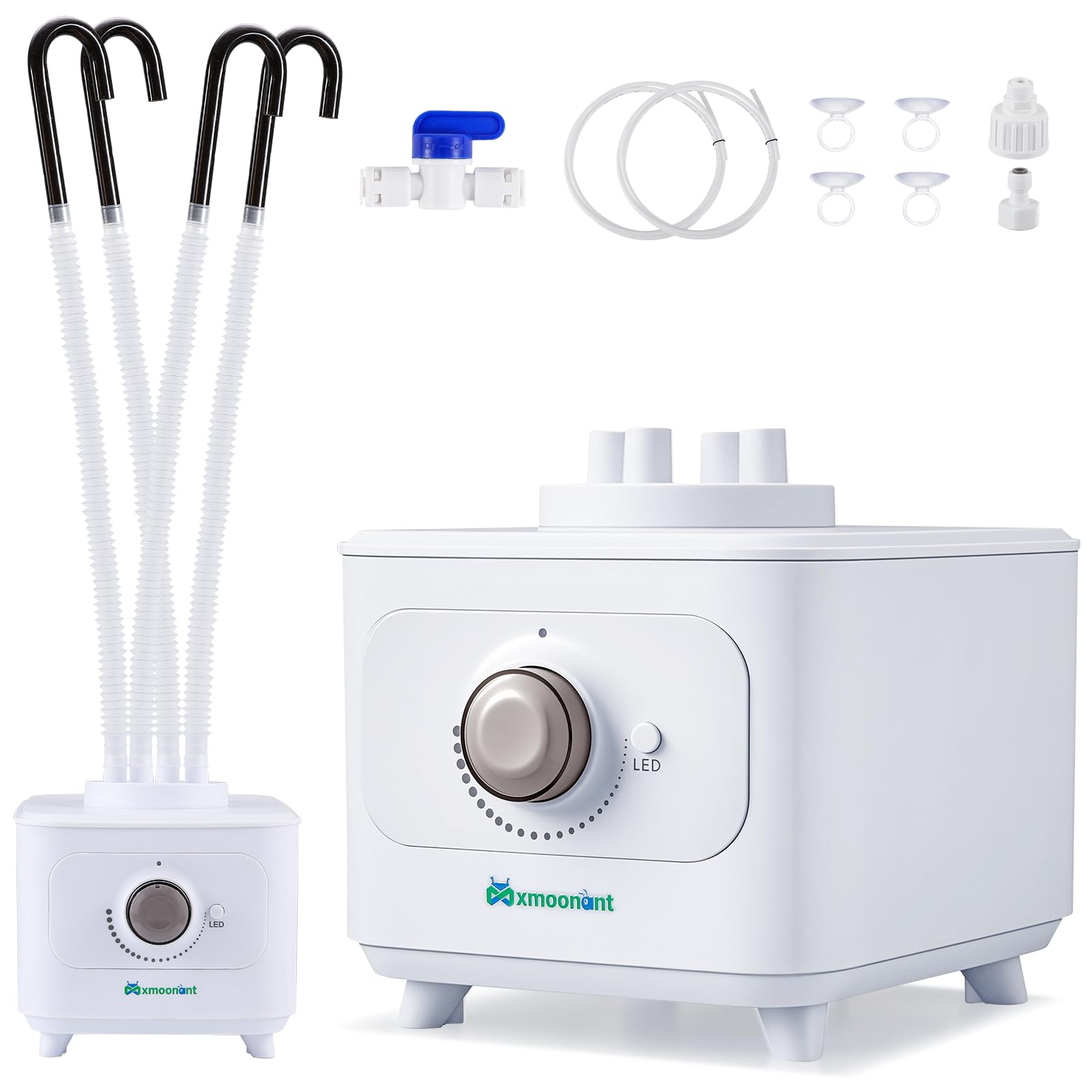
Figure 1: Mxmoonant BRF138 Automatic Water Filling Ultrasonic Humidifier.
Key Features:
- Tankless Auto-Fill System: Automatic water filling design directly connects to water supply, eliminating manual refilling.
- 4 Nozzles for Multi-Zone Coverage: Four adjustable nozzles allow precise mist targeting and customization of output (0-600ml/h).
- Library-Quiet Operation: Operates at a low 35dB, ensuring a peaceful environment.
- 5-Minute Setup: Universal 1/2" & 3/4" thread fits most faucets for quick and easy installation.
- Widely Applications: Suitable for reptile enclosures, plant cultivation, greenhouses, and room humidification.
Video 1: Overview of the Mxmoonant Automatic Water Filling Ultrasonic Humidifier in operation.
2. Safety Information
Please read all safety instructions carefully before using the humidifier. Failure to follow these instructions may result in electric shock, fire, or serious injury.
- Always unplug the humidifier from the power outlet before cleaning, refilling, or performing any maintenance.
- Keep the humidifier out of reach of children and pets.
- Use only clean, cool tap water or distilled water. Do not add essential oils or other additives directly into the water tank.
- Do not block the air vents or mist outlets. Ensure proper ventilation around the unit.
- Do not place the humidifier on soft surfaces like carpets or rugs, as this may block airflow.
- Avoid placing the humidifier near heat sources, direct sunlight, or in areas with high humidity.
- If the humidifier is damaged or malfunctions, discontinue use immediately and contact customer support.
3. Setup Instructions
3.1 Unboxing and Components
Carefully remove all components from the packaging. Verify that all listed accessories are present.

Figure 2: Humidifier and included accessories.
- Ultrasonic Mist Maker Humidifier (1)
- Corrugated Flexible Hose (4)
- Water Pipe 1/4" (2)
- Shut Off Valve (1)
- Mist Guide Bent Pipe (4)
- Suction Cup (4)
- Thread Adapter 3/4" (1)
- Thread Adapter 1/2" (1)
Video 2: Detailed unboxing and overview of humidifier components.
3.2 Connecting the Water Supply
The humidifier features an automatic water filling system. Connect the provided water pipe to a suitable water source.
- Open the lid of the humidifier and remove any accessories inside.
- Connect the 1/4" water pipe to the designated port on the humidifier.
- Attach the appropriate thread adapter (1/2" or 3/4") to your faucet.
- Connect the other end of the 1/4" water pipe to the faucet adapter. Ensure all connections are secure to prevent leaks.

Figure 3: Automatic water filling system connection diagram.
Video 3: Step-by-step guide for installing the automatic water filling system.
3.3 Attaching Mist Hoses
Connect the corrugated flexible hoses to the four mist outlets on the humidifier's lid. Use the mist guide bent pipes and suction cups to direct the mist as needed.

Figure 4: Humidifier with four adjustable nozzles for precise fog delivery.
4. Operating Instructions
4.1 Power On/Off and Mist Control
Once the water supply is connected and hoses are in place, plug the humidifier into a 110V power outlet. The LED indicator will show the unit's status.
- Turn the rotary knob clockwise to power on the humidifier and adjust the mist output.
- Rotate the knob to increase or decrease the mist volume from 0 to 600ml/h.
- Press the LED button to control the ambient light.
- The LED indicator will be green for normal operation and red for a water shortage state.

Figure 5: Adjustable mist output control.
Video 4: Demonstration of the humidifier's display and mist output adjustment.
4.2 Automatic Water Filling
The humidifier is equipped with a float valve that automatically controls the water level in the tank. When the water level drops, the valve opens to allow water from the connected supply to refill the tank, ensuring continuous operation without manual intervention.

Figure 6: Internal float valve for automatic water intake.
4.3 Quiet Operation
The humidifier operates at a low noise level of 35dB, comparable to a whisper. This ensures that it does not disturb sleep, work, or the natural behavior of pets in their enclosures.

Figure 7: Humidifier operating quietly at 35dB.
5. Maintenance
Regular maintenance is crucial for the optimal performance and longevity of your humidifier. Always unplug the unit before cleaning.
- Daily: Refill the water tank with fresh water.
- Weekly: Clean the water tank and base to prevent mineral buildup and bacterial growth. Use a soft cloth and mild detergent. Rinse thoroughly.
- Monthly: Descale the ultrasonic transducer (mist maker) using a descaling solution or a mixture of white vinegar and water. Follow the descaling product's instructions or soak the transducer for 30 minutes, then rinse well.
- Ensure the mist outlets and hoses are free from obstructions.
6. Troubleshooting
If you encounter any issues with your humidifier, refer to the following common problems and solutions:
- No Mist:
- Check if the unit is plugged in and powered on.
- Ensure the water supply is connected and the shut-off valve is open.
- Verify that the water tank has sufficient water (green LED indicator).
- Clean the ultrasonic transducer for mineral buildup.
- Red LED Indicator:
- Indicates low water level. Check water supply connection and ensure the float valve is functioning correctly.
- Water Leakage:
- Ensure all water pipe connections are tight and properly sealed.
- Check for cracks or damage in the water tank or base.
- Unusual Noise:
- Ensure the humidifier is placed on a flat, stable surface.
- Check for any foreign objects in the water tank or around the fan.
7. Specifications

Figure 8: Product parameters and dimensions.
| Feature | Detail |
|---|---|
| Brand | Mxmoonant |
| Model Name | BRF138 |
| Special Feature | Automatic Watering System; Adjustable Humidity Control |
| Color | White |
| Operation Mode | Automatic |
| Product Dimensions | 10.43"D x 7.87"W x 6.89"H |
| Room Type | Kids Room, Living Room, Office |
| Included Components | Ultrasonic Mist Maker Humidifier, Water Pipe |
| Voltage | 110 Volts |
| Item Weight | 4.02 pounds |
8. Warranty and Support
This Mxmoonant humidifier is eligible for various protection plans to ensure your peace of mind:
- 3-Year Protection Plan
- 4-Year Protection Plan
- Complete Protect: One plan covers all eligible past and future purchases.
For further assistance, technical support, or warranty claims, please refer to the contact information provided in your product packaging or visit the official Mxmoonant website.