1. Introduction
Thank you for choosing the VEVOR Hot Dog Roller, Model ASQ-011HC. This commercial-grade appliance is designed for efficiently cooking hot dogs, sausages, and similar items, featuring 11 stainless steel rollers and a dedicated bun warmer. This manual provides essential information for safe operation, proper setup, maintenance, and troubleshooting to ensure optimal performance and longevity of your hot dog machine.

Image 1.1: The VEVOR Hot Dog Roller in use at an outdoor event, showcasing its capacity for hot dogs and buns.
2. Safety Instructions
Please read all safety warnings and instructions carefully before operating this appliance to prevent injury or damage. Keep this manual for future reference.
- Electrical Safety: Ensure the power supply matches the voltage specified on the appliance (220V). Use a grounded outlet. Do not operate with a damaged cord or plug.
- Hot Surfaces: The rollers and surrounding surfaces become extremely hot during operation. Use heat-resistant gloves and avoid direct contact.
- Placement: Place the appliance on a stable, heat-resistant surface, away from walls or flammable materials, ensuring adequate ventilation.
- Water and Liquids: Do not immerse the appliance in water or other liquids. Avoid splashing water onto electrical components.
- Children and Pets: Keep children and pets away from the appliance during operation and cooling.
- Cleaning: Always unplug the appliance and allow it to cool completely before cleaning.
- Maintenance: Do not attempt to repair or modify the appliance yourself. Contact qualified service personnel for any repairs.
3. Package Contents
Verify that all items are present upon unboxing. If any parts are missing or damaged, contact VEVOR customer service.
- 1 x Hot Dog Machine (Model ASQ-011HC)
- 1 x Clip
- 1 x Brush
- 1 x Shelf (for bun warming)
- 3 x Scouring Pads
- 1 x Set of Mounting Accessories (for glass cover)
- 1 x Instruction Manual

Image 3.1: Overview of the VEVOR Hot Dog Roller dimensions and included accessories.
4. Product Diagram and Components
Familiarize yourself with the different parts of your VEVOR Hot Dog Roller.
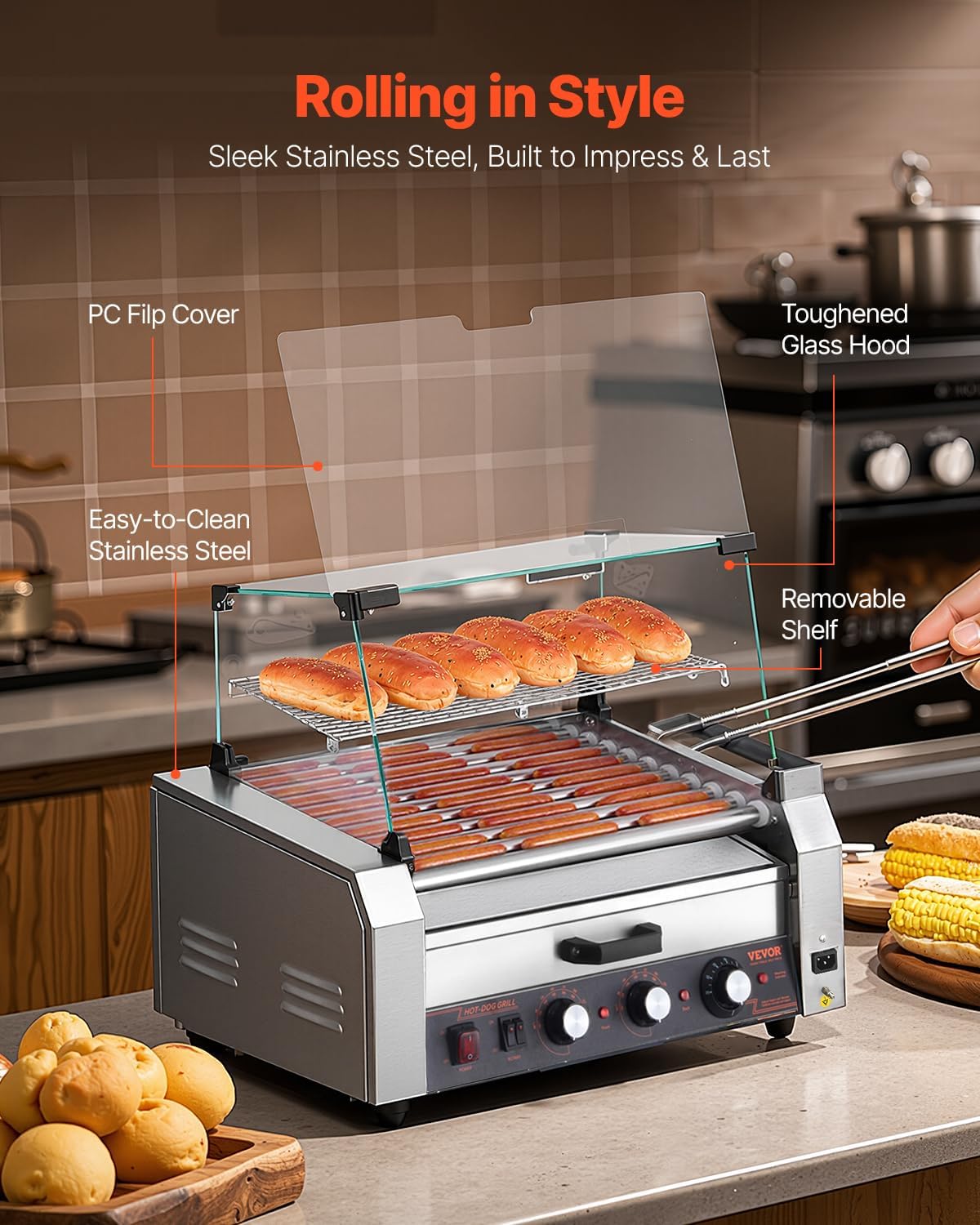
Image 4.1: Key components of the VEVOR Hot Dog Roller, including the glass hood and removable shelf.
- Stainless Steel Rollers: 11 rollers for cooking hot dogs.
- Glass Hood/Cover: Protects food and helps maintain temperature.
- Bun Warmer Drawer: Located beneath the rollers, for warming buns.
- Control Panel: Includes power switch, rotary switch, and temperature control knobs.
- Removable Drip Tray: Collects grease and food debris for easy cleaning.
- Side Storage Box: Convenient storage for utensils.
5. Setup
Follow these steps to set up your hot dog roller before first use.
- Unpacking: Carefully remove all packaging materials and inspect the appliance for any damage.
- Placement: Position the hot dog roller on a flat, stable, and heat-resistant surface. Ensure there is sufficient clearance around the unit for ventilation.
- Assemble Glass Cover: Attach the glass hood using the provided mounting accessories. Ensure it is securely fastened.
- Install Drip Tray: Slide the removable drip tray into its designated slot beneath the rollers.
- Initial Cleaning: Before first use, wipe down the rollers, glass cover, and drip tray with a damp cloth and mild detergent. Rinse and dry thoroughly.
- Power Connection: Plug the power cord into a grounded electrical outlet that matches the appliance's voltage requirements (220V).
6. Operating Instructions
This section details how to operate your VEVOR Hot Dog Roller for optimal cooking results.
6.1. Controls Overview
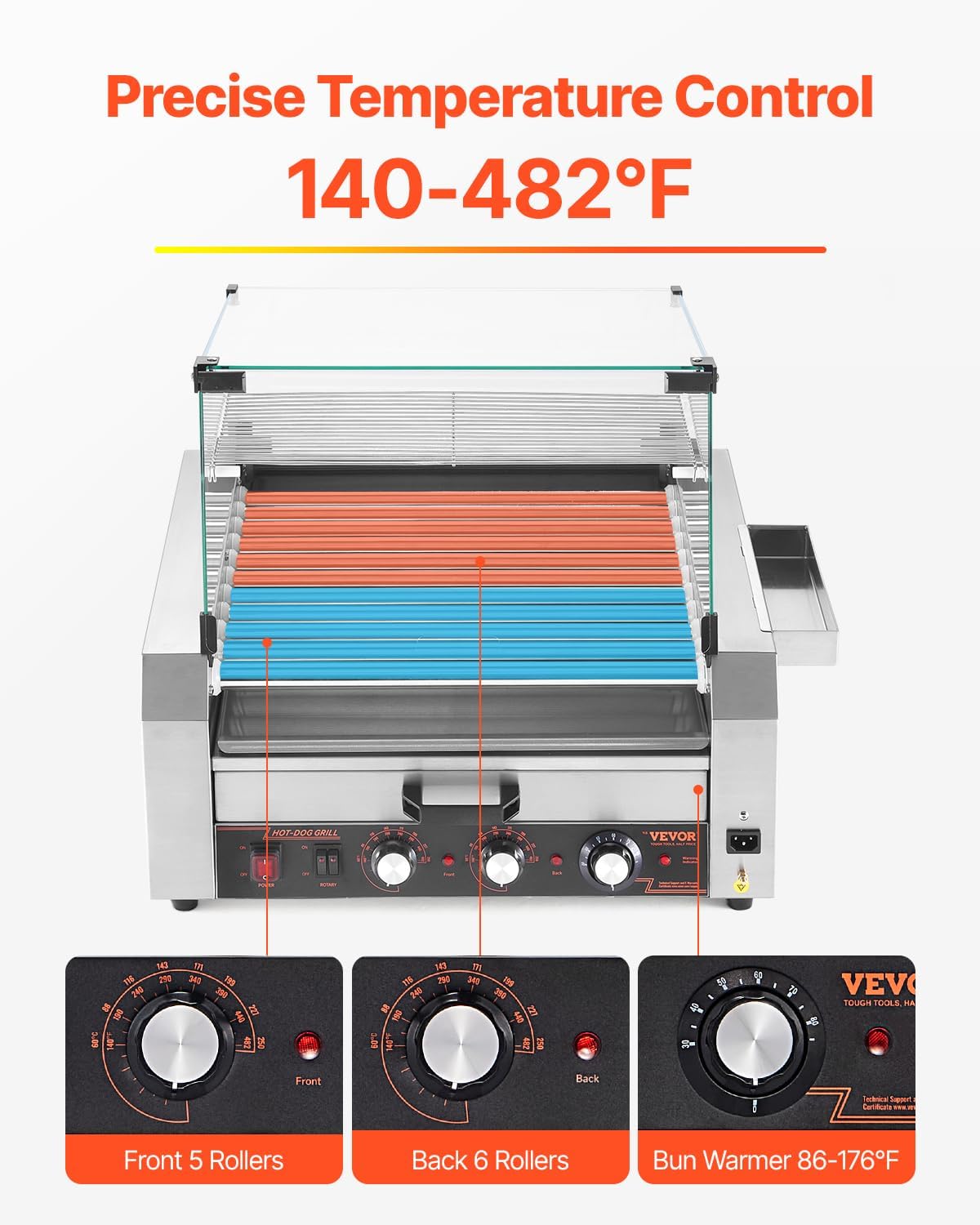
Image 6.1: Detailed view of the temperature control knobs for the rollers and bun warmer.
- Power Switch: Turns the entire unit on/off.
- Rotary Switch: Activates the roller rotation.
- Front Temperature Knob: Controls the temperature of the front 5 rollers (up to 482°F / 250°C).
- Back Temperature Knob: Controls the temperature of the back 6 rollers (up to 482°F / 250°C).
- Bun Warmer Knob: Controls the temperature of the bun warmer (86-176°F / 30-80°C).
6.2. Cooking Hot Dogs
- Pre-heating: Turn on the power switch. Set the desired temperature for the front and back rollers using their respective knobs. Allow 5-10 minutes for the rollers to reach the set temperature.
- Load Hot Dogs: Place hot dogs or sausages evenly on the rollers. Avoid overcrowding to ensure even cooking.
- Start Rotation: Turn on the rotary switch to begin the 360° rotation of the rollers. This ensures even cooking and browning.
- Monitor Cooking: Cook until hot dogs are heated through and browned to your preference. Cooking time will vary based on the type and size of the hot dogs and desired doneness.
- Keep Warm: Once cooked, you can reduce the temperature settings to keep the hot dogs warm without overcooking.

Image 6.2: The 360-degree rotating rollers ensure even cooking of hot dogs.
6.3. Using the Bun Warmer
- Load Buns: Place buns in the bun warmer drawer. The drawer can accommodate approximately 30 buns.
- Set Temperature: Use the dedicated bun warmer knob to set the desired warming temperature (86-176°F / 30-80°C).
- Warm Buns: Allow buns to warm to your preference.

Image 6.3: The integrated bun warmer drawer, capable of warming multiple buns simultaneously.
7. Maintenance and Cleaning
Regular cleaning and maintenance will extend the life of your appliance and ensure hygienic operation.
- Power Off and Unplug: Always turn off the power switch, unplug the unit, and allow it to cool completely before cleaning.
- Empty Drip Tray: Remove and empty the drip tray. Wash it with warm, soapy water and rinse thoroughly.
- Clean Rollers: Use a damp cloth and mild detergent to wipe down the stainless steel rollers. For stubborn residue, use the provided brush or a non-abrasive scouring pad. Ensure no water enters the roller mechanism.
- Clean Glass Cover: Wipe the glass cover with a soft cloth and glass cleaner.
- Clean Exterior: Wipe the exterior stainless steel surfaces with a damp cloth. Do not use abrasive cleaners or steel wool, as they can scratch the surface.
- Dry Thoroughly: Ensure all parts are completely dry before reassembling or storing the appliance.

Image 7.1: The removable drip tray and side storage box for convenient cleaning and organization.
8. Troubleshooting
Refer to this section for common issues and their solutions. If the problem persists, contact VEVOR customer support.
| Problem | Possible Cause | Solution |
|---|---|---|
| Appliance does not turn on. | No power supply; Power switch off; Faulty power cord. | Check power outlet and plug; Ensure power switch is ON; Inspect power cord for damage. |
| Rollers not rotating. | Rotary switch off; Motor malfunction. | Ensure rotary switch is ON; Contact customer support if motor is faulty. |
| Uneven cooking. | Overcrowding of hot dogs; Incorrect temperature setting. | Do not overcrowd rollers; Adjust temperature settings for front and back rollers as needed. |
| Hot dogs sticking to rollers. | Rollers not properly cleaned; Insufficient oil/grease on rollers (if applicable for specific hot dog types). | Clean rollers thoroughly; Lightly grease rollers if necessary before cooking. |
9. Specifications
Detailed technical specifications for the VEVOR Hot Dog Roller ASQ-011HC.
| Feature | Specification |
|---|---|
| Model Number | ASQ-011HC |
| Voltage | 220V (EU: AC220-240V 50HZ) |
| Power | 2400W (EU) |
| Temperature Range | Rollers: 140-482°F (60-250°C) Bun Warmer: 86-176°F (30-80°C) |
| Number of Rollers | 11 |
| Roller Speed | 5 r/min |
| Material | Stainless Steel (Body & Rollers), Toughened Glass (Cover) |
| Product Dimensions | 22.91"D x 20.67"W x 20.08"H (582mm x 510mm x 525mm) |
| Item Weight | 50.9 lbs (23.1 kg) |
10. Product Videos
Watch these official product videos for visual guidance on setup and operation.
Video 10.1: Comprehensive demonstration of the VEVOR Hot Dog Roller's features and operation.
Video 10.2: Overview of the VEVOR Hot Dog Roller, highlighting its design and functionality.
11. Warranty and Support
This VEVOR product comes with a limited warranty. For specific warranty terms and conditions, please refer to the warranty card included with your product or visit the official VEVOR website. For technical support, replacement parts, or any inquiries, please contact VEVOR customer service.
Manufacturer: VEVOR