
1. Introduction
This manual provides detailed instructions for the Atheewon N19 Bluetooth Headset. Please read it carefully to ensure proper use and optimal performance of your device.
Key Features:
- Dual Noise Cancellation: Equipped with CVC 8.0 and ENC technology for clear calls by reducing background interference.
- High-Definition Audio: Features 13.0mm dynamic drivers and supports AAC/SBC audio encoding for balanced sound.
- Bluetooth 5.3: Ensures stable, low-latency connections with a wireless range of up to 15 meters.
- Ergonomic Design: Lightweight with ultra-soft silicone ear cushions, a 180° rotatable ear hook, and a 270° adjustable boom arm for comfort. Includes S/M/L ear tips.
- Extended Battery Life: Up to 20 hours of talk time on a single charge, and up to 120 hours with the charging case.
- IPX7 Waterproof: Designed to withstand water splashes and sweat.
- LED Display: Charging case features an LED display for battery status.
2. What's in the Box
Upon unpacking, please verify that all items listed below are present:
- Atheewon N19 Bluetooth Earpiece (1 unit)
- Wireless Charging Case (1 unit)
- USB-C Charging Cable (1 unit)
- User Manual (This document)
- Ear Tips (S/M/L sizes, 3 pairs)

Image: Atheewon N19 Bluetooth Headset inside its charging case, displaying the battery percentage.
3. Product Overview
Familiarize yourself with the components and controls of your Atheewon N19 Bluetooth Headset.

Image: Detailed diagram illustrating the location and function of buttons and ports on the Atheewon N19 headset, including Type-C port, main mic, second mic, and control buttons.
Headset Components:
- Power Button: Located on the side for power on/off, play/pause, answer/hang up calls.
- Volume Buttons: Separate buttons for increasing (+) and decreasing (-) volume, also used for track navigation.
- Main Microphone: For voice pickup during calls.
- Second Microphone: Assists with noise reduction.
- USB-C Charging Port: For direct charging of the headset.
- LED Indicator: Displays status (e.g., pairing, charging).
Charging Case Components:
- Charging Slots: Securely holds the headset for charging.
- LED Display: Shows the charging case's battery percentage.
- USB-C Charging Port: For charging the case itself.
4. Setup
4.1 Charging the Headset and Case
Before first use, fully charge both the headset and the charging case.
- Place the Atheewon N19 headset into the charging case. Ensure it is seated correctly.
- Connect the provided USB-C charging cable to the charging port on the case and to a USB power source (e.g., wall adapter, computer USB port).
- The LED display on the charging case will show the current battery percentage. The headset's LED indicator will also show charging status.
- Charging typically takes approximately 1.5 hours for a full charge.

Image: Illustration showing the Atheewon N19 headset being charged via USB-C, highlighting the 120 hours of battery life with the case and 20 hours for the single headset.
4.2 Pairing with a Bluetooth Device
The Atheewon N19 headset uses Bluetooth 5.3 for quick and stable connections.
- Power On: Take the headset out of the charging case, or press and hold the power button for 2 seconds until the LED indicator flashes blue and red, indicating it is in pairing mode.
- Activate Bluetooth: On your smartphone, tablet, or other Bluetooth-enabled device, go to the Bluetooth settings and ensure Bluetooth is turned on.
- Select Device: In the list of available devices, locate and select "N19".
- Confirm Connection: Once connected, the headset's LED indicator will flash blue slowly, and your device will confirm the connection.

Image: Visual guide demonstrating the one-step pairing process with a smartphone and showcasing compatibility with various devices including iOS, Android, and Windows.
5. Wearing Instructions
For optimal comfort and sound quality, adjust the headset to fit your ear.
- Choose Ear Tip: Select the ear tip size (S, M, L) that provides the most secure and comfortable fit for your ear canal.
- Insert Ear Tip: Gently insert the ear tip into your ear canal.
- Position Ear Hook: Place the ear hook over the back of your ear. The ear hook is 180° rotatable, allowing you to wear the headset on either your left or right ear.
- Adjust Boom Arm: The microphone boom arm can be adjusted 270° to position the microphone closer to your mouth for clearer voice pickup.
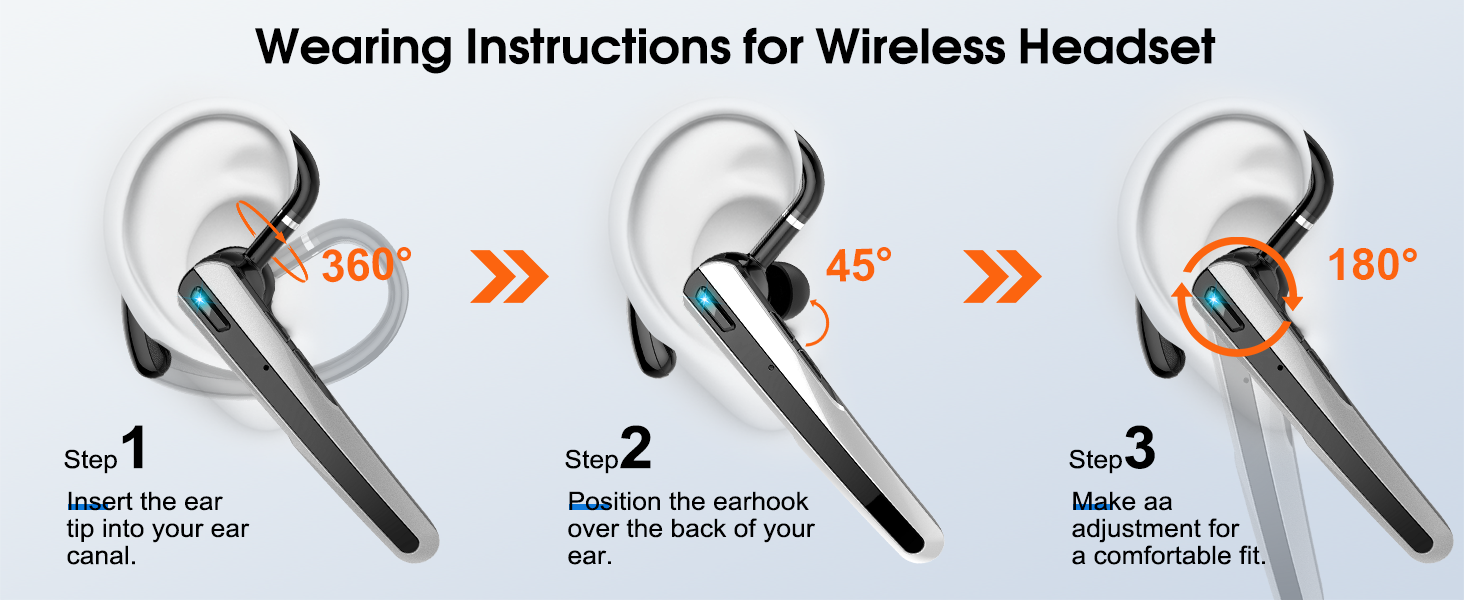
Image: Three-step visual guide demonstrating how to properly wear the Atheewon N19 headset, including inserting the ear tip, positioning the ear hook, and making final adjustments for comfort.
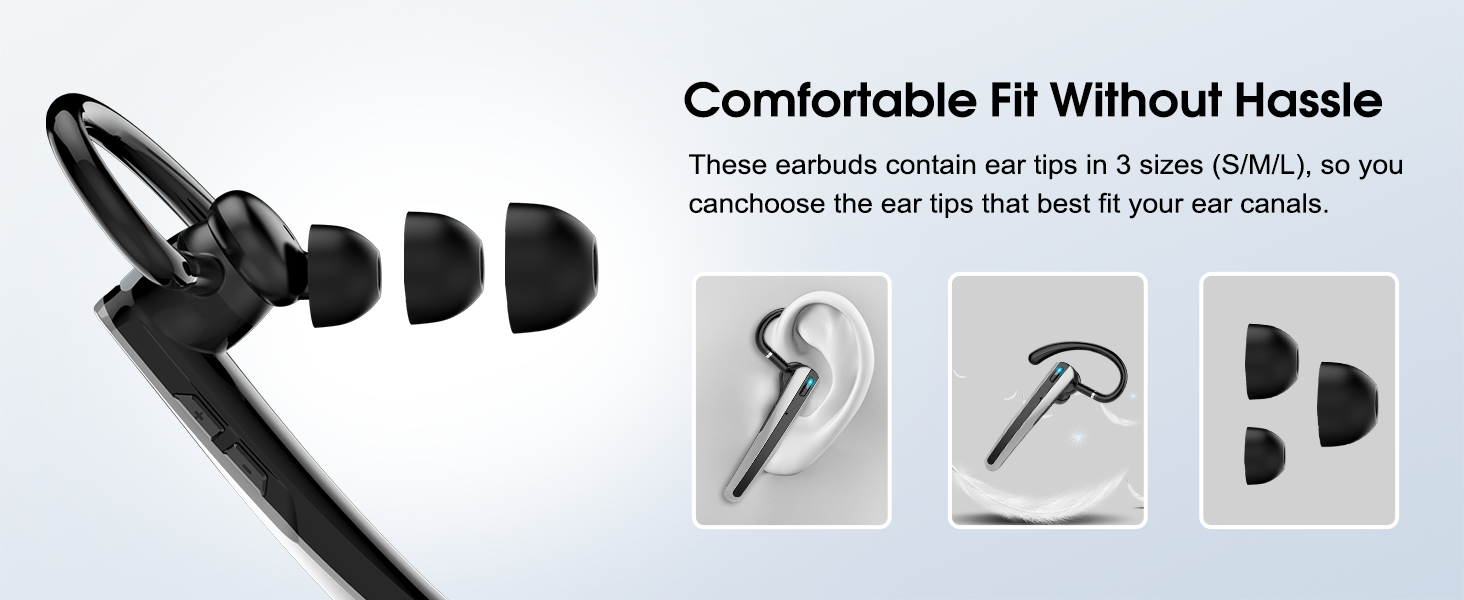
Image: Illustration showing the Atheewon N19 headset with different sized ear tips (S, M, L) to ensure a comfortable and secure fit for various ear canals.
6. Operating Instructions
The Atheewon N19 headset features multi-functional buttons for easy control of calls, music, and voice assistants.
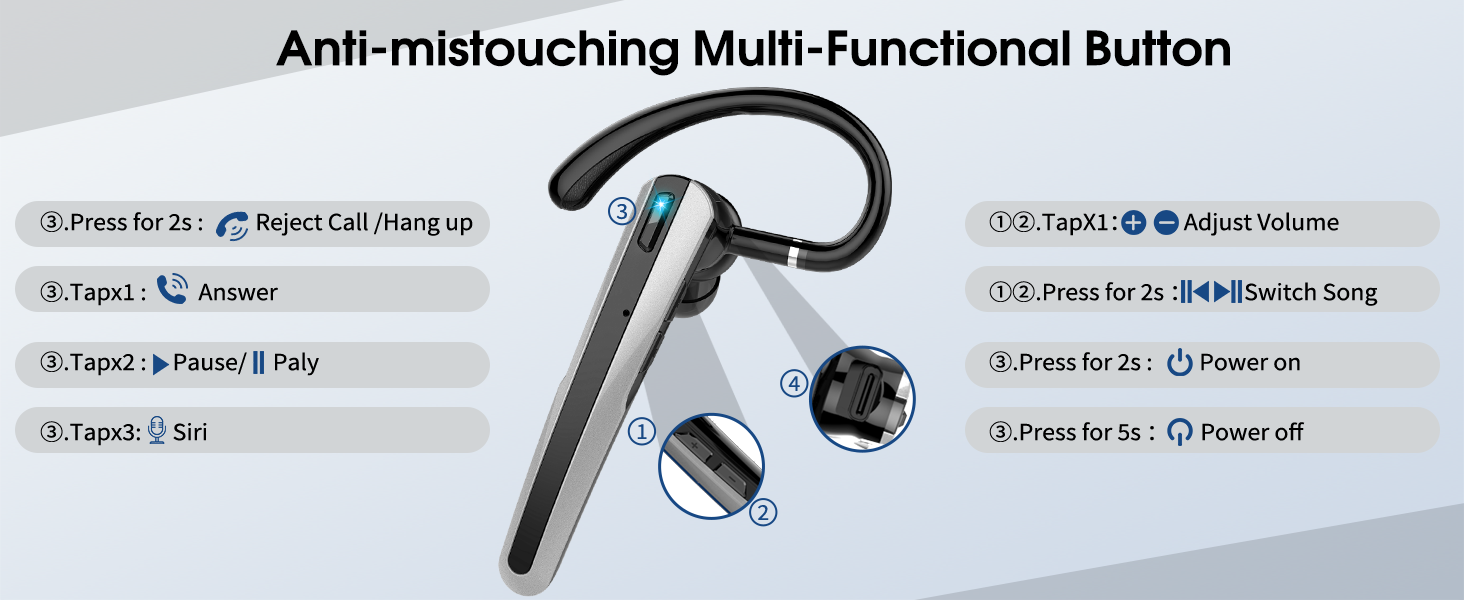
Image: Detailed diagram explaining the functions of the multi-functional button on the Atheewon N19 headset, including power, call management, music playback, and voice assistant activation.
6.1 Power Control
- Power On: Press and hold the power button for 2 seconds.
- Power Off: Press and hold the power button for 5 seconds.
6.2 Call Management
- Answer Call: Tap the power button once.
- End Call: Tap the power button once during a call.
- Reject Call: Press and hold the power button for 2 seconds.
6.3 Music Playback
- Play/Pause: Tap the power button twice.
- Volume Up: Tap the '+' volume button once.
- Volume Down: Tap the '-' volume button once.
- Next Track: Press and hold the '+' volume button for 2 seconds.
- Previous Track: Press and hold the '-' volume button for 2 seconds.
6.4 Voice Assistant
- Activate Siri/Voice Assistant: Tap the power button three times.
7. Maintenance
Proper maintenance ensures the longevity and performance of your Atheewon N19 headset.
7.1 Cleaning
- Regularly clean the ear tips and the headset's surface with a soft, dry, lint-free cloth.
- Do not use abrasive cleaners, alcohol, or chemical solvents.
- Ensure no moisture enters the charging port or speaker grilles.
7.2 Storage
- When not in use, store the headset in its charging case to protect it from dust and damage.
- Avoid storing the device in extreme temperatures (hot or cold) or in highly humid environments.
7.3 Water Resistance
The Atheewon N19 headset is IPX7 waterproof, meaning it can withstand immersion in up to 1 meter of water for 30 minutes. However, it is not recommended for swimming or prolonged water exposure. Ensure the charging port is dry before charging.

Image: The Atheewon N19 headset partially submerged in water, illustrating its IPX7 waterproof rating.
8. Troubleshooting
If you encounter issues with your Atheewon N19 headset, refer to the following common solutions:
| Problem | Possible Solution |
|---|---|
| Headset does not power on. | Ensure the headset is fully charged. Place it in the charging case or connect directly via USB-C. |
| Cannot pair with device. |
|
| No sound or low volume. |
|
| Call quality is poor. |
|
| Charging case LED display is off. | Connect the charging case to a power source to check its battery level. It might be fully discharged. |
9. Specifications
| Feature | Detail |
|---|---|
| Model Name | N19 |
| Connectivity Technology | Wireless (Bluetooth 5.3) |
| Bluetooth Version | 5.3 |
| Bluetooth Range | Up to 15 meters (open environment) |
| Battery Life (Single Headset) | 20 Hours |
| Battery Life (with Charging Case) | 120 Hours |
| Charging Time | 1.5 Hours |
| Audio Driver Type | 13.0mm Dynamic Driver |
| Noise Control | ENC (Environmental Noise Cancellation), CVC 8.0 |
| Water Resistance Level | IPX7 Waterproof |
| Charging Port | USB-C |
| Headset Weight | Approximately 3.84 ounces |
| Included Components | Bluetooth Earpiece, Wireless Charging Case, USB-C Cable, User Manual, Ear Tips (S/M/L) |
10. Warranty and Support
Atheewon is committed to providing quality products and customer satisfaction.
10.1 Warranty Information
Your Atheewon N19 Bluetooth Headset comes with a 2-Year Warranty from the date of purchase, covering manufacturing defects. Please retain your proof of purchase for warranty claims.
10.2 Returns and Refunds
A 30-Day Return and Refund policy is available for eligible purchases. Refer to your retailer's return policy for specific details.

Image: Graphic illustrating Atheewon's commitment to quality service, including 30-day returns and a 2-year warranty.
10.3 Customer Support
For any questions, technical assistance, or warranty claims, please contact Atheewon customer support through the retailer where you purchased the product or visit the official Atheewon website for contact information.