
1. Introduction
This manual provides essential information for the safe and efficient operation of your DOOGEE S200 Max 5G Rugged Smartphone. Please read it thoroughly before using your device to ensure proper setup, usage, and maintenance. The DOOGEE S200 Max is designed for durability and high performance in challenging environments, featuring a robust build, extended battery life, and advanced camera capabilities.
2. Package Contents
Verify that all items are present in your product package:
- DOOGEE S200 Max 5G Rugged Smartphone
- USB Cable
- Power Adapter (may vary by region)
- SIM Ejector Tool
- Quick Start Guide
- Warranty Card
3. Device Overview
Familiarize yourself with the physical components of your DOOGEE S200 Max smartphone.
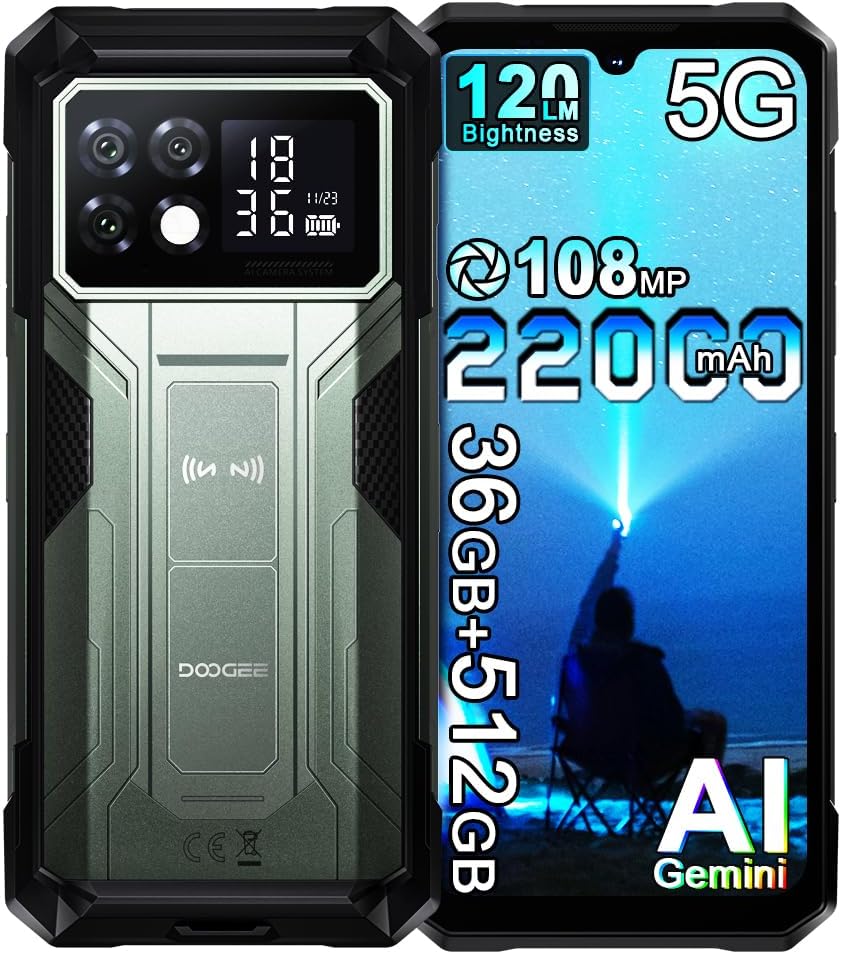
Image: Front and rear view of the DOOGEE S200 Max smartphone, highlighting its rugged design and dual display.
3.1 Main Display
The device features a 6.72-inch FHD+ IPS display with a 120Hz refresh rate, providing a clear and smooth visual experience.

Image: Close-up of the 6.72-inch main display, showing its resolution, refresh rate, and other display specifications.
3.2 Rear Display
A 1.3-inch IPS secondary display is located on the back, offering quick access to information without activating the main screen. This display can show dynamic watch faces, notifications, music controls, and call information.
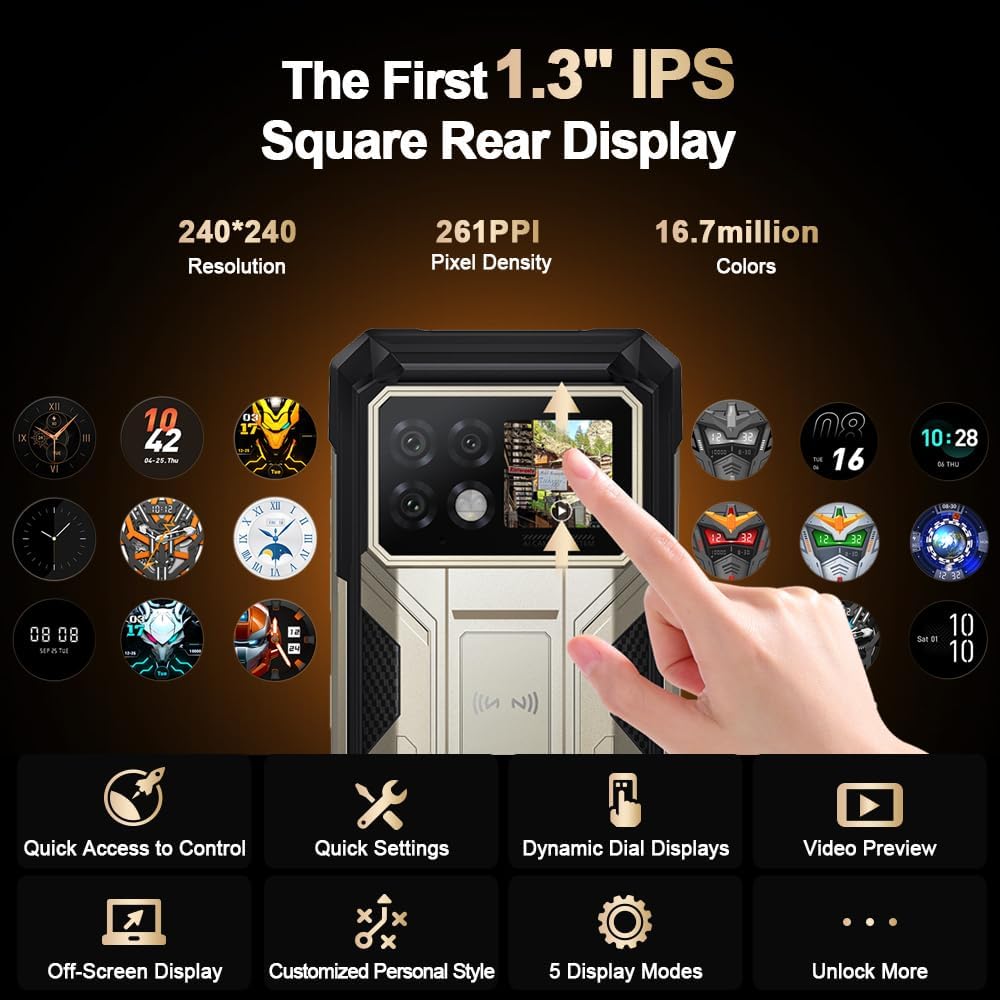
Image: Illustration of the 1.3-inch rear display, demonstrating its various functions such as quick access controls, settings, dynamic dials, and video previews.
3.3 Camera System
The device is equipped with a versatile camera setup:
- Main Camera: 108MP AI camera for high-resolution photography.
- Night Vision Camera: 20MP for clear images in low-light conditions.
- Macro Camera: 2MP for detailed close-up shots.
- Front Camera: 32MP for selfies and video calls.

Image: Diagram illustrating the DOOGEE S200 Max's camera modules, including the 108MP AI main camera, 20MP night vision camera, 2MP macro camera, and 32MP front camera.
3.4 Dual Flashlight
A powerful 120-lumen dual flashlight is integrated, offering 6000-8000K color temperature and a 10-meter illumination range. It supports adjustable continuous light, strobe, and SOS modes.

Image: The DOOGEE S200 Max with its dual flashlight activated, demonstrating its brightness and utility in dark environments.
4. Setup
4.1 SIM Card and SD Card Installation
- Locate the SIM card tray on the side of the device.
- Insert the SIM ejector tool into the small hole next to the tray to open it.
- Place your Nano-SIM card(s) and/or microSD card into the designated slots on the tray. Ensure correct orientation.
- Gently push the tray back into the device until it is flush.
4.2 Initial Power On
Press and hold the Power button (usually located on the side) for a few seconds until the DOOGEE logo appears on the screen. Follow the on-screen instructions to complete the initial setup process, including language selection, Wi-Fi connection, and Google account setup.
4.3 Charging the Device
Connect the provided USB cable to the phone's charging port and the other end to the power adapter. Plug the adapter into a wall outlet. The device supports 66W super-fast charging. The 22000mAh battery can reach 100% charge in approximately 2 hours. The phone also supports 18W OTG reverse charging, allowing it to charge other devices.

Image: Visual representation of the 22000mAh battery capacity and 66W fast charging capability, along with estimated usage times.
5. Operating Instructions
5.1 Using the Main Display
Navigate the Android 15 operating system using touch gestures. Swipe, tap, pinch, and spread to interact with apps, menus, and content. The 120Hz refresh rate ensures a fluid user experience.
5.2 Utilizing the Rear Display
The 1.3-inch rear display can be customized to show various information and controls. Access quick settings, view notifications, control music playback, or preview calls without needing to activate the main screen. Refer to the phone's settings for customization options.
5.3 Camera Operation
Open the Camera application to access the various camera modes. Switch between the 108MP main, 20MP night vision, 2MP macro, and 32MP front cameras. Utilize AI features for enhanced image processing, including AI Erase, AI Background Replacement, AI Digital Human, and AI Portrait modes.
5.4 Flashlight Control
The dual flashlight can be activated and controlled via a dedicated app or quick settings. Adjust brightness (20-100%), select continuous light, strobe, or SOS modes as needed for outdoor activities or emergencies.
5.5 Connectivity
- Dual 5G SIM: Supports two 5G SIM cards for flexible network usage.
- Wi-Fi 6: Connect to high-speed Wi-Fi networks.
- Bluetooth 5.2: Pair with wireless accessories like headphones and speakers.
- NFC: Enable contactless payments via Google Pay and other NFC-enabled services.
- GPS: Utilize GPS, Beidou, GLONASS, and Galileo for precise navigation.
5.6 Security Features
The DOOGEE S200 Max offers biometric authentication for secure access:
- Fingerprint Unlock: Register your fingerprints for quick and secure unlocking.
- Face Unlock: Use facial recognition to unlock your device.
5.7 Software Features (Android 15)
The device runs on Android 15, offering various optimized features:
- App Cloning: Run multiple instances of the same app.
- Dynamic Capsule: Enhanced notification and interaction system.
- Smart Control Panel: Quick access to essential settings and functions.
- Glove Mode: Improves touch sensitivity for use with gloves.
- Game Mode: Optimizes performance for gaming.
- Kid Mode: Provides a safe and controlled environment for children.

Image: Overview of Android 15 features on the DOOGEE S200 Max, including App Cloning, Dynamic Capsule, Smart Control Panel, Internet Speed Indication, and Battery Protection.
6. Maintenance
To ensure the longevity and optimal performance of your DOOGEE S200 Max:
- Cleaning: Use a soft, damp cloth to clean the device. Avoid harsh chemicals or abrasive materials.
- Water Exposure: While the phone is IP68/IP69K rated, ensure all ports are securely closed before exposing it to water. Do not intentionally submerge the device beyond its rated depth or duration.
- Temperature: Avoid exposing the device to extreme temperatures (very hot or very cold) as this can affect battery life and internal components.
- Software Updates: Regularly check for and install system updates to ensure your device has the latest security patches and performance improvements.
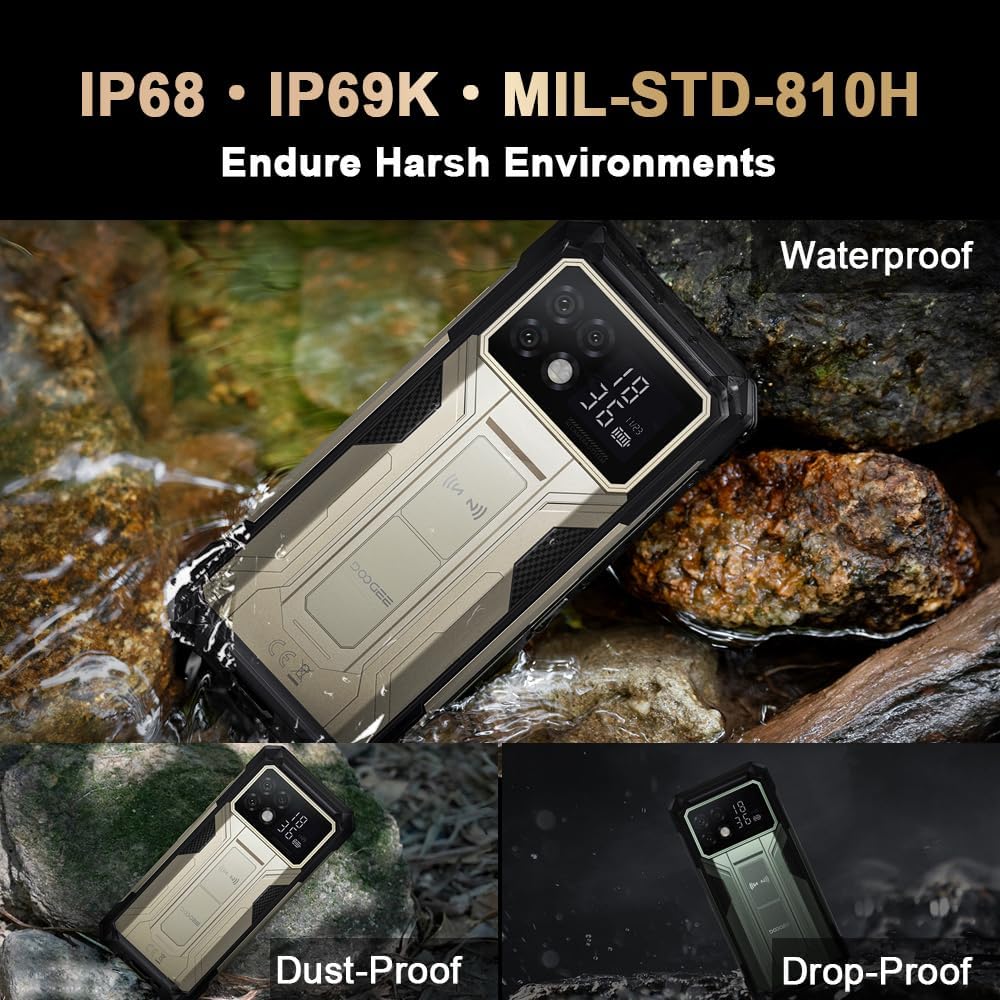
Image: The DOOGEE S200 Max demonstrating its waterproof, dust-proof, and drop-proof capabilities, certified to IP68, IP69K, and MIL-STD-810H standards.
7. Troubleshooting
If you encounter issues with your device, try the following common solutions:
- Device Not Responding: Press and hold the Power button for about 10-15 seconds to force a restart.
- Charging Issues: Ensure the USB cable and power adapter are securely connected and undamaged. Try a different outlet or charging accessory.
- Network Connectivity Problems: Check if your SIM card is properly inserted. Toggle Airplane Mode on and off. Restart the device. Verify your network settings.
- App Crashes: Clear the cache and data of the problematic app in Settings > Apps. If the issue persists, uninstall and reinstall the app.
- Slow Performance: Close unnecessary background apps. Clear cached data. Consider performing a factory reset if performance issues are severe (back up your data first).
8. Specifications
| Model Name | DOOGEE S200 Max |
| Operating System | Android 15 |
| Processor | MediaTek Dimensity 7050 5G (6nm Octa-core, 2.6GHz) |
| RAM | 36GB (16GB Physical + 20GB Virtual) |
| Internal Storage | 512GB ROM (Expandable up to 2TB via microSD) |
| Main Display | 6.72-inch FHD+ IPS (1080x2400), 120Hz Refresh Rate |
| Rear Display | 1.3-inch IPS (240x240) |
| Rear Cameras | 108MP AI Main, 20MP Night Vision, 2MP Macro |
| Front Camera | 32MP |
| Battery Capacity | 22000mAh |
| Charging | 66W Fast Charging, 18W OTG Reverse Charging |
| Connectivity | Dual 5G SIM, Wi-Fi 6, Bluetooth 5.2, NFC, GPS (GPS/Beidou/GLONASS/Galileo) |
| Durability | IP68, IP69K, MIL-STD-810H Certified |
| Dimensions | 7.07 x 3.25 x 0.75 inches (179.5 x 82.5 x 19 mm) |
| Weight | 1.18 pounds (535 grams) |

Image: Diagram detailing the 36GB RAM, 512GB ROM (expandable to 2TB), and the Dimensity 7050 Octa-Core processor with its 6nm high-efficiency architecture.
9. Warranty and Support
Your DOOGEE S200 Max smartphone comes with a 24-month warranty. For technical assistance, warranty claims, or further support, please contact DOOGEE customer service or the authorized reseller from whom you purchased the device. Keep your proof of purchase for warranty validation.


