
1. Introduction and Safety Information
Thank you for choosing the Phantomgogo Electric Scooter Model Y2. This manual provides essential information for the safe assembly, operation, and maintenance of your scooter. Please read it thoroughly before first use and keep it for future reference.
1.1 Important Safety Warnings
- Always wear a helmet and appropriate safety gear (knee pads, elbow pads) when riding.
- Ensure all bolts and fasteners are tightened before each ride.
- Do not ride in wet conditions, on uneven surfaces, or at night without proper lighting.
- This scooter is designed for children aged 6-12 years with a maximum weight limit of 132 lbs (60 kg).
- Adult supervision is required at all times.
- Familiarize yourself with local laws and regulations regarding electric scooter use.
- Avoid sudden turns or maneuvers at high speeds.
1.2 Product Overview
The Phantomgogo Model Y2 is a lightweight electric scooter featuring an 80W motor, a 21.6V lithium battery, LED display, and colorful light-up wheels. It is designed for recreational use and short commutes, offering a maximum speed of 9.3 mph and a range of 3-5 miles.
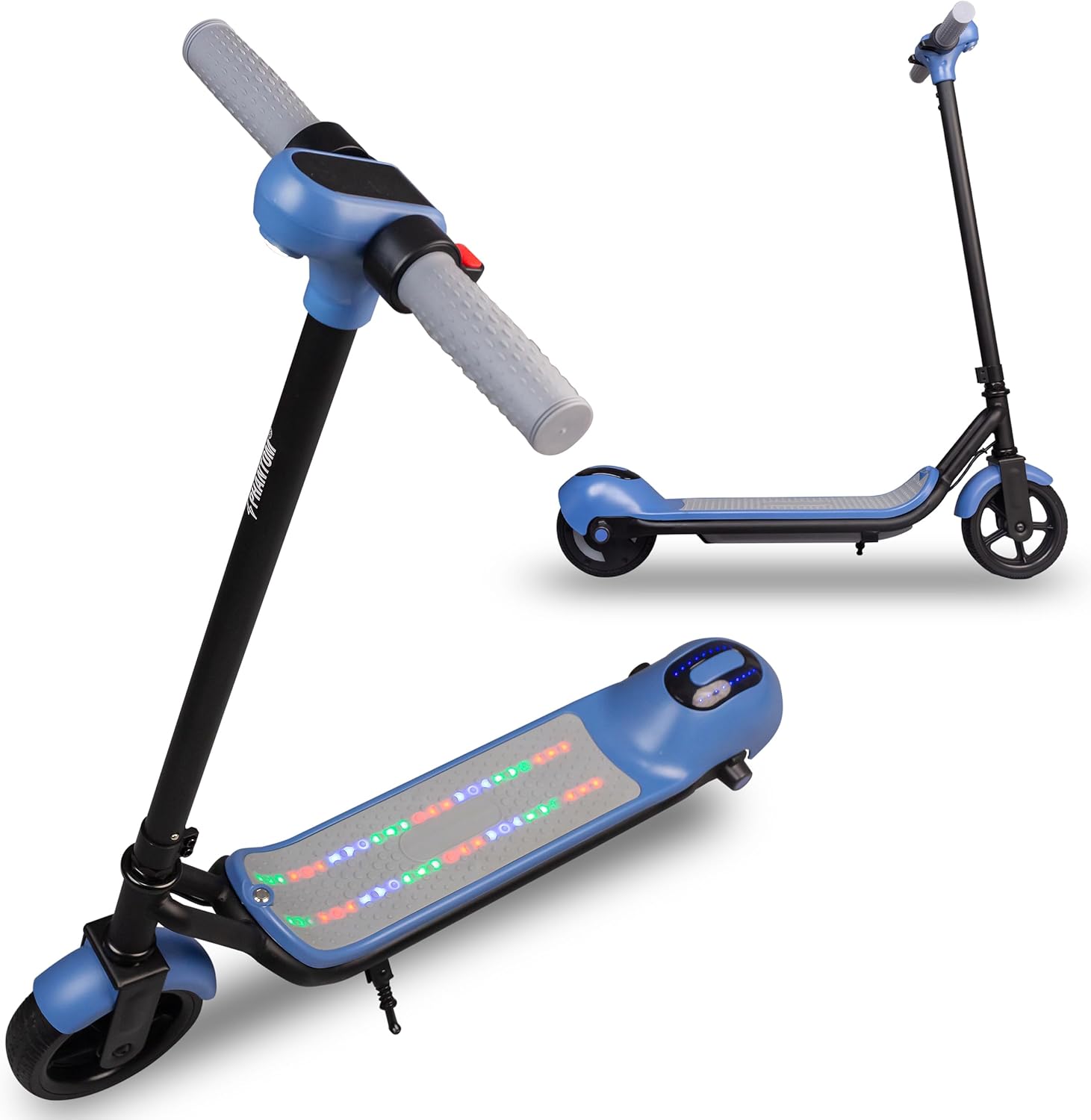
Figure 1: Phantomgogo Electric Scooter Model Y2. This image displays the scooter's overall design, including the blue deck, black frame, handlebars, and the integrated colorful lights on the deck.
2. Setup and Initial Preparation
2.1 Unboxing
Carefully remove all components from the packaging. Ensure all parts listed in the packing list are present. Retain packaging for future storage or transport.
2.2 Handlebar Assembly
- Insert the handlebar stem into the main frame tube until it clicks securely into place.
- Ensure the handlebar is facing forward and aligned with the front wheel.
- Tighten any quick-release clamps or screws as instructed in the quick start guide (not provided in this manual, refer to included documentation).
2.3 Initial Charging
Before first use, fully charge the scooter's battery. Connect the charger to the charging port, typically located on the side of the deck, and then plug it into a standard wall outlet. The charging indicator light on the charger will change color (e.g., red to green) when fully charged. Initial charge time is approximately 3 hours.

Figure 2: Product Specifications. This image shows a rider's foot on the scooter deck, with key specifications such as weight limit, charge time, max speed, max range, and climbing angle displayed.
3. Operating Instructions
3.1 Powering On/Off
- To power on: Press and hold the power button on the LED display unit for a few seconds.
- To power off: Press and hold the power button again until the display turns off.
3.2 Riding the Scooter
- Place one foot firmly on the scooter deck.
- Use your other foot to kick off and gain initial momentum (kick-start).
- Once moving, gently press the electric throttle lever (typically on the right handlebar) to engage the motor.
- Maintain balance and keep both hands on the handlebars.
3.3 Braking
To slow down or stop, release the throttle and gently press the electric brake lever (typically on the left handlebar). Apply the brake smoothly to avoid sudden stops.
Figure 3: Handlebar Controls. This image highlights the LED display, electric throttle, and electric brake on the scooter's handlebars, crucial for operation.
3.4 LED Display and Lights
The integrated LED display shows current speed and battery level. The scooter also features colorful light-up wheels and atmosphere lights on the deck for enhanced visibility and style, especially in low-light conditions.

Figure 4: Deck Atmosphere Lights. This image focuses on the scooter's deck, showcasing the vibrant, multi-colored LED lights that provide both aesthetic appeal and increased visibility.
3.5 Bluetooth Connection (Model Y2)
The Model Y2 scooter supports Bluetooth connectivity. To connect, turn on Bluetooth on your mobile device and search for 'Y2'. Pair with the device to access additional features (e.g., music playback, if supported by the scooter's internal system, though this model primarily uses Bluetooth for potential app connectivity or diagnostics).

Figure 5: Bluetooth Connectivity. This image depicts the scooter alongside a smartphone, indicating its ability to connect via Bluetooth for potential enhanced user interaction.
4. Maintenance
4.1 Cleaning
Wipe the scooter with a damp cloth after each use. Do not use harsh chemicals or abrasive cleaners. Avoid spraying water directly onto electrical components.
4.2 Battery Care
- Charge the battery fully after each ride, especially if it has been depleted.
- If storing the scooter for an extended period, charge the battery to approximately 50-70% every 30 days to prolong its lifespan.
- Do not expose the battery to extreme temperatures.
4.3 Tire and Brake Inspection
- Regularly inspect the 6.5-inch solid tires for wear and tear.
- Check the rear electric brake for proper function before each ride. Ensure it engages smoothly and effectively.
4.4 General Checks
Periodically check all screws, bolts, and connections to ensure they are secure. Tighten any loose parts as necessary.

Figure 6: Powerful Brushless Motor. This image provides a detailed view of the scooter's internal motor and gear mechanism, highlighting its robust construction.
5. Troubleshooting
| Problem | Possible Cause | Solution |
|---|---|---|
| Scooter does not turn on | Low battery; Power button not pressed correctly; Loose connection | Charge the battery; Press and hold power button firmly; Check all connections |
| Scooter not charging | Charger not connected properly; Faulty charger/charging port | Ensure charger is fully plugged in; Try a different outlet; Contact support if issue persists |
| Motor not engaging | Scooter not kick-started; Throttle issue; Low battery | Kick-start the scooter to gain initial speed; Check battery level; Contact support |
| Lights not working | Loose wiring; Electrical fault | Check for visible loose wires; Contact support |
If you encounter problems not listed here or if the suggested solutions do not resolve the issue, please contact Phantomgogo customer support.
6. Specifications
| Feature | Detail |
|---|---|
| Model Name | Y2 |
| Brand | Phantomgogo |
| Motor Power | 80W |
| Battery | 21.6V Lithium (2.6Ah) |
| Max Speed | 9.3 mph |
| Max Range | 3-5 miles |
| Weight Limit | 132 lbs (60 kg) |
| Age Range | 6-12 years |
| Wheel Size | 6.5 inches |
| Wheel Type | Solid Rubber |
| Brake Style | Rear Electric Braking |
| Frame Material | Alloy Steel |
| Special Feature | Light Up Wheels, LED Display |
| Charge Time | Approx. 3 hours |
| UPC | 850065260884 |
7. Warranty Information
The Phantomgogo Electric Scooter Model Y2 comes with a 1 Year Limited Warranty. This warranty covers manufacturing defects under normal use. It does not cover damage caused by misuse, accidents, unauthorized modifications, or normal wear and tear. Please retain your proof of purchase for warranty claims.
8. Customer Support
For technical assistance, warranty claims, or general inquiries, please visit the official Phantomgogo store or contact their customer service department.
Official Brand Store: Phantomgogo Store on Amazon


