1. Introduction
This manual provides essential information for the safe and effective use of your Panasonic ZS99 Digital Camera (DC-ZS99K). The ZS99 is a compact, high-performance camera featuring a 20.3MP MOS sensor, a Leica DC Vario-Elmarit 30x optical zoom lens, 4K photo and video capabilities, and a 5-axis Hybrid O.I.S. system. Please read this manual thoroughly before using the camera and retain it for future reference.

Figure 1.1: Front view of the Panasonic ZS99 Digital Camera. This image displays the camera's lens, flash, and grip, highlighting its compact design.
2. What's in the Box
Verify that all the following items are included in your camera package:
- Panasonic ZS99 Digital Camera (Black)
- Battery (DMW-BLG10)
- AC Adapter
- USB Connection Cable
- Hand Strap
- 2 x Shoulder Strap Adapter

Figure 2.1: The Panasonic ZS99 Digital Camera shown with its standard included accessories, such as the battery, charger, and cables.
3. Setup
3.1. Battery Installation and Charging
- Open the battery/card compartment cover on the bottom of the camera.
- Insert the battery (DMW-BLG10) with the contacts facing the correct direction, as indicated inside the compartment. Push until it clicks into place.
- Close the compartment cover securely.
- To charge, connect the camera to the AC adapter using the USB connection cable. Plug the AC adapter into a power outlet. The charging indicator will illuminate.
- Charging is complete when the indicator turns off.
3.2. Memory Card Installation
The camera supports SD, SDHC, and SDXC memory cards.
- Open the battery/card compartment cover.
- Insert the memory card into the designated slot with the label facing the front of the camera, pushing gently until it clicks.
- Close the compartment cover.
3.3. Attaching the Hand Strap
Thread the hand strap through the strap eyelet on the side of the camera to prevent accidental drops.
4. Operating the Camera
4.1. Power On/Off
Press the ON/OFF button located on the top of the camera to power it on or off.

Figure 4.1: Top view of the camera, illustrating the mode dial, shutter button, zoom lever, and ON/OFF button.
4.2. Basic Photography
- Mode Dial: Rotate the mode dial on the top of the camera to select your desired shooting mode (e.g., Intelligent Auto (iA), Program AE (P), Aperture Priority (A), Shutter Priority (S), Manual (M), Scene Guide, Creative Control).
- Zoom: Use the zoom lever around the shutter button to adjust the 30x optical zoom. Push towards 'W' for wide-angle and 'T' for telephoto.
- Taking a Photo: Press the shutter button halfway to focus, then press fully to capture the image.
- Recording Video: Press the dedicated video recording button to start and stop video capture.

Figure 4.2: The Panasonic ZS99 with its Leica DC Vario-Elmarit 30x optical zoom lens extended, demonstrating its telephoto capability.
4.3. 4K Photo and Video
The ZS99 supports 4K video recording and advanced 4K Photo modes.
- 4K Video: Record ultra-high-definition video at 30 frames per second.
- 4K Photo Modes: Utilize 4K Burst, 4K Burst (Start/Stop), and 4K Pre-Burst to capture 8MP still images from 4K video sequences. Access these modes via the camera's menu.
- Post Focus: This feature allows you to select the focus point after the image has been taken. Capture an image in Post Focus mode, then review it and tap on the desired focus area on the LCD to save a new photo with that focus.
4.4. Tilting LCD Screen
The 3.0-inch LCD screen can be tilted upwards 180 degrees, which is useful for self-portraits or shooting from low angles.
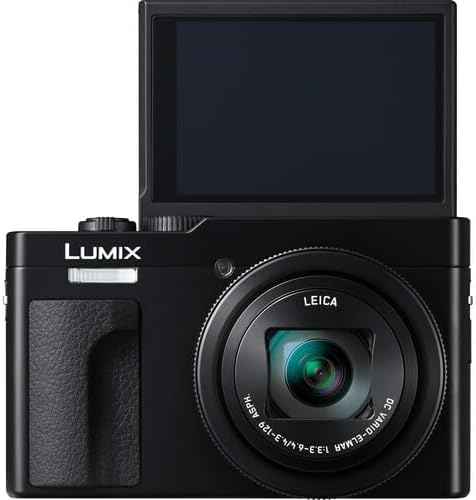
Figure 4.3: The camera with its 3.0-inch LCD screen tilted upwards, facilitating self-portraits and creative low-angle shots.
4.5. Connectivity (Wi-Fi & Bluetooth)
The camera features built-in Wi-Fi and Bluetooth 5.0 for seamless transfer of photos and videos to a smartphone or tablet using the Panasonic Image App. Refer to the camera's menu for pairing and connection instructions.
4.6. Image Stabilization
The 5-axis Hybrid O.I.S. (Optical Image Stabilizer) system automatically compensates for camera shake, helping to produce sharp, clear images and stable videos, especially in low light or when using the telephoto zoom.
5. Maintenance
- Cleaning the Camera Body: Use a soft, dry cloth to wipe the camera body. For stubborn dirt, slightly dampen the cloth with water. Avoid using organic solvents.
- Cleaning the Lens: Use a lens brush to remove dust, then gently wipe with a lens cleaning cloth. Avoid touching the lens surface with your fingers.
- Battery Care: Store batteries in a cool, dry place. Do not expose them to extreme temperatures. If not using the camera for an extended period, remove the battery.
- Storage: Store the camera in a dry, well-ventilated area, away from direct sunlight and high humidity.
6. Troubleshooting
If you encounter issues with your camera, refer to the following common solutions:
- Camera does not power on: Ensure the battery is fully charged and correctly inserted.
- Images are blurry: Check that the lens is clean. Ensure the camera is stable during shooting, or enable the O.I.S. function. Adjust shutter speed or ISO in manual modes if necessary.
- Memory card error: Ensure the memory card is inserted correctly and is not full or corrupted. Try formatting the card (this will erase all data).
- Cannot connect to smartphone via Wi-Fi/Bluetooth: Ensure Wi-Fi/Bluetooth is enabled on both the camera and your smartphone. Restart both devices and try pairing again. Ensure the Panasonic Image App is installed and updated.
- Battery drains quickly: Reduce screen brightness, limit Wi-Fi/Bluetooth usage, or carry a spare charged battery.
7. Specifications
| Feature | Detail |
|---|---|
| Model Name | DC-ZS99K |
| Effective Still Resolution | 20 MP |
| Photo Sensor Technology | MOS |
| Image Stabilization | Optical (5-axis Hybrid O.I.S.) |
| Camera Lens | Leica DC Vario-Elmarit 30x optical zoom lens |
| Minimum Shutter Speed | 1/16000s |
| Screen Size | 3 Inches (Tilting LCD) |
| Supported File Format | JPEG, MP4 |
| Video Capture Format | MP4 |
| Frame Rate (Video) | 30 fps (for 4K) |
| Wireless Technology | Bluetooth, Wi-Fi |
| Viewfinder | Electronic |
| Camera Flash | Built-In |
| Power Source | DMW-BLG10 Battery |
| Item Weight | 3.07 Pounds |
| Color | Black |
8. Warranty and Support
For warranty information, please refer to the warranty card included with your product or visit the official Panasonic support website. For technical assistance or further inquiries, contact Panasonic customer support.
Panasonic Support Website: www.panasonic.com/us/support.html


