
Introduction
Thank you for choosing the JUNJIEUNVO Q39 Wireless Translation Earbuds. These earbuds are designed to provide high-quality audio, comfortable wear, and convenient language translation capabilities. This manual will guide you through the setup, operation, and maintenance of your new device.
Package Contents
- JUNJIEUNVO Q39 Wireless Translation Earbuds (Left and Right)
- Charging Case
- USB Charging Cable
- User Manual (This document)
Product Overview
The JUNJIEUNVO Q39 earbuds feature an open-ear design for comfort and situational awareness, integrated Bluetooth 5.4 for stable connectivity, and IPX5 water resistance for sports use. The charging case provides extended battery life and includes a digital display.

Image: The JUNJIEUNVO Q39 Wireless Translation Earbuds in their charging case. The earbuds are beige with gold accents, and the charging case is open, revealing the earbuds and a digital display for battery status.
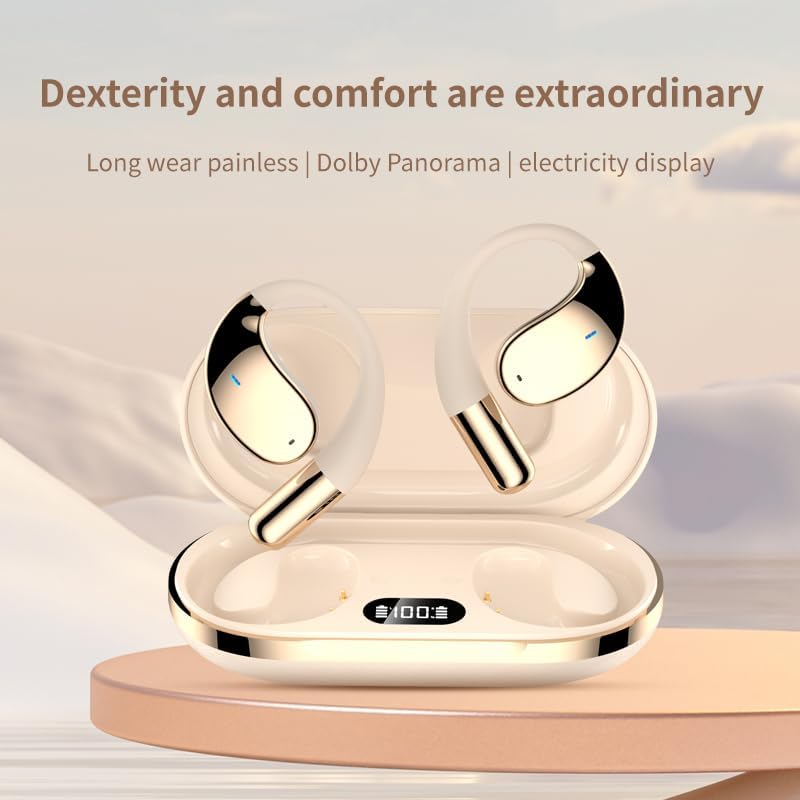
Image: A closer view of the JUNJIEUNVO Q39 earbuds nestled in their charging case. The case features a clear digital display indicating the battery percentage, currently showing "100".
Setup
1. Charging the Earbuds and Case
Before first use, fully charge the earbuds and charging case.
- Connect the USB charging cable to the charging port on the case and to a USB power source.
- The digital display on the charging case will show the battery level during charging.
- A full charge for the case takes approximately 1.5 hours.
- The earbuds will charge automatically when placed inside the powered charging case. Earbuds battery capacity: 40mAh each. Charging case battery capacity: 500mAh.
2. Bluetooth Pairing
To connect your earbuds to a device:
- Ensure the earbuds are charged.
- Open the charging case. The earbuds will automatically enter pairing mode.
- On your device (smartphone, tablet, etc.), go to Bluetooth settings and turn Bluetooth on.
- Search for available devices and select "Q39" from the list.
- Once connected, you will hear a confirmation tone, and the earbuds will be ready for use.
- The earbuds support Bluetooth V5.4+EDR and a connection distance of up to 10 meters.
Operating Instructions
Power On/Off
- Power On: Open the charging case, and the earbuds will automatically power on.
- Power Off: Place the earbuds back into the charging case and close the lid. They will automatically power off and begin charging.
Music Playback
Specific touch controls for music playback are typically detailed in a quick start guide or on the product itself. Generally, common controls include:
- Play/Pause: Single tap on either earbud.
- Next Track: Double tap on the right earbud.
- Previous Track: Double tap on the left earbud.
- Volume Control: (If supported) Triple tap on an earbud or adjust via your connected device.
Call Management
- Answer/End Call: Single tap on either earbud during an incoming call.
- Reject Call: Press and hold either earbud for 2 seconds during an incoming call.
Translation Function
The JUNJIEUNVO Q39 earbuds support language translation for over 134 countries. To utilize this feature:
- Ensure your earbuds are connected to your smartphone.
- Download and install the dedicated translation application (if available) or a compatible third-party translation app on your smartphone.
- Follow the instructions within the translation application to initiate and manage real-time translation. The earbuds will act as the audio input and output device for the translation.
Maintenance
- Cleaning: Use a soft, dry, lint-free cloth to clean the earbuds and charging case. Do not use harsh chemicals or abrasive materials.
- Water Resistance: The earbuds are IPX5 waterproof, meaning they are resistant to splashes and sweat. Do not submerge them in water or expose them to heavy rain. Ensure they are dry before placing them back in the charging case.
- Storage: Store the earbuds in their charging case when not in use to protect them and keep them charged. Avoid extreme temperatures.
Troubleshooting
- Earbuds not pairing:
- Ensure both earbuds are charged.
- Turn off Bluetooth on your device and turn it back on.
- Forget "Q39" from your device's Bluetooth list and try pairing again.
- Place earbuds back in the case, close the lid, wait a few seconds, then open to reset.
- No sound from one earbud:
- Check battery level of both earbuds.
- Try resetting the earbuds as described above.
- Charging case not charging:
- Ensure the charging cable is securely connected to both the case and the power source.
- Try a different USB cable or power adapter.
Specifications
| Model Name | YYK-Q39 |
| Bluetooth Version | V5.4+EDR |
| Bluetooth Chip | Blue Flood |
| Supported Protocols | AVRCP V1.6, A2DP V1.3, HFP V1.7 (Simultaneous LE and BR / EDR) |
| Usage/Playback Time | Approximately 8 hours (at 80% volume) |
| Standby Time | 80 hours |
| Charging Time (Case) | Approximately 1.5 hours |
| Wireless Distance | 10 meters |
| Earbud Battery Capacity | 40mAh |
| Charging Case Battery Capacity | 500mAh |
| Water Resistance Rating | IPX5 |
| Ear Placement | On Ear (Open-ear design) |
| Impedance | 32 Ohm |
| Item Weight | 5 ounces (total package weight is 185g gross, 84g net) |
| UPC | 884613749477 |
Warranty and Support
For warranty information and customer support, please refer to the documentation provided at the time of purchase or contact your retailer. Keep your proof of purchase for any warranty claims.