
1. Introduction
Thank you for purchasing the NEEWER HB80B 80W Bi-color LED Video Light. This compact and powerful COB light is designed for various photography and videography applications, offering adjustable color temperature, brightness, and multiple lighting effects. Please read this manual carefully before use to ensure proper operation and maintenance.
2. Safety Information
- Do not expose the product to water, moisture, or high humidity.
- Do not disassemble or modify the product. Repairs should only be performed by authorized service personnel.
- Use only the specified power adapter and charging cable.
- Keep the product out of reach of children.
- Avoid direct eye exposure to the light source.
- Ensure adequate ventilation during operation to prevent overheating.
- Do not block the fan or ventilation openings.
3. Package Contents
Verify that all items listed below are included in your package:
- 1 x NEEWER HB80B LED Video Light
- 1 x Grip Handle
- 1 x Bowens Mount Reflector
- 1 x Light Stand Adapter (Mini Tripod)
- 1 x PD100W Fast Charger
- 1 x 3m 240W USB-C to USB-C PD Charging Cable
- 1 x Carrying Bag

Image: NEEWER HB80B light, grip handle, Bowens mount reflector, light stand adapter, PD100W charger, USB-C cable, and carrying bag. The image also shows a detailed diagram of the light's components and controls.
4. Product Diagram
Familiarize yourself with the components of your NEEWER HB80B LED Video Light:
- Color Display
- Fan
- Menu Button (Tap to enter menu)
- Mode Switch (Short press)
- Fan Lock (Long press)
- Type-C Port
- Power On/Off (Long press)
- Infinity/2.4G Switch (Short press)
- Key Lock Option (Short press) / Scroll/Dial for parameter adjustment
Image: A detailed view of the NEEWER HB80B LED video light with numbered labels pointing to its various parts and controls, including the color display, fan, buttons, and Type-C port.
5. Setup
5.1 Mounting the Light
- On a Light Stand: Attach the included light stand adapter (mini tripod) to the bottom 1/4-inch screw hole of the HB80B. Then, mount the adapter onto a standard light stand. The adapter allows for 360-degree angle adjustment.
- Handheld: Screw the grip handle into the 1/4-inch screw hole on the bottom of the light for comfortable handheld operation.
5.2 Attaching Accessories
- The HB80B features a standard Bowens mount. Align your Bowens mount accessory (e.g., included reflector, softbox, beauty dish) with the mount on the light and twist clockwise until it locks securely.
- The light also has an umbrella mount for attaching photographic umbrellas.
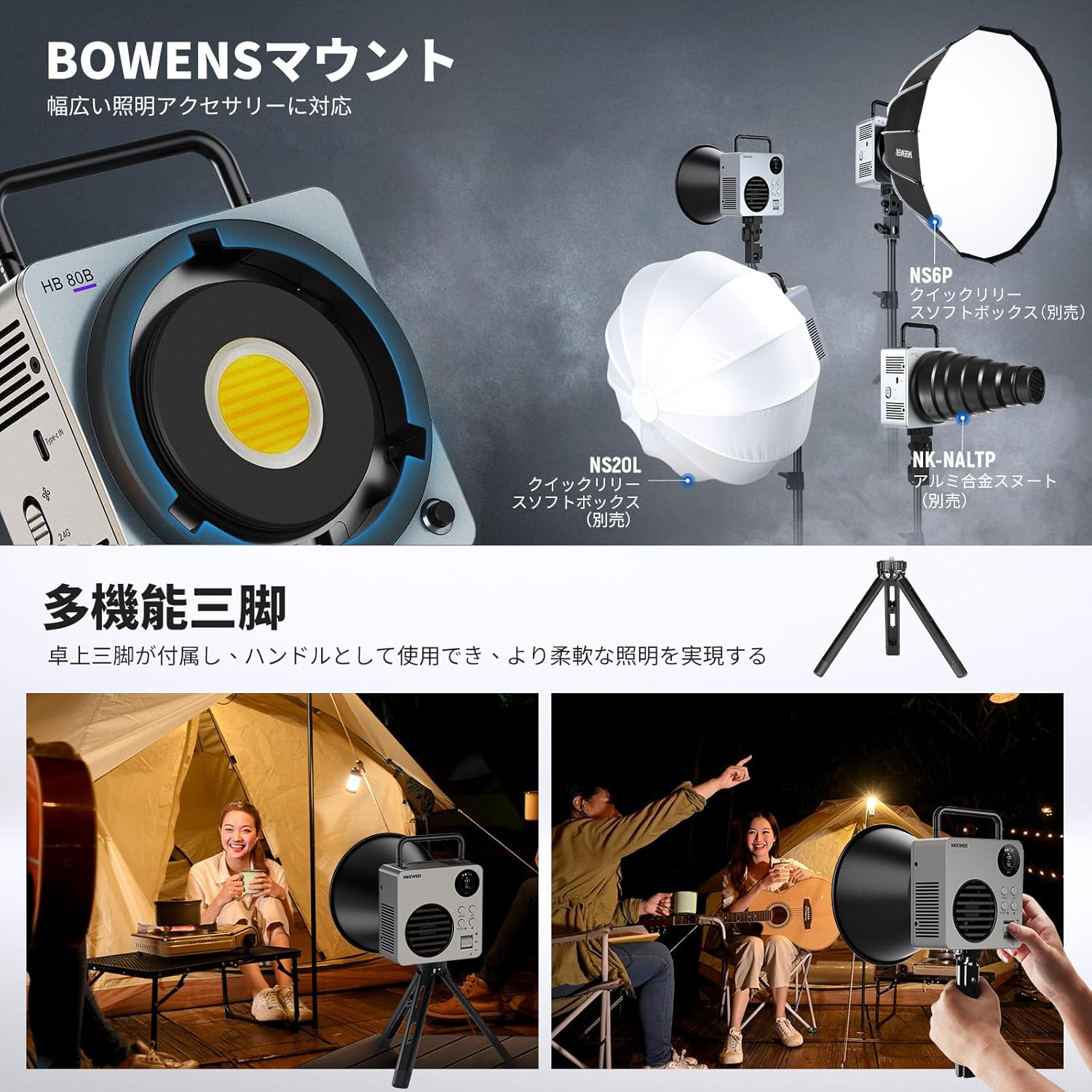
Image: The NEEWER HB80B light shown with a Bowens mount reflector and a softbox, demonstrating compatibility with various accessories. It also illustrates the use of the included mini tripod for stable placement.
5.3 Powering the Light
- Internal Battery: The HB80B has a built-in 72Wh battery for portable use.
- PD Fast Charging: Connect the included PD100W fast charger and USB-C cable to the Type-C port for charging. The light supports PD100W input and PD60W output, allowing for use while charging. A full charge takes approximately 2 hours with PD60W.

Image: The NEEWER HB80B light connected via its Type-C port, illustrating its bidirectional power capabilities with PD100W input for charging and PD60W output to power other devices.
6. Operating Instructions
6.1 Power On/Off
Long press the Power On/Off button (7) to turn the light on or off.
6.2 Panel Control
Use the physical buttons and the scroll/dial (9) on the control panel for direct adjustments:
- Menu Button (3): Tap to access menu options.
- Mode Switch (4): Short press to cycle through lighting modes (CCT, SOURCE, FX).
- Scroll/Dial (9): Rotate to adjust parameters like brightness, color temperature, or effect intensity. Press to confirm selections.
- Key Lock Option (9): Short press to lock/unlock the controls.
6.3 Lighting Modes
The HB80B offers three primary lighting modes:
- CCT Mode: Adjust color temperature from 2700K (warm) to 6500K (cool) and brightness from 0% to 100%.
- SOURCE Mode: Choose from 10 different light source simulations to match various ambient lighting conditions.
- FX Mode: Select from 13 special scene effects, such as lightning, fire, or police car, to add dynamic elements to your shots.

Image: A scene demonstrating creative lighting with the NEEWER HB80B, highlighting its CCT mode (2700K-6500K), 10 light source simulations, and 13 scene effects.
6.4 Fan Modes (Intelligent Cooling System)
The light features an intelligent cooling system with three fan modes:
- Mute Mode (45W): For silent operation, ideal for video recording where audio is critical.
- Normal Mode (60W): Standard operation with balanced cooling and power output.
- Booster Mode (80W): Provides maximum light output. Requires a PD100W charger for sustained 80W operation.

Image: An illustration of the NEEWER HB80B's intelligent cooling system, showing the fan and three power modes: 45W (Mute), 60W (Normal), and 80W (Booster).
6.5 Wireless Control (App & 2.4G)
The HB80B supports both app control via Bluetooth and 2.4G wireless control:
- NEEWER Infinity App: Download the NEEWER Infinity app to your smartphone. Pair the light via Bluetooth to control all functions remotely, including brightness, color temperature, modes, and scene effects. The app also supports master-slave grouping for controlling multiple lights.
- 2.4G Wireless Control: The built-in 2.4G system allows for wireless control within a 20m range. Set the light to a channel between 00-99 to synchronize with other compatible NEEWER lights.

Image: The NEEWER HB80B demonstrating its Infinity wireless control system, showing the physical control panel, smartphone app interface for remote control, and 2.4G wireless control for multi-light synchronization.
7. Maintenance
- Cleaning: Use a soft, dry cloth to clean the light body. Do not use harsh chemicals or abrasive materials.
- Storage: When not in use, store the light in its carrying bag in a cool, dry place, away from direct sunlight and extreme temperatures.
- Battery Care: For optimal battery life, fully charge the light before long-term storage and recharge it every three months.
8. Troubleshooting
| Problem | Possible Cause | Solution |
|---|---|---|
| Light does not turn on | Low battery or no power connection. | Charge the battery or connect to the PD charger. Ensure the power button is long-pressed. |
| App control not working | Bluetooth not enabled, app not paired, or light's 2.4G/Infinity switch is off. | Ensure Bluetooth is on, pair the light in the app, and check the Infinity/2.4G switch (8) on the light. |
| Light overheats | Fan mode set too low or ventilation blocked. | Switch to Normal or Booster fan mode. Ensure the fan and ventilation openings are clear. |
| Brightness is lower than expected | Not in Booster Mode or using a non-PD100W charger. | Switch to Booster Mode. For sustained 80W output, use the included PD100W charger. |
9. Specifications
| Feature | Specification |
|---|---|
| Model | HB80B |
| Power Output | 80W (Booster Mode), 60W (Normal Mode), 45W (Mute Mode) |
| Input | PD3.0: 9V/3A, 12V/3A, 15V/3A, 20V/3.25A, 20V/5A (Max PD100W) |
| Output | PD3.0: 9V/3A, 12V/3A, 15V/3A, 20V/3.25A (Max PD60W) |
| Battery Capacity | 14.4V/5000mAh / 72Wh |
| Brightness Range | 0-100% |
| Color Temperature | 2700K-6500K |
| Channel Range | 00-99 |
| CRI/TLCI | 95+/97+ |
| Illumination (Booster Mode) | 25500lx/1m (with reflector, 5600K); 3070lx/1m (without reflector, 5600K) |
| Lighting Modes | CCT / SOURCE / FX |
| Special Scene Effects | 13 |
| Light Sources | 10 |
| Battery Runtime | Approx. 74 min (Normal Mode); Approx. 94 min (Mute Mode) |
| Charging Time | Approx. 120 min |
| Dimensions | 130x130x70mm |
| Weight | 1055g (light body only) |
| Mount | Bowens Mount, Umbrella Mount |
| Control Methods | On-board Panel, NEEWER Infinity App, 2.4G Wireless |

Image: A table detailing the technical specifications of the NEEWER HB80B, including power, input/output, battery, color temperature, CRI/TLCI, and various lighting modes.
10. Warranty and Support
This NEEWER HB80B LED Video Light comes with a 1-year manufacturer warranty from the date of purchase. This warranty covers defects in materials and workmanship under normal use.
For warranty claims, technical support, or any inquiries regarding your product, please contact NEEWER customer service through the official website or your point of purchase. Please retain your proof of purchase for warranty validation.


