Introduction
This manual provides essential information for the safe and efficient operation of your AMEIFU F2 Air Purifier. Please read it thoroughly before use and retain it for future reference.
Important Safety Instructions
- Read all instructions before operating the appliance.
- Do not operate any fan with a damaged cord or plug. Discard fan or return to an authorized service facility for examination and/or repair.
- Do not run cord under carpeting. Do not cover cord with throw rugs, runners, or similar coverings. Arrange cord away from traffic area and where it will not be tripped over.
- To reduce the risk of fire or electric shock, do not use this fan with any solid-state speed control device.
- Unplug the air purifier before moving, cleaning, or performing any maintenance.
- Keep the air purifier away from water or other liquids.
- Do not block air inlets or outlets.
- This appliance is not intended for use by persons (including children) with reduced physical, sensory or mental capabilities, or lack of experience and knowledge, unless they have been given supervision or instruction concerning use of the appliance by a person responsible for their safety.
- Children should be supervised to ensure that they do not play with the appliance.
Product Components
Familiarize yourself with the parts of your AMEIFU F2 Air Purifier:
- Air Purifier Unit (Main Body)
- H13 HEPA Filter (Pre-installed)
- Power Cord
- Aromatherapy Pad (inside the unit)

Image: The AMEIFU F2 Air Purifier, showing its compact design and the top opening for aromatherapy oil application.
Setup Guide
- Unpack the Air Purifier: Carefully remove the unit from its packaging.
- Remove Filter Packaging: The power cord and filter are placed inside the product for shipping.
- Turn the unit upside down and twist the base cover counter-clockwise to unlock.
- Remove the base cover and take out the H13 HEPA filter.
- Remove all plastic packaging from the filter.
- Place the unwrapped filter back into the unit.
- Replace the base cover and twist clockwise to lock it securely.
- Position the Unit: Place the air purifier on a flat, stable surface. Ensure there is at least 6 inches (15 cm) of space around all sides for optimal airflow.
- Connect Power: Plug the power cord into a standard electrical outlet.

Image: An exploded view illustrating the 3-stage filtration system: Pre-Filter, H13 HEPA Filter, and Activated Carbon Filter.
Operating Instructions
Control Panel Overview
The AMEIFU F2 Air Purifier features a smart touch control panel with the following functions:
- Power Button: Turns the unit on/off.
- Light Button: Controls the display light.
- Mode Button: Cycles through fan speeds (L1, L2, L3, Auto) and Sleep Mode.
- Timer Button: Sets the operating timer (2h, 4h, 8h, 12h).
- Child Lock Button: Activates/deactivates the child lock.
- Filter Reset Indicator: Lights up when filter replacement is needed.

Image: Close-up of the air purifier's smart touch control panel, highlighting the various function buttons.
Initial Power On
After plugging in, the air purifier will enter a preheating state. The indicator light will flash for approximately one minute as it calibrates the air quality sensor.
Air Quality Indicator
The unit features a real-time air quality sensor. The light color indicates current air quality:
- Green: Good air quality.
- Blue: Minor pollution detected.
- Red: Severe pollution detected.
Fan Speed Settings
Press the "Mode" button to cycle through the following fan speeds:
- L1 (Low): Quiet operation, suitable for sleeping.
- L2 (Medium): Balanced performance for daily use.
- L3 (High): Maximum purification for quick cleaning.
- Auto Mode: Adjusts fan speed automatically based on detected air quality.
Sleep Mode
Activate Sleep Mode by pressing the "Mode" button until it is selected. In this mode, the fan operates at a low noise level (less than 15dB), and the display screen turns off automatically after one minute to ensure an undisturbed environment. L1 or Auto speed is recommended for sleeping.
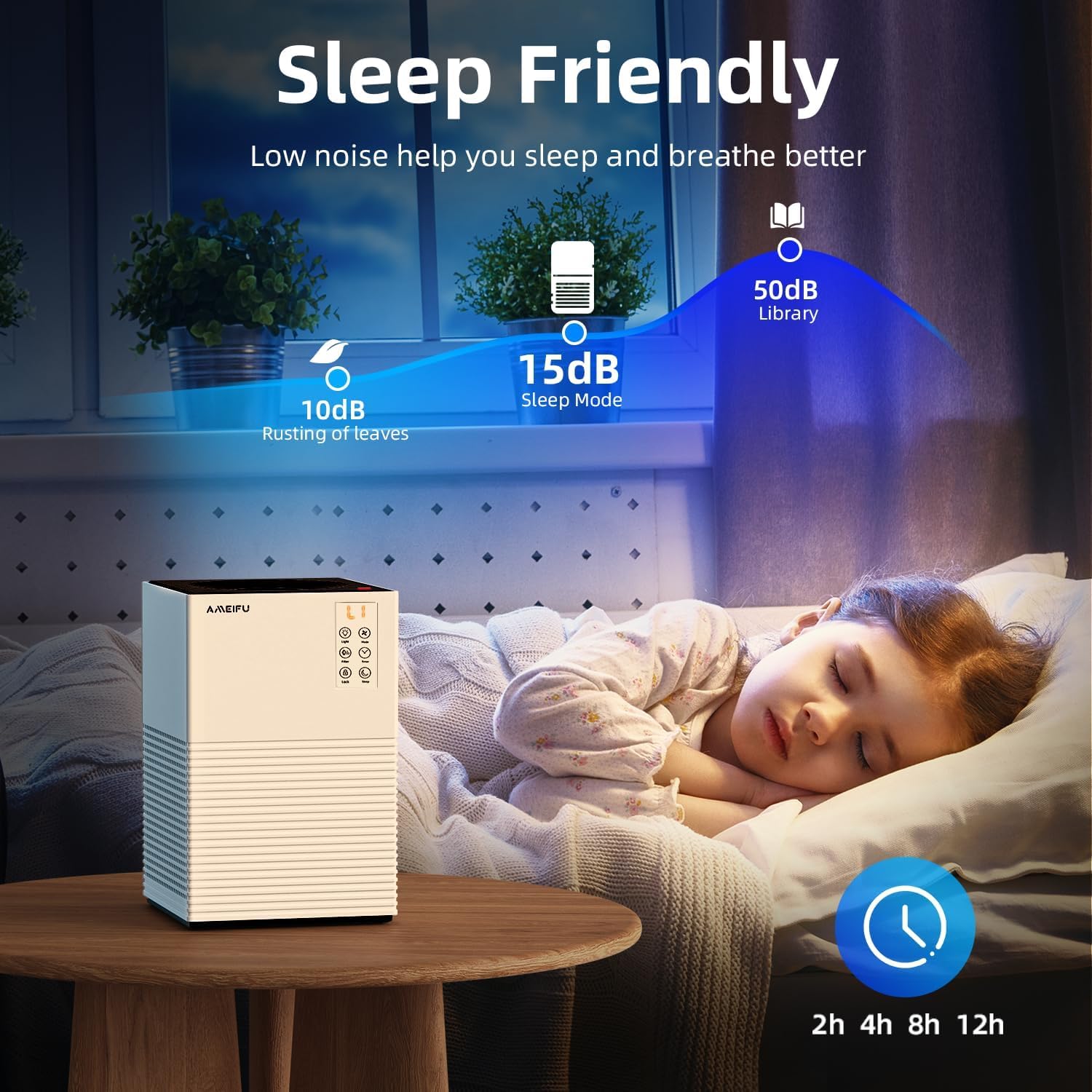
Image: A child sleeping, with the air purifier nearby, demonstrating its low noise level (15dB) in sleep mode.
Timer Function
Press the "Timer" button to set the operating duration. Available settings are 2 hours, 4 hours, 8 hours, and 12 hours. The unit will automatically turn off after the set time.
Child Lock
To activate the Child Lock, press and hold the "Child Lock" button for a few seconds. This prevents accidental changes to settings. Repeat the action to deactivate the Child Lock.

Image: A child and a dog playing near the air purifier, highlighting the child lock feature for safety.
Aromatherapy Function
To use the aromatherapy function:
- Locate the aroma pad on the top of the unit.
- Add a few drops of your preferred essential oil (not included) onto the aroma pad.
- The fragrance will be diffused with the purified air.

Image: A woman adding essential oil to the top of the air purifier, demonstrating the aromatherapy feature.
Maintenance
Filter Replacement
The filter reset indicator light will flash after approximately 2160 hours of use, prompting you to replace the filter. For optimal performance, replace the filter every 3-6 months, depending on usage and air quality.
- Unplug the air purifier from the power outlet.
- Turn the unit upside down and twist the base cover counter-clockwise to unlock.
- Remove the old filter and dispose of it properly.
- Insert a new AMEIFU H13 HEPA replacement filter (search B0DK574MDG on Amazon). Ensure it is correctly seated.
- Replace the base cover and twist clockwise to lock it securely.
- Plug the unit back in. Press and hold the "Filter Reset" button for 3-5 seconds until the indicator light turns off to reset the filter timer.
Note: Do not wash the filter. The filter is not reusable.
Cleaning the Unit
- Always unplug the air purifier before cleaning.
- Wipe the exterior of the unit with a soft, dry cloth.
- Do not use abrasive cleaners or solvents.
- Periodically vacuum the air inlet vents to remove dust and debris.
Troubleshooting
| Problem | Possible Cause | Solution |
|---|---|---|
| Unit does not turn on. |
|
|
| Airflow is weak or noise is excessive. |
|
|
| Air quality indicator always red/blue despite clean environment. |
|
|
| Filter reset light remains on after filter change. |
|
|
Specifications
| Feature | Detail |
|---|---|
| Model Number | F2 |
| Brand | AMEIFU |
| Product Dimensions | 7.3"D x 7.3"W x 11.2"H |
| Weight | 3.24 Pounds |
| Coverage Area | Up to 1200 Sq Ft |
| Filtration Type | H13 HEPA 3-Stage Filtration (Pre-filter, H13 HEPA, Activated Carbon) |
| Fan Speeds | 3 (L1, L2, L3) + Auto Mode |
| Timer Settings | 2h, 4h, 8h, 12h |
| Noise Level (Sleep Mode) | Less than 15dB |
| Special Features | Real-Time Air Quality Sensor, Child Lock, Aromatherapy Function, Filter Reset Reminder |
| Wattage | 6 watts |
| Certifications | CARB Certified, CE Certified, EPA Certified, ETL Certified, FCC Certified |
Warranty and Support
For warranty information and customer support, please refer to the documentation included with your purchase or contact AMEIFU customer service directly. Keep your purchase receipt as proof of purchase.
Replacement Filter: The official replacement filter can be purchased on Amazon by searching for ASIN B0DK574MDG.


