
1. Introduction
This manual provides essential information for the safe and effective operation of your ENDYSHOW LED Blinder Stage Light, Model SL-103S. This powerful 200W COB LED fixture combines the functions of a stage blinder and a strobe light, offering both cool white and warm white uplighting capabilities. It is designed for various professional and event lighting applications.

Figure 1: Front view of the ENDYSHOW LED Blinder Stage Light, showing four COB LED modules.
2. Safety Instructions
Please read and understand all safety instructions before installation and operation. Retain this manual for future reference.
- Electrical Safety: Ensure the power supply voltage matches the specified requirements of the fixture. Always connect to a grounded power outlet. Disconnect power before servicing or cleaning.
- Heat Dissipation: The fixture generates heat during operation. Ensure adequate ventilation and do not block cooling vents. Maintain a minimum distance of 0.5 meters from flammable materials.
- Eye Protection: Avoid direct eye exposure to the light source. The light output is intense and can cause eye damage.
- Installation: Mount the fixture securely using appropriate hardware. Ensure the mounting surface can support the weight of the fixture.
- Moisture: Do not expose the fixture to rain or moisture. This product is designed for indoor use only.
- Servicing: Refer all servicing to qualified personnel. Do not attempt to repair the unit yourself.
3. Package Contents
Verify that all items are present and in good condition upon unpacking:
- 1 x ENDYSHOW LED Blinder Stage Light (Model SL-103S)
- 1 x Power Cable
- 1 x User Manual (This document)
4. Product Overview
4.1 Key Features
- 200W COB LED Technology: High-power Chip-on-Board LEDs for bright and efficient illumination.
- Dual Color Temperature: Features 2-in-1 cool white (5600K) and warm white (3200K) LEDs, allowing for mixing to achieve a neutral white (4400K).
- Blinder & Strobe Functionality: Operates as both a powerful stage blinder and a dynamic strobe light.
- Wide Beam Angle: 90° optical angle for broad coverage, suitable for small to medium stages (lighting range 6-10 meters).
- Multiple Control Modes: Supports Standalone, Sound Activation, Master/Slave, and DMX (6-channel mode).
- Efficient Cooling: Built-in cooling fan maintains optimal operating temperature.
- Durable Construction: Robust aluminum housing with powder-coated finish.
4.2 Component Identification
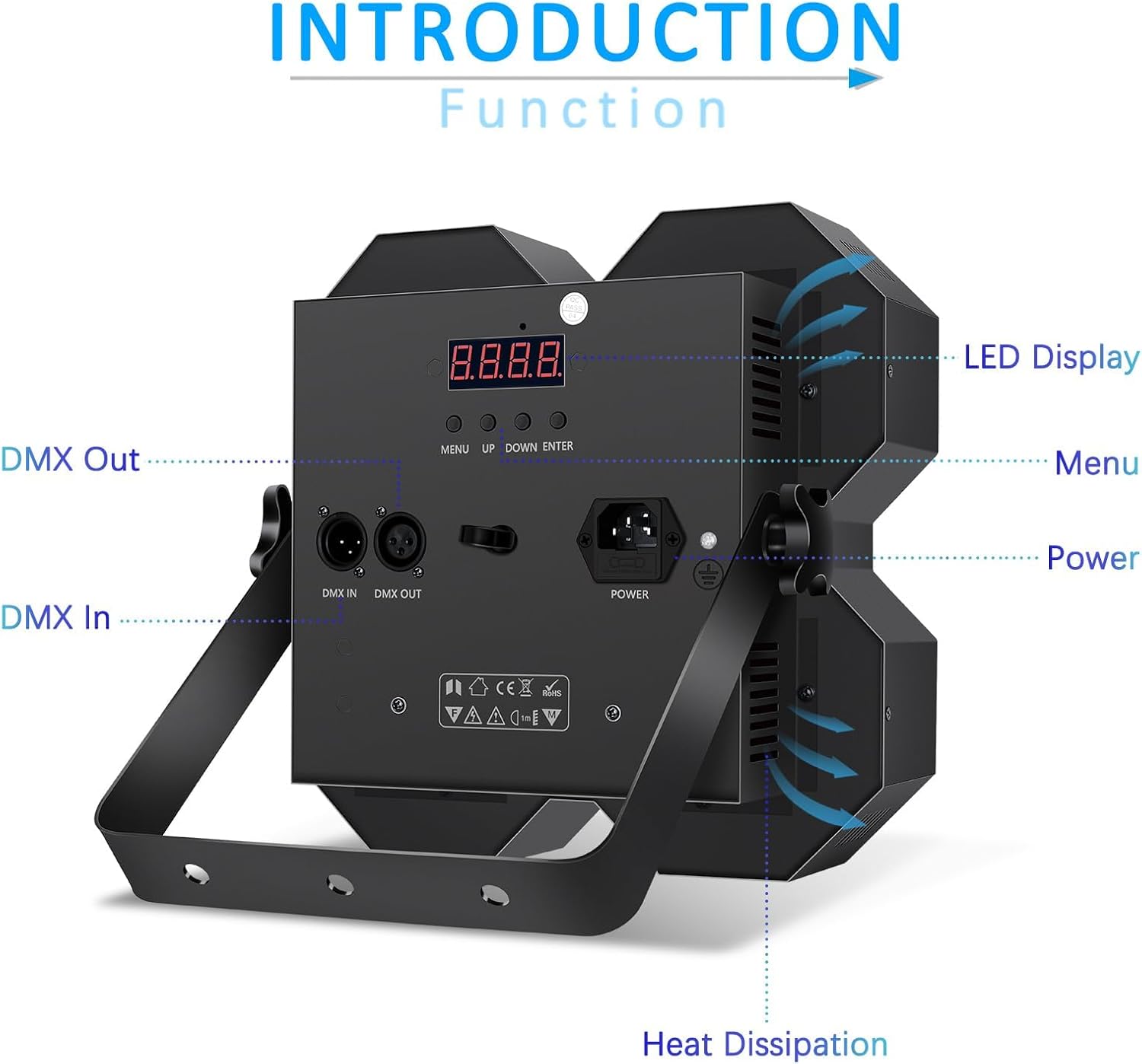
Figure 2: Rear panel of the light, showing the LED display, control buttons, DMX In/Out, and power connection.
- LED Display: Shows current mode, DMX address, and other settings.
- Control Buttons (MENU, UP, DOWN, ENTER): Used to navigate menus and adjust settings.
- DMX IN: 3-pin XLR connector for DMX signal input.
- DMX OUT: 3-pin XLR connector for DMX signal output to other fixtures.
- Power IN: IEC power connector for main power supply.
- Heat Dissipation Vents: Ensures proper airflow for cooling.
- Mounting Bracket: Adjustable bracket for floor or truss mounting.
5. Setup
5.1 Mounting
The fixture can be placed on a flat surface or mounted to a truss using the integrated mounting bracket. Ensure the mounting location is stable and capable of supporting the fixture's weight. Use appropriate clamps (not included) for truss mounting.
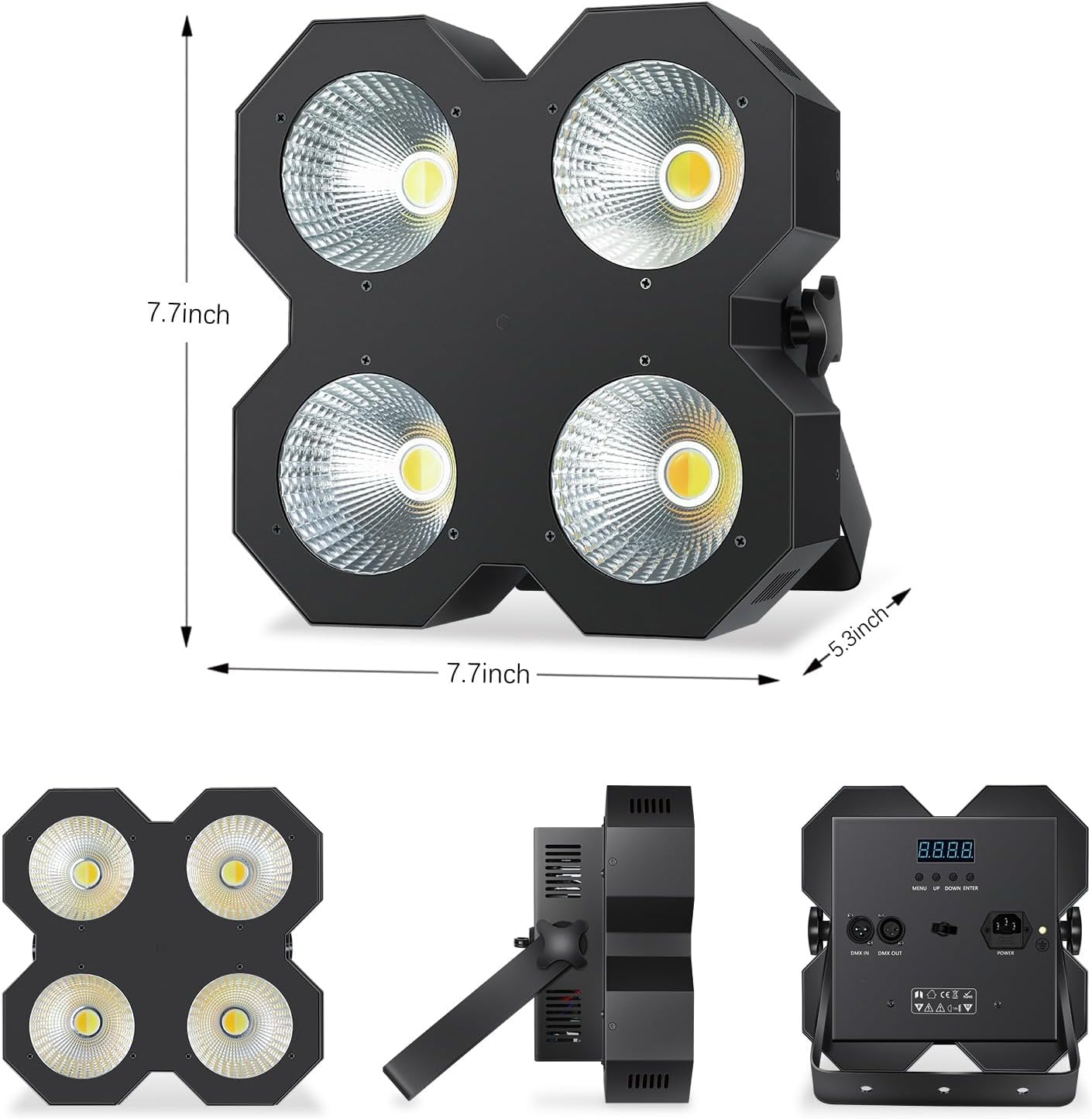
Figure 3: Product dimensions for mounting reference (approx. 7.7"L x 7.7"W x 5.3"H).
5.2 Power Connection
Connect the provided power cable to the Power IN socket on the rear panel of the fixture and then to a suitable grounded power outlet (AC 100-240V, 50/60Hz).
5.3 DMX Connection (Optional)
For DMX control, connect a DMX controller to the DMX IN port of the first fixture using a 3-pin XLR cable. To daisy-chain multiple fixtures, connect the DMX OUT of the first fixture to the DMX IN of the next, and so on. Terminate the last fixture in the chain with a DMX terminator (not included) for optimal signal integrity.
6. Operating Instructions
The ENDYSHOW LED Blinder Stage Light offers several operating modes, selectable via the LED display and control buttons on the rear panel.
6.1 Control Panel Navigation
- MENU: Press to cycle through main menu options.
- UP/DOWN: Use to navigate within a menu or adjust parameter values.
- ENTER: Confirm selection or save changes.
6.2 Operating Modes
The fixture supports the following modes:
- DMX Mode:
Allows external control via a DMX controller. Set the DMX address using the control panel. The fixture uses a 6-channel DMX profile. Refer to the DMX Channel Chart in Section 7 for details.
- Master/Slave Mode:
Connect multiple fixtures via DMX cables. Set one fixture as the "Master" and others as "Slave." The slave units will mirror the master's operation. The light automatically recognizes the master/slave function.
- Sound Activation Mode:
The fixture reacts to ambient sound, creating dynamic light patterns. Adjust sensitivity via the menu if available.
- Standalone Mode (Auto Programs):
The fixture runs pre-programmed light sequences. Options may include static color, color changing (fade, jump), strobe, and blinder effects. Use the control panel to select desired programs and adjust parameters like speed or brightness.

Figure 4: The light in use, highlighting its various control capabilities.
6.3 Color Temperature Adjustment
The 2-in-1 COB LEDs allow for cool white, warm white, or a mixed neutral white output. In DMX mode, specific channels control the intensity of each color component. In standalone modes, pre-programmed effects or manual settings may allow for color temperature selection.

Figure 5: Examples of cool white, warm white, and mixed white light output.
7. DMX Channel Chart (6-Channel Mode)
This chart outlines the DMX functions for the 6-channel mode. DMX values range from 0-255.
| Channel | Function | Value Range | Description |
|---|---|---|---|
| 1 | Master Dimmer | 0-255 | Overall intensity control (0% to 100%). |
| 2 | Cool White Intensity | 0-255 | Intensity of the cool white LEDs (0% to 100%). |
| 3 | Warm White Intensity | 0-255 | Intensity of the warm white LEDs (0% to 100%). |
| 4 | Strobe/Blinder Effect | 0-10: No function 11-255: Strobe speed (slow to fast) / Blinder effect. | Controls strobe rate or blinder effect intensity. |
| 5 | Auto Program Selection | 0-10: Manual control 11-255: Selects various auto programs. | Cycles through built-in automatic programs. |
| 6 | Auto Program Speed | 0-255 | Adjusts the speed of selected auto programs (slow to fast). |
Note: Specific DMX channel assignments may vary slightly. Always test your DMX controller with the fixture to confirm functionality.
8. Maintenance
Regular maintenance ensures optimal performance and extends the lifespan of your fixture.
- Cleaning: Periodically clean the lens and exterior casing with a soft, lint-free cloth. Do not use abrasive cleaners or solvents. Ensure the fixture is powered off and cool before cleaning.
- Inspection: Regularly inspect power cables, DMX cables, and mounting hardware for any signs of damage or wear. Replace damaged components immediately.
- Cooling Vents: Ensure cooling vents are free from dust and debris to prevent overheating.
9. Troubleshooting
If you encounter issues, refer to the following common problems and solutions:
| Problem | Possible Cause | Solution |
|---|---|---|
| No power | Power cable disconnected; no power from outlet; faulty cable. | Check power cable connection. Test outlet with another device. Replace power cable if damaged. |
| No DMX control | Incorrect DMX address; faulty DMX cable; no DMX terminator; DMX controller issue. | Verify DMX address matches controller. Check DMX cable connections. Use a DMX terminator. Test with a different DMX controller. |
| Light flickers or behaves erratically | Poor DMX signal; power fluctuations; overheating. | Ensure DMX cables are secure and terminated. Check power supply stability. Ensure adequate ventilation. |
| Fan is noisy | Normal operation; dust in fan; fan malfunction. | A certain level of fan noise is normal. Clean dust from vents. If excessive, contact support. |
10. Specifications
| Feature | Detail |
|---|---|
| Model Number | SL-103S |
| Light Source | 200W COB LED (Cool White & Warm White) |
| Color Temperature | Cool White (5600K), Warm White (3200K), Mixed (4400K) |
| Beam Angle | 90° |
| Lighting Range | 6-10 meters |
| Control Modes | DMX512 (6-channel), Master/Slave, Sound Activation, Standalone (Auto) |
| Input Voltage | AC 100-240V, 50/60Hz |
| Power Consumption | 200 Watts |
| Housing Material | Aluminum (Powder Coated) |
| Product Dimensions | 12.25"L x 8.58"W x 12.38"H (approx. 31.1cm L x 21.8cm W x 31.4cm H) |
| Item Weight | 7.52 pounds (approx. 3.41 kg) |
| Included Components | Blinder Stage Light, Power Cable, User Manual |
11. Warranty and Support
For warranty information and technical support, please refer to the purchase documentation or contact ENDYSHOW customer service through the retailer where the product was purchased.