
Introduction
Thank you for choosing the Aume JA-D300 Security Camera. This add-on camera is designed to enhance your home security system with advanced features such as a 360° panoramic view, spotlight night vision, and efficient solar power. This manual provides detailed instructions for installation, operation, and maintenance to ensure optimal performance and longevity of your device.
Product Features
- Optional Use Methods: Supports connection with an Aume hub (not included) or independent use via 2.4GHz Wi-Fi (5GHz Wi-Fi not supported).
- Local Storage: 32GB storage for up to 120 days of continuous recording without subscription fees. Expandable to 128GB.
- Ultra-Clear Visuals: 2K HD lens for 80% sharper images than standard 3MP cameras.
- Spotlight Night Vision: Built-in spotlight for vivid and clear color footage at night.
- 360° Panoramic View: 355° horizontal and 90° vertical rotation for comprehensive monitoring.
- PIR Smart Tracking: Detects unusual activity, records, and sends instant alerts. Customizable monitoring zones.
- Efficient Solar-Powered: Equipped with a solar panel for continuous operation with 3 hours of sunlight daily.
- IP65 Waterproof: Designed to perform reliably in harsh weather conditions.
- Multi-Functional APP Control: Features 4-screen display, color/infrared night vision, two-way audio, multi-user sharing, PIR sensitivity adjustment, customizable zones, and Alexa compatibility via the EseeCloud app.
Package Contents
Please check the package for the following items:
- Aume JA-D300 Security Camera
- Solar Panel
- Mounting Accessories (screws, wall anchors)
- USB Charging Cable
- Quick Start Guide
Setup
1. Physical Installation
Choose a suitable outdoor location for your camera and solar panel. Ensure the solar panel receives at least 3 hours of direct sunlight daily for optimal charging. Mount the camera securely using the provided screws and wall anchors. Position the solar panel to maximize sun exposure.

The camera is equipped with an efficient solar panel, ensuring continuous operation with just a few hours of sunlight daily. This eliminates the need for frequent battery recharging.
2. Power Connection
Connect the solar panel cable to the charging port on the Aume JA-D300 camera. Ensure the connection is secure and waterproof. The camera also has an internal rechargeable battery.
3. Wi-Fi and App Setup
- Download the EseeCloud app from your smartphone's app store (available for iOS and Android).
- Register for an account or log in if you already have one.
- Follow the in-app instructions to add your Aume JA-D300 camera. Ensure your smartphone is connected to a 2.4GHz Wi-Fi network during setup, as the camera does not support 5GHz Wi-Fi.
- If connecting to an Aume hub, follow the hub's specific pairing instructions.
Operation
1. Live View and Multi-Screen Display
Open the EseeCloud app to access the live feed from your camera. If you have multiple cameras, utilize the 4-screen display feature to monitor different areas simultaneously.

The EseeCloud app allows for multi-screen display, providing a comprehensive view of your property from various camera angles simultaneously.
2. Pan and Tilt Control
Within the app, use the directional controls to remotely adjust the camera's view. The camera supports 355° horizontal and 90° vertical rotation, providing a full 360° panoramic coverage.

The camera offers a 360° panoramic view with 355° horizontal and 90° vertical rotation, eliminating blind spots for comprehensive surveillance.
3. Night Vision Modes
The camera automatically switches between day and night vision. You can also manually select between infrared (IR) night vision for black and white footage or full-color night vision, which utilizes the built-in spotlights for enhanced clarity.
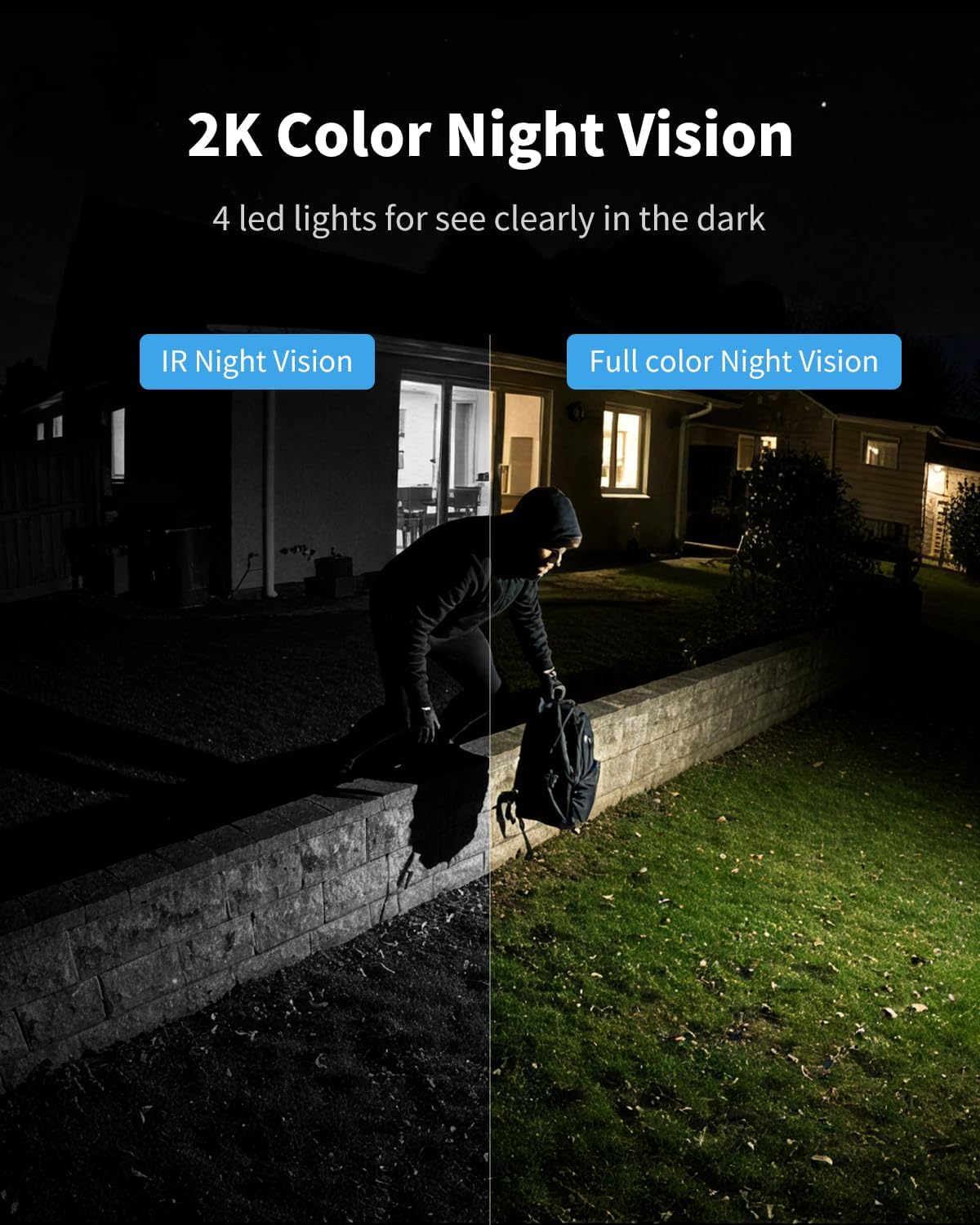
Experience clear visuals day and night with 2K HD resolution. The camera features both infrared (IR) night vision and full-color night vision, enhanced by built-in spotlights for improved clarity in low-light conditions.
4. Motion Detection and Alerts
Configure motion detection sensitivity and set specific monitoring zones within the EseeCloud app. When motion is detected, the camera will automatically record and send push notifications to your smartphone.

The camera provides instant alerts upon detecting unusual activity, allowing you to monitor and respond to potential security events.
5. Two-Way Audio
Use the two-way audio feature in the app to communicate with visitors or deter intruders through the camera's built-in speaker and microphone.
6. Recording and Storage
Recordings are stored on the internal 32GB memory card (expandable to 128GB). Cloud storage options are available for independent camera use (without a hub) and may require a subscription.

The Aume security camera system supports local storage up to 32GB, allowing for extended loop recording without subscription fees. Storage can be expanded to 128GB by replacing the memory card.
Maintenance
1. Cleaning
Regularly clean the camera lens and solar panel with a soft, damp cloth to ensure clear image quality and efficient solar charging. Avoid using harsh chemicals.
2. Battery Care
Ensure the solar panel is free from obstructions (e.g., leaves, dirt) to maintain consistent charging. In prolonged periods of low sunlight, you may need to manually charge the camera's internal battery using the provided USB cable.
Troubleshooting
- Camera Not Connecting to Wi-Fi: Ensure your Wi-Fi is 2.4GHz. Check Wi-Fi signal strength at the camera's location. Restart your router and the camera.
- No Recordings: Verify the memory card is correctly inserted and not full. Check app settings for recording schedules and motion detection.
- Poor Image Quality: Clean the camera lens. Ensure sufficient lighting for night vision modes.
- Battery Not Charging: Ensure the solar panel is clean and receiving direct sunlight. Check the connection between the solar panel and the camera.
- App Notifications Not Received: Check your phone's notification settings for the EseeCloud app. Ensure the camera is connected to the internet.
Specifications
| Model Number | JA-D300 |
| Power Source | Solar Powered (with rechargeable Lithium Ion battery) |
| Connectivity Protocol | Wireless (2.4GHz Wi-Fi only) |
| Controller Type | EseeCloud App |
| Color | White |
| Product Dimensions | 5.71 x 2.76 x 4.72 inches |
| Item Weight | 2.07 pounds |
| Recommended Uses | Outdoor Security |
| Special Feature | Add-on Cam, 360° Panoramic View, Spotlight Night Vision |
| Compatible Devices | Smartphone |
Warranty and Support
For warranty information or technical support, please refer to the official Aume website or contact Aume customer service directly. Keep your purchase receipt for any warranty claims.