
1. Introduction
This manual provides detailed instructions for the SYMIK Essential Accessory Kit designed specifically for the Insta360 X4 camera. This comprehensive kit includes essential items to enhance your camera's functionality, protection, and charging capabilities. Please read this manual thoroughly before using the accessories to ensure proper operation and longevity.
Package List:
- SYMIK Intelligent 3-in-1 Fast Charging Case for Insta360 X4 Battery (1)
- SYMIK S320-X Carry Case (1)
- 30W PD GaN Power Adapter (1)
- USB-C to C Cable (1)
- Screen Protectors (3-pack: 2 Flexible TPU, 1 Tempered Glass)
- Silicone Case Cover (1)
- Lens Cap (1)
- User Manual (This document)
2. Product Overview
2.1. SYMIK Intelligent 3-in-1 Fast Charging Case
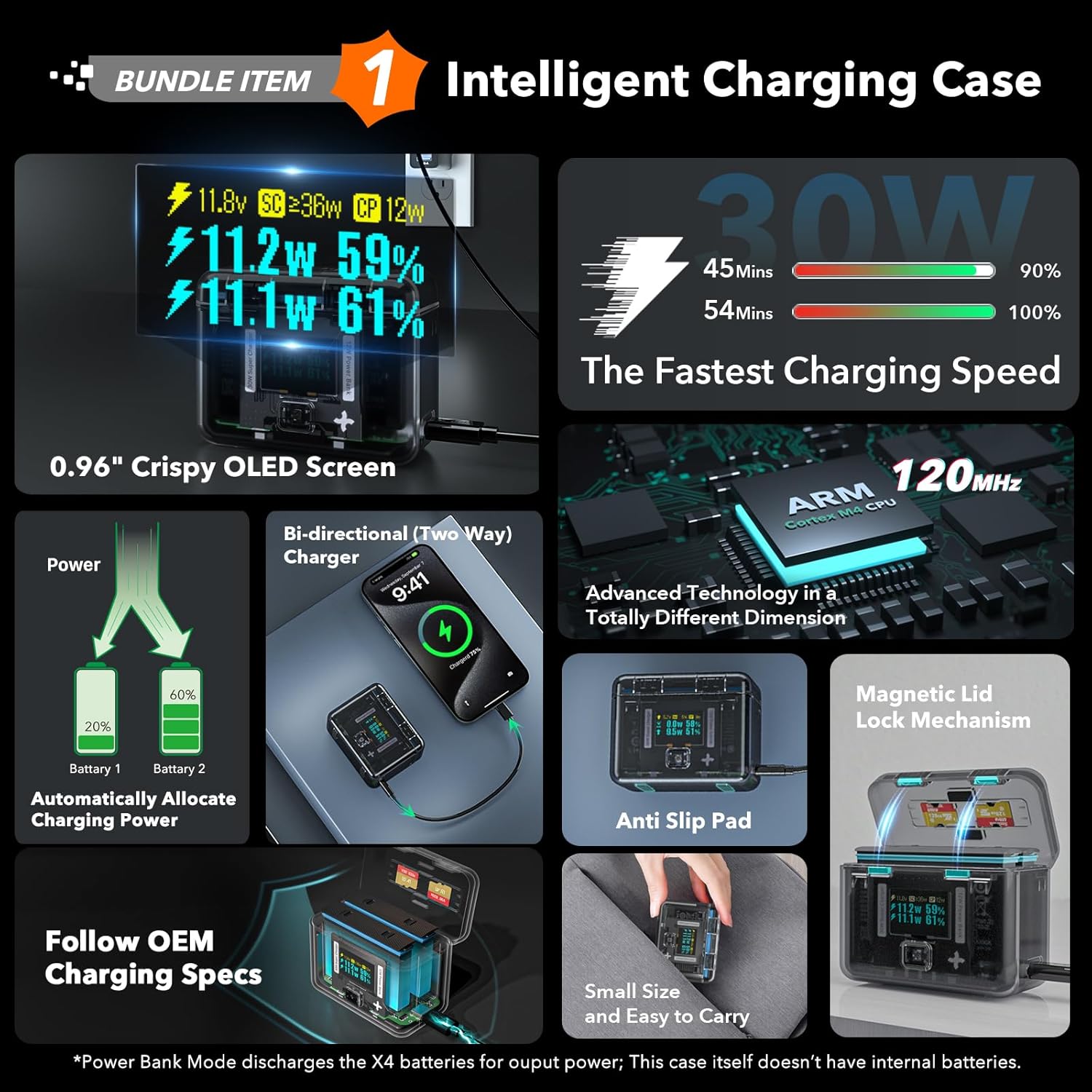
This versatile charging case functions as a dual-channel 30W fast charge hub, a 12W output power source, and a battery storage case. It features a 0.96" OLED screen displaying real-time battery and charging information. The special Output Mode allows sequential discharge of X4 batteries to charge other small devices. Note: The charging case itself does not have a built-in battery.
Video: Insta360 X4 Battery Charger Overview
This video provides a detailed look at the intelligent charging case, demonstrating its features and how it charges Insta360 X4 batteries. It highlights the OLED screen and its information display.
2.2. SYMIK S320-X Carry Case


The S320-X carry case is constructed from high-quality 900D nylon, offering anti-water splash, anti-shock, scratchproof, and dustproof protection. It is designed to securely hold your Insta360 X4 camera (with lens cap and Thermo Grip Cover), a 114cm invisible selfie stick (or shorter), the charge hub, up to 3 extra batteries, a bullet time handle or tripod, cables, power adapter, and other small accessories.
Video: SYMIK S320-X Case for Insta360 X4 Accessories
This video showcases the SYMIK S320-X carry case, demonstrating its robust construction and the various compartments designed to organize and protect your Insta360 X4 camera and accessories.
2.3. 30W PD GaN Power Adapter & USB-C to C Cable
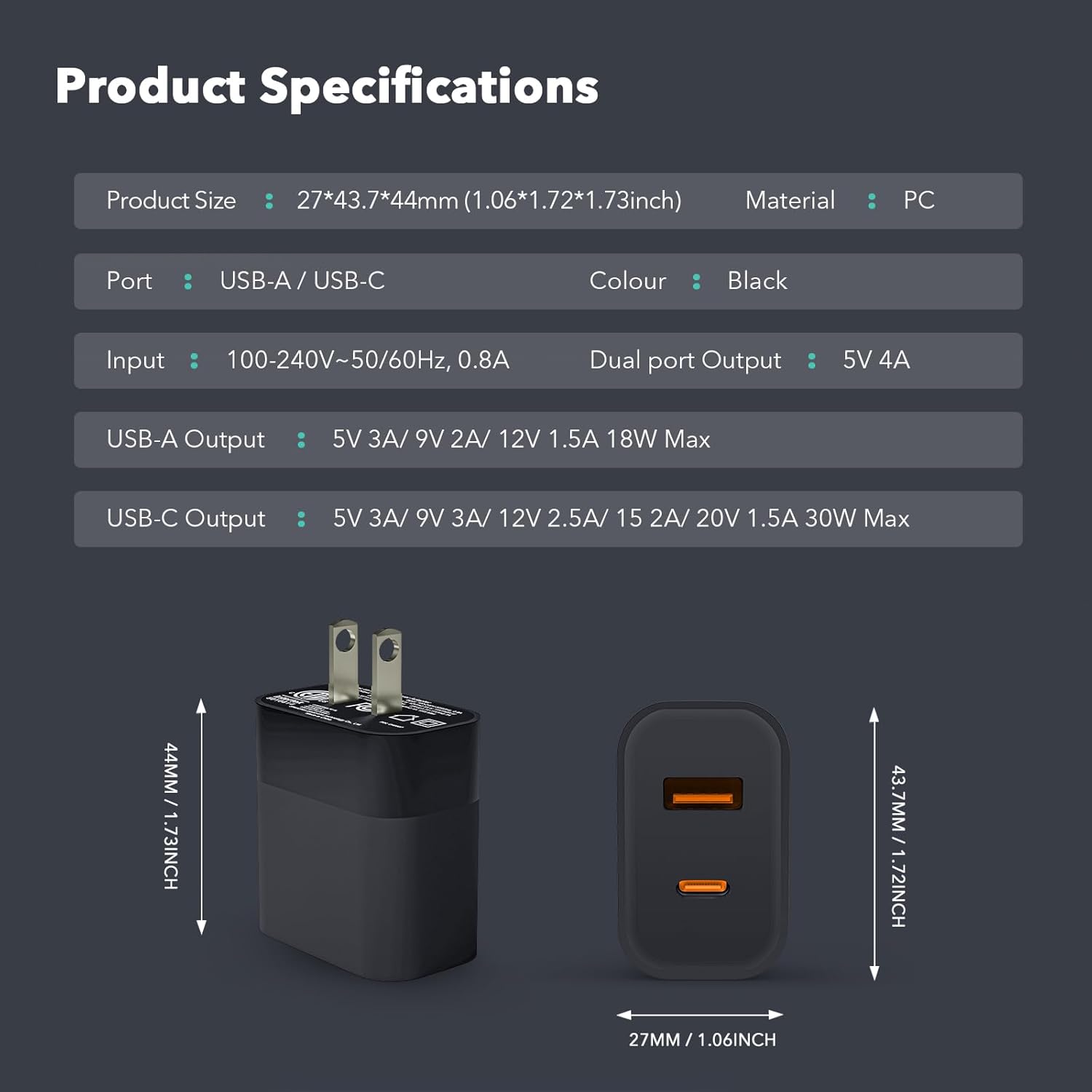
The included 30W PD (Power Delivery) wall charger block utilizes upgraded GaN technology for fast and efficient charging. It features dual ports (Type-C and USB-A) for versatile charging. The USB-C to C cable is perfectly compatible with the SYMIK X4 charging case, ensuring optimal charging performance.
2.4. Screen Protectors (3-Pack)

This pack includes two flexible TPU screen protectors and one 9H high-hardness tempered glass screen protector. They offer comprehensive protection against scratches, ensure automatic adsorption for bubble-free application, and maintain precise touch sensitivity for your Insta360 X4 screen.
2.5. Silicone Case Cover

The protective silicone case is specifically designed for a perfect fit on the Insta360 X4. It offers fit protection, features a 1:1 mold opening for all ports and buttons, is easy to clean, and is not easily deformed, providing durable protection for your camera body.
2.6. Lens Cap

The included lens cap is made from durable silicone, providing anti-crack, anti-scratch, and anti-fingerprint protection for your X4 camera lenses. It is suitable for use with or without standard/premium lens guards installed.
3. Setup
3.1. Preparing the Insta360 X4
- Clean the Camera: Before applying any protectors or cases, ensure your Insta360 X4 camera is clean and free of dust or smudges. Use a soft, lint-free cloth.
3.2. Installing Screen Protectors
- Clean Screen: Use the provided wet wipe (Wipes 1) to thoroughly clean the camera screen.
- Dry Screen: Use the dry wipe (Wipes 2) to remove any moisture and ensure the screen is completely dry.
- Apply Protector: Carefully peel off the backing from the screen protector (either TPU or Tempered Glass). Align it precisely with the camera screen and gently lay it down.
- Remove Bubbles: Use a microfiber cloth or a soft card to gently push out any air bubbles towards the edges.
3.3. Attaching Silicone Case Cover and Lens Cap
- Silicone Case: Gently stretch the silicone case cover over your Insta360 X4, ensuring all ports, buttons, and lenses are correctly aligned with the case's openings.
- Lens Cap: Place the silicone lens cap over the camera lenses when not in use to protect them from dust and scratches.
4. Operating Instructions
4.1. Using the Intelligent 3-in-1 Fast Charging Case
- Insert Batteries: Open the charging case and insert up to two Insta360 X4 batteries into the designated slots. Ensure they are correctly oriented.
- Connect Power: Connect the 30W PD GaN Power Adapter to a power outlet and then connect the USB-C to C cable from the adapter to the charging case's input port.
- Monitor Charging: The 0.96" OLED screen will display the charging status, battery levels, and wattage for each battery.
- Power Bank Mode: To use as a power bank, ensure charged batteries are in the case. Connect your external device (e.g., smartphone) to the charging case's output port. The case will discharge the X4 batteries sequentially to charge your device.
4.2. Using the S320-X Carry Case
- Organize Accessories: Utilize the custom-fit compartments within the carry case to store your Insta360 X4 camera, charging case, batteries, selfie stick, cables, and other small accessories.
- Secure Closure: Ensure the zipper is fully closed to provide maximum protection against elements and impacts during transport.
5. Maintenance
- Cleaning: Regularly wipe down the charging case, carry case, silicone case, and lens cap with a soft, damp cloth. Avoid harsh chemicals.
- Storage: Store all accessories in a cool, dry place away from direct sunlight and extreme temperatures when not in use.
- Battery Care: For optimal battery life, avoid fully discharging or overcharging batteries frequently. Store partially charged if not used for extended periods.
6. Troubleshooting
6.1. Charging Case Issues
- Not Charging: Ensure the power adapter and USB-C cable are securely connected to both the power source and the charging case. Verify the power outlet is functional.
- OLED Screen Blank: Check power connection. If batteries are fully charged, the screen may enter a low-power state. Press the button on the case to wake it up.
- Slow Charging: Ensure you are using the provided 30W PD GaN Power Adapter and USB-C to C cable for optimal fast charging speeds.
6.2. Screen Protector Issues
- Bubbles After Application: Small bubbles may disappear over 24-48 hours. For larger bubbles, gently lift the nearest edge of the protector and reapply, pushing the bubble out.
- Dust Under Protector: If dust is trapped, carefully lift the protector and use a dust-removal sticker to clean both the screen and the adhesive side of the protector before reapplying.
7. Specifications
| Feature | Detail |
|---|---|
| Product Dimensions (Charging Case) | 1.69 x 2.28 x 2.91 inches |
| Item Weight | 2.29 pounds |
| Brand | SYMIK |
| Color | Black |
| Output Voltage | 5 Volts (DC) |
| Certification | CE, FCC, UL |
| Charging Speed (Max) | 15W (Boost Mode) |
| Charging Time (0% to 95%) | 45 Minutes (Room Temperature) |
| Charging Time (0% to 100%) | 54 Minutes (Room Temperature) |
| Carry Case Material | 900D Nylon (Anti-water splash, anti-shock, scratchproof, dustproof) |
8. Warranty & Support
SYMIK products are designed for durability and performance. For specific warranty information regarding your Essential Accessory Kit, please refer to the product packaging or contact SYMIK customer support directly. Keep your purchase receipt as proof of purchase.
Contact Information:
For technical support, warranty claims, or general inquiries, please visit the official SYMIK website or contact their customer service department through the retailer where the product was purchased.