
Introduction
The be quiet! Pure Base 501 LX Black is a mid-tower ATX case designed for high airflow and aesthetic appeal, featuring pre-installed Light Wings LX PWM fans with ARGB lighting. This manual provides essential information for setting up, operating, maintaining, and troubleshooting your PC build within this case.
Key features include:
- ARGB Lighting: Equipped with 4 preinstalled Light Wings LX PWM fans and an ARGB controller with a PWM hub for synchronized lighting effects.
- Optimized Airflow: Designed for maximum airflow with 3x 120mm Light Wings LX PWM fans at the front and 1x 140mm fan at the rear.
- Spacious Interior: Accommodates high-end graphics cards and large coolers, with support for radiators up to 360mm at the front and 240mm at the top.
- Vertical GPU Installation: PCIe slots can be rotated 90° for vertical mounting of graphics cards (optional riser cable required).
- Efficient Cable Management: Cleverly integrated routing options simplify cable organization.

Figure 1: The be quiet! Pure Base 501 LX Black Mid-Tower ATX Case.
Setup
Motherboard Installation
The Pure Base 501 LX Black supports Mini ATX, Micro ATX, and ATX motherboards. Standoffs for common motherboard sizes are pre-installed. Carefully align your motherboard with the standoffs and secure it with screws.
GPU Installation
The case offers generous space for graphics cards up to 365mm in length. For aesthetic preference or to accommodate wider cards, the PCIe slots can be rotated 90 degrees to allow for vertical GPU installation. An optional be quiet! Riser Cable is recommended for this configuration to provide anti-sag support.
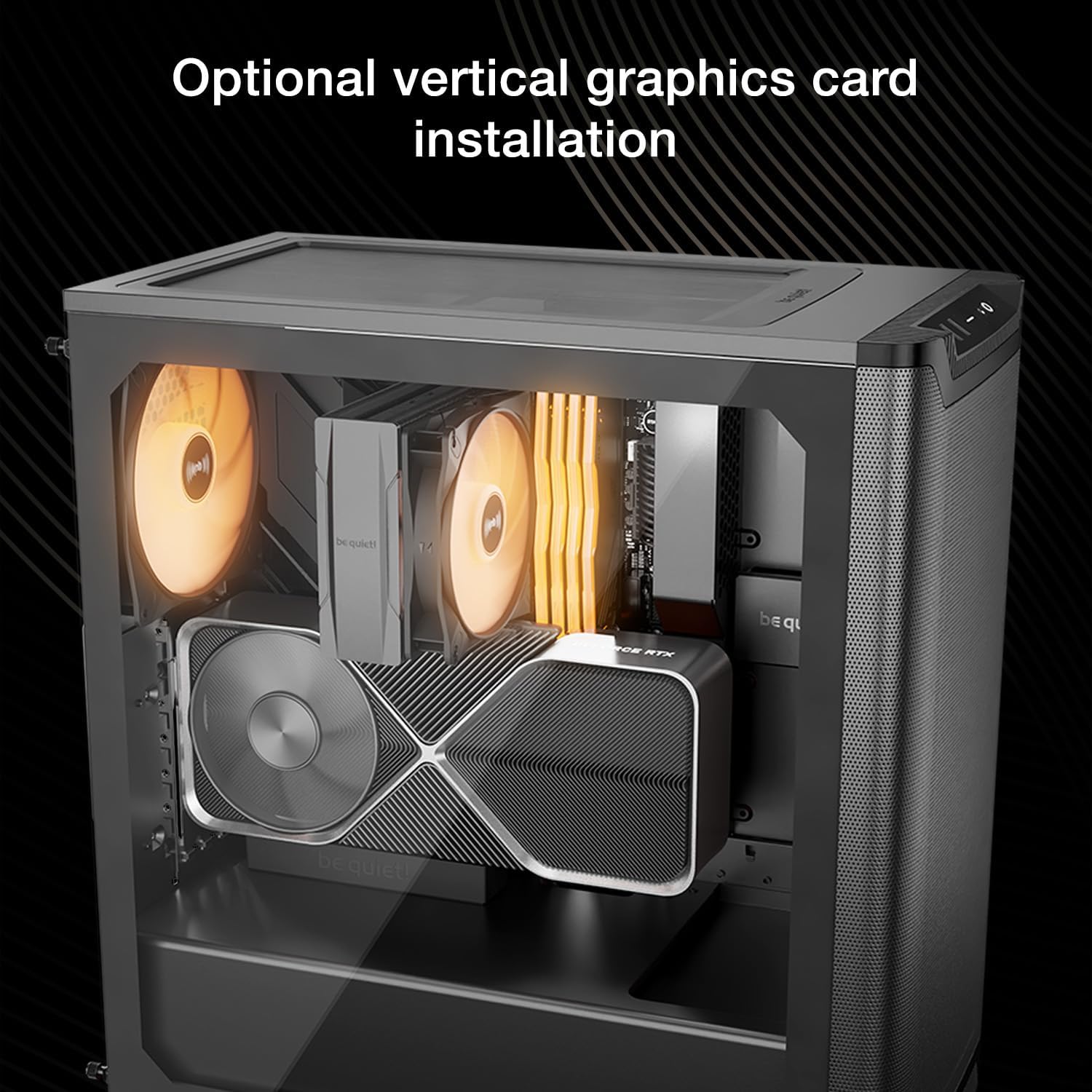
Figure 2: Optional vertical graphics card installation.
Fan and Radiator Support
The case comes with 4 pre-installed Light Wings LX PWM fans: 3x 120mm at the front for intake and 1x 140mm at the rear for exhaust. Additional fan and radiator configurations are supported:
- Front: Up to 3x 120mm or 3x 140mm fans, or a radiator up to 360mm.
- Top: Up to 2x 120mm or 2x 140mm fans, or a radiator up to 240mm.
- Rear: 1x 140mm fan (pre-installed).

Figure 3: High airflow intake from front panel and top cover.
Power Supply Installation
The power supply unit (PSU) is installed at the bottom of the case in a dedicated compartment. The case supports PSUs up to 200mm in length. If the hard drive cage is in its default position, the maximum PSU length is 180mm.
Storage Installation
The case includes a removable hard drive cage at the bottom, supporting 2x 3.5" HDDs. Additionally, there are 4x 2.5" SSD mounting points located behind the motherboard tray for clean installation.
Cable Management
The Pure Base 501 LX Black features cleverly integrated cable routing options and Velcro ties behind the motherboard tray to ensure a clean and organized build, optimizing airflow and aesthetics.
Video 1: Overview of Pure Base 501 DX/LX features and design.
Operating
Front I/O Ports
The front I/O panel provides convenient access to essential ports and controls:
- 1x USB 3.2 Gen 2 Type-C port
- 2x USB 3.2 Type-A ports
- HD Audio (3.5mm combo jack)
- Power Button
- Reset Button
- ARGB Button (for lighting control)

Figure 4: Front I/O ports for connectivity and control.
ARGB Lighting Control
The pre-installed Light Wings LX PWM fans feature ARGB lighting. The integrated ARGB controller and PWM hub, located behind the motherboard tray, supports up to 6 ARGB devices and PWM fans. Use the dedicated ARGB button on the front I/O panel to cycle through various lighting modes and colors, or synchronize with your motherboard's ARGB software.

Figure 5: ARGB controller and ARGB-PWM hub for lighting and fan control.
Maintenance
Dust Filters
To ensure optimal airflow and prevent dust buildup, the Pure Base 501 LX Black is equipped with removable dust filters at the front, top, and bottom. Regularly clean these filters to maintain cooling performance and prolong the lifespan of your components.
- Front Filter: Accessible by removing the front panel.
- Top Filter: Magnetic, easily removable for cleaning.
- Bottom Filter: Slides out from the front for convenient access.
Troubleshooting
RAM Clearance with Top Radiators
When installing a radiator at the top of the case, be mindful of potential clearance issues with tall RAM modules. The case supports up to 240mm radiators at the top, but thicker radiators or fans combined with tall RAM may interfere. Consider using low-profile RAM or a thinner radiator/fan combination if clearance is tight.
CPU Power Cable Routing
For easier installation, it is recommended to connect the 8-pin CPU power cable to the motherboard before installing any top-mounted fans or radiators. This provides better access to the CPU power connector, especially in compact builds.
General Cable Management Challenges
While the case offers integrated cable routing, managing thick cables like the 24-pin ATX power cable can be challenging due to limited space behind the motherboard tray. Utilize the provided Velcro ties and consider removing the hard drive cage if not needed to create more space for excess cabling.
Specifications
| Feature | Detail |
|---|---|
| Model Name | Pure Base 501 LX Black |
| Item Model Number | BGW78 |
| Case Type | Mid-Tower |
| Motherboard Compatibility | Mini ATX, Micro ATX, ATX |
| Dimensions (LxWxH) | 17.72 x 9.09 x 18.23 inches (450 x 231 x 463 mm) |
| Item Weight | 17.16 pounds (7.8 Kilograms) |
| Material | Tempered Glass |
| Pre-installed Fans | 3x Light Wings LX 120mm PWM (Front), 1x Light Wings LX 140mm PWM (Rear) |
| Front Radiator Support | Up to 360mm |
| Top Radiator Support | Up to 240mm |
| GPU Clearance | Up to 365mm |
| PSU Length | Up to 200mm (180mm with HDD cage) |
| Drive Bays | 2x 3.5" HDD, 4x 2.5" SSD |
| Front I/O | 1x USB 3.2 Gen 2 Type-C, 2x USB 3.2 Type-A, HD Audio, Power, Reset, ARGB Button |

Figure 6: Case dimensions for the Pure Base 501 LX.
Warranty and Support
For detailed warranty information and technical support, please refer to the official be quiet! website or contact their customer service. Keep your proof of purchase for any warranty claims.