
1. Product Overview
The ZGCINE V99 Pro is a compact, high-capacity mini V-mount battery designed for professional video and photography equipment. It features multiple output ports, fast charging capabilities, and an intelligent OLED screen for real-time power monitoring. Its portable design makes it suitable for travel and various shooting environments.

Image: ZGCINE V99 Pro Mini V-Mount Battery, front view.
2. Key Features
- Bi-direction PD 100W Fast-Charging: Supports PD 3.0 technology via a USB-C port, allowing for full battery charge in approximately 1.5 hours with a 100W GaN charger (not included).
- Multiple Ports: Equipped with 2 USB-C ports, 8.4V/3A DC & 12V/3A DC ports, BP, and D-Tap interfaces for simultaneous charging of various devices such as DSLR cameras, camcorders, field monitors, and LED video lights. Includes dust covers for port protection.
- Intelligent Battery Management System (BMS): Provides automatic protection against short circuits, overvoltage, overcurrent, overcharging, and over-discharge. Timely alerts are provided for overpower, overcurrent, overvoltage, over-temperature, and under-power discharge.
- Portable & Airline Friendly: Compact size (4.33 x 2.95 x 2.29 inches) and lightweight (21.34 oz / 605g) design, making it suitable for air travel. Features a threaded hole on the V-mount backplate for secure mounting.
- Real-Time Power Monitoring: A bright 1.1-inch OLED screen displays port status, voltage, power output, and remaining battery life. A short press of the power button activates the screen.
- Robustness and Durability: Aerospace aluminum casing enhances safety and durability. Designed to operate in extreme cold conditions down to -20°C.
3. Setup
3.1 Charging the Battery
To charge the ZGCINE V99 Pro battery, connect a USB-C PD 100W charger (not included) to the designated USB-C input port. The OLED screen will display charging status and progress. A full charge typically takes 1.5 hours with a 100W charger.

Image: Illustration of PD3.0 100W fast charging via USB-C.
3.2 Connecting Devices
The battery offers various output ports for different devices:
- USB-C Output: Use for devices compatible with USB Power Delivery, such as laptops, smartphones, and certain cameras.
- D-Tap Output: For professional video accessories requiring D-Tap power.
- DC Outputs (8.4V/3A & 12V/3A): For devices requiring specific DC voltage inputs, such as field monitors or LED lights.
- BP Output: For devices compatible with BP-style battery plates.
Ensure correct polarity and voltage when connecting devices to avoid damage. Dust covers should be used when ports are not in use.

Image: Diagram showing the various input and output ports on the ZGCINE V99 Pro battery.
3.3 Mounting
The V99 Pro can be mounted onto V-mount plates or other camera rigs using its V-mount mechanism. Additionally, a threaded hole on the backplate allows for attachment with a ball head or clamp for flexible positioning.
Video: Overview of the ZGCINE V99 Pro V-Mount battery, demonstrating its compact size and various ports. This video highlights its use in fast-paced shooting environments, showing it powering camera rigs, LED lights, and laptops, and emphasizing its quick charging and real-time info display.
4. Operating Instructions
4.1 Powering On/Off
The battery typically powers on automatically when a device is connected and draws power. To check the battery status or activate the OLED screen, short press the power button located on the side of the battery.
4.2 Monitoring Power
The 1.1-inch OLED screen provides real-time information:
- Battery Percentage: Displays the remaining charge.
- Voltage (U): Shows the current output voltage.
- Power (P): Indicates the current power output in watts.
- Port Status: Shows which ports are active and their input/output status.

Image: Close-up of the intelligent OLED screen displaying battery percentage, voltage, power, and port status.
4.3 Simultaneous Device Charging
The ZGCINE V99 Pro can power multiple devices simultaneously without voltage reduction. Ensure the total power draw does not exceed the battery's maximum output capacity.
5. Safety Precautions
The integrated Intelligent Battery Management System (BMS) protects the battery from various hazards. However, always observe the following general safety guidelines:
- Do not disassemble, crush, or puncture the battery.
- Avoid exposing the battery to extreme temperatures (above 55°C or below -20°C) or direct sunlight.
- Keep the battery away from water and moisture.
- Use only recommended chargers and cables.
- Ensure correct polarity when connecting D-Tap devices. Incorrect connection can damage the battery and connected equipment.
- Store the battery in a cool, dry place when not in use.

Image: Visual representation of the built-in protection mechanisms of the ZGCINE V99 Pro battery.
6. Specifications
| Parameter | Value |
|---|---|
| Model | ZG-V99Pro |
| Capacity | 14.8V 6400mAh 94.72Wh |
| Size (L x W x H) | 4.33 x 2.95 x 2.29 inches (109.94 x 74.99 x 58.2 mm) |
| Weight | 21.34 oz / 605g |
| Operating Temperature | -20°C ~ +55°C |
| Charging Time (PD100W) | 1.5 Hours |
| USB-C Input | 5V/3A, 9V/3A, 12V/3A, 15V/3A, 20V/5A |
| USB-C Output | 5V/3A, 9V/3A, 12V/3A, 15V/3A, 20V/5A (C1), 20V/3.25A (C2) |
| D-Tap / BP Input | 16.8V/3A MAX |
| D-Tap / BP Output | 14.8V/13A MAX |
| DC Output | 8.4V/3A, 12V/3A |
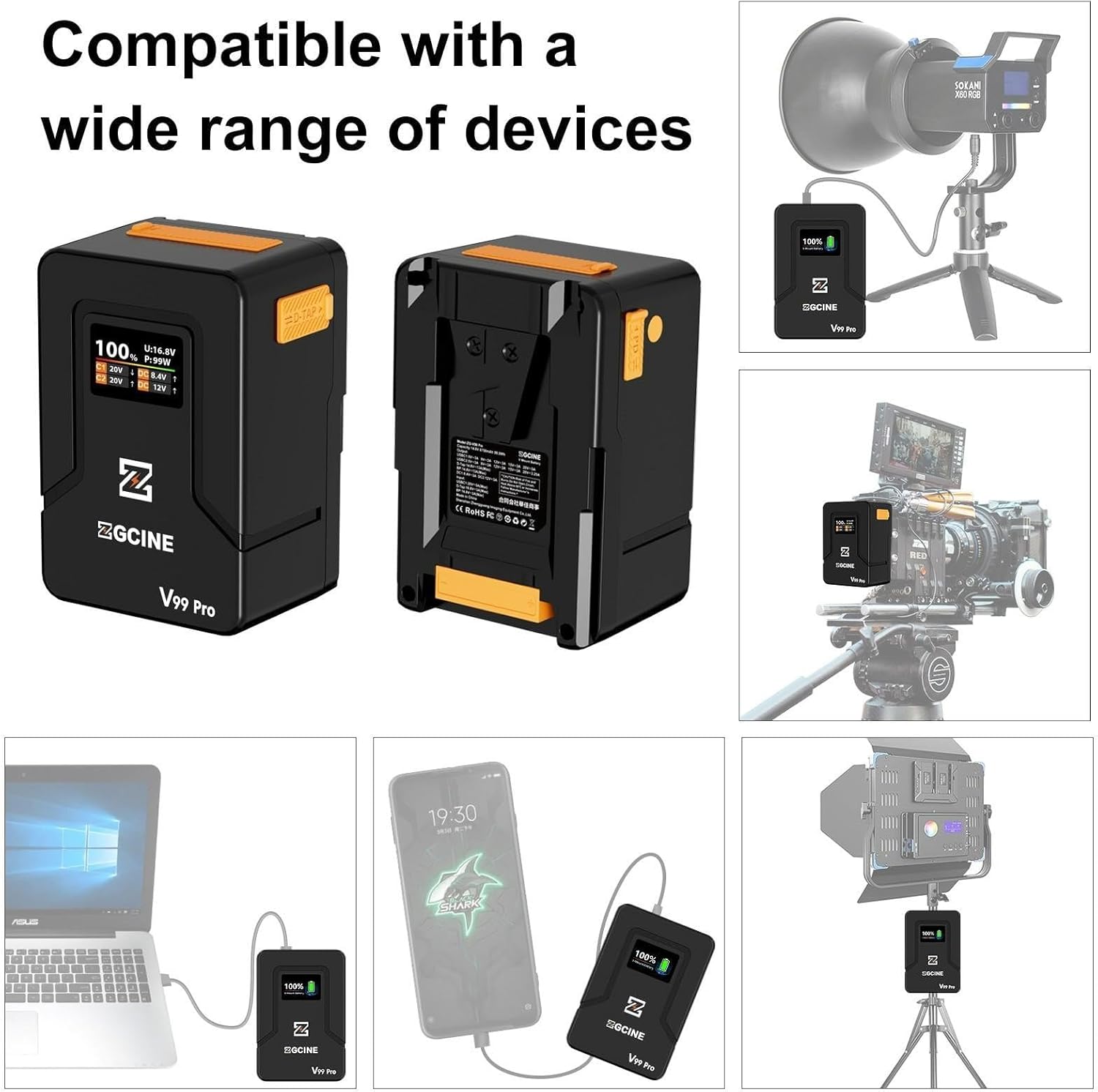
Image: Detailed product parameters and port specifications.
7. Maintenance
To ensure the longevity and optimal performance of your ZGCINE V99 Pro battery:
- Regularly clean the battery contacts with a dry, soft cloth.
- Avoid fully discharging the battery for extended periods. Recharge it periodically if not in use.
- Store the battery at approximately 50% charge if storing for a long time.
- Do not expose the battery to extreme physical shocks or drops.
8. Troubleshooting
If you encounter issues with your ZGCINE V99 Pro battery, consider the following:
- Battery not charging: Ensure the charger and cable are functioning correctly and connected to the correct USB-C input port. Check for any debris in the port.
- Device not powering on: Verify the battery has sufficient charge. Check all cable connections and ensure the device is compatible with the output voltage/current of the connected port.
- OLED screen not displaying: Short press the power button to activate the screen. If it remains off, the battery might be fully discharged or require service.
- Overheat warning: Disconnect all devices and allow the battery to cool down in a well-ventilated area. The BMS will prevent operation if the temperature is too high.
9. Warranty and Support
9.1 Warranty Information
The ZGCINE V99 Pro battery typically comes with a 1-year warranty from the date of purchase. Please retain your proof of purchase for warranty claims. The warranty covers manufacturing defects but generally excludes damage caused by misuse, accidents, or unauthorized modifications.

Image: Indication of a 1-year warranty for the ZGCINE V99 Pro.
9.2 Customer Support
For any questions, technical assistance, or warranty inquiries, please contact ZGCINE customer support. If you purchased through Amazon, you can find seller contact information on your Amazon Order Page by clicking "problem with this order." Responses are typically provided within 24 hours during working days.
Alternatively, you may visit the EACHSHOT Store on Amazon for more information and support resources.
10. Package Contents
The standard package for the ZGCINE V99 Pro includes:
- ZGCINE V99 Pro V-Mount Battery x 1
- USB-C Charging Cable x 1

Image: Contents included in the ZGCINE V99 Pro package.

