
Introduction
This manual provides detailed instructions for the assembly, operation, and maintenance of your MSmask Boucle Upholstered Twin Bed Frame. This bed frame is designed for comfort and functionality, featuring a soft boucle fabric upholstery, a storage headboard with a charging station, four large-capacity drawers, and integrated LED lighting. Please read all instructions carefully before beginning assembly and retain this manual for future reference.
Safety Information
- Weight Capacity: Do not load the bed frame with more than 800 lbs (static load capacity). Overloading can compromise structural integrity.
- Assembly: Always follow the assembly instructions carefully to prevent instability or collapse. Ensure all fasteners are securely tightened.
- Electrical Safety: Be cautious around the LED lights and charging station to avoid electrical hazards. Do not expose electrical components to water or excessive moisture.
- Children: Keep small parts and packaging materials away from children during assembly to prevent choking hazards.
- Maintenance: Regularly check all connections and fasteners to ensure they remain tight.
Package Contents
Before assembly, verify that all parts are present. If any parts are missing or damaged, please contact customer support.
- Upholstered Headboard (with integrated storage, charging station, and LED lights)
- Upholstered Footboard (with integrated LED lights)
- Upholstered Side Rails (2)
- Metal Bed Frame Components
- Wooden Slats (with EVA sponge for noise reduction)
- Storage Drawers (4) with wheels
- Hardware Pack (screws, bolts, Allen wrench, etc.)
- LED Light Remote Control
- Installation Manual
Setup and Assembly
Assembly is designed to be straightforward and does not require professional skills. It is recommended to assemble the bed frame with two people.
- Unpack Components: Carefully unpack all boxes and lay out all parts on a clean, soft surface (like a carpet) to prevent scratches. Identify all components against the parts list in your included installation manual.
- Assemble Headboard: Attach the headboard support legs to the upholstered headboard. Ensure the charging station and LED wiring are accessible.
- Connect Side Rails: Attach the upholstered side rails to the headboard and footboard using the provided hardware. Do not fully tighten screws until all major components are connected.
- Install Metal Frame: Insert the metal bed frame components into the assembled structure.
- Place Wooden Slats: Lay the wooden slats across the metal frame. The plastic snap design simplifies installation. Ensure the EVA sponge is correctly positioned to reduce noise.
- Assemble Drawers: Assemble the four storage drawers according to the separate drawer instructions. Attach the wheels to the bottom of each drawer.
- Final Tightening: Once all parts are in place, securely tighten all screws and bolts.
- Connect Electrical: Plug in the LED lights and charging station to a power outlet.

Figure 1: Overall dimensions and components of the Twin Bed Frame. The bed measures 81.9"L x 40.9"W x 41.7"H and has a weight capacity of 800 lbs.

Figure 2: Details on easy assembly features, including plastic snap design for slats and EVA sponge for noise-free operation.
Operating Instructions
LED Lights
The integrated LED lights on the headboard and footboard offer extensive customization:
- Color Options: Choose from over 60,000 RGB colors.
- Dynamic Modes: Select from 29 dynamic lighting modes.
- Adjustments: Adjust brightness and speed to your preference.
- Music Sync: Lights can synchronize with the rhythm of music via the built-in microphone.
- Timing Function: Set a timer for the lights to turn off automatically.
- Control: Control the LED lights using the included remote control or a dedicated mobile phone application.
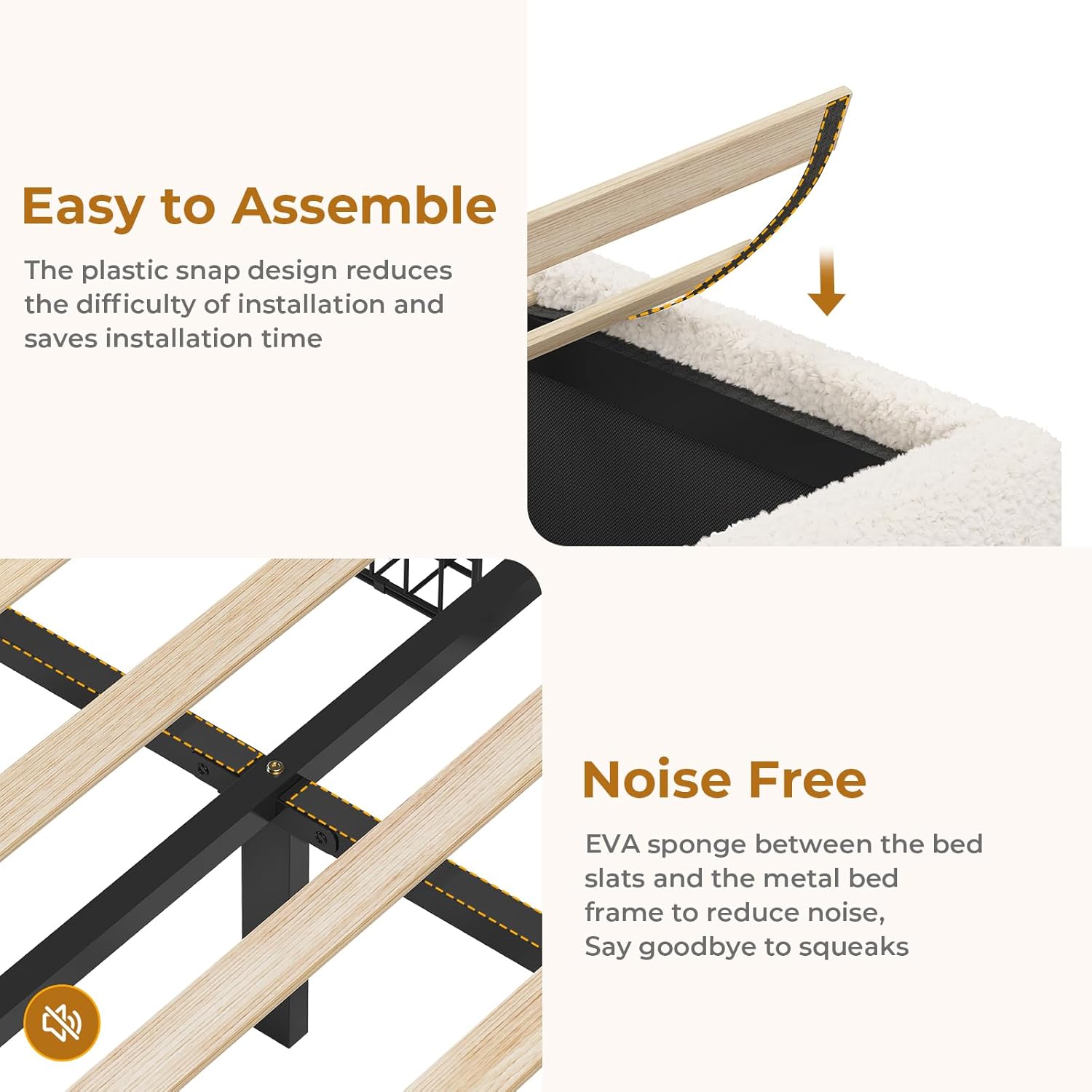
Figure 3: Smart RGB LED lights in operation, demonstrating control via remote or mobile app.
Charging Station
The headboard features a convenient charging station:
- Ports: Includes 1 TYPE-C port (5V/3A), 1 USB port (5V/2A), and 2 AC sockets (125V/12A).
- Usage: Connect your mobile phone, tablet, and other electronic devices for charging.

Figure 4: Detailed view of the storage headboard, highlighting the charging station and various storage options.
Storage Solutions
- Hidden Headboard Storage: The headboard features a hidden compartment for discreet storage.
- Headboard Shelves: A 2-layer storage shelf on top of the headboard is ideal for clocks, books, and small decorations.
- Side Pockets: Pockets on both sides of the bed provide easy access for mobile phones, remote controls, or glasses.
- Under-Bed Drawers: Four large-capacity sliding drawers beneath the bed offer ample space for clothes, bedding, or other items.

Figure 5: The four spacious storage drawers located under the bed frame.
Maintenance
- Cleaning Upholstery: For the boucle fabric, gently vacuum regularly to remove dust. For spills, blot immediately with a clean, dry cloth. For stubborn stains, use a mild fabric cleaner and test on an inconspicuous area first. Do not use harsh chemicals.
- Frame Care: Wipe the metal and wooden parts with a damp cloth. Avoid abrasive cleaners.
- Electrical Components: Keep the charging station and LED lights free from dust. Do not attempt to repair electrical components yourself; contact qualified personnel if issues arise.
- Fastener Check: Periodically check all bolts and screws to ensure they are tight. Re-tighten if necessary to maintain stability.
Troubleshooting
| Problem | Possible Cause | Solution |
|---|---|---|
| Bed frame is wobbly or squeaks. | Loose fasteners; uneven assembly; missing EVA sponge. | Ensure all bolts and screws are securely tightened. Check that the bed frame is on a level surface. Verify all wooden slats have the EVA sponge for noise reduction. |
| LED lights are not working. | Power not connected; remote control battery dead; app connection issue; faulty wiring. | Check if the power adapter is securely plugged into the wall outlet and the bed frame. Replace remote control batteries. Re-pair the app if necessary. If issues persist, contact customer support. |
| Charging station is not providing power. | Power not connected; device not compatible; faulty port. | Ensure the bed frame's main power cord is plugged in. Test with a different device or cable. Try a different port. If no ports work, contact customer support. |
| Drawers do not slide smoothly. | Obstruction; wheels not properly installed; uneven floor. | Check for any items blocking the drawer path. Ensure the wheels are correctly attached and free of debris. Position the bed frame on a level surface. |
Specifications
- Brand: MSmask
- Model Number: Boucle Bed Twin Size (Manufacturer Part Number: 3983)
- Size: Twin
- Color: Off-white
- Material: Boucle Fabric, Foam (Headboard), Metal, Wood
- Product Dimensions (L x W x H): 81.9" x 40.9" x 41.7"
- Item Weight: 90.4 Pounds
- Maximum Weight Recommendation: 800 Pounds
- Special Features: Charging Station (1 Type-C, 1 USB, 2 AC outlets), LED Lighting (RGB, 29 modes, music sync, timing), Soft Boucle Fabric, Space Saving, Storage Headboard (hidden compartment, 2-layer shelf, side pockets), 4 Storage Drawers.
- Assembly Required: Yes
- Box Spring Required: No
Warranty and Support
MSmask products are manufactured with quality and care. While specific warranty details may vary, we are committed to providing support for our customers.
- Warranty: Please refer to your purchase documentation or contact your retailer for specific warranty terms and conditions.
- Customer Support: For any questions regarding assembly, missing parts, operation, or troubleshooting, please contact MSmask customer service. You can typically find contact information on the packaging, your purchase receipt, or the official MSmask website.
- Returns: This product typically includes a 30-day easy return policy. Please check with your seller for details.