
HOGARLABS PD10G-25
Contents
HOGARLABS 80 Pints Dehumidifier User Manual
Model: PD10G-25 | Brand: HOGARLABS
Introduction
Thank you for choosing the HOGARLABS 80 Pints Dehumidifier. This appliance is designed to efficiently remove excess moisture from your indoor environment, creating a more comfortable and healthy living space. Please read this manual thoroughly before operating the dehumidifier to ensure proper use, optimal performance, and safety.
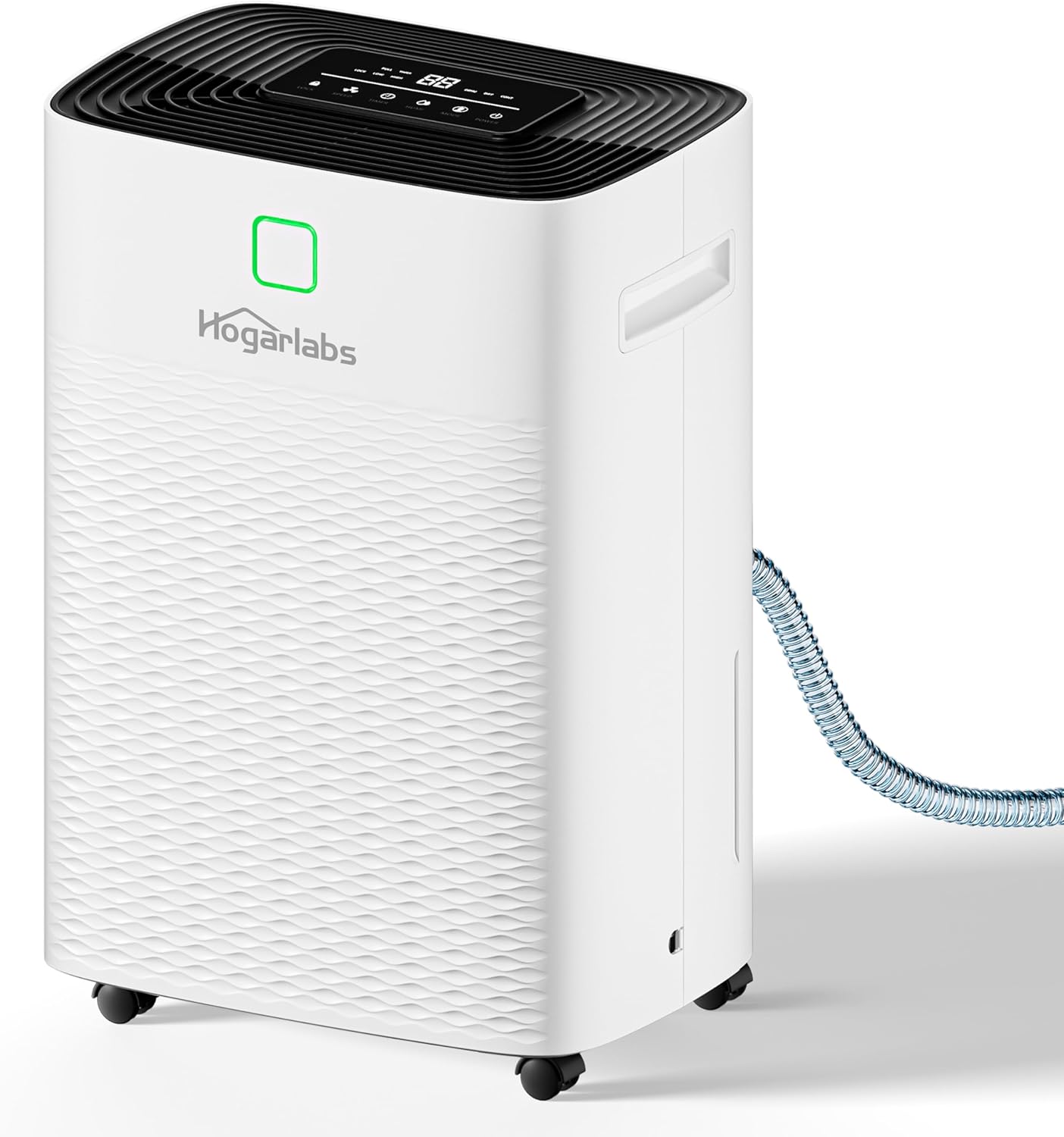
Image: The HOGARLABS 80 Pints Dehumidifier, a white unit with a control panel on top and a drain hose connected to the side.
Safety Information
Always follow basic safety precautions when using this electrical appliance to reduce the risk of fire, electric shock, or injury.
- Ensure the dehumidifier is placed on a stable, level surface.
- Do not operate the unit if the power cord or plug is damaged.
- Keep the unit away from heat sources and direct sunlight.
- Do not block the air inlet or outlet. Maintain at least 8 inches of clearance around the unit.
- The unit features an auto shut-off function when the water tank is full to prevent overflow.
- Utilize the child lock feature to prevent accidental changes to settings.
- The dehumidifier is constructed with fireproof materials for enhanced safety.
Product Overview
Key Features
- High Capacity: Removes up to 80 pints of moisture per day (under 95°F, 90%RH conditions), suitable for large areas up to 5000 sq ft.
- 3 Smart Modes: DEHU (auto dehumidification), DRY (clothes drying), and CONT (continuous operation) for versatile use.
- Flexible Drainage: Features a 1.32-gallon (5L) water tank for manual drainage with auto shut-off, and a 3.28-foot drain hose for continuous drainage.
- Quiet Operation: Operates at a low noise level of no more than 40 dB, ideal for bedrooms and living spaces.
- Portable Design: Equipped with 4 universal wheels and a hidden handle for easy movement between rooms.
- Energy Efficient: 2025 Energy Star certified, designed to reduce energy consumption by up to 30%.
- Intelligent Control: Built-in humidity sensor, 24-hour timer, and intelligent control panel for precise humidity management.
- Washable Filter: Easy-to-clean air filter for consistent performance and air quality.

Image: A graphic illustrating the dehumidifier's high efficiency, showing a reduction from 80% to 45% humidity in a room.

Image: A cutaway view of the dehumidifier highlighting its Energy Star certification and internal compressor technology.
Setup
Unpacking
Carefully remove the dehumidifier from its packaging. Retain the packaging materials for future storage or transport. Before plugging in the unit, allow it to stand upright for at least 24 hours if it was not transported in an upright position. This allows the refrigerant to settle.
Placement
Place the dehumidifier in a location where the humidity is highest, such as a basement, bathroom, or laundry room. Ensure there is adequate air circulation around the unit. The dehumidifier is suitable for various room sizes, including basements, living rooms, bedrooms, and offices.

Image: An illustration showing the dehumidifier's versatility for placement in different areas of a home.
Drainage Options
Your HOGARLABS dehumidifier offers two drainage methods:
- Manual Drainage (Water Tank): The unit collects water in its internal 1.32-gallon (5L) water tank. When the tank is full, the unit will automatically shut off and alert you. Carefully remove the tank and empty the collected water.
- Continuous Drainage (Drain Hose): For continuous operation without manual emptying, attach the included 3.28-foot drain hose to the drainage port on the back of the unit. Ensure the hose is sloped downwards to allow gravity to drain the water into a floor drain or suitable receptacle.
Note: When using the water tank for drainage, ensure the switch at the water pipe connection point is tightened to prevent leakage. If using the hose, ensure the internal plug is removed from the drainage port.

Image: A visual representation of the dehumidifier's water tank and the option for continuous drainage via a hose.
Operating Instructions
Control Panel
The dehumidifier features an intelligent touch control panel located on the top of the unit. The display shows the current humidity level and other settings.

Image: A detailed view of the dehumidifier's touch control panel with buttons for Lock, Speed, Timer, Humi, Mode, and Power.
- Power Button: Turns the unit ON/OFF.
- Mode Button: Cycles through DEHU, DRY, and CONT modes.
- Humi Button: Adjusts the desired humidity level (30% to 80%).
- Timer Button: Sets the 24-hour ON/OFF timer.
- Speed Button: Selects fan speed (High or Low).
- Lock Button: Activates/deactivates the child lock.
Smart Modes
- DEHU Mode: The smart dehumidifier will automatically start and shut down based on your set humidity level. Ideal for general dehumidification.
- DRY Mode: Uses optimal fan speed and dehumidification intensity to efficiently dry clothes.
- CONT Mode: The dehumidifier runs continuously to reduce indoor humidity to the lowest possible level. Best for persistently humid areas or continuous drainage.
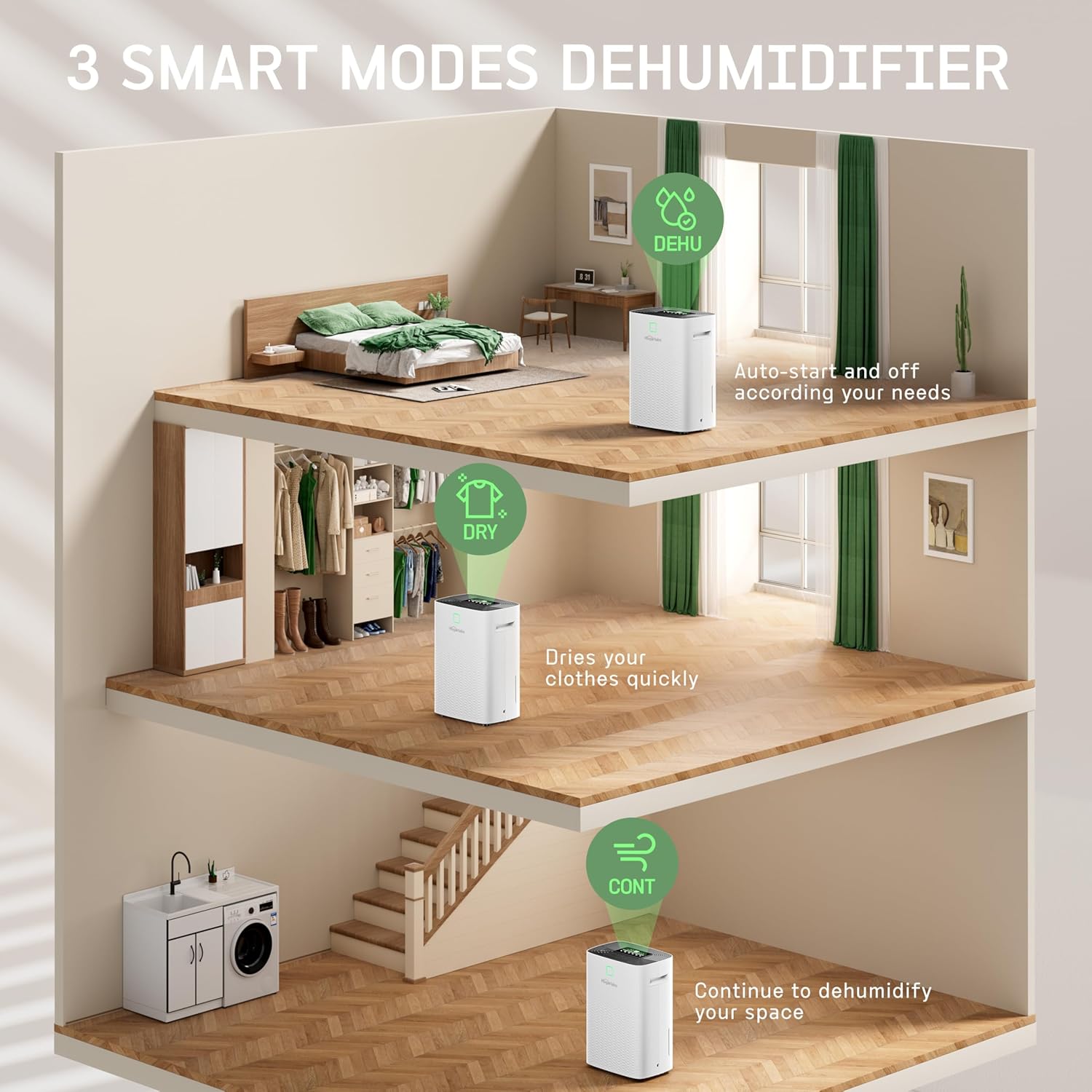
Image: A diagram showing the application of DEHU mode in a bedroom, DRY mode in a laundry area, and CONT mode in a basement.
Setting Humidity
In DEHU mode, press the 'Humi' button to set your desired humidity level between 30% and 80%. The unit will operate until the set humidity is reached, then cycle on and off to maintain it.
Timer Function
Use the 'Timer' button to set a 24-hour timer for automatic ON/OFF operation. This allows you to schedule the dehumidifier to run only when needed, saving energy.

Image: The dehumidifier shown in a bedroom setting, emphasizing its quiet operation and 24-hour timer feature for undisturbed sleep.
Fan Speed
Press the 'Speed' button to toggle between high and low fan speeds. A higher fan speed will dehumidify the room faster, while a lower speed will result in quieter operation.
Child Lock
To prevent accidental changes to settings, press and hold the 'Lock' button for a few seconds to activate the child lock. Repeat the action to deactivate it.
Maintenance
Regular maintenance ensures the longevity and efficiency of your dehumidifier.
Emptying the Water Tank
When the water tank is full, the unit will stop operating and an indicator light will illuminate. Carefully pull out the water tank from the front of the unit, empty the collected water, and slide the tank back into place until it clicks securely. The unit will then resume operation.
Cleaning the Air Filter
The dehumidifier is equipped with a washable filter. A clean filter helps maintain optimal performance and air quality.
- Remove the air filter from the back of the unit.
- Wash the filter with warm, soapy water.
- Rinse thoroughly and allow it to air dry completely before reinserting.
- Clean the filter regularly, approximately every two weeks, or more often depending on usage and air quality.

Image: A side view of the dehumidifier highlighting its hidden handle, 360° rotatable wheels, and the removable washable filter.
General Cleaning
Wipe the exterior of the dehumidifier with a soft, damp cloth. Do not use harsh chemicals or abrasive cleaners. Ensure the unit is unplugged before cleaning.
Troubleshooting
If you encounter issues with your dehumidifier, refer to the following table for common problems and solutions.
| Problem | Possible Cause | Solution |
|---|---|---|
| Dehumidifier does not turn on. | No power; Water tank full or not properly inserted; Child lock activated. | Check power connection; Empty and reinsert water tank; Deactivate child lock. |
| Unit is running but not collecting water. | Room temperature too low; Air filter clogged; Humidity setting too high. | Dehumidifiers work best above 5°C (41°F); Clean air filter; Lower desired humidity setting. |
| Unit is noisy. | Fan speed set to high; Unit not on a level surface. | Switch to low fan speed; Ensure unit is on a flat, stable surface. |
| Water leaks from the unit. | Water tank not properly inserted; Drain hose not securely connected or clogged. | Reinsert water tank correctly; Check drain hose connection and clear any blockages. |
Specifications
| Feature | Specification |
|---|---|
| Brand | HOGARLABS |
| Model Number | PD10G-25 |
| Colour | White |
| Product Dimensions | 24.51 x 35 x 50.01 cm |
| Item Weight | 14.51 kg |
| Capacity | 80 pints/day |
| Water Tank Capacity | 1.32 Gallons (5L) |
| Power/Wattage | 480 watts |
| Material | Plastic |
| Number of Speeds | 2 (High/Low) |
| Special Features | Adjustable Humidity Control, Auto Shut-off, 24H Timer, Child Lock, Washable Filter |
| Floor Area Coverage | Up to 5000 Square Feet |
Warranty and Support
HOGARLABS products are manufactured to high-quality standards. For warranty information, technical support, or any inquiries regarding your dehumidifier, please contact HOGARLABS customer service. You can reach them via email at support@hogarlabs.com.
Please retain your proof of purchase for warranty claims.
Documents and downloads
Ask a question about this manual
Ask about setup, troubleshooting, compatibility, parts, safety, or missing instructions. Manuals+ will review the question and use this page’s manual context to help answer it.