
LiitoKala PD4
Contents
LiitoKala LII-PD4 Universal Smart Battery Charger User Manual
Model: LII-PD4
1. Introduction
This user manual provides detailed instructions for the safe and efficient operation of your LiitoKala LII-PD4 Universal Smart Battery Charger. The LII-PD4 is designed for charging various types of rechargeable batteries with intelligent features and multiple safety protections. Please read this manual thoroughly before using the charger to ensure proper function and longevity of your device and batteries.

Figure 1: LiitoKala LII-PD4 Battery Charger and accessories.
2. Safety Precautions
Always adhere to the following safety guidelines to prevent damage to the charger, batteries, or personal injury:
- Use only compatible battery types and sizes as specified in this manual.
- Do not attempt to charge non-rechargeable batteries.
- Ensure proper polarity when inserting batteries.
- Avoid short circuits, overcharging, and reverse connections. The charger includes built-in protections, but user vigilance is crucial.
- Do not expose the charger to water, high temperatures, or direct sunlight.
- Keep out of reach of children and pets.
- Unplug the charger from the power source when not in use or during cleaning.

Figure 2: Built-in safety protection functions of the LII-PD4 charger.
3. Product Features
- Smart Universal Charger: Compatible with Li-ion / IMR / LiFePO4 (26650, 20700, 18650, 18490, 18350, 17670, 17500, 16340(RCR123), 14500, 10440) and NiMH/Cd (AA, AAA, SC, C) batteries. Note: Cannot charge 1.5V AA/AAA batteries.
- Multi-Power Input: Supports AC cable 110-240V 50/60Hz (included) and optional 12V 1A adapter.
- Independent Charging Slots: Four independent charging slots with microcomputer management system.
- Intelligent Auto-Set Current: Automatically sets charging current to 500mA / 1000mA / 2000mA. 2000mA is fixed only for slot #4 when used alone.
- Safety Protections: Features overcharge, over-discharge, short circuit, reverse connection protection, and intelligent bad battery identification.
- LCD Display: Large screen displays charging voltage, charging current, charging time, battery type, and battery power percentage.
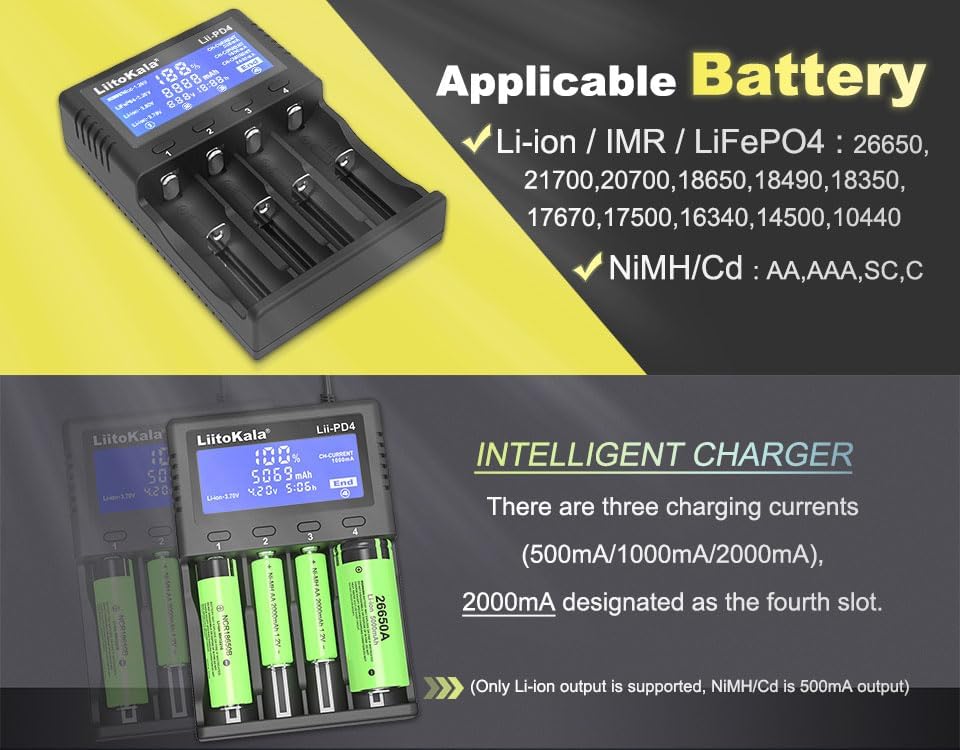
Figure 3: Overview of compatible battery types and intelligent charging features.
4. Setup
To set up your LiitoKala LII-PD4 charger:
- Unpack all components from the box.
- Connect the provided AC power cable (110-240V 50/60Hz) to the charger's input port and then to a wall outlet. Alternatively, use a 12V 1A adapter (not included) for DC power.
- The LCD display will illuminate, indicating the charger is ready for use.

Figure 4: Power input options for the LII-PD4 charger.
5. Operating Instructions
Follow these steps to charge your batteries:
- Insert Batteries: Carefully insert one or more compatible rechargeable batteries into the charging slots, ensuring correct polarity (+ and - ends match the markings on the charger). The charger will automatically detect the battery type (Li-ion 3.7V, Ni-MH/Cd 1.2V) and begin charging. For LiFePO4 3.2V and Li-ion 3.8V (IMR) batteries, manual selection may be required using the corresponding slot button.
- Monitor Charging: The LCD display will show real-time charging information, including:
- Battery type (e.g., NiMH/NiCd-1.2V, LiFePO4-3.2V, Li-ion-3.80V, Li-ion-3.70V)
- Charging percentage (%)
- Accumulated charge (mAh)
- Current voltage (V)
- Charging time (h)
- Charging current (CH-CURRENT: 500mA, 1000mA, 2000mA)
- Charging Current: The charger intelligently auto-sets the current. Note that the 2000mA charging current is exclusively available for slot #4 when it is the only slot in use. If multiple slots are used, the current will adjust accordingly (e.g., 1000mA for two batteries, 500mA for three or four).
- Completion: Charging is complete when the LCD display shows "End" for the respective slot and the battery percentage reaches 100%. Remove batteries promptly after charging is complete.

Figure 5: Batteries inserted into the LII-PD4 charger, displaying charging status.
Video 1: Demonstration of inserting batteries and observing the LCD display on the LiitoKala LII-PD4 charger.
6. Maintenance
To ensure optimal performance and extend the lifespan of your charger:
- Clean the charger regularly with a soft, dry cloth. Do not use abrasive cleaners or solvents.
- Keep the charging slots free from dust and debris.
- Store the charger in a cool, dry place away from direct sunlight and moisture when not in use.
- Avoid dropping or subjecting the charger to strong impacts.
7. Troubleshooting
If you encounter issues with your LiitoKala LII-PD4 charger, refer to the following common problems and solutions:
| Problem | Possible Cause | Solution |
|---|---|---|
| Charger not powering on. | No power connection or faulty power cable. | Ensure the power cable is securely connected to both the charger and the wall outlet. Test the outlet with another device. |
| Battery not charging. | Incorrect battery insertion, incompatible battery, or bad battery. | Check battery polarity. Verify battery type is compatible. The charger can intelligently identify bad batteries; if indicated, replace the battery. |
| LCD display shows error. | Short circuit, reverse connection, or over-discharge. | Remove the battery, check for any visible damage or incorrect insertion, and reinsert. If the error persists, the battery may be faulty. |
| Slow charging speed. | Multiple batteries charging simultaneously or battery type. | Charging current is automatically adjusted based on the number of batteries. Slot #4 provides 2000mA only when used alone. This is normal operation. |
8. Specifications
| Feature | Detail |
|---|---|
| Product Dimensions | 5.79 x 3.94 x 1.46 inches (147 x 100 x 37 mm) |
| Item Weight | 12.3 ounces (221g) |
| Input | AC 110-240V 50/60Hz / DC 12V 1A (min.) |
| Output Current (Auto-set) | Lithium: 2000mA (slot #4 only) / 1000mA * 2 / 500mA * 4 Ni-MH/Cd: 1000mA * 2 / 500mA * 4 |
| Output Voltage | 1.48V / 4.20V / 3.65V / 4.35V |
| Charge Display | LCD Display of all data in one screen: battery-type/voltage/current/percentage/time/capacity |
| Standby Current | <15mAh |
| Manufacturer | Liitokala |
| Country of Origin | China |
| Safety Certification | UL |
9. What's Included
Your LiitoKala LII-PD4 package includes:
- 1x LiitoKala LII-PD4 4-Slot Battery Charger
- 1x US PLUG (AC Power Cable 110-240V 50/60Hz)
- 1x Car Cable (12V)
- 1x User Manual

Figure 6: Items included in the LII-PD4 package.
10. Warranty and Support
LiitoKala products are manufactured with high-quality standards. For warranty information or technical support, please refer to the contact details provided on the product packaging or visit the official LiitoKala website. Keep your purchase receipt for warranty claims.
For further assistance, you may also contact the seller directly through the platform where the product was purchased.
Documents and downloads
Ask a question about this manual
Ask about setup, troubleshooting, compatibility, parts, safety, or missing instructions. Manuals+ will review the question and use this page’s manual context to help answer it.