Introduction
This manual provides detailed instructions for the installation, operation, and maintenance of your CNBINGO MT-WK Rotary Knob Digital Room Thermostat. Please read this manual thoroughly before installation and use to ensure proper function and safety. This thermostat is designed to regulate the temperature of various heating systems, including electric heating, hot water heating, and water/gas boilers, ensuring a comfortable indoor climate.

Figure 1: CNBINGO MT-WK Rotary Knob Digital Room Thermostat with external sensor.
The CNBINGO MT-WK thermostat is a flush-mounted device featuring a rotary knob for temperature control and an integrated sensor, with an option for an external sensor. It supports a maximum current of 16A and voltage of 110-230V.
Safety Information
- Installation must be performed by a qualified electrician in accordance with local electrical codes.
- Always disconnect power at the circuit breaker before installing or servicing the thermostat.
- Do not expose the thermostat to water or excessive moisture. The device has an IP20 rating, suitable for indoor use.
- Ensure all wiring connections are secure and properly insulated to prevent short circuits.
- The thermostat housing is made of flame-retardant PC material for safety.
Product Overview
The CNBINGO MT-WK thermostat features a simple and intuitive design for temperature control.

Figure 2: Thermostat Components.
- PC Material: Durable and flame-retardant housing.
- Status LED: Indicates heating status (red when active).
- Temperature Controller: Rotary knob for setting and calibrating temperature.
- On/Off Switch: Slider switch to power the thermostat on or off.
- Temperature Display: Scale around the rotary knob indicating the set temperature.
Setup and Installation
1. Wiring Diagram
Refer to the following diagram for correct wiring connections. This thermostat is compatible with electric heating, hot water heating, and water/gas boiler systems.

Figure 3: Wiring Diagram and Compatible Devices.
- L: Live wire connection.
- N: Neutral wire connection.
- External Sensor: Connect the provided 3-meter external sensor cable if required.
2. Sensor Selection
The thermostat includes both a built-in aluminum sensor and a 3-meter external temperature sensor. You can choose to use one or both depending on your specific needs.

Figure 4: Built-in vs. External Sensor Usage.
- Built-in Sensor: Ideal for smaller rooms where uniform temperature distribution is expected. The sensor is integrated directly into the thermostat unit.
- External Sensor: Recommended for larger rooms or areas where the thermostat's location might not accurately reflect the room's overall temperature. The 3-meter cable allows for flexible placement.
3. Mounting Requirements
The thermostat is designed for flush-mounting in a standard wall box.

Figure 5: Product Dimensions and Wall Box Requirements.
- Dimensions: The thermostat measures 86mm x 86mm x 55mm.
- Wall Box: Mount in a standard wall box with a diameter of 60mm.
- Depth: The depth of the device box should be at least 35mm to accommodate the thermostat.
Operating Instructions
1. Power On/Off
Use the slider switch on the thermostat to turn the unit on or off.
2. Temperature Adjustment
To set the desired temperature, rotate the central knob. The temperature can be precisely set to 0.5°C increments within a range of 5°C to 40°C.
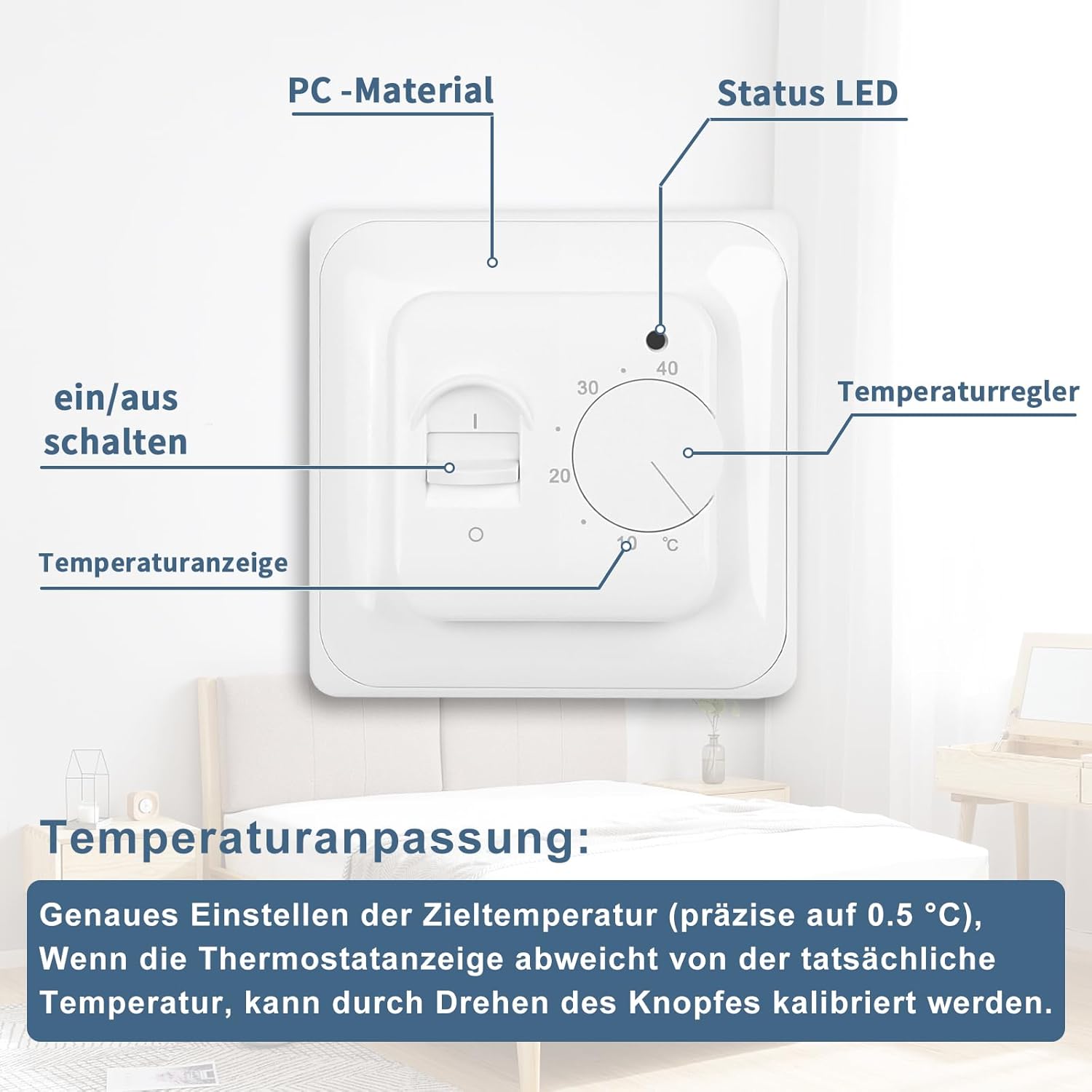
Figure 6: Temperature Adjustment Knob.
3. Temperature Calibration
If the temperature displayed on the thermostat deviates from the actual room temperature, you can calibrate it by gently turning the rotary knob until it matches the accurate reading from another thermometer.
4. LED Indicator
The thermostat is equipped with an LED indicator light that provides visual feedback on its operational status.

Figure 7: LED Indicator.
- Red LED: The LED lights up red when the heating system is actively engaged and providing heat.
- LED Off: The LED is off when the heating system is not active or the thermostat is powered off.
Maintenance
The CNBINGO MT-WK thermostat requires minimal maintenance.
- Cleaning: Wipe the thermostat's surface with a soft, dry cloth. Do not use abrasive cleaners or solvents.
- Inspection: Periodically check for any visible damage or loose connections. If any issues are found, consult a qualified electrician.
Troubleshooting
If you encounter issues with your thermostat, refer to the following common problems and solutions:
- Thermostat not powering on:
- Check the main power supply to the thermostat.
- Ensure the on/off slider switch is in the 'on' position.
- Verify wiring connections are secure.
- Heating not turning on:
- Ensure the set temperature is higher than the current room temperature.
- Check if the red LED indicator is lit. If not, the thermostat is not calling for heat.
- Verify the heating system (boiler, electric heater) is operational.
- Incorrect temperature reading:
- Calibrate the thermostat by adjusting the rotary knob to match a known accurate thermometer.
- Ensure the sensor (internal or external) is not obstructed or exposed to drafts/direct sunlight.
Specifications
| Feature | Specification |
|---|---|
| Model Number | MT-WK |
| Voltage | 110-230 Volts (AC) |
| Max Current | 16A |
| Power Source Type | AC |
| Temperature Control Range | 5°C - 40°C |
| Temperature Accuracy | 0.5°C |
| Sensors | Built-in aluminum sensor, 3m external sensor |
| Protection Rating | IP20 |
| Product Dimensions (L x W x H) | 8.3 x 8.3 x 5.5 cm |
| Weight | 0.2 Kilograms |
| Color | White |
Warranty and Support
For warranty information or technical support, please contact CNBINGO customer service. Refer to your purchase documentation for specific warranty terms.
Manufacturer: CNBINGO
Model: MT-WK
For further assistance, please visit the official CNBINGO website or contact your local distributor.


