Introduction
This manual provides essential information for setting up, operating, and maintaining your HOTWAV R10 Pro Rugged Tablet. Designed for durability and high performance, this tablet is equipped with advanced features suitable for various environments and tasks. Please read this manual thoroughly to ensure optimal use and longevity of your device.
What's in the Box
- 1x R10 Pro Rugged Tablet
- 1x Charger & Type-C Data Cable
- 1x Explosion-proof Film
- 1x Card Safety Pin
- 1x Manual

Figure 1: Included items with the HOTWAV R10 Pro Rugged Tablet.
Product Overview
The HOTWAV R10 Pro features a robust design with a 10.1-inch display. It includes a rear camera module and a front-facing camera. The device is equipped with a USB-C port for charging and data transfer, and a SIM/TF card slot for expanded connectivity and storage. Its armored body ensures durability.

Figure 2: Front view of the HOTWAV R10 Pro.

Figure 3: Rear view of the HOTWAV R10 Pro.
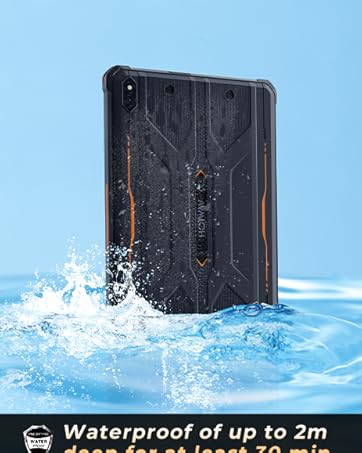
Figure 4: Side profile of the HOTWAV R10 Pro.
Setup
- Initial Charge: Connect the tablet to the charger using the provided Type-C cable and charge it fully before first use.
- Power On: Press and hold the power button until the HOTWAV logo appears.
- Language & Region: Follow the on-screen prompts to select your preferred language and region.
- Wi-Fi Connection: Connect to a stable Wi-Fi network to complete the setup process and download necessary updates.
- Google Account: Sign in with your Google account or create a new one to access the Google Play Store and other services.
- SIM/TF Card Installation: Use the card safety pin to open the SIM/TF card slot. Insert your 4G-LTE SIM card(s) and/or a MicroSD card (up to 1TB) for expanded storage. Ensure the tray is securely closed to maintain water resistance.
Operating Instructions
Display & Interface
The tablet features a 10.1-inch HD+ display with a resolution of 800x1200 pixels, offering clear and vibrant visuals. The screen supports wet touch, allowing for operation even when wet. It runs on the latest Android 14 operating system, providing a smooth and intuitive user experience with access to a vast array of applications.

Figure 5: The 10.1-inch HD+ display of the HOTWAV R10 Pro.
Performance
Powered by a Unisoc T606 octa-core processor and 20GB RAM (8GB physical + 12GB virtual expansion), the R10 Pro ensures seamless multitasking and efficient performance for demanding applications and games. The 256GB internal storage is expandable up to 1TB via a MicroSD card, providing ample space for all your data.

Figure 6: Internal components highlighting RAM, ROM, and processor.
Camera Usage
The tablet is equipped with a 13MP rear camera and a 5MP front camera, allowing for crisp photos and clear video calls. Its waterproof design enables underwater photography, perfect for capturing moments in aquatic environments.

Figure 7: Camera features and underwater photography capability.
Connectivity
The R10 Pro supports dual SIM 4G-LTE for global cellular connectivity, high-speed 2.4G/5G Wi-Fi, Bluetooth 5.0, and a comprehensive GPS positioning system (Beidou, Galileo, GLONASS, GPS) for accurate navigation. Face ID is available for secure and quick unlocking.

Figure 8: GPS positioning system features.
Battery Management
Equipped with a 10800mAh high-capacity battery, the tablet offers extended usage times: up to 1000 hours standby, 400 hours talk time, and 200 hours music playback. It also supports OTG reverse charging, allowing it to function as a power bank for other devices.

Figure 9: Battery capacity and usage times.
Durability Features
The HOTWAV R10 Pro is built to withstand harsh conditions, meeting IP68, IP69K, and MIL-STD-810G standards. It offers:
- Water Resistance: Up to 1.5 meters for 30 minutes.
- Drop Protection: Resistant to drops from up to 1.2 meters.
- Dustproof: 360° dustproof capability.

Figure 10: Durability testing of the HOTWAV R10 Pro.
Software
The HOTWAV R10 Pro runs on the Android 14 operating system, offering enhanced security, privacy features, and a customizable user interface. Users can access a wide range of applications through the Google Play Store.

Figure 11: Android 14 operating system on the HOTWAV R10 Pro.
Troubleshooting
Common Issues & Solutions
- Device Not Powering On: Ensure the battery is charged. Connect to the charger and wait a few minutes before attempting to power on again.
- Slow Performance: Close unnecessary background applications. Clear cache regularly. Consider performing a factory reset if issues persist (back up data first).
- Connectivity Problems (Wi-Fi/4G): Check network settings. Restart the tablet and your router/modem. Ensure SIM card is correctly inserted and activated.
- Touchscreen Unresponsive: Restart the device. If the issue is intermittent, ensure the screen is clean and dry.
Specifications
| Feature | Specification |
|---|---|
| Display Size | 10.1 Inches |
| Screen Resolution | 800x1200 pixels |
| Operating System | Android 14 |
| Processor | Unisoc T606 Octa-Core |
| RAM | 20GB (8GB physical + 12GB virtual) |
| Internal Storage | 256GB (Expandable up to 1TB via MicroSD) |
| Rear Camera | 13MP |
| Front Camera | 5MP |
| Battery Capacity | 10800mAh |
| Waterproof Rating | IP68 & IP69K |
| Drop Protection | MIL-STD-810G (1.2 meters) |
| Wireless Connectivity | 4G-LTE, 5G Wi-Fi (802.11ax), Bluetooth 5.0 |
| Navigation | GPS, Beidou, Galileo, GLONASS |
| Dimensions (LxWxH) | 10.59 x 7.17 x 0.67 inches |
| Item Weight | 2.99 pounds |
Official Product Videos
Official product video showcasing the HOTWAV R10 Pro Rugged Tablet's design and key features, including its robust build and user interface.
Official product video highlighting the HOTWAV R10 Pro Tablet's performance, durability, and user experience.
Warranty and Support
HOTWAV is committed to providing excellent customer service. The R10 Pro Rugged Tablet comes with:
- 30-day no-reason returns
- Two-year free warranty
- Lifetime technical support
- 24-hour online customer service
For any inquiries or support, please contact HOTWAV Official After-Sales Service.


