
1. Overview
The WEN 14500-Watt Tri Fuel Electric Start Generator is a versatile power solution designed for various applications, from home emergency backup to job site use. It offers the flexibility to operate on three different fuel sources: gasoline, propane (LPG), and natural gas (NG). Equipped with an electric start for convenience and a CO Watchdog sensor for safety, this generator provides reliable power with multiple output options.
Key Features
- Tri-Fuel Capability: Easily switch between gasoline (14500 surge watts, 11500 running watts), propane (12500 surge watts, 10300 running watts), and natural gas (10500 surge watts, 8750 running watts) using a simple selection dial.
- Dual Voltage Output: Operates at both 120V and 240V, making it suitable for transfer switches and emergency backup power.
- CO Watchdog Shutdown Sensor: Enhances safety by automatically turning off the generator if dangerous levels of carbon monoxide are detected.
- Electric Start: Powers the 500cc 4-stroke OHV engine with the turn of a key, complemented by a recoil starter for backup.
- Extended Runtime: The 8.2-gallon fuel tank provides up to 12 hours of half-load runtime on gasoline.
- Multiple Outlets: Features four 120V 5-20R outlets, a 120V/240V 30A NEMA L14-30R outlet, a 120V/240V 50A NEMA 14-50R outlet, and a standard 12V DC automotive outlet.
- Data Meter: Onboard digital display shows voltage, frequency, total runtime, and session runtime for maintenance tracking.
- Portability: Includes a wheel and handle kit for easy transportation.

Figure 1: Front-side view of the WEN TF1450X Tri-Fuel Generator, highlighting its robust frame and orange accents.
2. Setup
Before operating your WEN TF1450X generator, proper setup is crucial for safety and optimal performance. Follow these steps for initial assembly and preparation:
- Unpacking and Assembly: Carefully remove the generator from its packaging. Attach the wheels and handles using the provided hardware. Ensure all components are securely fastened.
- Add Engine Oil: Locate the oil fill cap/dipstick. Add the recommended amount and type of engine oil (typically 1 quart, refer to the manual for exact specifications) before the first start. Do not overfill.
- Connect Battery: Connect the positive cable to the battery terminal. The battery powers the electric start feature.
- Fuel Selection: The generator supports gasoline, propane, and natural gas.
- For Gasoline: Fill the 8.2-gallon tank with fresh, unleaded gasoline (87 octane maximum).
- For Propane (LPG): Connect the included 6-foot LPG hose to a propane tank and the generator's propane inlet.
- For Natural Gas (NG): Connect an NG hose (not included, part no. TF1450X-1431) to a natural gas line and the generator's NG quick-connect adapter.
Note: Gasoline generally provides higher wattage output.
- Positioning: Place the generator on a flat, stable surface outdoors in a well-ventilated area, away from windows, doors, and vents to prevent carbon monoxide buildup.

Figure 2: Detailed view of the control panel, showing the fuel switch (Gasoline, Propane, Natural Gas) and engine start key.
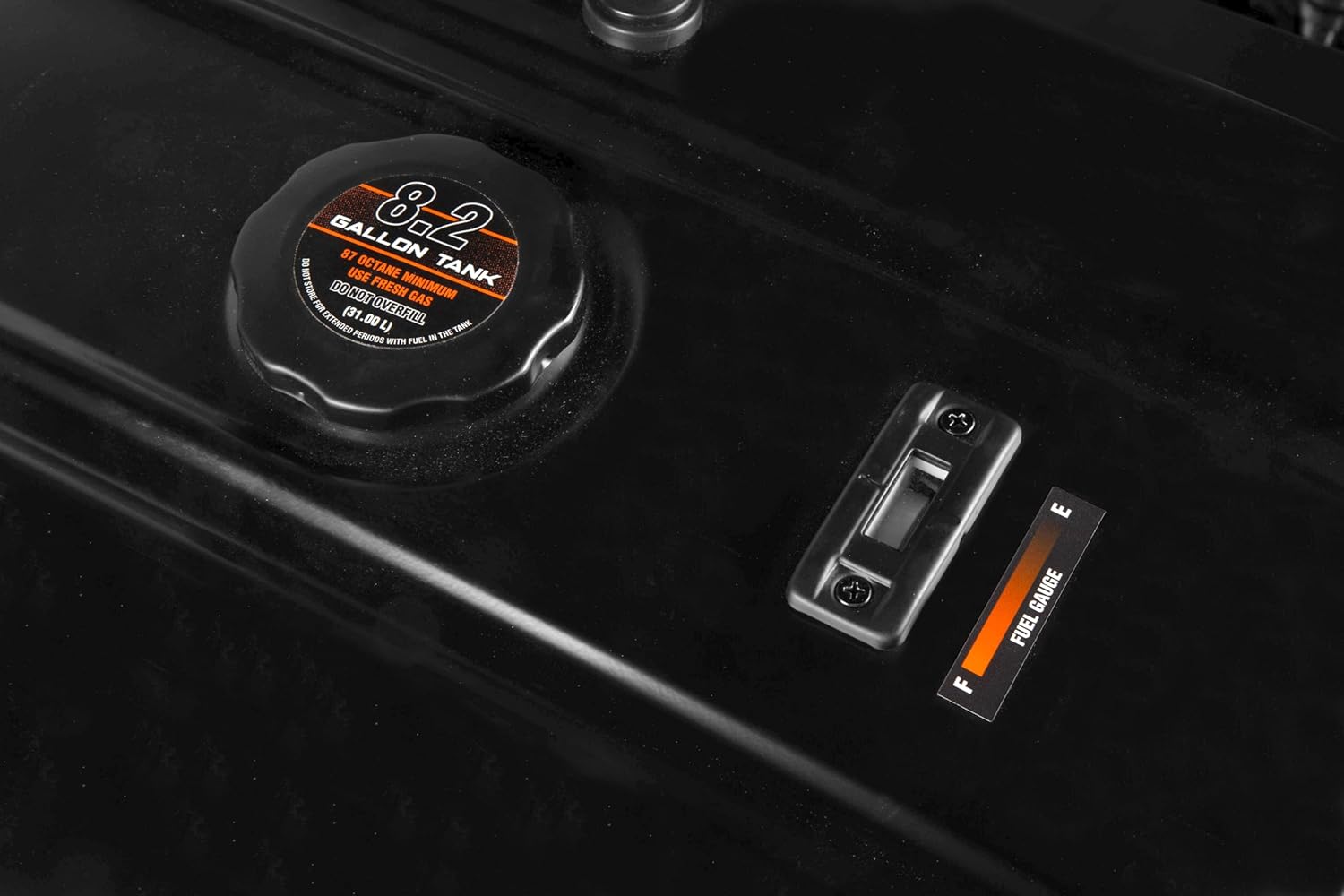
Figure 3: The 8.2-gallon fuel tank cap and integrated fuel gauge for monitoring gasoline levels.
3. Operating Instructions
Once the generator is set up, follow these steps to safely operate it:
- Start the Engine:
- Ensure the fuel switch is set to your desired fuel type (Gasoline, Propane, or Natural Gas).
- Insert the key into the engine switch and turn it to the "ON" position.
- Turn the key to "START" to engage the electric starter. Hold until the engine starts. If the battery is low, use the recoil start by pulling the cord.
- Connect Appliances/Transfer Switch:
- Allow the generator to run for a few minutes to warm up.
- For direct appliance connection: Plug your devices into the appropriate 120V 5-20R outlets.
- For home backup (transfer switch ready): Connect the NEMA L14-30R or 14-50R outlet to your transfer switch using a compatible power cord. Ensure your home's main breaker is off before engaging the transfer switch to prevent backfeeding.
- Monitor Operation: Use the onboard data meter to monitor voltage, frequency, and runtime. This helps ensure stable power delivery and track maintenance intervals.
- Shutdown Procedure:
- Disconnect all loads from the generator.
- Turn the engine switch to the "OFF" position.
- If using gasoline, turn the fuel switch to "STORAGE" to run the carburetor dry, preventing fuel buildup.
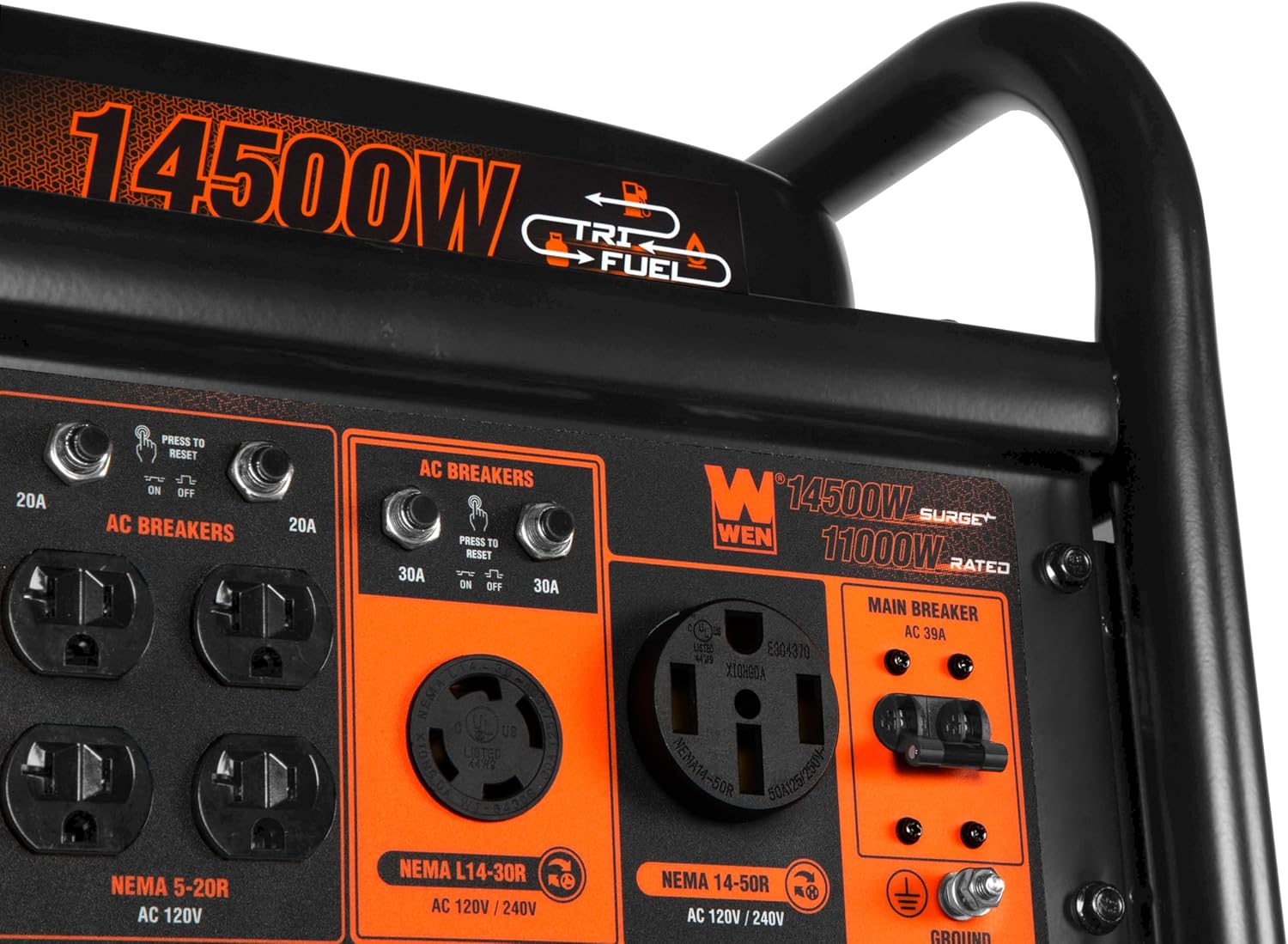
Figure 4: The generator's control panel featuring various AC outlets and the main breaker switch.
4. Maintenance
Regular maintenance ensures the longevity and reliable operation of your WEN TF1450X generator. Always refer to the full user manual for detailed maintenance schedules and procedures.
- Oil Changes: Change the engine oil after the first 20-25 hours of operation, and then every 50-100 hours or annually, whichever comes first. Use the recommended oil type (e.g., SAE 10W-30).
- Air Filter: Inspect and clean the air filter regularly. Replace if heavily soiled or damaged.
- Spark Plug: Check the spark plug condition periodically. Clean or replace as needed to ensure proper ignition.
- Fuel System: For gasoline operation, use fresh fuel and consider a fuel stabilizer if storing the generator for extended periods. Run the carburetor dry before long-term storage.
- General Cleaning: Keep the generator clean and free of debris. Ensure cooling vents are unobstructed.
- CO Watchdog Sensor: The CO Watchdog sensor is a critical safety feature. Ensure it is functioning correctly. The data meter will display error codes (e.g., P50 for oil change, P100 for extensive service) to prompt maintenance.

Figure 5: The engine compartment, including the recoil start mechanism for manual starting.
5. Troubleshooting
If your generator encounters issues, consult this basic troubleshooting guide. For complex problems, contact WEN customer support.
| Problem | Possible Cause | Solution |
|---|---|---|
| Generator won't start. | Low oil level; no fuel; stale fuel; spark plug issue; battery dead (for electric start). | Check oil, add if low. Add fresh fuel. Replace spark plug. Charge/replace battery. |
| No power output. | Circuit breaker tripped; overload; main breaker on generator off. | Reset circuit breakers on generator. Reduce load. Ensure main breaker is ON. |
| Engine runs rough. | Dirty air filter; stale fuel; carburetor issues. | Clean/replace air filter. Use fresh fuel. Consult service for carburetor cleaning. |
| CO Watchdog alarm. | High carbon monoxide levels detected. | Immediately move generator to a well-ventilated outdoor area. Do not operate indoors. |
6. Technical Specifications
| Specification | Value |
|---|---|
| Brand | WEN |
| Model Name | 14,500-Watt 120V/240V Tri-Fuel Generator |
| Model Number | TF1450X |
| Fuel Type | Gasoline, Propane, Natural Gas |
| Starting Wattage (Gasoline) | 14500 Watts |
| Running Wattage (Gasoline) | 11500 Watts |
| Surge Wattage (Propane) | 12500 Watts |
| Running Wattage (Propane) | 10300 Watts |
| Surge Wattage (Natural Gas) | 10500 Watts |
| Running Wattage (Natural Gas) | 8750 Watts |
| Voltage | 120 Volts (AC), 240 Volts (AC) |
| Engine Type | 500cc 4-Stroke OHV |
| Ignition System Type | Electric Start |
| Fuel Tank Volume | 8.2 Gallons |
| Runtime (Half-load, Gasoline) | Up to 12 hours |
| Total Power Outlets | 7 (4x 120V 5-20R, 1x 120V/240V L14-30R, 1x 120V/240V 14-50R, 1x 12V DC automotive) |
| Special Feature | CO Sensor (CO Watchdog) |
| Product Dimensions (L x W x H) | 28.8" x 28.3" x 25.8" |
| Item Weight | 252 pounds |
| UPC | 044459145004 |
7. Warranty & Support
The WEN TF1450X Tri-Fuel Generator comes backed by a three-year limited warranty, ensuring peace of mind for your investment. WEN provides a nationwide network of skilled service technicians and a stocked inventory of replacement parts.
For any questions, technical assistance, or warranty claims, please contact WEN customer support:
- Customer Helpline: 1-847-429-9263 (M-F 8-5 CST)
- Website: www.wenproducts.com
- WEN Store on Amazon: Visit the WEN Store