
Introduction
This manual provides detailed instructions for the installation, operation, and maintenance of your Mount-It! MI-1706WHT Single Monitor Stand. Please read these instructions carefully before installation to ensure safe and correct usage.
Package Contents
Verify that all components are present and undamaged. If any parts are missing or damaged, please contact Mount-It! customer support.
- Monitor Arm Assembly (Pole, VESA Plate, Arm)
- Desk Clamp Component
- Grommet Mount Component
- Hardware Kit (various screws, washers, hex wrenches)
- Cable Management Clip
Specifications
| Brand | Mount-It! |
| Model | MI-1706WHT |
| Mounting Type | Tabletop Mount (Clamp & Grommet) |
| Material | Alloy Steel |
| Color | White |
| Compatible Devices | Monitor |
| Minimum Supported Screen Size | 17 Inches |
| Maximum Supported Screen Size | 32 Inches |
| Weight Capacity | Up to 19.8 lbs |
| VESA Compatibility | 75x75mm, 100x100mm |
| Movement Type | Rotate, Tilt, Swivel |
| Tilt Angle | ±40 Degrees |
| Swivel Angle | 160 Degrees |
| Rotation | 360 Degrees |
| Pole Height | 16 Inches |
Setup and Installation
This monitor stand offers two installation methods: C-clamp and grommet mount. Choose the method that best suits your desk.
1. Assemble the Base
Attach the base plate to the main pole using the provided bolt and hex wrench. Ensure it is securely tightened.
2. Choose Your Mounting Option
C-Clamp Installation
For desks with a thickness between 0.4" and 3.3". Attach the C-clamp bracket to the pole base. Depending on your desk thickness, you may need to adjust the orientation of the clamp handle. Place the assembled stand onto the edge of your desk. Tighten the hand knob until the clamp is firmly secured against the underside of the table.

Figure 1: C-clamp and Grommet Mounting Options. The C-clamp is shown on the left, securing the stand to the edge of a desk. The grommet mount is shown on the right, installed through a desk hole.

Figure 2: Mounting Dimensions. This diagram illustrates the 16-inch pole height and the adjustable clamp/grommet depths, along with VESA 75x75mm and 100x100mm compatibility.
Grommet Mount Installation
For desks with an existing grommet hole or if you plan to drill one (0.4" - 1.6" thickness). Remove the C-clamp components. Insert the grommet bolt through the desk hole from the top. From the underside of the desk, attach the grommet handle and tighten it until the stand is secure.
3. Attach the Monitor Arm to the Pole
Slide the monitor arm assembly over the top of the pole. Position it at your desired height and tighten the bolt on the rear of the arm using the hex wrench until it is secure.
4. Attach the VESA Plate to Your Monitor
Select the appropriate size mounting bolts and washers from the hardware kit that fit your monitor's VESA mounting holes (75x75mm or 100x100mm). Attach the VESA plate securely to the back of your monitor.
5. Mount the Monitor
Carefully slide the VESA plate with your monitor onto the monitor arm. Ensure it is fully seated. Install the safety bolt at the top of the VESA bracket to prevent accidental dislodgement.
Installation Video Guide
Video 1: Mount-It! Monitor Desk Mount MI-1706 Installation. This video provides a visual guide for the complete installation process of the monitor desk mount, covering both clamp and grommet options.
Operating and Adjustments
The Mount-It! Single Monitor Stand allows for various adjustments to achieve optimal viewing angles and ergonomic positioning.
Height Adjustment
To adjust the monitor height, loosen the bolt on the rear of the monitor arm, slide the arm up or down the 16-inch pole to your desired eye level, and then re-tighten the bolt securely.

Figure 3: Ergonomic Height Adjustment. The image highlights the 16-inch pole, allowing users to set their monitor at an optimal ergonomic height.
Tilt, Swivel, and Rotation
The monitor arm supports 160° swivel, ±40° tilt, and 360° rotation. To adjust the tilt, loosen the bolt on the side of the VESA plate, position your screen to the desired angle, and then re-tighten the bolt. The monitor can be swiveled left or right by gently turning the screen. For 360° rotation, simply rotate the monitor to switch between landscape and portrait orientations.

Figure 4: Full Motion Adjustments. This image demonstrates the monitor stand's ability to swivel 160°, tilt ±40°, and rotate 360° for versatile viewing angles.
Features Overview Video
Video 2: Mount-It! Monitor Desk Mount MI-1706 Features. This video showcases the various adjustable features and benefits of the monitor desk mount, including ergonomic positioning and space-saving design.
Maintenance
- Cleaning: Wipe the stand with a soft, damp cloth. Avoid abrasive cleaners or solvents.
- Tightness Check: Periodically check all bolts and connections to ensure they remain tight and secure. Re-tighten as necessary.
- Cable Management: Utilize the included cable management clip to keep cables organized and prevent strain.
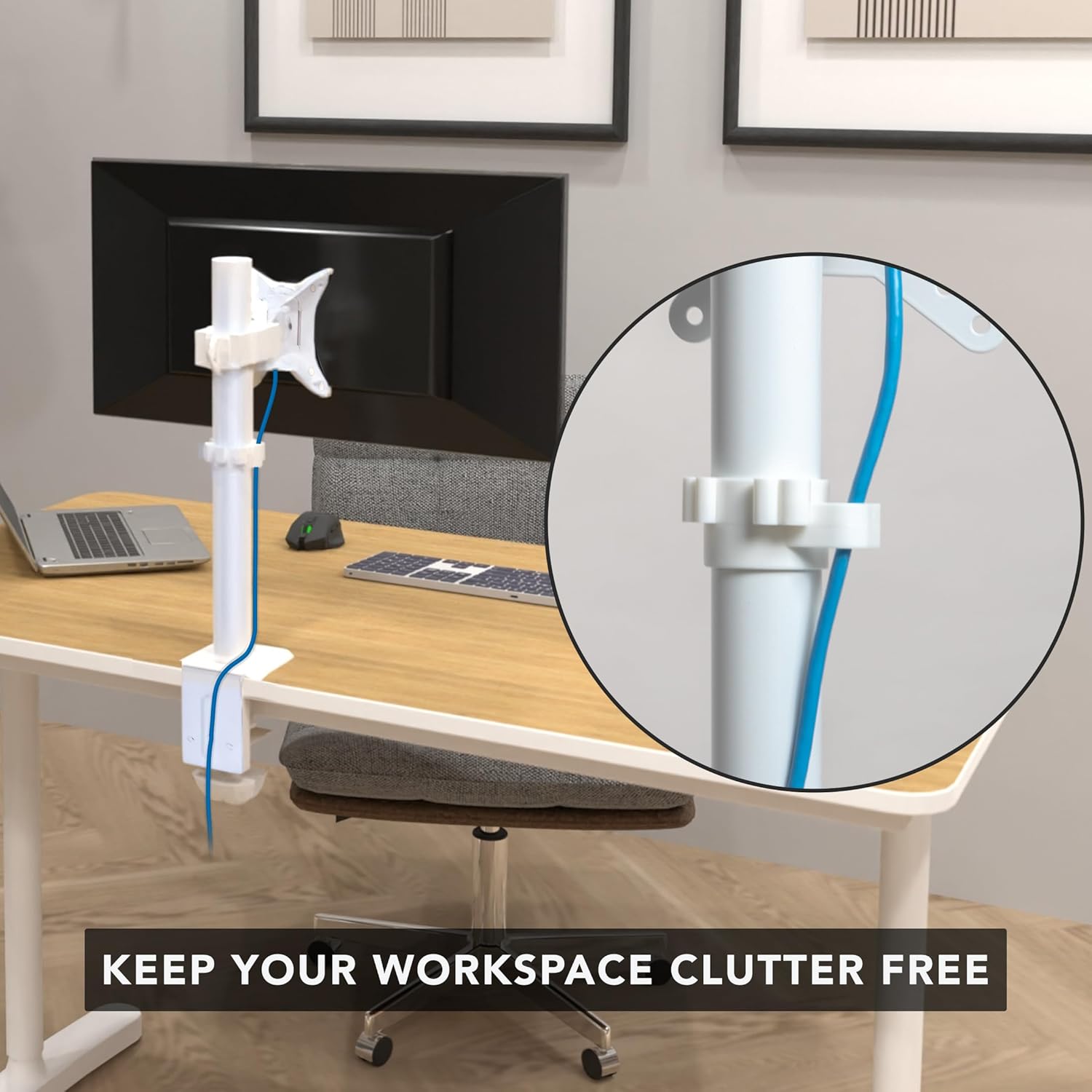
Figure 5: Cable Management. The integrated cable clip helps maintain a tidy workspace by routing monitor cables along the stand's pole.
Troubleshooting
- Monitor is wobbly: Ensure all mounting bolts, especially the clamp/grommet and monitor arm bolts, are securely tightened. Verify your desk surface is stable.
- Monitor does not hold position (tilts/swivels too easily): Tighten the adjustment bolts on the monitor arm and VESA plate. Refer to the "Operating and Adjustments" section.
- Cannot attach VESA plate to monitor: Check your monitor's VESA pattern (75x75mm or 100x100mm) and ensure you are using the correct size screws and washers from the hardware kit. Some monitors may require spacers (not included if not standard).
- Stand does not fit desk: Confirm your desk thickness is within the specified range for the C-clamp (0.4" - 3.3") or grommet mount (0.4" - 1.6").
Warranty Information
This Mount-It! product is backed by a Lifetime Manufacturer Warranty. For details regarding warranty claims or coverage, please contact Mount-It! customer support.
Customer Support
For technical assistance, missing parts, or warranty inquiries, please contact our dedicated US-based technical experts. Visit the official Mount-It! website for contact information or refer to your product packaging.


