1. Introduction
This manual provides comprehensive instructions for the safe and effective use of your Ibiza COLUMBA700 Bluetooth Wireless Speaker, LEDBAR-ASTRO-RC DJ Light Stand, and PARTY-MINIWAVE Water Wave Light Effect. Please read this manual thoroughly before operating the devices and retain it for future reference.
2. Safety Information
Observe the following safety precautions to prevent electric shock, fire, or injury:
- Do not expose the devices to rain or moisture.
- Do not open the casing. Refer all servicing to qualified personnel.
- Ensure proper ventilation around the devices.
- Use only the power adapters specified for each device.
- Keep the devices away from heat sources and direct sunlight.
- Avoid placing heavy objects on the power cords.
- Do not look directly into the light sources when operating the lighting effects.
3. Package Contents
Verify that all items are present in your package:
- 1 x Ibiza COLUMBA700 Active Standalone Speaker
- 1 x LEDBAR-ASTRO-RC Lighting Gate with Stand and Remote Control
- 1 x PARTY-MINIWAVE Water Wave Light Set with Remote Control
- 1 x USB-C Charging Cable (for COLUMBA700 speaker)
- 1 x Power Adapter (for LEDBAR-ASTRO-RC)
- 1 x Power Adapter (for PARTY-MINIWAVE)
- This Instruction Manual
4. Product Overview
4.1 Ibiza COLUMBA700 Bluetooth Wireless Speaker
The COLUMBA700 is a portable, powerful speaker featuring dual 8-inch woofers, integrated LED lighting, and multiple connectivity options.
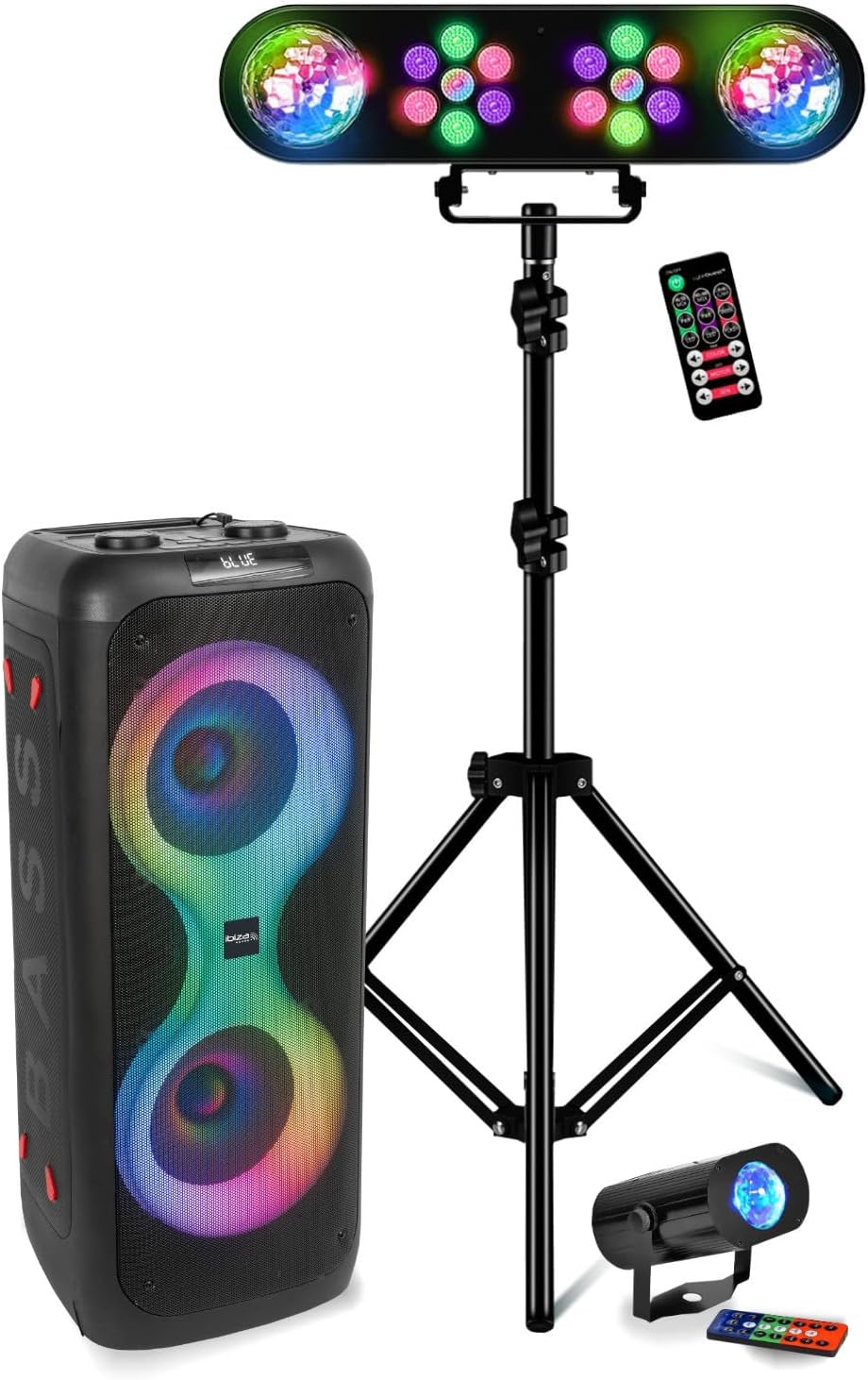
Image: Front view of the Ibiza COLUMBA700 speaker, showcasing its dual 8-inch woofers with integrated LED lighting.
Controls and Ports:

Image: Top control panel of the Ibiza COLUMBA700 speaker, showing various inputs and controls.
- MIC 1 / MIC 2: 6.3mm Jack inputs for microphones.
- AUX: 3.5mm Jack input for external audio devices.
- TF CARD: Slot for microSD card playback.
- USB: Port for USB drive playback.
- DC IN 5V 2A: USB-C port for charging the internal battery.
- CHARGE Indicator: LED indicating charging status.
- MIC VOLUME (Min/Max): Rotary knob to adjust microphone volume.
- VOLUME (Min/Max): Rotary knob to adjust master volume.
- MODE: Button to switch between input modes (Bluetooth, USB, SD, AUX).
- REC / REPLAY: Button to start/stop recording or replay recordings.
- MENU / MIC PRI: Button to access menu options or activate microphone priority.
- Previous / Next Track: Buttons for track navigation.
- Play / Pause / TWS: Button for playback control and TWS pairing.
4.2 LEDBAR-ASTRO-RC DJ Light Stand
The LEDBAR-ASTRO-RC is a 4-in-1 lighting system featuring two PAR headlights and two rotating Astro balls, mounted on an adjustable stand.

Image: The LEDBAR-ASTRO-RC light stand fully assembled, showcasing the light bar with PAR headlights and Astro balls.
Components:
- Light Bar: Contains 2 PAR headlights (7x3W RGB LEDs) and 2 ASTRO Ball headlights (3x3W RGB LEDs).
- Adjustable Stand: Extends up to 1.7 meters.
- Remote Control: For mode selection and control.
4.3 PARTY-MINIWAVE Water Wave Light Effect
The PARTY-MINIWAVE creates a dynamic water ripple effect with its 6x3W RGB LEDs.

Image: The PARTY-MINIWAVE water wave light effect unit, shown with its blue light projection.
5. Setup
5.1 Ibiza COLUMBA700 Speaker Setup
- Charging: Before first use, fully charge the speaker using the provided USB-C cable and a compatible 5V 2A USB power adapter. The CHARGE indicator will illuminate during charging and turn off when complete.
- Power On: Locate the power switch (usually on the back or top panel) and switch it to the 'ON' position. The display will light up.
5.2 LEDBAR-ASTRO-RC Light Stand Setup
- Assemble Stand: Extend the tripod legs of the light stand for stability. Adjust the height to your desired level (maximum 1.7m) and secure the locking mechanisms.
- Attach Light Bar: Securely mount the LEDBAR-ASTRO-RC light bar onto the top of the stand using the provided mounting hardware.
- Power Connection: Connect the provided power adapter to the light bar and plug it into a suitable power outlet.

Image: Exploded view of the LEDBAR-ASTRO-RC components, including the light bar, stand, and remote control, illustrating assembly.
5.3 PARTY-MINIWAVE Water Wave Light Setup
- Placement: Place the PARTY-MINIWAVE on a stable, flat surface or mount it using its bracket. Consider the projection area for the best effect.
- Power Connection: Connect the provided power adapter to the unit and plug it into a suitable power outlet.
6. Operating Instructions
6.1 Ibiza COLUMBA700 Speaker Operation
Bluetooth Pairing:
- Power on the speaker. Press the MODE button until 'BLUE' or 'Bluetooth' appears on the display.
- Enable Bluetooth on your mobile device and search for 'COLUMBA700'.
- Select 'COLUMBA700' to pair. A confirmation sound will indicate successful pairing.
TWS (True Wireless Stereo) Function:
To connect two COLUMBA700 speakers for stereo sound:
- Ensure both COLUMBA700 speakers are powered on and in Bluetooth mode, but not yet paired to any device.
- On one speaker (this will be the master), press and hold the TWS button (often combined with Play/Pause).
- The speakers will attempt to pair with each other. A confirmation sound will indicate successful TWS pairing.
- Now, pair your mobile device to the master speaker via Bluetooth as described above. Audio will play in stereo through both speakers.
USB/SD Card Playback:
- Insert a USB drive or microSD card (TF CARD) with MP3 audio files into the respective slot.
- The speaker will automatically switch to USB/SD mode and begin playback. If not, press the MODE button.
- Use the Previous/Next Track and Play/Pause buttons to control playback.
AUX Input:
- Connect an external audio device (e.g., laptop, MP3 player) to the AUX input using a 3.5mm audio cable.
- Press the MODE button until 'AUX' is selected.
- Control playback from your external device.
Microphone Usage and Recording:
- Connect microphones to the MIC 1 or MIC 2 inputs.
- Adjust microphone volume using the MIC VOLUME knob.
- To activate Microphone Priority (reduces music volume during speech), press the MENU / MIC PRI button.
- To Record, ensure a USB drive or microSD card is inserted. Press the REC button to start recording. Press again to stop.
- To Replay recordings, press the REPLAY button.
6.2 LEDBAR-ASTRO-RC Light Stand Operation
- Power On: Once connected to power, the unit will typically power on automatically.
- Mode Selection: Use the remote control or buttons on the unit to select operating modes:
- Automatic Mode: Lights cycle through pre-programmed patterns.
- Sound Mode: Lights react to ambient sound or music. Ensure the microphone on the unit is not obstructed.
- Adjustments: Use the remote control to adjust brightness, speed, or select specific colors/patterns if available.
6.3 PARTY-MINIWAVE Water Wave Light Operation
- Power On: Once connected to power, the unit will typically power on automatically.
- Control: Use the provided remote control to turn the unit on/off, change colors, adjust brightness, or modify the movement speed of the water wave effect.
7. Maintenance
- Cleaning: Wipe the surfaces of all devices with a soft, dry cloth. Do not use abrasive cleaners or solvents.
- Storage: When not in use, store the devices in a cool, dry place, away from direct sunlight and extreme temperatures.
- Battery Care (COLUMBA700): To prolong battery life, avoid fully discharging the speaker frequently. Charge it regularly, even if not in use for extended periods.
8. Troubleshooting
8.1 Ibiza COLUMBA700 Speaker
- No Power: Ensure the speaker is charged or connected to a power source. Check the power switch.
- No Sound: Check the master volume and input source. Ensure Bluetooth is paired correctly or cables are securely connected.
- Bluetooth Disconnection: Move your device closer to the speaker. Disconnect and re-pair the Bluetooth connection.
- Microphone Not Working: Ensure microphones are plugged in correctly and MIC VOLUME is adjusted. Check microphone priority setting.
8.2 LEDBAR-ASTRO-RC Light Stand / PARTY-MINIWAVE Light Effect
- Lights Not Working: Ensure the power adapter is securely connected and plugged into a working outlet. Check if the remote control batteries need replacement.
- Remote Control Not Responding: Ensure there is a clear line of sight to the device's IR receiver. Replace batteries if necessary.
- Sound Mode Not Reacting: Ensure the microphone on the light bar is not obstructed and the music source is loud enough.
9. Specifications
| Feature | Specification |
|---|---|
| Brand | Ibiza |
| Model | IBIZA_columba700_ledbar-astro-rc_mw |
| Speaker Output Wattage | 700 Watts (Max) |
| Speaker Boomers | 2 x 8 inch (20cm) |
| Speaker Impedance | 4 Ohms |
| Speaker Bandwidth | 30Hz - 20kHz |
| Speaker Connectivity | Bluetooth, USB, microSD, AUX |
| Speaker Audio Inputs | 1 x AUX, 2 x Microphone |
| Speaker Battery | Rechargeable Li-ion (7.4V, 2500mAh) |
| Speaker Charging Input | 5V 2A (USB-C) |
| Speaker Dimensions (L x W x H) | 28.4 x 28.2 x 68 cm |
| Speaker Weight | 6.8 kg |
| LEDBAR-ASTRO-RC Light Sources | 2 x 7x3W RGB PAR headlights, 2 x 3x3W RGB ASTRO Ball LEDs |
| LEDBAR-ASTRO-RC Stand Height | Max. 1.7 m |
| PARTY-MINIWAVE Light Source | 6 x 3W RGB LEDs |
| PARTY-MINIWAVE Power Supply | 12Vdc 2A |
| PARTY-MINIWAVE Dimensions | 22 x 13 x 13 cm |
| PARTY-MINIWAVE Weight | 0.8 kg |
| Material Type | Plastic |
10. Warranty and Support
This product is manufactured by Lotronic under the Ibiza brand. For warranty information and technical support, please refer to the documentation provided at the point of purchase or contact your retailer. EU spare part availability is guaranteed for 2 years.


