
1. Introduction
The Xiaomi Smart Band 10 is a versatile fitness tracker designed to enhance your daily life with advanced health monitoring, extensive sports tracking, and smart connectivity features. This manual provides essential information on setting up, operating, maintaining, and troubleshooting your device.
2. Setup
2.1 Package Contents
Ensure all items are present in the package:
- Xiaomi Smart Band 10 (Main Unit)
- Charging Cable
- User Manual
2.2 Charging the Device
Before first use, fully charge your Smart Band 10. Connect the charging cable to the charging contacts on the back of the band and to a USB power source. A full charge takes approximately 60 minutes.

The Smart Band 10 charging via its magnetic cable. The display shows 100% battery and the current time.
2.3 Pairing with Your Smartphone
To unlock the full potential of your Smart Band 10, pair it with the MI Fitness app on your smartphone (compatible with iOS and Android devices).
- Download and install the MI Fitness app from your smartphone's app store.
- Open the app and create an account or log in.
- Follow the on-screen instructions in the app to add a new device.
- Select "Xiaomi Smart Band 10" from the list of available devices.
- Confirm the pairing request on both your smartphone and the Smart Band.
3. Operating Instructions
3.1 Display and Navigation
The Smart Band 10 features a 1.72-inch AMOLED touch display with up to 1500 nits brightness and a 60Hz refresh rate for clear visuals and smooth interaction.

The Xiaomi Smart Band 10 features a 1.72-inch AMOLED display with a high screen-to-body ratio and ultra-thin 2.0mm bezels, providing an immersive visual experience.
- Swipe Up/Down: Scroll through menus and notifications.
- Swipe Left/Right: Access quick widgets or different functions.
- Tap: Select an item or confirm an action.
- Press and Hold: Customize watch faces or access specific settings.
3.2 Notifications and Smart Features
Receive call and app notifications directly on your band. The Xiaomi Smart Hub allows seamless interaction with other devices.

With the Smart Band 10, you can check incoming calls, send quick replies, and view notifications from apps like LINE and calendar events simply by raising your wrist.
- Call Notifications: View incoming calls and choose to reject them or send quick replies.
- App Notifications: Receive alerts from messaging apps (e.g., LINE) and other applications.
- Xiaomi Smart Hub: Control earphone battery levels, adjust volume, switch noise cancellation modes, remotely control your smartphone camera, and manage tablet slides during presentations.
3.3 Health Monitoring
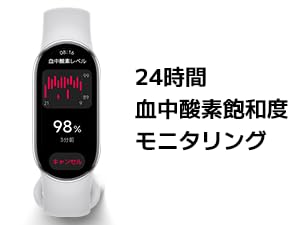
The Smart Band 10 offers comprehensive 24-hour health management.

The Smart Band 10 offers comprehensive 24-hour health management, including continuous heart rate monitoring, blood oxygen saturation (SpO2) tracking, stress level assessment, and dedicated women's health tracking features.
- Heart Rate Monitoring: Continuous 24-hour heart rate tracking.
- Blood Oxygen Saturation (SpO2): Monitor your blood oxygen levels throughout the day.
- Stress Monitoring: Track your stress levels and receive alerts for high stress.
- Sleep Monitoring 2.0: Enhanced accuracy for sleep and wake detection, providing detailed reports and personalized sleep improvement suggestions.
- Women's Health Tracking: Monitor menstrual cycles and receive predictions.
3.4 Sports Modes and Activity Tracking
The Smart Band 10 supports over 150 sports modes and features a 9-axis motion sensor for accurate data.

The Smart Band 10 features an enhanced sports algorithm and a 9-axis motion sensor, supporting over 150 sports modes for comprehensive activity tracking.
- 150+ Sports Modes: Track a wide range of activities, including swimming, cycling, and running.
- Heart Rate Broadcast: Transmit real-time heart rate data via Bluetooth to compatible external devices.
- Running Courses: Access various built-in running courses with scientific guidance to optimize your training.
4. Maintenance
4.1 Cleaning the Device
Regular cleaning helps maintain the device's performance and appearance.
- Wipe the screen and strap with a soft, damp cloth.
- Avoid using harsh chemicals or abrasive materials.
- Ensure the charging contacts are clean and dry before charging.
4.2 Water Resistance
The Smart Band 10 has a 5ATM water resistance rating, meaning it can withstand pressures equivalent to a depth of 50 meters. It is suitable for swimming and showering, but not for diving or high-pressure water activities.
The Smart Band 10 is water-resistant up to 5ATM, making it suitable for swimming.
5. Troubleshooting
If you encounter issues with your Smart Band 10, try the following solutions:
- Device Not Turning On: Ensure the device is fully charged. Connect it to the charger for at least 10 minutes.
- Pairing Issues: Make sure Bluetooth is enabled on your smartphone and the band is within range. Restart both devices and try pairing again. Ensure the MI Fitness app is updated to the latest version.
- Inaccurate Data: Ensure the band is worn snugly on your wrist. Clean the sensors on the back of the device. Update the firmware via the MI Fitness app.
- Notifications Not Appearing: Check app notification settings in the MI Fitness app and your smartphone's system settings. Ensure the app has necessary permissions.
- Screen Unresponsive: Restart the device by pressing and holding the button (if available) or by connecting it to the charger.
6. Specifications
| Feature | Detail |
|---|---|
| Operating System | Xiaomi HyperOS |
| Display Type | AMOLED |
| Screen Size | 1.72 inches |
| Resolution | 212 x 520 |
| Max Brightness | 1500 nits |
| Battery Capacity | 233 mAh Lithium-ion |
| Average Battery Life | 21 days |
| Charging Time | 60 minutes |
| Connectivity | Bluetooth |
| Water Resistance | 5 ATM (50 meters) |
| Sensors | Blood Oxygen (SpO2), Heart Rate, Stress, Sleep Duration, 9-axis motion sensor |
| GPS | Smartphone-assisted GPS |
| Supported App | MI Fitness |
| Compatible Devices | iOS and Android smartphones |
| Band Material | Polyester |
| Case Material | Aluminum alloy |
| Product Weight | 0.03 kg |
| Dimensions (D x W x H) | 47 x 23 x 11 mm |
| Included Components | Charging cable, User manual, Main unit |
7. Warranty Information
The Xiaomi Smart Band 10 comes with a 1-year manufacturer's warranty from the date of purchase. This warranty covers manufacturing defects under normal use. Please retain your proof of purchase for warranty claims.
8. Support
For further assistance or inquiries, please contact Xiaomi customer support:
- Phone Support: 0120-767-378 (Reception hours: 9:00-18:00, excluding year-end and New Year holidays)
- Email Support: service.jp@support.mi.com
You can also visit the official Xiaomi store on Amazon for more product information and accessories: Xiaomi Amazon Store
9. Product Overview Video
This video provides a visual overview of the Xiaomi Smart Band 10, highlighting its sleek design and the availability of different strap materials and colors, allowing for personal style customization.


