Introduction
This manual provides detailed instructions for the setup, operation, and maintenance of your Pyle PHSKR28.5 Mini Hi-Fi Bluetooth Stereo System. Please read this manual thoroughly before using the product to ensure proper function and to maximize your listening experience.

Image: The Pyle PHSKR28.5 Mini Hi-Fi Bluetooth Stereo System, featuring a central unit and two accompanying speakers, all in black.
What's in the Box
Verify that all components are present in the packaging:
- Main Stereo Unit
- Two Speakers
- BT Stereo System Remote Control
- AV Connection Cable
- One Wireless Microphone
- Power Cord
- FM Antenna Cable

Image: An illustration showing all items included in the product package: the main stereo unit, two speakers, a microphone, an AV cable, an FM antenna, and a remote control.
Setup Instructions
1. Speaker Connection
- Connect the speaker wires from the main unit to the corresponding speaker terminals on each speaker. Ensure correct polarity (positive to positive, negative to negative).
- Position the speakers for optimal sound distribution.
2. Antenna Connection
- Connect the supplied FM antenna cable to the FM antenna input on the rear of the main unit.
- Extend the antenna for better reception.
3. Power Connection
- Plug the power cord into the AC inlet on the main unit.
- Connect the other end of the power cord to a standard AC power outlet.
4. Optional Connections
- USB Devices: Insert a USB flash drive into the USB port for media playback or recording.
- AUX Input: Connect external audio devices (e.g., smartphone, MP3 player) using an AUX cable to the AUX input.
- HDMI Output: Connect an HDMI cable from the unit's HDMI output to a compatible display for video output from CD/DVD playback.
- Microphone: Connect the wireless microphone receiver or a wired microphone to the microphone input for karaoke or recording.

Image: The Pyle PHSKR28.5 stereo system highlighting its various input options including Aux, HDMI, and USB ports, alongside visual cues for Bluetooth connectivity with a laptop and smartphone.
Operating Instructions
Power On/Off
Press the POWER button on the front panel or remote control to turn the unit on or off.
Source Selection
Press the SOURCE or FUNCTION button on the front panel or remote control to cycle through available input sources: Bluetooth, CD/DVD, FM Radio, USB, AUX, HDMI.
Bluetooth Pairing
- Select the Bluetooth source using the SOURCE button. The display will show "BT" and indicate pairing mode.
- On your mobile device, enable Bluetooth and search for available devices.
- Select "Pyle PHSKR28.5" (or similar) from the list.
- Once paired, the unit will confirm the connection.
CD/DVD Playback
- Select the CD/DVD source.
- Press the OPEN/CLOSE button to open the disc tray.
- Place a CD or DVD (compatible with MP3, CD-R/RW) onto the tray with the label side up.
- Press OPEN/CLOSE again to close the tray. Playback will begin automatically or can be started with the PLAY/PAUSE button.

Image: A close-up view of the Pyle PHSKR28.5 stereo system's tray-loading CD player, with a hand inserting a disc.
FM Radio Tuning
- Select the FM Radio source.
- Use the TUNE +/- buttons to manually tune to a station.
- Press and hold TUNE +/- for automatic scanning to the next available station.
- To save a preset, press MEMORY, then use PRESET +/- to select a preset number, and press MEMORY again to confirm.
USB Playback, Recording, and CD Ripping
- USB Playback: Insert a USB flash drive. Select the USB source. The unit will automatically detect and play compatible audio files.
- USB Recording: While playing audio from another source (e.g., FM radio, AUX, microphone input), press the RECORD button to begin recording to the connected USB drive.
- CD Ripping: While a CD is playing, press the CD RIP button to convert tracks from the CD to MP3 format and save them onto the USB drive.
Microphone Usage
Connect the microphone to the designated input. Use the MIC VOL knob to adjust microphone volume. Adjust ECHO and REVERB effects as desired for vocal enhancement.
Equalizer Settings
Press the EQ button on the front panel or remote to cycle through various equalizer presets such as Jazz, Rock, Pop, Classical, and Bass. These settings adjust the audio frequency response for different music genres.

Image: The Pyle PHSKR28.5 stereo system with its speakers illuminated by colorful LED lights, illustrating the visual feedback of equalizer effects and strong bass output.


Image: Icons representing various equalizer presets: Jazz (saxophone), Classical (cello), and Pop (person with headphones).
Volume, Bass, and Treble Adjustment
Use the MASTER VOLUME knob on the front panel or the VOL +/- buttons on the remote to adjust the overall volume. Separate BASS and TREBLE controls are available on the remote for fine-tuning the audio output.
Remote Control Functions
The included remote control provides convenient access to all major functions, including power, source selection, volume, track control, equalizer settings, and microphone effects.

Image: A detailed view of the Pyle PHSKR28.5 main unit's control panel, showing buttons for digital amplifier, Bluetooth 5.0, USB ports, LED indicators, and microphone volume/bass/treble adjustments.
Maintenance
- Cleaning: Use a soft, dry cloth to clean the exterior surfaces of the unit and speakers. Do not use liquid cleaners or abrasive materials.
- Ventilation: Ensure that the ventilation openings on the unit are not blocked to prevent overheating.
- Disc Care: Handle CDs and DVDs by their edges. Store them in their cases to prevent scratches. Clean discs with a soft, lint-free cloth, wiping from the center outwards.
- Storage: If storing the unit for an extended period, disconnect it from the power outlet and store it in a cool, dry place.
Troubleshooting
| Problem | Possible Cause | Solution |
|---|---|---|
| No power | Power cord not connected; Power outlet not active. | Ensure power cord is securely plugged in. Test the outlet with another device. |
| No sound | Volume too low; Incorrect source selected; Speaker wires loose. | Increase volume. Select the correct input source. Check speaker wire connections. |
| Bluetooth not pairing | Unit not in pairing mode; Device too far; Previously paired device connected. | Ensure unit is in Bluetooth pairing mode. Move device closer. Disconnect from other Bluetooth devices. |
| CD/DVD not playing | Disc inserted incorrectly; Disc is scratched or dirty; Incompatible disc format. | Insert disc correctly. Clean or replace disc. Ensure disc is compatible (MP3, CD-R/RW). |
| Poor FM reception | Antenna not properly connected or extended; Weak signal. | Adjust FM antenna position. Try repositioning the unit. |
| Remote control not working | Batteries depleted; Obstruction between remote and unit. | Replace remote control batteries. Ensure clear line of sight to the unit's IR sensor. |
Specifications
| Feature | Detail |
|---|---|
| Model Number | PHSKR28.5 |
| Brand | Pyle |
| Power Output | 160W RMS |
| Connectivity | Bluetooth 5.0, USB, AUX, HDMI |
| Media Playback | CD, DVD, VCD, CD-R/RW, MP3, FM Radio |
| Special Features | DSP Technology, Equalizer Settings (Jazz, Rock, Pop, Classical, Bass), Microphone Inputs with Echo/Reverb, USB Recording, CD Ripping |
| Color | Black |
| Product Dimensions (L x W x H) | 10.8 x 12 x 15.5 inches (Main Unit + Speakers) |
| Item Weight | 16 pounds |
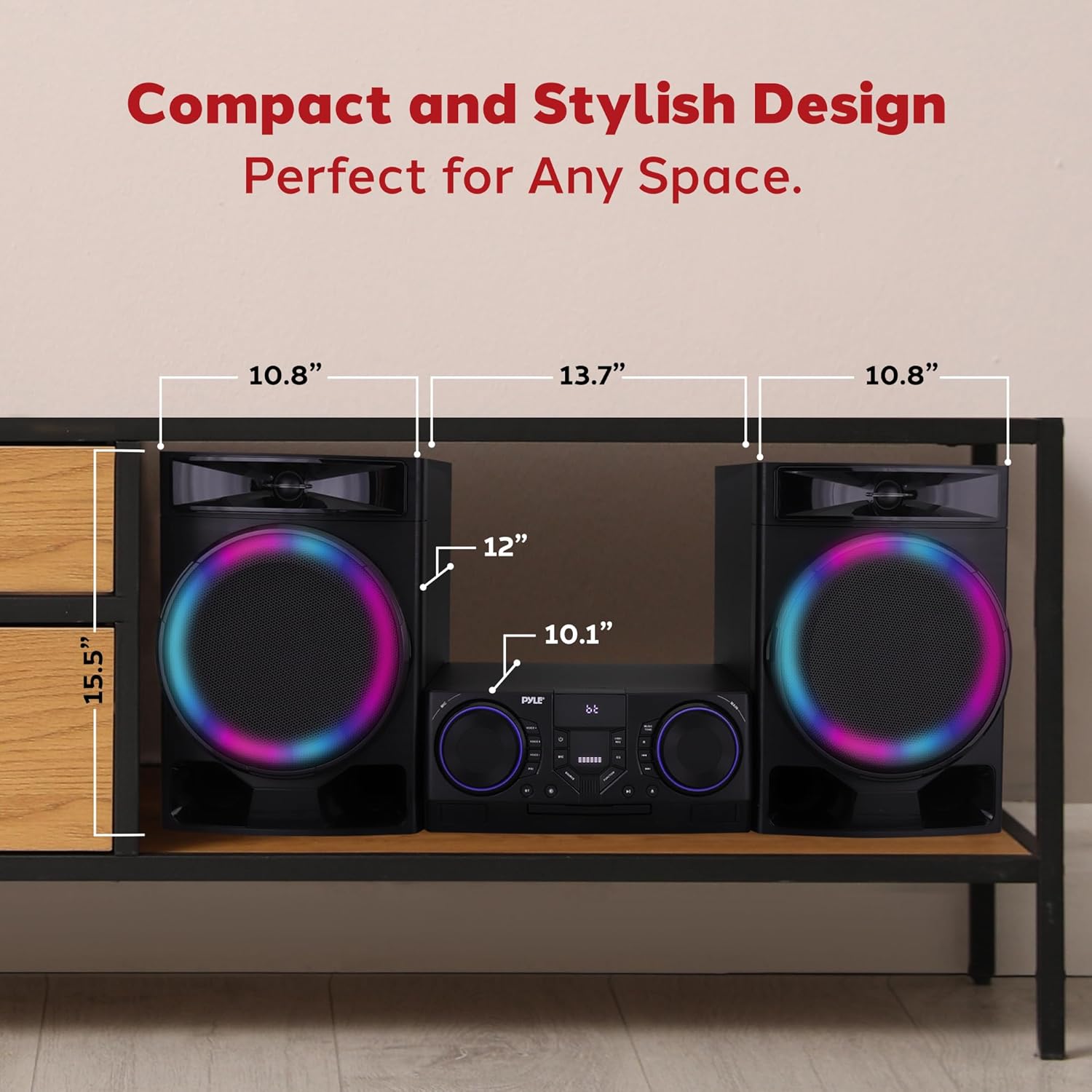
Image: A diagram illustrating the dimensions of the Pyle PHSKR28.5 stereo system, including the main unit and speakers, with measurements for length, width, and height.
Warranty and Support
Pyle products are designed for reliability and performance. For warranty information, please refer to the warranty card included with your product or visit the official Pyle website. For technical support or service inquiries, please contact Pyle customer service.
Note: Keep your purchase receipt as proof of purchase for warranty claims.


