1. Introduction
This manual provides essential information for the safe and efficient installation, operation, and maintenance of your Haier ES80V-TF7W(EU) 80L Wi-Fi Electric Water Heater. Please read this manual thoroughly before installation and use, and keep it for future reference.
The Haier ES80V-TF7W(EU) is an 80-liter electric water heater designed for efficient hot water supply. It features Wi-Fi connectivity for remote control and monitoring, an ultra-compact design, and multi-position installation (vertical/horizontal). Key features include advanced insulation, anti-corrosion resistance, and multiple safety systems.
2. Safety Information
Important Safety Instructions:
- Read all instructions before using this water heater.
- Installation and servicing must be performed by qualified personnel only.
- Ensure the power supply matches the voltage specified on the water heater's rating label.
- Do not operate the water heater if it is damaged or malfunctioning.
- Always disconnect power before performing any maintenance or repairs.
- This appliance is not intended for use by persons (including children) with reduced physical, sensory or mental capabilities, or lack of experience and knowledge, unless they have been given supervision or instruction concerning use of the appliance by a person responsible for their safety.
- Children should be supervised to ensure that they do not play with the appliance.
- The water heater is equipped with a safety valve. Do not tamper with or block the safety valve.
- The Shock-Proof technology ensures protection against electric shocks without the need for a separate dielectric connector.
- Protection against overheating and overpressure is integrated.
3. Package Contents
Verify that all components are present and undamaged before proceeding with installation.
- Haier ES80V-TF7W(EU) Electric Water Heater unit
- User Manual (this document)
- Mounting accessories (if included, check packaging)
Note: The product specifications mention "Chauffe-eau" (Water Heater) as components included. Other accessories like mounting brackets might be separate or pre-attached.
4. Specifications
| Feature | Specification |
|---|---|
| Brand | Haier |
| Model Number | ES80V-TF7W(EU) / 25001120Y |
| Capacity | 80 Liters |
| Dimensions (L x W x H) | 53 x 53 x 107 cm |
| Color | White |
| Power Source | Electric Cable |
| Mounting Type | Wall Mount |
| Installation | Vertical or Horizontal |
| Energy Efficiency Class | B |
| Special Features | Anti-rust, Self-cleaning, Discharge valve, LED screen, Wi-Fi Connectivity, U-Flow Technology, Shock-Proof Technology |
5. Setup and Installation
Professional installation by a qualified technician is highly recommended.
- Location Selection: Choose a suitable location that can support the weight of the water heater when full (80 liters of water + unit weight). Ensure adequate space for maintenance and proper ventilation. The unit supports both vertical and horizontal installation.
- Mounting: Securely mount the water heater to a sturdy wall using appropriate mounting hardware. Refer to the detailed mounting instructions provided with the physical product for specific drilling patterns and bracket installation.
- Water Connections:
- Connect the cold water inlet to the designated port (usually marked blue or with a 'C').
- Connect the hot water outlet to the designated port (usually marked red or with an 'H').
- Install the safety relief valve (T&P valve) according to local codes and manufacturer instructions. Ensure proper drainage for the relief valve.
- Open a hot water faucet in your home to allow air to escape while the tank fills. Once water flows steadily from the faucet, close it.
- Check all connections for leaks.
- Electrical Connection:
- Ensure the power supply is disconnected at the main breaker before making electrical connections.
- Connect the water heater to a dedicated electrical circuit as per local electrical codes. The unit uses an electric cable power source.
- Verify proper grounding.
- Initial Power-Up:
- Once water and electrical connections are complete and checked, restore power to the unit.
- The LED screen should illuminate.
- Wi-Fi Setup:
- Download the Haier Smart Home application on your smartphone.
- Follow the in-app instructions to connect your water heater to your home Wi-Fi network. This will enable remote control and monitoring features.
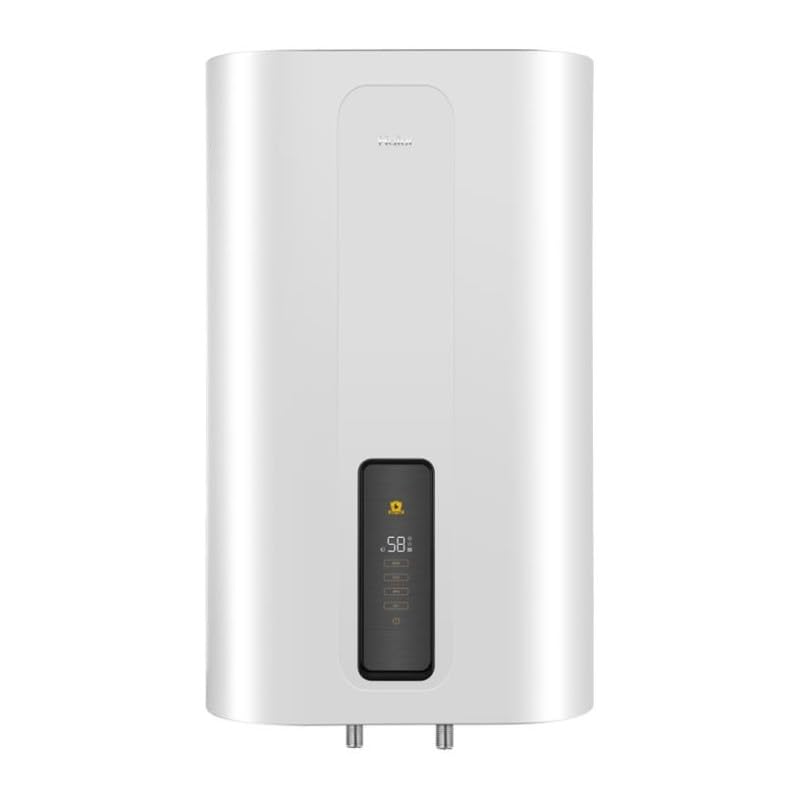
Image 1: Haier ES80V-TF7W(EU) 80L Electric Water Heater. This image shows the compact design of the water heater, suitable for multi-position installation.
6. Operating Instructions
The Haier ES80V-TF7W(EU) water heater can be operated via its integrated LED screen or remotely through the Haier Smart Home application.
6.1. Control Panel Operation
The intuitive digital display allows for precise temperature control and function selection.
- Power Button: Press to turn the unit ON or OFF.
- Temperature Adjustment: Use the '+' and '-' buttons to set the desired water temperature. The current temperature will be displayed.
- Mode Selection: Cycle through the available operating modes using the mode button. The water heater offers 4 functions:
- Normal: Standard heating mode.
- ECO: Energy-saving mode, optimizes heating cycles to reduce power consumption.
- BPS (Sterilization): A mode designed for sterilization, likely involving heating water to a higher temperature for a period. Consult the full product manual for specific temperature and duration details.
- Max: Heats water to the maximum safe temperature.
- Wi-Fi Indicator: An icon on the display indicates the Wi-Fi connection status.
6.2. Wi-Fi Remote Control
Once connected to the Haier Smart Home app, you can:
- Turn the water heater ON/OFF remotely.
- Adjust the target water temperature.
- Select operating modes (Normal, ECO, BPS, Max).
- Monitor energy consumption.
- Set schedules for heating cycles to optimize energy usage.
- Receive notifications regarding the water heater's status.
6.3. U-Flow Technology
The U-Flow technology is designed to reduce the impact of incoming cold water on the existing hot water layer, preventing stratification breakdown. This feature increases hot water availability by up to 24%.
7. Maintenance
Regular maintenance ensures optimal performance and extends the lifespan of your water heater. Always disconnect power before performing any maintenance.
- Drainage: Periodically drain a small amount of water from the tank to remove sediment buildup. This should be done at least once a year, or more frequently in areas with hard water.
- Safety Valve Check: Manually operate the temperature and pressure (T&P) relief valve at least once a year to ensure it is not obstructed. Follow the manufacturer's instructions for this procedure carefully to avoid scalding.
- Anode Rod Inspection: The anti-corrosion resistance is enhanced by an anode rod. This rod should be inspected and replaced periodically (typically every 1-3 years, depending on water quality) by a qualified technician.
- Exterior Cleaning: Clean the exterior of the water heater with a soft, damp cloth. Do not use abrasive cleaners or solvents.
- Self-cleaning Function: The unit features a self-cleaning function. Refer to the full product manual for instructions on how to activate and utilize this feature.
8. Troubleshooting
Before contacting customer service, refer to the following common issues and solutions:
| Problem | Possible Cause | Solution |
|---|---|---|
| No hot water | No power; thermostat tripped; heating element failure. | Check circuit breaker; reset thermostat; contact qualified technician for element replacement. |
| Insufficient hot water | Thermostat set too low; excessive hot water usage; sediment buildup. | Increase temperature setting; reduce hot water demand; drain tank to remove sediment. |
| Water too hot | Thermostat set too high. | Lower temperature setting. |
| Leaking from T&P valve | Excessive pressure; faulty valve. | Check water pressure; contact qualified technician to inspect/replace valve. |
| Wi-Fi connection issues | Router issues; incorrect password; distance from router. | Restart router; re-enter Wi-Fi password in app; ensure water heater is within Wi-Fi range. |
For issues not listed here or if problems persist, contact Haier customer support or a qualified service technician.
9. Warranty and Support
Haier products are manufactured to high-quality standards. For specific warranty terms and conditions, please refer to the warranty card included with your product or visit the official Haier website for your region.
Customer Support:
- For technical assistance, spare parts, or service requests, please contact Haier customer support.
- Have your model number (ES80V-TF7W(EU) / 25001120Y) and serial number ready when contacting support.
- You can find contact information on the official Haier website or in the documentation provided with your purchase.
Note: Information regarding spare parts availability was not provided in the product data. Please contact Haier directly for spare parts inquiries.