
1. Introduction
This manual provides detailed instructions for the installation, operation, and maintenance of your darkFlash DG240 240mm All-in-One (AIO) Liquid CPU Cooler. Please read this manual thoroughly before installation to ensure proper setup and optimal performance.
The darkFlash DG240 is designed to provide efficient cooling for your CPU, featuring a high-performance pump, ARGB lighting, and PWM-controlled fans. It is compatible with various Intel and AMD CPU sockets.
2. Package Contents
Verify that all components are present in the package:
- DG240 AIO Cooler (Radiator, Pump, and Fans pre-attached)
- Mounting Brackets for Intel and AMD Sockets
- Backplates for Intel and AMD Sockets
- Mounting Screws and Standoffs
- Thermal Paste (pre-applied or in a tube)
- User Manual

Image 2.1: darkFlash DG240 240mm AIO Liquid CPU Cooler with ARGB fans and pump.
3. Installation Guide
Before beginning installation, ensure your system is powered off and unplugged. Refer to your motherboard manual for specific header locations.
3.1. CPU Socket Compatibility
The darkFlash DG240 supports the following CPU sockets:
- Intel: LGA 1200, 115X, 1700, 1851
- AMD: AM4, AM5

Image 3.1: Mounting brackets for Intel and AMD CPU sockets.
3.2. Preparing the Motherboard
- Identify the correct backplate for your CPU socket (Intel or AMD).
- Attach the backplate to the rear of your motherboard, aligning the holes with the CPU cooler mounting holes.
- Insert the appropriate standoffs through the motherboard from the front, securing them to the backplate.
3.3. Installing the Radiator and Fans
The DG240 features a 240mm radiator with two fans. The fans are designed for high wind pressure and efficient airflow.
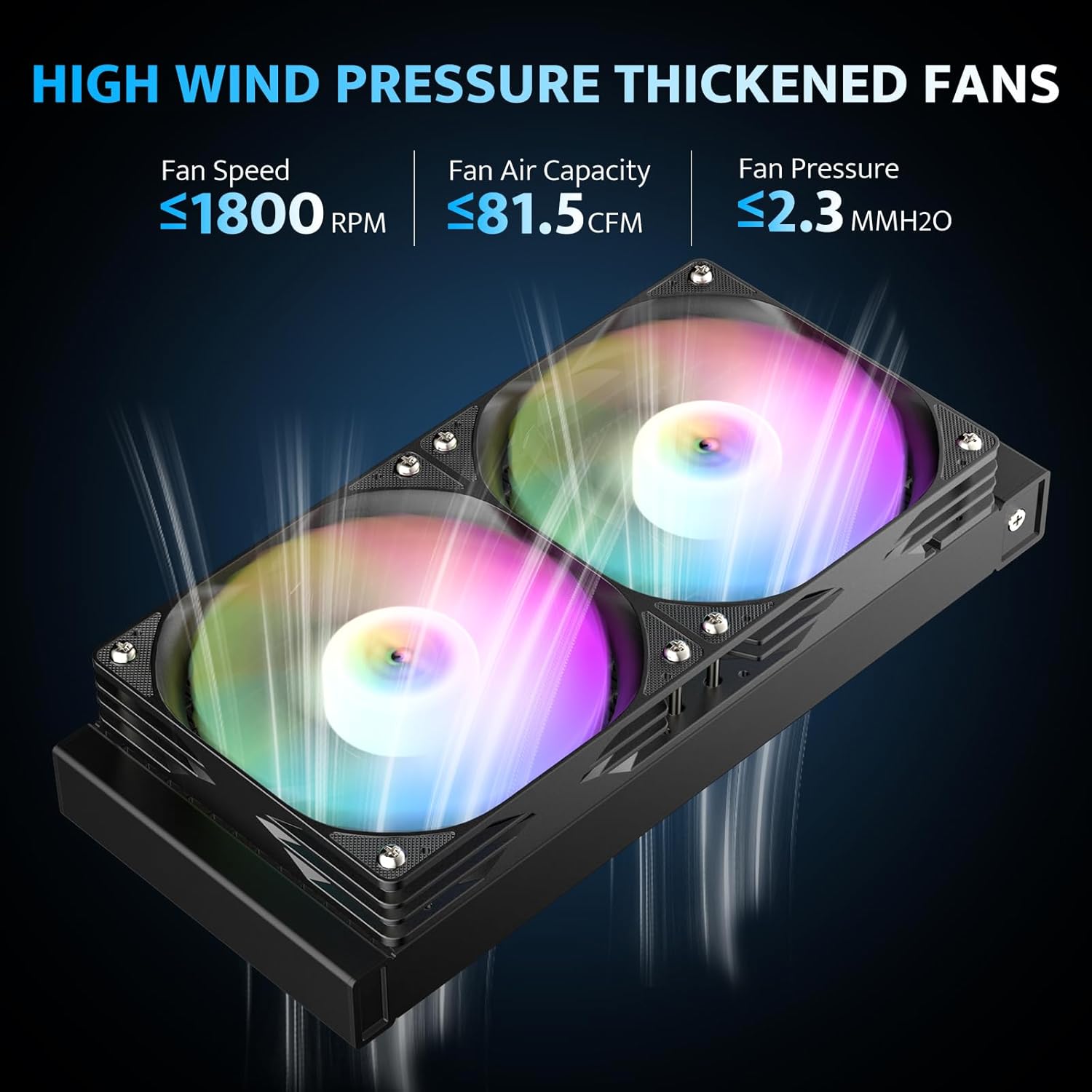
Image 3.2: Illustration of the high wind pressure fans, indicating fan speed, air capacity, and pressure.

Image 3.3: Diagram showing the high-density cooling radiator with optimized airflow and IIR+EPDM dual-material tubing.
- Determine the optimal mounting location for the radiator within your PC case (e.g., top, front, or rear). Ensure adequate clearance.
- Secure the radiator to the case using the provided screws.
- Ensure the fans are oriented to push or pull air as desired for optimal case airflow.
3.4. Mounting the Pump/Cold Plate
The pump features a 3-phase 6-pole motor and a ceramic bearing for efficient and durable operation.

Image 3.4: Exploded view of the pump, highlighting the 3-phase 6-pole motor, ceramic bearing, and copper cold plate.

Image 3.5: Close-up of the optimized copper cooling plate, showing its dimensions and micro-channel design for improved heat transfer.
- If thermal paste is not pre-applied, apply a small, pea-sized amount to the center of your CPU's integrated heat spreader (IHS).
- Carefully place the pump/cold plate assembly onto the CPU, aligning the mounting holes with the standoffs.
- Secure the pump with the provided thumb screws or nuts, tightening them in a diagonal pattern until snug. Do not overtighten.
3.5. Cable Connections
The DG240 features ARGB lighting and PWM fan control.

Image 3.6: Example of the DG240 cooler installed in a PC case, demonstrating ARGB lighting synchronization with other components.
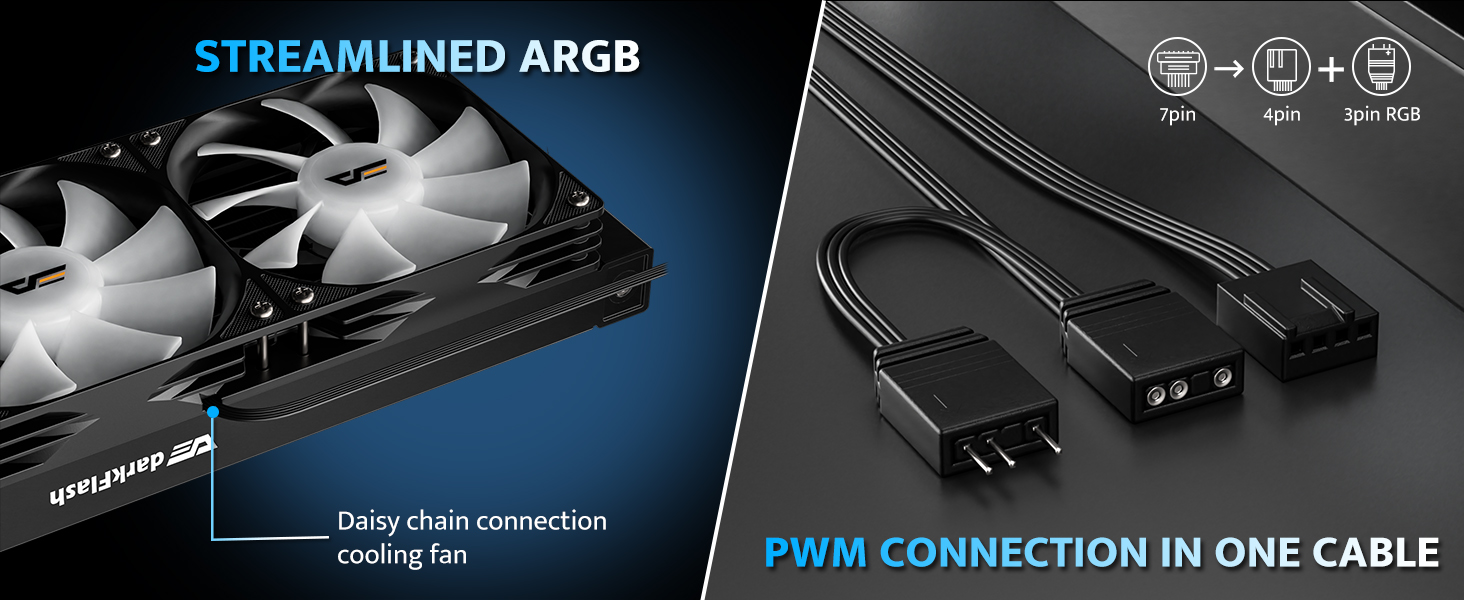
Image 3.7: Diagram illustrating the daisy-chain connection for the cooling fans and the consolidated PWM connection cable.
- Connect the pump's 3-pin power cable to an available 3-pin or 4-pin fan header on your motherboard (usually labeled "AIO_PUMP" or "CPU_FAN"). Ensure it receives full power.
- Connect the fans' PWM cable to the CPU_FAN header on your motherboard. The fans support daisy-chain connection for simplified wiring.
- Connect the 5V 3-pin ARGB cable from the pump and fans to a compatible 5V 3-pin ARGB header on your motherboard. This allows for synchronized lighting effects.
- Organize cables to ensure proper airflow and a clean build.
4. Operating Instructions
4.1. Initial Power-Up
After installation, double-check all connections before powering on your system. Upon first boot, monitor CPU temperatures using system monitoring software.
4.2. PWM Fan Control
The fans are PWM-controlled, meaning their speed adjusts automatically based on CPU temperature. This provides optimal cooling performance when needed and quieter operation during lighter loads. You can configure fan curves in your motherboard's BIOS/UEFI settings or through compatible software.
4.3. ARGB Lighting Synchronization
The DG240 supports 5V 3-pin Addressable RGB (ARGB) synchronization. Connect the ARGB cable to a compatible motherboard header (e.g., ASUS Aura Sync, MSI Mystic Light Sync, Gigabyte RGB Fusion, ASRock Polychrome RGB) to control lighting effects through your motherboard's software. This allows for unified lighting across your system components.
5. Maintenance
Regular maintenance helps ensure the longevity and optimal performance of your liquid CPU cooler.
- Dust Removal: Periodically clean dust from the radiator fins and fan blades using compressed air. Ensure fans are not spinning during cleaning.
- Cable Management: Verify that all cables are securely connected and not obstructing airflow.
- Coolant Check: As an AIO unit, the coolant is sealed and does not require refilling. However, inspect the tubing for any signs of leaks or damage.
- Pump Noise: A slight hum from the pump is normal. Excessive noise or grinding sounds may indicate an issue and should be investigated.
6. Troubleshooting
If you encounter issues with your darkFlash DG240 cooler, refer to the following common problems and solutions:
| Problem | Possible Cause | Solution |
|---|---|---|
| High CPU Temperatures |
|
|
| Fans Not Spinning |
|
|
| ARGB Lighting Not Working |
|
|
| Unusual Pump Noise |
|
|
7. Specifications
Detailed technical specifications for the darkFlash DG240 Liquid CPU Cooler:
| Feature | Specification |
|---|---|
| Model Number | DG240 |
| Product Dimensions | 10.91"L x 4.72"W x 1.06"H (Radiator) |
| Weight | Approximately 3.68 Pounds |
| CPU Socket Compatibility | Intel LGA 1200/115X/1700/1851, AMD AM4/AM5 |
| Cooling Method | Liquid (Water) |
| Radiator Material | Aluminum |
| Cold Plate Material | Copper, Micro Skived Fins |
| Pump Speed | Up to 3000 RPM |
| TDP Support | Up to 315W |
| Fan Airflow | Up to 81.5 CFM |
| Fan Noise Level | 33 dBA (Maximum) |
| Maximum Rotational Speed (Fans) | 1800 RPM |
| Power Connector Type | 5-Pin (for pump/fans, typically splits to 3-pin pump and 4-pin PWM fan) |
| Voltage | 12 Volts |
| Wattage | 1.8 watts (Pump) |
| ARGB Sync | 5V 3-pin ARGB compatible with major motherboard brands |
| Tubing Length | 400mm (15.75 inches) |

Image 7.1: Diagram showing the dimensions of the darkFlash DG240 cooler, including radiator and water block size.
8. Warranty and Support
8.1. Warranty Information
The darkFlash DG240 All-in-One Liquid CPU Cooler comes with a 3-year warranty. This warranty covers defects in materials and workmanship under normal use. For warranty claims, please retain your proof of purchase.
For additional protection, extended protection plans may be available through your retailer:
- 3-Year Protection Plan
- 4-Year Protection Plan
- Complete Protect (monthly plan)
8.2. Technical Support
For technical assistance, troubleshooting, or further inquiries, please visit the official darkFlash website or contact their customer support. Refer to the product packaging or the darkFlash brand store on Amazon for the most current contact information.
darkFlash Brand Store: Visit darkFlash Store on Amazon