
1. Introduction
Thank you for choosing MUCCCUTE Permanent Outdoor RGB Eaves Lights. This product is designed to provide versatile and durable outdoor lighting for various occasions and year-round use. Featuring IP67 waterproof LED bulbs, app and remote control, and a wide range of color options, these lights offer a convenient solution for enhancing your outdoor decor. This manual provides essential information for proper installation, operation, and maintenance to ensure optimal performance and longevity of your lighting system.
2. What's in the Box
Upon unpacking, please verify that all the following components are included:
- 300ft String Lights with Adhesive Backsides x 1
- Power Adapter x 1
- Remote Control x 1
- Screw Driver x 1
- Screws x 200
- User Manual x 1
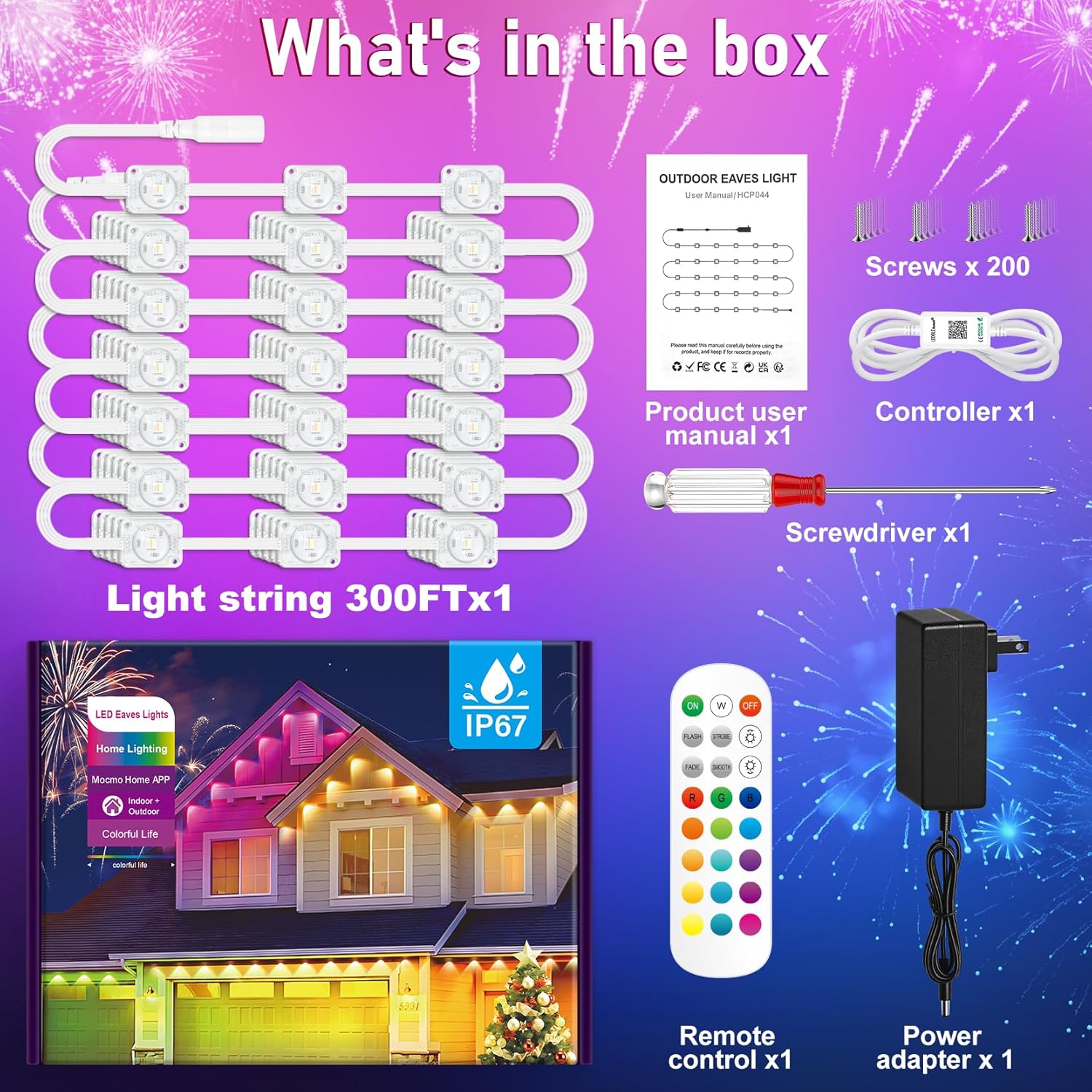
The image above displays the complete set of items you should find in your product package. Ensure all parts are present and undamaged before proceeding with installation.
3. Features
The MUCCCUTE HCP044 Permanent Outdoor RGB Eaves Lights offer a range of features designed for durability, versatility, and ease of use:
- Weather Resistant Design: Equipped with IP67 waterproof LED bulbs, these lights are built to withstand various weather conditions, including rain, snow, and sun, ensuring year-round functionality. (Note: The power adapter is not waterproof and must be protected from moisture.)
- Colorful and Versatile Lighting: Enjoy a spectrum of 16 million colors. The lights can be controlled via the included remote or a dedicated mobile application (connection model name: ELK-BLEDOB03).
- Smart Control Options: The mobile application provides advanced functionalities such as music synchronization, timer settings for automatic on/off, and scene customization.
- Easy Installation: Each LED light bulb features an adhesive backing for straightforward attachment. The package includes all necessary accessories, including screws for additional security.
- Energy-Efficient: These LED lights are designed to be bright while maintaining energy efficiency, making them suitable for extended use.


4. Setup & Installation
Follow these steps for a hassle-free installation of your MUCCCUTE Permanent Outdoor RGB Eaves Lights:
- Prepare the Surface: Before installing, clean the surface where the string lights will be attached with a cloth or tissue to ensure proper adhesion.
- Apply Adhesive: Each LED light bulb has an adhesive backing. Tear off the protective paper from the back of each light.
- Positioning: Install the string lights approximately 1.9-3.9 inches (5-10 cm) away from the wall surface to achieve the desired lighting effect.
- Secure with Screws: For enhanced stability and long-term installation, attach 4 screws to each string light to keep them securely in place. The included screwdriver and screws are provided for this purpose.
- Connect String Lights: If you are using multiple sections of string lights, connect them via the waterproof connectors and firmly screw on the caps to ensure a secure and sealed connection.
- Power Connection: Connect the power adapter to the string lights and plug it into a power outlet. Remember, the power adapter is not waterproof and should be placed in a dry, protected area.

5. Operating Instructions
Your MUCCCUTE Permanent Outdoor RGB Eaves Lights can be controlled using either the included remote control or the dedicated mobile application.
5.1 Remote Control Operation
The remote control provides quick access to basic functions:
- ON/OFF: Power the lights on or off.
- Warm White Mode: Activate a warm white light setting.
- Brightness Adjustment: Increase or decrease the light intensity.
- Color Selection: Choose from 15 preset colors.
- Flash/Strobe/Fade/Smooth Modes: Select various dynamic lighting effects.
- RGB Buttons: Directly select Red, Green, or Blue colors.
5.2 Mobile Application Control
For advanced features and customization, download the dedicated mobile application (connection model name: ELK-BLEDOB03). The app allows you to:
- 16 Million Colors: Access a full spectrum of colors for precise customization.
- Music Sync: Synchronize the lights with your music for dynamic effects.
- Timer Function: Set schedules for the lights to automatically turn on and off.
- Scene Settings: Choose from various pre-programmed scenes or create your own custom lighting scenarios.
- Brightness & Dimming: Adjust brightness levels with fine control.

Note: This RGB light string changes color for the whole string set. If you require individual or section-specific color changes, please refer to our RGB+IC light string models.

6. Maintenance
To ensure the longevity and optimal performance of your MUCCCUTE Permanent Outdoor RGB Eaves Lights, follow these maintenance guidelines:
- Regular Cleaning: Periodically wipe down the LED bulbs and cables with a soft, damp cloth to remove dust, dirt, or debris. Avoid using harsh chemicals or abrasive materials.
- Inspect Connections: Annually, or as needed, inspect all connections, especially the waterproof connectors, to ensure they remain tightly screwed and sealed.
- Power Adapter Protection: Always ensure the power adapter is located in a dry, protected area, away from direct exposure to rain, snow, or excessive moisture, as it is not waterproof.
- Cable Integrity: Check the cables for any signs of wear, cuts, or damage. If any damage is found, discontinue use and contact customer support for assistance.
- Seasonal Checks: Before and after extreme weather conditions (e.g., heavy storms, prolonged freezing temperatures), perform a visual inspection to ensure all lights are securely attached and functioning correctly.
7. Troubleshooting
If you encounter any issues with your MUCCCUTE Permanent Outdoor RGB Eaves Lights, please refer to the following troubleshooting tips:
- Lights Not Turning On:
- Ensure the power adapter is securely plugged into a working outlet.
- Check all cable connections between the light strings and the adapter.
- Verify that the remote control or app is sending the ON command.
- Remote Control Not Responding:
- Check if the remote's battery needs replacement.
- Ensure there are no obstructions between the remote and the light receiver.
- App Connection Issues:
- Ensure Bluetooth is enabled on your mobile device.
- Restart the app and try reconnecting.
- Verify that the light's connection model name (ELK-BLEDOB03) is correctly selected in the app.
- Inconsistent Lighting/Colors:
- Check for any loose connections along the light string.
- Ensure the power supply is stable.
- If individual bulbs are not functioning, they may require replacement.
If these steps do not resolve the issue, please contact MUCCCUTE customer support for further assistance.
8. Specifications
| Feature | Specification |
|---|---|
| Brand | MUCCCUTE |
| Model Number | HCP044 |
| Color | RGB Multi-colored (300ft) |
| Indoor/Outdoor Usage | Indoor, Outdoor |
| Special Feature | IP67 Waterproof LEDs, Remote & App Control, Set Scenes on App, Set Timer on App, 16 Million Colors (whole string color change) |
| Light Source Type | LED |
| Power Source | DC |
| Light Color | Multicolor |
| Material | Plastic |
| Number of Light Sources | 300 |
| Voltage | 24 Volts (DC) |
| Control Method | App, Remote |
| Average Life | 50,000 Hours |
| Item Weight | 5.1 pounds |
| Package Dimensions | 9.45 x 8.23 x 5.79 inches |
| UPC | 717504217475 |
9. Customer Support
For any concerns or questions regarding your MUCCCUTE Permanent Outdoor RGB Eaves Lights, please contact our customer support team. You can reach us by clicking "3CCC Direct" on the product page or your order page. Our customer support team aims to respond within 24 hours.