
1. Product Overview
The ADIMO Hand Gun Safe is designed to provide secure and rapid access to your firearms. It integrates advanced biometric technology, a digital keypad, and traditional key access to ensure your valuables are protected while remaining accessible when needed. Its robust construction and thoughtful features prioritize both security and user convenience.

Image 1.1: The ADIMO Hand Gun Safe, showcasing its interior capacity for firearms and accessories, along with included components like keys and a security cable.
2. Key Features
- Advanced Biometric Technology: High-resolution fingerprint scanner allows single-handed entry and stores up to 32 user fingerprints for quick and reliable access.
- Multiple Quick Access Options: Choose from instant fingerprint recognition, a 5-digit backlit keypad, or two backup keys for versatile entry.
- Durable and Secure Construction: Built with a reinforced thick steel lid and a pry-resistant door, featuring a robust high-strength locking system.
- Child Safety Design: Keeps firearms securely locked while allowing quick emergency access for adults, preventing unauthorized access by children.
- Ample Capacity: Flexibly stores 1 standard handgun with extra ammo, or 2 compact handguns along with other essentials. Interior padded with soft foam to prevent scratches.
- Mute Function: Allows for discreet and silent entry when needed by muting beeping sounds.
- Low Battery Alarm: A red light on the fingerprint button flashes 4 times when the battery is low, indicating it's time for replacement.
- Emergency USB Power Port: Provides continuous power if batteries die or keys are lost, connecting to an adapter, power bank, or car charger (does not charge batteries).
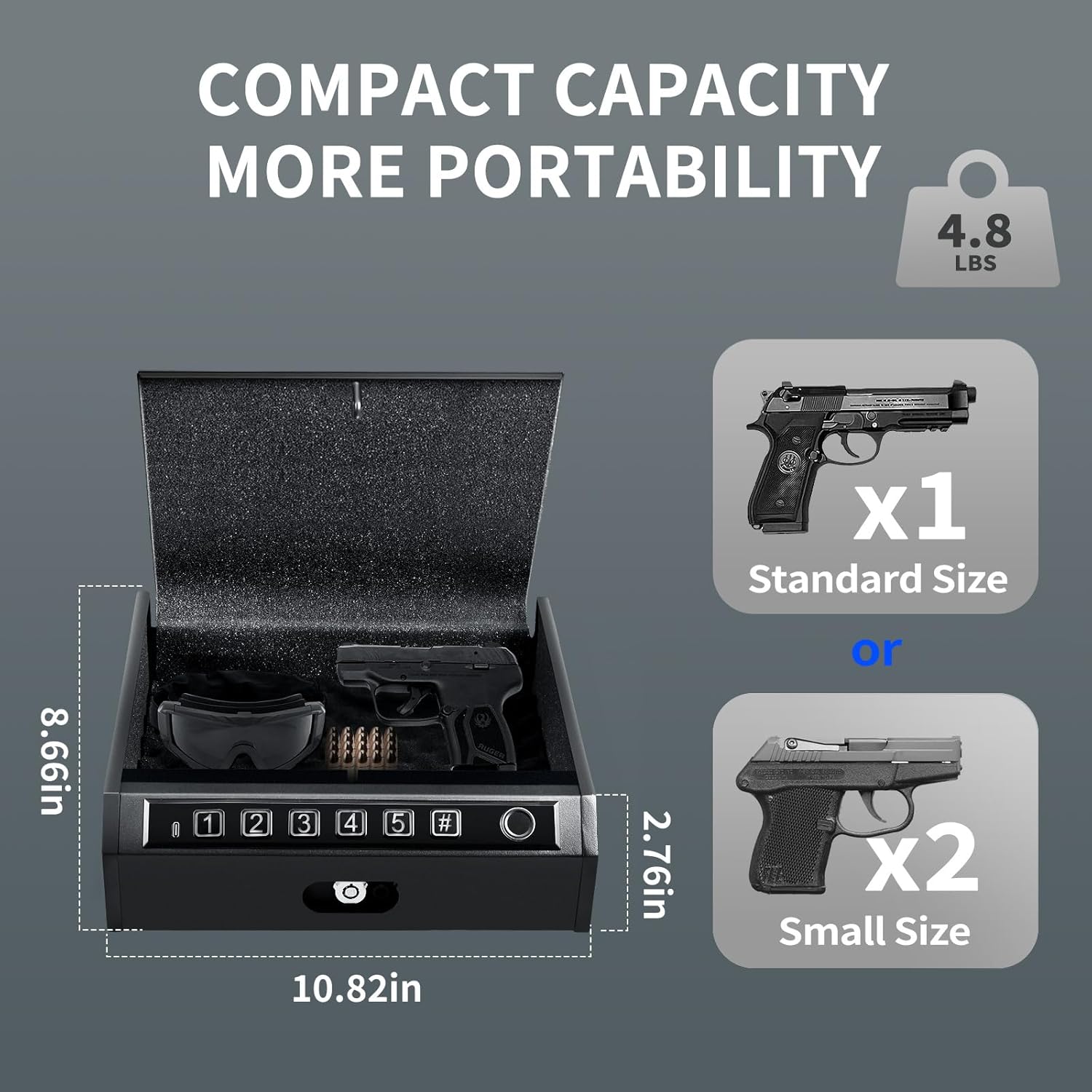
Image 2.1: Feature comparison illustrating the advantages of the ADIMO Biometric Handgun Safe.

Image 2.2: Compact dimensions and storage capacity of the safe.
3. What's Included
Upon unboxing your ADIMO Hand Gun Safe, please verify that all the following components are present:
- ADIMO Hand Gun Safe Unit
- Keys (x2)
- Screws Kit
- Security Cable
- USB Cable (for emergency power)
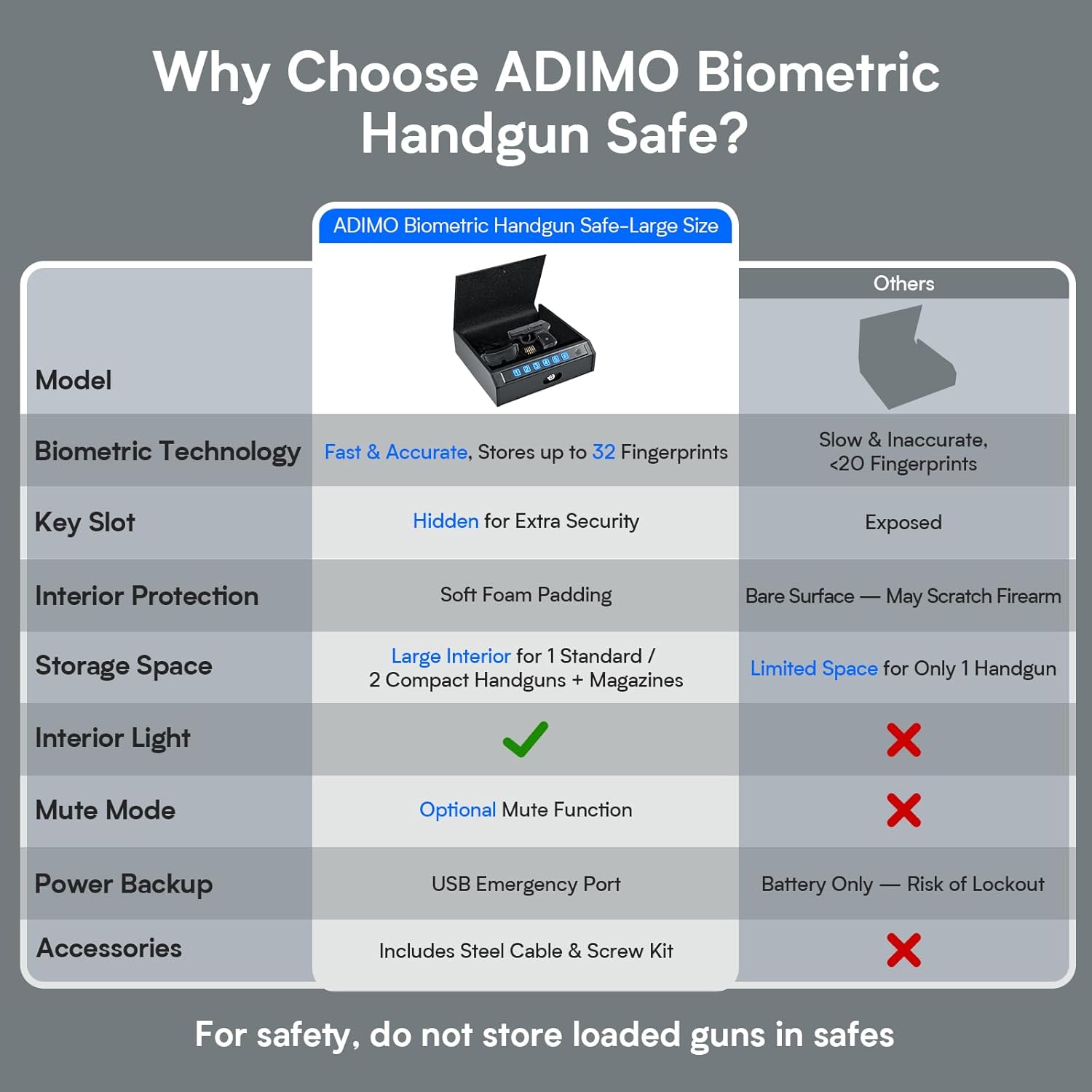
Image 3.1: All components included with the ADIMO Hand Gun Safe.
4. Setup Guide
4.1 Battery Installation
The safe requires 4 AA batteries (not included). To install:
- Locate the battery compartment, typically on the underside or rear of the safe.
- Open the compartment cover.
- Insert 4 AA batteries, ensuring correct polarity (+/-).
- Close the battery compartment cover securely.
4.2 Initial Access and Keyhole Location
For first-time access or if batteries are depleted, use the backup key. The keyhole is discreetly located for enhanced security.

Image 4.1: Location of the concealed keyhole.
4.3 Programming Fingerprints
The safe can store up to 32 unique fingerprints.
- With the safe open, locate the 'Set' button (refer to Image 4.2 for component identification).
- Press the 'Set' button. The fingerprint scanner light will activate.
- Place your finger firmly on the scanner. Lift and repeat several times from different angles until the safe confirms successful registration (e.g., a green light or audible beep).
- Repeat for additional fingerprints as desired.
4.4 Programming Keypad Code
Set your personal 5-digit keypad code.
- With the safe open, press the 'Set' button.
- Enter your desired 5-digit code on the keypad.
- Press the '#' key to confirm. The safe will indicate successful programming.
4.5 Mounting the Safe
The safe can be secured using the included screws or security cable.
- Using Screws: For permanent installation, use the provided screws to secure the safe to a flat surface (e.g., inside a drawer, to a nightstand).
- Using Security Cable: Loop the security cable around a fixed object and attach it to the designated anchor point on the safe.

Image 4.2: Securing the safe with the anti-theft security cable.
5. Operating Instructions
5.1 Accessing the Safe
The ADIMO safe offers three methods for quick access:
- Fingerprint Access: Place a registered finger on the biometric scanner. The safe will open automatically upon successful recognition.
- Keypad Access: Enter your programmed 5-digit code on the backlit keypad. The safe will open upon correct entry.
- Key Access: Insert one of the backup keys into the concealed keyhole and turn to unlock. This method is primarily for emergencies or initial setup.

Image 5.1: Triple unlocking security options.

Image 5.2: Accessing the safe silently.
5.2 Mute Function
To activate or deactivate the mute function (silent mode), refer to your specific model's manual section on sound settings. This feature allows for discreet operation without audible beeps.
5.3 Emergency USB Power
If the batteries are completely depleted, you can power the safe temporarily using the emergency USB port. Connect a USB cable from an adapter, power bank, or car charger to the safe's USB port. This will provide enough power to open the safe using your fingerprint or keypad code. Note: This port does not charge the internal batteries.

Image 5.3: Emergency USB power port in use.
6. Maintenance
6.1 Battery Replacement
When the battery level is low, the red light on the fingerprint button will flash 4 times. Replace all 4 AA batteries promptly to ensure continuous operation.

Image 6.1: Low power awareness indicator.
6.2 Cleaning
Wipe the exterior of the safe with a soft, damp cloth. Avoid abrasive cleaners or solvents that could damage the finish or electronic components. The interior foam padding can be gently wiped if necessary.

Image 6.2: Soft foam interior for gun protection.
7. Troubleshooting
- Safe Not Opening with Fingerprint/Keypad:
- Check battery level. Replace batteries if the low battery alarm is active.
- Ensure your finger is clean and dry when using the biometric scanner. Try re-registering your fingerprint if issues persist.
- Verify the keypad code is entered correctly.
- Use the backup key for emergency access.
- Safe Not Closing Properly:
- Ensure no obstructions are preventing the lid from closing completely.
- Check the locking mechanism for any visible damage or debris.
- No Power/Lights:
- Confirm batteries are installed correctly and are not depleted.
- Utilize the emergency USB power port to temporarily power the safe.
8. Specifications
| Attribute | Detail |
|---|---|
| Brand | ADIMO |
| Model Number | BGX-M/D-K2 |
| Product Dimensions | 10.82"W x 8.66"D x 2.73"H |
| Item Weight | 4.8 Pounds |
| Lock Type | Electronic (Biometric/Password/Keys) |
| Color | Black |
| Capacity | 0.15 Cubic Feet |
| Material | Alloy Steel |
| Mounting Type | Freestanding (Mounting Kit Included) |
| Batteries Required | Yes (4 x AA, not included) |
| Included Components | Gun Safe, Keys*2, Screws Kit, Security Cable, USB Cable |
9. Warranty and Support
9.1 Warranty Information
This ADIMO Hand Gun Safe comes with a 1 Year Manufacturer Warranty. Please retain your proof of purchase for warranty claims.
9.2 Customer Support
For further assistance, technical support, or warranty inquiries, please visit the official ADIMO Store on Amazon: