
1. Introduction
This manual provides essential information for the safe and effective use of your Sony ULT Tower 9AC Bluetooth Karaoke Party Speaker. Please read this manual thoroughly before operating the unit and retain it for future reference.

Figure 1: Front view of the Sony ULT Tower 9AC Speaker, showcasing its sleek black design and integrated party lights.
2. What's in the Box
- Speaker (SRSULT900AC)
- Optical Cable
- AC Power Cord
3. Product Overview
3.1 Design and Mobility
The ULT Tower 9AC features a robust, matte black plastic exterior. It stands approximately 35.83 inches tall, 16.14 inches wide, and 17.95 inches deep, weighing about 62.9 pounds. For easy transport, the speaker is equipped with a convenient carrying handle and integrated wheels.

Figure 2: The speaker's built-in handle and wheels facilitate easy movement.
3.2 Speaker Components
The ULT Tower 9AC is engineered for powerful, 360° sound. It includes multiple speaker units:
- Tweeters: Four 1.57-inch tweeters (two front-firing, two rear-firing) for clear high frequencies.
- Mid-Range Woofers: Two 3.75-inch mid-range woofers.
- Subwoofer: One 12.6-inch by 12.6-inch Sony X-Balanced Subwoofer for deep, distortion-free bass.

Figure 3: Front view of the speaker, highlighting the speaker grilles and overall design.
3.3 Control Panel and Ports
The top panel features touch-based controls for power, Bluetooth pairing, volume adjustment, input source selection, and party lighting. A physical ULT button is also present for bass enhancement. The rear panel houses various connectivity ports:
- USB-A Port: For audio playback from a USB drive or charging external devices (5V = 1.5A output).
- Optical In: For connecting to a TV.
- Audio In: Standard auxiliary input.
- Mic/Guitar Input: A 1/4-inch input with a dedicated volume control knob and a guitar toggle button for connecting a microphone or guitar.
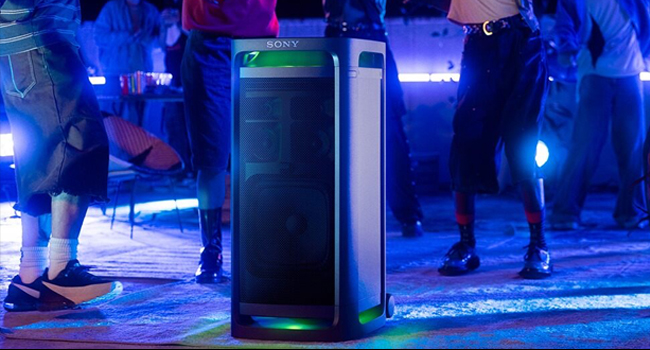
Figure 4: The intuitive top control panel with touch controls and the ULT button.

Figure 5: Rear view of the speaker, detailing the various input and output ports.
4. Setup
4.1 Powering On and Charging
- Connect the supplied AC power cord to the speaker's AC input and then to a wall outlet.
- Press the power button on the top panel to turn the speaker on.
- The speaker will begin charging automatically when connected to power.
4.2 Initial Bluetooth Pairing
- With the speaker powered on, press the Bluetooth pairing button on the top panel. The Bluetooth indicator will flash.
- On your mobile device, navigate to Bluetooth settings and select "SRSULT900AC" from the list of available devices.
- Once connected, the Bluetooth indicator on the speaker will stop flashing and remain lit.
5. Operating Instructions
5.1 Connectivity
- Bluetooth 5.2: Supports multipoint connection for seamless switching between two paired devices. Compatible with SBC, AAC, and LDAC audio codecs for high-resolution audio streaming.
- USB-A: Plug in a USB drive for direct audio playback or use the port to charge your smartphone or tablet.
- Optical In: Connect to your TV for enhanced audio.
- Audio In: Use a standard 3.5mm audio cable to connect other audio sources.
5.2 Sound Features
- ULT Button: Press the ULT button to cycle through bass enhancement modes: ULT OFF (default), ULT 1 (deeper bass), and ULT 2 (punchier bass).
- 360° Party Sound: The speaker's design, including rear-firing tweeters, projects sound in all directions to fill the room.
- X-Balanced Speaker Unit: Delivers powerful, clear sound with enhanced bass and reduced distortion.
- 10-Band Equalizer: Customize your sound profile using the Sony Music Center app.
- TV Sound Booster: Connect via optical cable to enhance TV audio, utilizing the subwoofer and rear tweeters for an immersive viewing experience.
- Sound Field Optimization: Automatically adjusts sound settings based on ambient noise for optimal clarity. This feature can be enabled via the Sony Music Center app.
5.3 Party Features
- 360° Party Light: Dynamic, multi-color lighting effects synchronize with your music. Control light modes (strobe, gradient, solid color) via the Sony Music Center app.
- Stereo Sound & Party Connect: Pair two ULT Tower 9AC speakers for true stereo sound. Use Sony's Party Connect feature to link up to 100 compatible Sony speakers for synchronized music across multiple locations.
- Karaoke Partner: Connect up to two wireless microphones (one included with some variants) via the 1/4-inch input. Adjust microphone volume, key, and reverb directly from the top panel or via the Sony Music Center app.

Figure 6: The speaker's 360° Party Light feature in action.
Figure 7: The speaker is an ideal companion for karaoke sessions.
6. Maintenance
The ULT Tower 9AC is designed to be splash-proof on its top surface. However, it is not fully waterproof or dust-proof. To clean the speaker, use a soft, dry cloth. Avoid using abrasive cleaners or solvents. Ensure all port covers are securely closed when not in use to maintain splash resistance.
7. Troubleshooting
- No Power: Ensure the AC power cord is securely connected to both the speaker and a working wall outlet.
- No Sound: Check the volume level on both the speaker and your connected device. Verify the correct input source is selected. For Bluetooth, ensure the device is properly paired.
- Bluetooth Pairing Issues: Make sure the speaker is in pairing mode (Bluetooth indicator flashing). Ensure your device's Bluetooth is enabled and within range. Try unpairing and re-pairing the device.
- Distorted Sound: Reduce the volume on both the speaker and the connected device. Check audio source quality. If using ULT modes, try switching to ULT OFF or adjusting the 10-band EQ.
- Karaoke Microphone Issues: Ensure the microphone is powered on and properly connected to the 1/4-inch input. Adjust the microphone volume knob.
8. Specifications
| Feature | Specification |
|---|---|
| Model Name | ULT TOWER 9AC |
| Dimensions (D x W x H) | 17.95"D x 16.14"W x 35.83"H |
| Item Weight | 62.9 Pounds |
| Power Source | Corded Electric (Plug-in Power) |
| Input Voltage | 120 Volts |
| Wireless Technology | Bluetooth 5.2 |
| Audio Codecs | SBC, AAC, LDAC |
| Speaker Type | Party Speaker (Floor Standing) |
| Special Features | 360° Party Sound and Lights, Bass Boost (ULT Button), Karaoke Function, TV Sound Booster |
| Material | Plastic |
| Color | Black |
| UPC | 027242931930 |
9. Official Product Video
Watch this official product video from Sony Electronics to see the ULT Tower 9AC in action.
Video 1: Sony ULT TOWER 9AC x Post Malone - A brief showcase of the speaker's features and design.
10. Warranty and Support
The Sony ULT Tower 9AC comes with a limited warranty. For detailed warranty information and customer support, please refer to the documentation included in your product packaging or visit the official Sony website.
You may also consider purchasing extended protection plans:
- 3-Year Protection Plan
- Complete Protect: One plan covers all eligible past and future purchases


