1. Introduction
This manual provides comprehensive instructions for the proper installation, operation, and maintenance of your Ulanzi UURig R056 L-Plate, specifically designed for the Sony ZV1 camera. The L-plate enhances camera stability and expands mounting options for various accessories, improving your photography and videography experience.
2. Product Overview
The Ulanzi UURig R056 L-Plate is a custom-fit accessory that provides a secure base and additional mounting points for your Sony ZV1 camera. It features a robust metal construction with a comfortable wooden grip, designed for ergonomic handling and enhanced stability.
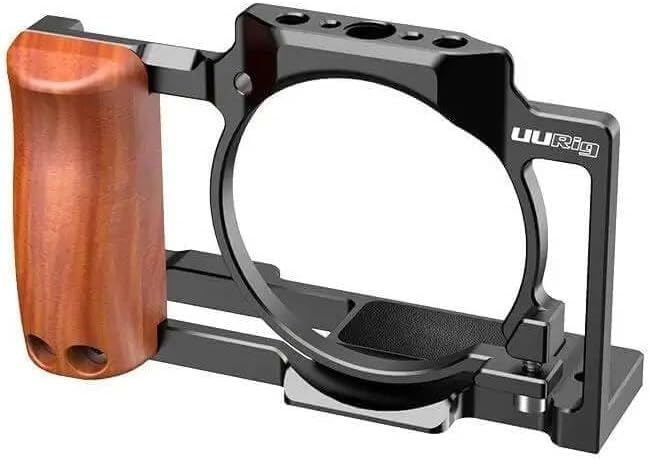
Figure 2.1: The Ulanzi UURig R056 L-Plate. This image displays the black metal L-plate with a brown wooden grip on the left side. The plate is designed to fit around the camera body, providing a secure attachment point and multiple threaded holes for accessory mounting.
Key components include the main L-shaped frame, a wooden handgrip for improved ergonomics, and multiple 1/4"-20 threaded holes for attaching external accessories.
3. What's in the Box
- Ulanzi UURig R056 L-Plate for Sony ZV1 Camera
- Mounting Screw (pre-installed or separate)
- Hex Wrench (if required for installation)
4. Setup
Follow these steps to securely attach the Ulanzi UURig R056 L-Plate to your Sony ZV1 camera:
- Prepare Camera: Ensure your Sony ZV1 camera is powered off.
- Align Plate: Position the L-plate against the bottom of your Sony ZV1 camera, aligning the camera's tripod socket with the mounting screw hole on the L-plate.
- Secure Attachment: Insert the provided mounting screw (usually a 1/4"-20 screw) into the camera's tripod socket through the L-plate.
- Tighten Screw: Use a coin or the provided hex wrench (if applicable) to firmly tighten the screw. Ensure the L-plate is snug against the camera body and does not wobble. Do not overtighten.
- Verify Stability: Gently test the attachment to confirm the camera is securely mounted to the L-plate.
5. Operating Instructions
Once installed, the Ulanzi UURig R056 L-Plate provides enhanced functionality for your Sony ZV1 camera:
- Improved Grip: The integrated wooden handgrip offers a more comfortable and secure hold on your camera, reducing fatigue during extended shooting sessions.
- Enhanced Stability: The robust construction of the L-plate adds a stable base to your camera, which can help reduce camera shake, especially when shooting handheld.
- Accessory Mounting: Utilize the multiple 1/4"-20 threaded holes located on the L-plate to attach various accessories such as:
- External microphones
- LED video lights
- Monitors
- Articulating arms
- Arca-Swiss Compatibility: The base of the L-plate is designed to be Arca-Swiss compatible, allowing for quick attachment and detachment from Arca-Swiss standard tripods and ball heads.
6. Maintenance
Proper care ensures the longevity and performance of your L-plate:
- Cleaning: Wipe the L-plate with a soft, dry cloth to remove dust and fingerprints. For stubborn dirt, a slightly damp cloth can be used, followed by immediate drying. Avoid harsh chemicals or abrasive materials.
- Storage: Store the L-plate in a dry, cool place away from direct sunlight when not in use.
- Inspection: Periodically check all screws and connection points to ensure they remain tight. Retighten if necessary.
7. Troubleshooting
If you encounter issues with your Ulanzi UURig R056 L-Plate, refer to the following common problems and solutions:
- L-Plate feels loose on camera:
- Ensure the mounting screw is fully tightened.
- Verify that the L-plate is correctly aligned with the camera's tripod socket.
- Accessories do not fit threaded holes:
- Confirm that your accessory uses a standard 1/4"-20 screw.
- Check for any debris or obstruction in the threaded holes.
- Difficulty accessing camera ports/battery:
- The UURig R056 is designed for full access. Ensure the plate is correctly installed and not misaligned.
8. Specifications
| Model | R056 |
| Compatibility | Sony ZV1 Camera |
| Material | Aluminum Alloy, Wood |
| Mounting Points | Multiple 1/4"-20 threaded holes |
| Tripod Compatibility | Arca-Swiss standard |
| Item Weight | 800 g |
9. Warranty and Support
Ulanzi products are manufactured to high-quality standards. For information regarding warranty coverage, please refer to the warranty card included with your purchase or visit the official Ulanzi website. For technical support or inquiries, please contact Ulanzi customer service through their official channels.


