
Redragon K689WBO-RGB-PRO
Redragon Wyvern K689WBO-RGB-PRO Mechanical Gaming Keyboard User Manual
Model: K689WBO-RGB-PRO
This manual provides detailed instructions for the setup, operation, and maintenance of your Redragon Wyvern K689WBO-RGB-PRO Mechanical Gaming Keyboard. Please read thoroughly before use.
1. Product Overview
The Redragon Wyvern K689WBO-RGB-PRO is a full-size mechanical gaming keyboard designed for versatility and performance. It features triple-mode connectivity, hot-swappable switches, and customizable RGB lighting, catering to both gaming and professional use.
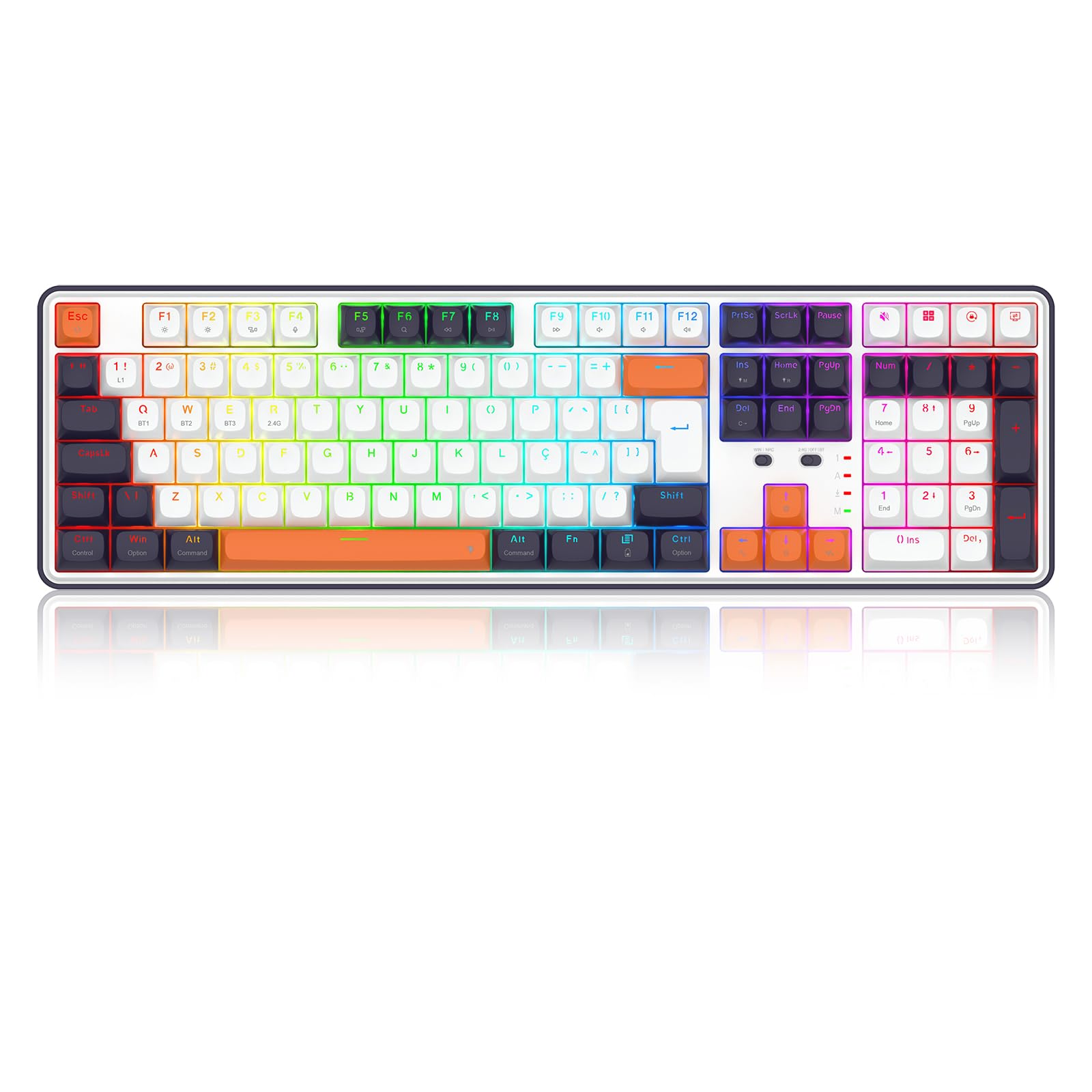
Figure 1: Front view of the Redragon Wyvern K689WBO-RGB-PRO Mechanical Gaming Keyboard.
2. Key Features
- ABNT2 Layout: Specifically designed for the Brazilian market.
- Unique Keycaps and Switches: Enhanced aesthetics and typing experience.
- Hotswap Pro Swap System: Compatible with 5-pin mechanical switches for easy customization.
- Full-Size Format: Includes a numeric keypad for comprehensive functionality.
- Triple Connectivity: Supports USB 2.4GHz wireless, Bluetooth, and USB Type-C wired connections.
- Factory-Included Foam Mod: Improves keyboard acoustics by dampening internal sounds.
- RGB Illumination: Customizable backlighting.
- N-Key Rollover: Ensures all key presses are registered accurately.
3. Setup Guide
3.1 Connectivity Modes
The Redragon Wyvern K689WBO-RGB-PRO offers three connection options:
- 2.4GHz Wireless (Dongle):
Insert the 2.4GHz USB dongle into an available USB port on your computer. Turn the keyboard's connectivity switch to '2.4G'. The keyboard should automatically connect. - Bluetooth:
Turn the keyboard's connectivity switch to 'BT'. The keyboard can store up to three Bluetooth devices (BT1, BT2, BT3). To pair, press and hold 'Fn' + 'Q' (for BT1), 'Fn' + 'W' (for BT2), or 'Fn' + 'E' (for BT3) until the indicator light flashes rapidly. On your device, search for 'Redragon K689' and connect. To switch between paired Bluetooth devices, short press 'Fn' + 'Q/W/E'. - USB Type-C Wired:
Connect the provided USB Type-C cable from the keyboard to a USB port on your computer. The keyboard will automatically switch to wired mode and begin charging.

Figure 2: Keyboard with the 2.4GHz USB dongle for wireless connection.

Figure 3: Switches for selecting Windows/Mac mode and 2.4G/Off/Bluetooth connectivity.
3.2 Operating System Mode Switch
A dedicated switch on the keyboard allows you to toggle between Windows (WIN) and Mac (MAC) operating system modes for optimal key mapping.
4. Operating Instructions
4.1 RGB Lighting Control
The keyboard features customizable RGB backlighting. Use the dedicated function keys (often combined with the 'Fn' key) to cycle through lighting modes, adjust brightness, and change colors. Refer to the specific key combinations printed on your keycaps or the Redragon software for detailed control.
4.2 Special Function Keys
The keyboard includes four extra shortcut keys for enhanced usability. These keys provide quick access to various functions, improving efficiency during daily tasks and gaming sessions.
4.3 Mambo Linear Switches
The keyboard is equipped with factory-lubricated Mambo Linear switches. These switches are designed to be smooth and quiet, providing a comfortable and responsive typing experience for all users.

Figure 4: Close-up view of a Mambo Linear switch, highlighting its design.
5. Maintenance
5.1 Cleaning
To clean your keyboard, disconnect it from your computer. Use a soft, dry cloth to wipe down the keycaps and chassis. For deeper cleaning, you may use a can of compressed air to remove debris from between the keys. Avoid using liquid cleaners directly on the keyboard.
5.2 Hot-Swappable Switches
The Pro Swap system allows for easy replacement of mechanical switches without soldering. To replace a switch:
- Gently remove the keycap using a keycap puller.
- Use the provided switch puller to carefully grip and pull out the switch.
- Align the pins of the new 3-pin or 5-pin mechanical switch with the holes on the PCB.
- Press the new switch firmly into place until it clicks.
- Reattach the keycap.

Figure 5: Detail of the hot-swappable switch sockets, allowing for easy switch replacement.
6. Troubleshooting
6.1 Connectivity Issues
- 2.4GHz/Bluetooth not connecting: Ensure the keyboard is charged and the correct mode switch (2.4G/BT) is selected. For Bluetooth, ensure the keyboard is in pairing mode (flashing indicator) and your device's Bluetooth is enabled.
- Intermittent connection: Check for interference from other wireless devices. Ensure the dongle is in a clear line of sight or use a USB extension cable if necessary.
6.2 Lighting Issues
- RGB not working: Ensure the keyboard is powered on. Check if the lighting is turned off or set to a very low brightness level using the function keys or software.
6.3 Key Not Responding
- Single key not working: If a single key is unresponsive, try removing and re-inserting its switch. If the issue persists, the switch may need replacement.
7. Specifications
| Feature | Detail |
|---|---|
| Brand | Redragon |
| Model | K689WBO-RGB-PRO |
| Switches | Mambo Linear Mechanical |
| Actuation | Mechanical |
| Durability | Hotswap Pro Swap (5-pin compatible) |
| Color | White, Black, and Orange |
| Format | Full Size |
| Layout | ABNT2 |
| Connectivity | Bluetooth, USB 2.4GHz, USB Type-C |
| Software | Yes |
| Adjustable Height | Yes |
| Case Material | ABS Plastic |
| Illumination | RGB |
| Rollover | N-Key |
| Cable Length | 1.80m |
| Keycaps | Doubleshot PBT |
| Weight (Net) | 1165 g |
| Weight (Gross) | 1244 g |
| Package Dimensions | 40 x 450 x 170 mm |
8. Warranty and Support
8.1 Warranty Information
This Redragon Wyvern K689WBO-RGB-PRO Mechanical Gaming Keyboard comes with a 12-month warranty from the date of purchase. This warranty covers manufacturing defects under normal use. Please retain your proof of purchase for warranty claims.
8.2 Customer Support
For technical support, troubleshooting assistance, or warranty inquiries, please contact Redragon customer service. Visit the official Redragon website for contact details and further resources.
9. Product Video
Video 1: A brief overview of the Redragon Wyvern K689WBO-RGB-PRO keyboard's key features and design. This video highlights the triple connectivity, hot-swappable switches, and overall build quality.
Ask a question about this manual
Ask about setup, troubleshooting, compatibility, parts, safety, or missing instructions. Manuals+ will review the question and use this page’s manual context to help answer it.