
Introduction
This instruction manual provides guidance for the proper use and maintenance of your ZdalaMit RMT-AM120U replacement remote control. This remote is designed to be compatible with various Sony Home Audio Systems, offering direct functionality without the need for programming.
Compatibility
The RMT-AM120U remote control is compatible with the following Sony Home Audio System models:
- SHAKE-X7D
- MHC-GT3D
- MHC-GT5D
- MHC-V7D
- SHAKE-X1D
- SHAKE-X3D
- HCD-SHAKEX3
- HCD-SHAKEX1
- SS-SHAKEX3
- SS-SHAKEX1
Setup
Battery Installation
- Locate the battery compartment on the back of the remote control.
- Slide the battery compartment cover downwards or in the direction indicated by an arrow to open it.
- Insert two (2) 1.5V AAA alkaline batteries, ensuring the positive (+) and negative (-) terminals match the diagrams inside the compartment.
- Close the battery compartment cover by sliding it back into place until it clicks securely.
Note: Batteries are not included with the remote control. Please use new alkaline batteries for optimal performance.
Initial Use
No programming is required for this replacement remote control. Once batteries are installed correctly, the remote is ready for immediate use with your compatible Sony Home Audio System.
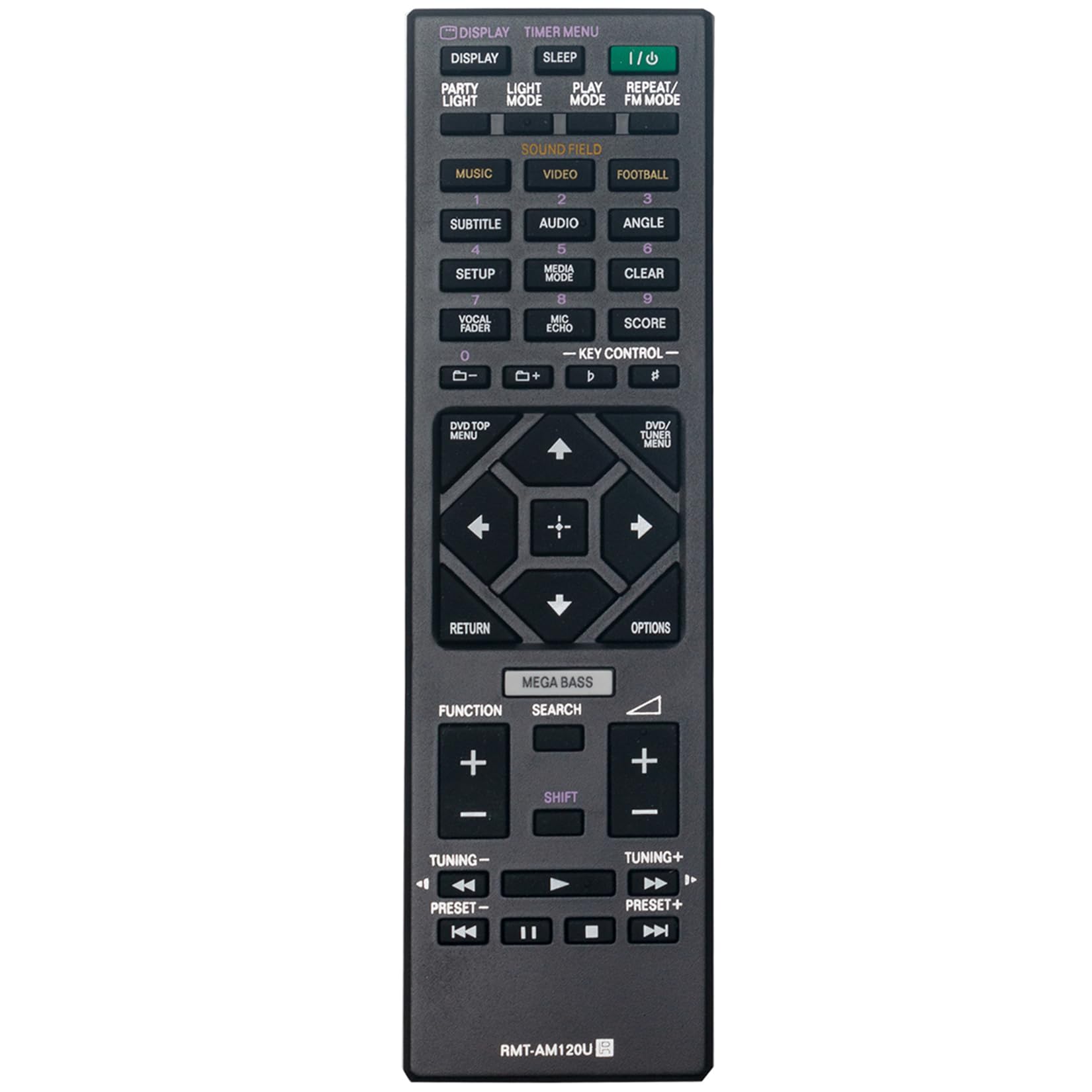
Figure 1: Front view of the RMT-AM120U remote control.
Operating Instructions
Point the remote control directly at the infrared sensor on your Sony Home Audio System. Ensure there are no obstructions between the remote and the system.
Key Functions
The remote control features various buttons for controlling your audio system. Common functions include:
- Power (I/O): Turns the audio system on or off.
- Display: Changes or shows display information.
- Timer Menu: Accesses timer settings.
- Sleep: Sets a sleep timer.
- Play Mode: Selects playback modes (e.g., Normal, Shuffle).
- Repeat/FM Mode: Toggles repeat playback or switches FM radio mode.
- Music/Video/Football: Selects input sources or sound modes.
- Subtitle/Audio/Angle: Controls DVD/Blu-ray playback options.
- Setup: Accesses system settings.
- Media Mode: Selects media input.
- Clear: Clears entries or selections.
- Vocal Fader/Mic Echo/Score: Controls microphone and karaoke functions.
- Key Control: Adjusts key for karaoke.
- Numeric Buttons (0-9): For direct track selection or input.
- DVD/TOP MENU: Accesses the top menu of a DVD/Blu-ray disc.
- DVD/TUNER MENU: Accesses the menu for DVD or tuner functions.
- Navigation Buttons (Up, Down, Left, Right, Enter): For menu navigation and selection.
- Return: Returns to the previous screen or menu.
- Options: Displays options menu.
- MEGA BASS: Enhances bass sound.
- Search: Initiates search function.
- Function: Cycles through functions or inputs.
- Volume (+/-): Adjusts the volume level.
- Tuning (+/-): Tunes radio frequencies.
- Preset (+/-): Selects preset radio stations.
- Playback Controls (Play, Pause, Stop, Fast Forward, Rewind, Skip Forward, Skip Back): Controls media playback.

Figure 2: Angled view highlighting the button layout.
Maintenance
Battery Replacement
Replace batteries when the remote control's response becomes sluggish or stops functioning. Always replace both batteries at the same time with new 1.5V AAA alkaline batteries. Do not mix old and new batteries, or different types of batteries.
Cleaning
Wipe the remote control with a soft, dry cloth. Do not use abrasive cleaners, solvents, or alcohol, as these can damage the surface or internal components.
Storage
If the remote control will not be used for an extended period, remove the batteries to prevent leakage and potential damage.
Troubleshooting
- Remote not responding:
- Check if the batteries are inserted correctly with the correct polarity.
- Replace old batteries with new ones.
- Ensure there are no obstructions between the remote control and the audio system's sensor.
- Make sure you are within the effective operating range (approximately 33 feet).
- Limited range or intermittent operation:
- Ensure the batteries are fresh.
- Verify that the remote control is pointed directly at the audio system.
- Avoid strong light sources (e.g., direct sunlight, fluorescent lights) that might interfere with the infrared signal.
Specifications
| Feature | Specification |
|---|---|
| Model | RMT-AM120U |
| Power Supply | 2 x 1.5V AAA Alkaline Batteries |
| Connectivity Technology | Infrared |
| Button Quantity | 15 |
| Maximum Range | 33 Feet (10 meters) |
| Dimensions (L x W x H) | 6.35" x 1.79" x 0.55" (16.13 cm x 4.55 cm x 1.40 cm) |
| Item Weight | 40 Grams (0.09 lbs) |
| Color | Black |

Figure 3: Remote control with approximate dimensions.
Warranty Information
This ZdalaMit RMT-AM120U replacement remote control comes with a 1-year warranty from the date of purchase. This warranty covers manufacturing defects under normal use. It does not cover damage caused by misuse, accidents, unauthorized modifications, or battery leakage.
For warranty claims or support, please contact your retailer or the manufacturer directly.
Support
For further assistance or inquiries regarding your ZdalaMit RMT-AM120U remote control, please refer to the contact information provided by your seller or visit the ZdalaMit official support channels.