
1. Important Safety Guidelines
Before operating your Caroma Electric Scooter, please read and understand all safety instructions. Failure to follow these guidelines may result in serious injury or property damage.
- Always wear a helmet and appropriate protective gear (knee pads, elbow pads) when riding.
- Ensure all screws and quick-release mechanisms are securely fastened before each ride.
- Do not ride in wet conditions, heavy rain, or through standing water to prevent damage to electrical components and loss of traction.
- Adhere to local traffic laws and regulations regarding electric scooter usage.
- Maintain a safe speed and distance from pedestrians and other vehicles.
- Avoid riding on steep slopes, uneven terrain, or over obstacles that may cause loss of control.
- Do not perform stunts or sudden maneuvers.
- Regularly inspect tires, brakes, and all components for wear and damage.
- The maximum weight limit for this scooter is 265 pounds.
2. Product Overview
The Caroma E22 PRO-Black Electric Scooter is designed for efficient urban commuting, featuring a powerful motor, long-range battery, and smart app control.

Figure 2.1: Caroma Electric Scooter E22 PRO-Black
Key Features:
- 350W Rear-Wheel Motor: Delivers up to 630W peak power, reaching a max speed of 20 mph and handling 20° max slopes.
- 285Wh Large Capacity Battery: Provides a travel range of up to 20 miles on a single charge.
- 9-inch Honeycomb Solid Tires: Explosion-proof, anti-puncture, and self-healing for a smooth ride.
- Auto Triple Lighting System: Automatic headlight, taillight, and pedal light for enhanced visibility.
- Dual Braking System: Combines EABS (Electronic Anti-lock Braking System) and drum braking for reliable stopping power.
- Adjustable Handlebar Height: Accommodates users from 40 to 46 inches.
- Intelligent APP Control: Manage speed modes, cruise control, and lighting via a mobile application.
- Folding Portable Design: One-step folding system for easy storage and transport.
3. Setup and Assembly
3.1 Unboxing and Initial Inspection
Carefully remove all components from the packaging. Verify that all parts listed in the packing list are present and undamaged. The package includes: 1x Electric Scooter, 1x Charger, 1x User Manual, 1x Tool Kit.
Video 3.1: Caroma Electric Scooter Installation Tutorial. This video demonstrates the unboxing and assembly process for the scooter.
3.2 Handlebar Assembly
- Lift the main stem of the scooter until it locks into the upright position.
- Connect the handlebar to the top of the stem. Ensure the cables are not pinched.
- Secure the handlebar using the provided screws and Allen key from the tool kit.
- Adjust the handlebar height by loosening the quick-release clamp, extending or retracting the handlebar, and then securely re-fastening the clamp.
3.3 Initial Charging
Before first use, fully charge the scooter's battery. The charging time is approximately 5.5 hours.
- Locate the charging port on the side of the scooter deck.
- Ensure the charging port cover is removed.
- Connect the charger to the scooter's charging port, then plug the charger into a standard wall outlet.
- The indicator light on the charger will change (e.g., from red to green) when charging is complete.
- Disconnect the charger and securely close the charging port cover to protect it from dust and moisture.
4. Operating Instructions
4.1 Power On/Off and Display
To power on the scooter, press and hold the power button on the handlebar display. The LED display will illuminate, showing real-time speed, battery life, and current speed mode.
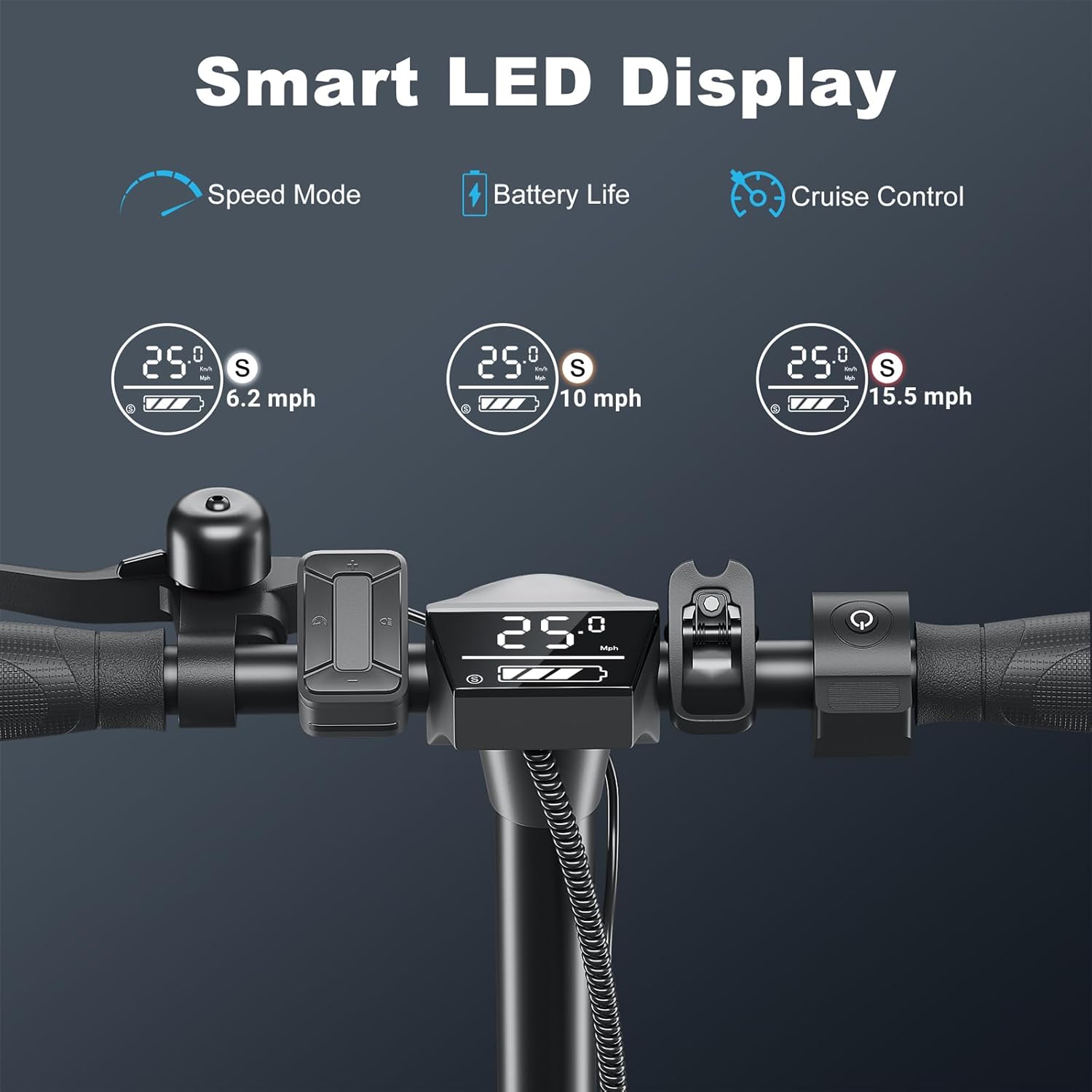
Figure 4.1: Smart LED Display showing speed mode, battery life, and cruise control indicator.
To power off, press and hold the power button again until the display turns off.
4.2 Riding the Scooter
- Kick-Start: The scooter requires a kick-start for safety. Push off with your foot to gain a small amount of momentum (approx. 1.8 mph / 3 km/h).
- Accelerate: Once moving, press the accelerator lever on the right handlebar to engage the motor.
- Speed Modes: Use the mode button on the display or the mobile app to switch between three speed gears: 9.3 mph, 15.5 mph, and 20 mph.
- Cruise Control: To activate cruise control, maintain a consistent speed for a few seconds. The scooter will beep, and the cruise control indicator will light up. To deactivate, lightly press the brake or accelerator.
Video 4.2: Caroma Electric Scooter for Adults, Ideal for Commute. This video demonstrates the scooter in various riding scenarios, highlighting its performance and features.
4.3 Braking System
The Caroma E22 PRO-Black is equipped with a dual braking system for enhanced safety.
- EABS (Electronic Anti-lock Braking System): Engages when the brake lever is pressed, providing smooth and controlled deceleration.
- Drum Braking: Provides additional mechanical stopping power.
- Press the brake lever on the left handlebar to activate both braking systems simultaneously. The taillight will flash to alert others.

Figure 4.3: Illustration of the dual braking system, combining electronic and drum brakes for effective stopping.
4.4 Lighting System
The scooter features an Auto Triple Lighting System for visibility and safety, especially during night rides.
- Automatic Headlight: Illuminates the path ahead.
- Taillight: Enhances rear visibility.
- Pedal Light: Provides under-deck illumination.
- These lights can be controlled via the mobile app or the multifunctional button console.

Figure 4.4: The scooter's lighting system, including the automatic headlight, taillight, and pedal light, for safe night riding.
4.5 Mobile App Control
Download the official Caroma app to unlock additional features and customize your riding experience.
- Connect the app to the scooter via Bluetooth.
- Control speed mode, cruise control, headlight, and pedal light settings.
- Record ride data and track your mileage.
Figure 4.5: The Caroma Electric Scooter with a smartphone displaying the control app interface.
4.6 Folding and Portability
The scooter features a convenient one-step folding system for easy storage and transport.
- Ensure the scooter is powered off.
- Locate the folding mechanism at the base of the handlebar stem.
- Engage the release lever and fold the handlebar stem downwards until it locks into place with the rear fender.
- The folded size is 44.5" x 18.5" x 19.7", making it suitable for carrying on public transport or storing in a car trunk.

Figure 4.6: A person demonstrating the one-step folding mechanism of the Caroma Electric Scooter for easy portability.
5. Maintenance
5.1 General Care
- Keep the scooter clean and dry. Wipe down with a damp cloth after use.
- Avoid using harsh chemicals or abrasive materials for cleaning.
- Store the scooter in a cool, dry place away from direct sunlight and extreme temperatures.
5.2 Battery Care
- Charge the battery regularly, even if the scooter is not in use, to maintain battery health.
- Do not overcharge or completely drain the battery.
- Use only the original charger provided with the scooter.

Figure 5.1: Detailed view of the scooter's 285Wh lithium battery and intelligent battery management system (BMS).
5.3 Tire Maintenance
The scooter is equipped with 9-inch honeycomb solid tires, which are designed to be maintenance-free and resistant to punctures.
- Regularly inspect tires for any signs of wear or damage.
- While puncture-resistant, avoid riding over sharp objects that could cause severe damage.

Figure 5.2: The scooter's wheels are shown splashing through water, indicating its water-resistant design and solid tires.
6. Troubleshooting
If you encounter any issues with your scooter, please refer to the following common troubleshooting steps.
6.1 Scooter Will Not Turn On
- Ensure the battery is sufficiently charged. Connect the charger and allow it to charge for at least 30 minutes before attempting to power on again.
- Verify that the power button is being pressed and held correctly.
- Check for any visible damage to the power button or display unit.
Video 6.1: Scooter Won't Turn On. This video addresses common reasons why the scooter might not power on and provides potential solutions.
6.2 Motor Not Engaging
- Remember the scooter requires a kick-start to activate the motor. Ensure you push off to gain initial momentum before pressing the accelerator.
- Check the battery level on the display or app. A low battery may prevent the motor from engaging.
- Ensure the accelerator lever is functioning correctly and not stuck.
6.3 App Connectivity Issues
- Ensure Bluetooth is enabled on your mobile device.
- Make sure the scooter is powered on and within Bluetooth range of your device.
- Try restarting both the scooter and your mobile device.
- Reinstall the Caroma app if problems persist.
7. Specifications
| Feature | Specification |
|---|---|
| Brand | Caroma |
| Model Name | E22 PRO |
| Color | 350W-E22 PRO-Black |
| Motor Power | 350W (up to 630W peak) |
| Max Speed | 20 Mph |
| Max Distance Range | 20 Miles |
| Battery Capacity | 285Wh |
| Charging Time | 5.5 Hours |
| Wheel Size | 9 Inches |
| Wheel Type | Solid (Honeycomb) |
| Brake Style | Front Braking, Rear Braking (EABS & Drum) |
| Weight Limit | 265 Pounds |
| Item Weight | 34.7 Pounds |
| Product Dimensions (LxWxH) | 43.3"L x 18.5"W x 45.7"H |
| Folded Size (LxWxH) | 44.5" x 18.5" x 19.7" |
| Frame Material | Aluminum |
| Special Features | Adjustable Handlebar Height, Anti-Puncture Tire, App Control, Cruise Control, Digital Display |
8. Warranty and Support
8.1 Product Warranty
The Caroma Electric Scooter E22 PRO-Black comes with a limited warranty. Please refer to the warranty description for specific coverage details:
- Warranty Description: 12 months or 6 months for different parts replacement.
For detailed warranty terms and conditions, please consult the full warranty document included with your purchase or contact Caroma customer support.
8.2 Customer Support
If you have any questions, require technical assistance, or need to claim warranty service, please contact Caroma customer support through the following channels:
- Refer to the contact information provided in your user manual.
- Visit the official Caroma website for support resources and contact details.


