
1. Product Overview
The IKOED Z02 Silver Fingerprint Door Lock offers advanced security and convenience for your home, office, apartment, or Airbnb. This smart door knob integrates multiple unlocking methods, including fingerprint, passcode, mobile app control, IC cards, and traditional physical keys, providing flexible access solutions.
Key features include rapid fingerprint recognition, secure passcode entry with anti-peep functionality, Bluetooth app management for user control and activity logs, and an automatic locking mechanism for enhanced safety.

Figure 1.1: IKOED Z02 Silver Fingerprint Door Lock, showing the main unit, included keys, and a smartphone displaying the control app.
2. Package Contents
Please verify that all components are present before beginning installation:
- Smart Door Knob Assembly (Exterior and Interior Handles)
- Latch Bolt
- Strike Plate
- Mounting Screws
- 2 x Physical Keys
- 2 x IC Cards
- Installation Guide / User Manual (this document)
3. Product Specifications
| Feature | Detail |
|---|---|
| Brand | IKOED |
| Model Name | Z02 Silver |
| Lock Type | Biometric |
| Unlocking Methods | Fingerprint, Passcode, APP Control, IC Cards, Physical Keys |
| Fingerprint Capacity | 50+ fingerprints |
| IC Card Capacity | 100 pcs |
| Dimensions (L x W x H) | 2.8 x 7 x 8.6 inches |
| Item Weight | 1.7 pounds |
| Power Source | Battery Powered (Batteries not included) |
| Emergency Power | Type-C USB port |
| Operating Temperature | -20°C to 158°C |
| Waterproof Rating | IP63 |
| Compatibility | Most US standard left-handed and right-handed doors |
4. Installation Guide
The IKOED smart door knob is designed for easy installation without the need for drilling, fitting most US standard left-handed and right-handed doors. A voice guide assists during the setup process.
4.1. Compatibility Check
Before installation, ensure your door meets the following specifications:
- Door Thickness: Minimum 1-3/8" (35mm) to Maximum 2-1/8" (55mm).
- Backset: 2-3/4" (70mm) or 2-3/8" (60mm).
- Cross Bore Diameter: 2-1/8" (54mm).
- Edge Bore Diameter: 1" (25mm).
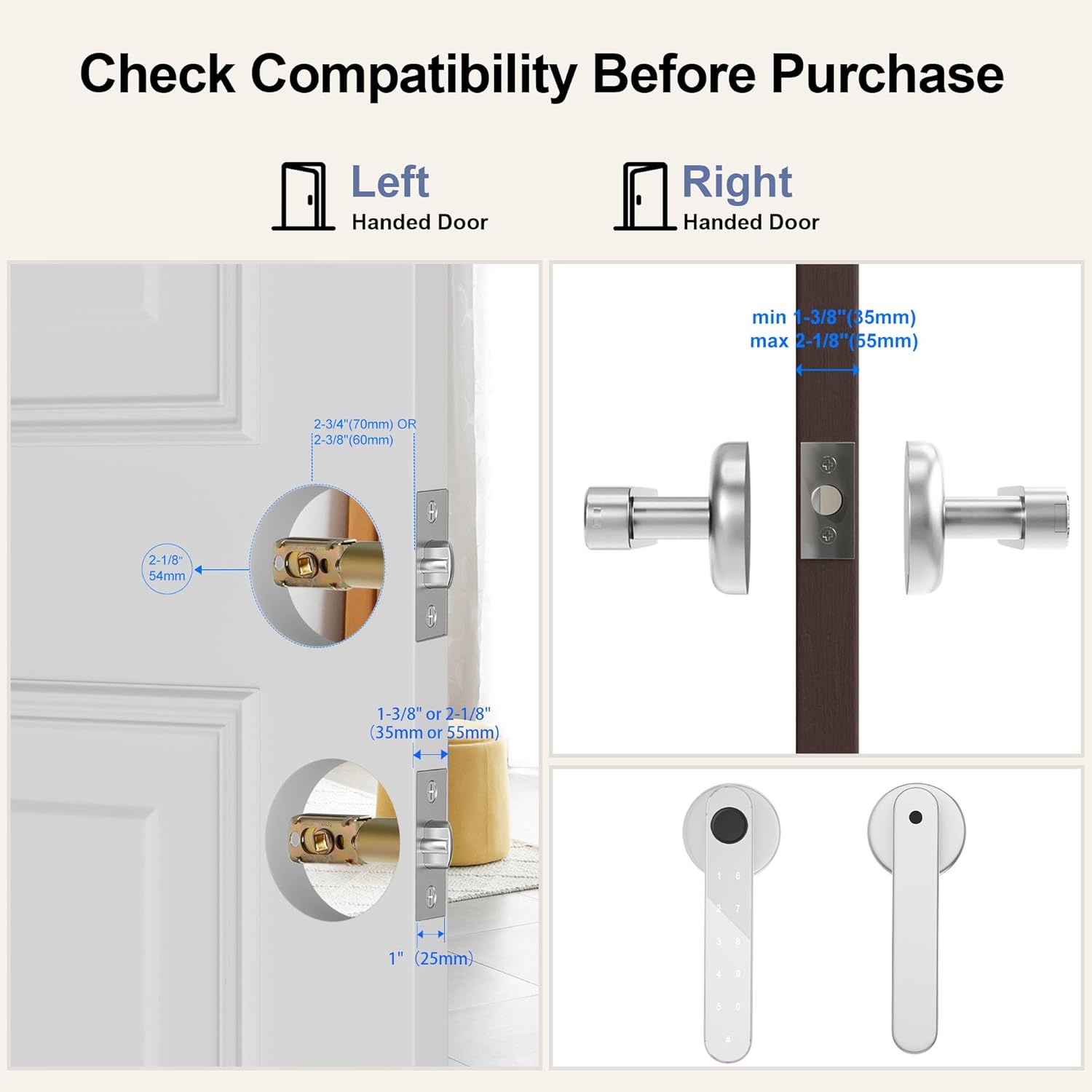
Figure 4.1: Door compatibility measurements for proper installation.
4.2. Step-by-Step Installation
- Prepare the Door: Ensure the door is properly prepped with the correct bore holes and backset.
- Install the Latch Bolt: Insert the latch bolt into the door edge and secure it with screws. Ensure the latch is oriented correctly for your door's swing.
- Install the Exterior Assembly: Feed the cable from the exterior handle through the cross bore. Position the exterior handle on the door.
- Install the Interior Assembly: Connect the cable from the exterior assembly to the interior assembly. Align the interior handle with the exterior handle and secure with mounting screws.
- Insert Batteries: Open the battery cover on the interior handle and insert 4 AAA batteries (not included).
- Test Operation: After installation, test the mechanical key and ensure the handle operates smoothly.
4.3. Initial Setup and Administrator Registration
Upon first power-up, the lock will prompt you to register an administrator fingerprint and passcode. Follow the voice prompts carefully.
- Register Administrator Fingerprint: Place your finger on the sensor multiple times as instructed until registration is complete.
- Set Administrator Passcode: Enter a new passcode and confirm it.
This administrator account will have full control over the lock's settings and user management via the Tuya app.
5. Operating Instructions
The IKOED smart door lock offers five convenient ways to unlock your door.

Figure 5.1: Multiple unlocking methods for the IKOED Smart Door Lock.
5.1. Fingerprint Unlock
The biometric fingerprint sensor allows for quick and secure access. Ensure the lock is "woken up" (e.g., by touching the keypad or sensor) before attempting to unlock with a fingerprint.
- Place your registered finger firmly on the fingerprint sensor.
- The lock will verify your fingerprint within 0.2 seconds.
- Once verified, the lock will unlock, and you can turn the handle to open the door.

Figure 5.2: Unlocking the door using the fingerprint sensor.
5.2. Passcode Unlock
Enter your registered passcode on the keypad. The lock supports anti-peep functionality, allowing you to enter random digits before and after your actual passcode to prevent others from guessing it.
- Wake up the lock by touching the keypad.
- Enter your passcode (e.g., XXXX + Passcode + XXXX, where X are random digits).
- Press the '#' key to confirm.
- The lock will unlock if the passcode is correct.

Figure 5.3: Using the anti-peep passcode feature for enhanced security.
5.3. IC Card Unlock
Use a registered IC card for quick tap-to-unlock access.
- Present the registered IC card to the card reader area on the lock.
- The lock will beep and unlock upon successful recognition.
5.4. Physical Key Unlock
In case of battery depletion or electronic malfunction, you can always use the provided physical keys for emergency access.
- Insert the physical key into the keyhole located on the exterior handle.
- Turn the key to unlock the door.
5.5. Auto-Lock Function
The lock can be configured to automatically lock after a set period (5 to 60 seconds) once the door is closed. This feature provides peace of mind, ensuring your door is always secured.
- This setting is managed via the Tuya app (see Section 6).
- Once enabled, the lock will engage automatically after the specified delay.

Figure 5.4: The auto-lock mechanism for enhanced security.
5.6. Anti-Lock Function (Privacy Mode)
The one-key anti-lock function, located on the backside of the interior handle, provides a privacy mode. When activated, only administrators can unlock the door from the outside, enhancing security and privacy within your space.
5.7. Silent Mode
The lock can operate in silent mode, muting all button beeps and voice prompts. This is ideal for maintaining quiet, especially during late hours. Silent mode is disabled by default after a factory reset.

Figure 5.5: Silent mode ensures quiet operation, ideal for bedrooms or offices.
5.8. Passage Mode
Passage mode allows the door to remain unlocked for free movement without restrictions. This is perfect for high-traffic areas or times when the door does not need to be secured.

Figure 5.6: Passage mode allows unrestricted access, suitable for high-traffic areas.
6. Tuya App Smart Control
The IKOED smart door lock integrates with the Tuya Bluetooth App, providing comprehensive control and management features directly from your smartphone. Note that this lock uses Bluetooth and does not require Wi-Fi, and there are no fees for using the app.
6.1. App Download and Pairing
- Download the "Tuya Smart" or "Smart Life" app from your smartphone's app store (iOS App Store or Google Play Store).
- Create an account or log in.
- Enable Bluetooth on your smartphone.
- In the app, tap "Add Device" or the "+" icon. The app will scan for nearby Bluetooth devices.
- Select your IKOED smart door lock from the list and follow the on-screen prompts to pair it.

Figure 6.1: Managing the smart lock via the Tuya App.
6.2. App Features
- Lock/Unlock Door: Remotely lock or unlock the door via Bluetooth when within range.
- Generate Passcodes: Create temporary, time-limited, or one-time passcodes for guests, cleaners, or couriers.
- Manage Users: Add, modify, or delete user fingerprints, passcodes, and IC cards. Assign different access levels (e.g., administrator, regular user).
- View Log Records: Access a detailed history of all lock and unlock events, including timestamps and user information.
- Alert Prompts: Receive notifications for low battery, unauthorized access attempts, or other security alerts.
- Auto-Lock Settings: Customize the auto-lock delay (5 to 60 seconds) or disable it.
- Passage Mode: Enable or disable passage mode for unrestricted access.
- Silent Mode: Toggle silent mode on or off to control audible feedback from the lock.

Figure 6.2: Sharing temporary passcodes for convenient access.
7. Maintenance
Proper maintenance ensures the longevity and optimal performance of your IKOED smart door lock.
- Battery Replacement: The lock will provide a low-battery notification at 10% power. Replace all four AAA batteries promptly when indicated.
- Emergency Power: If batteries completely drain, you can power the lock temporarily via the Type-C USB port for emergency access. This port is for power only and does not support data transfer.
- Cleaning: Wipe the lock's surface and fingerprint sensor with a soft, dry cloth. Avoid using abrasive cleaners or solvents that could damage the finish or electronic components.
- Environmental Conditions: While the lock is rated IP63 for water resistance and has a wide operating temperature range, avoid exposing it to extreme conditions or direct water spray for extended periods.
8. Troubleshooting
If you encounter issues with your IKOED smart door lock, refer to the following common problems and solutions:
| Problem | Possible Cause | Solution |
|---|---|---|
| Fingerprint not recognized. | Finger not placed correctly, sensor dirty, finger too cold/wet, unregistered fingerprint. | Ensure finger covers the sensor completely. Clean sensor. Warm/dry finger. Re-register fingerprint if needed, scanning from different angles. |
| Keypad unresponsive or not lighting up. | Batteries low or dead, lock not "woken up". | Touch the keypad to wake the lock. Replace batteries. Use emergency Type-C power if completely dead. |
| Lock does not engage/disengage. | Misalignment during installation, latch bolt obstruction, internal error. | Check door alignment and ensure nothing obstructs the latch. Re-check installation steps. Perform a factory reset if necessary (refer to app for instructions). |
| Cannot connect to Tuya App. | Bluetooth off, lock not in pairing mode, app issues. | Ensure Bluetooth is enabled on your phone. Bring phone closer to the lock. Restart app and phone. Follow app's pairing instructions carefully. |
| Auto-lock not working as expected. | Auto-lock disabled, incorrect delay setting, passage mode active. | Check auto-lock settings in the Tuya app. Ensure passage mode is disabled if you want auto-lock to function. |
9. Warranty and Customer Support
IKOED offers at least a 1-year product warranty from the date of purchase for the Z02 Silver Fingerprint Door Lock. This warranty covers manufacturing defects and ensures reliable operation under normal use.
For technical assistance, warranty claims, or any questions regarding your product, please contact IKOED customer support through the following channels:
- Email: [Manufacturer's Support Email - e.g., support@ikoed.com]
- Website: [Manufacturer's Official Website - e.g., www.ikoed.com/support]
- Phone: [Manufacturer's Support Phone Number - if available]
Please have your purchase receipt and product model number (Z02 Silver) ready when contacting support.