
1. Product Overview
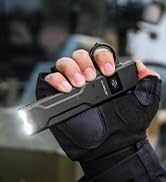
The Klarus FlatTac X1 is an ultra-slim, high-performance tactical flashlight designed for everyday carry (EDC) and tactical applications. It features a powerful SST-70 LED, an intuitive dual-switch interface, and an OLED display for real-time information. Its compact and durable design makes it suitable for various outdoor and emergency situations.

Key Features:
- Ultra-Bright Output: Up to 4200 lumens with a 230-meter beam distance.
- Slim & Compact Design: Measures 0.57 inches thick and weighs 4.41 ounces, with an integrated pocket clip.
- Tactical Dual Switch: Provides quick access to various modes, including Turbo, High, Moonlight, Strobe, and SOS.
- OLED Display: Shows real-time battery level, brightness mode, and lock status.
- USB-C Rechargeable: Fast charging, fully charges in 2 hours, offering up to 48 hours of runtime.
- Optimized Heat Sink: Aerospace-grade aluminum construction with temperature control for efficient heat dissipation.
- Proximity Sensor: Automatically reduces brightness when close to obstructions to prevent overheating.
- Durable Build: IPX6 waterproof and impact-resistant, featuring ceramic beads for emergency glass breaking.
2. Setup and First Use
2.1 Package Contents
Verify that all items are present in the package:
- Klarus FlatTac X1 Flashlight
- USB-C Charging Cable
- User Manual
2.2 Initial Charging
Before first use, fully charge the flashlight. The Klarus FlatTac X1 features a built-in 2150mAh battery and supports USB-C fast charging.
- Locate the USB-C charging port on the side of the flashlight.
- Connect the provided USB-C cable to the flashlight and a compatible USB power source (e.g., wall adapter, computer USB port).
- The OLED display will show a charging indicator. Charging typically takes approximately 2 hours.
- Once fully charged, the display will indicate a full battery. Disconnect the charging cable.

3. Operating Instructions
The FlatTac X1 features a tactical dual-switch design for intuitive control.

3.1 Switch Functions
- Main Switch (Black):
- Momentary-on Moonlight: Press and hold.
- One-Click Last Brightness: Single click to turn on to the last used brightness mode.
- Adjust Brightness: While on, single click to cycle through brightness levels (Moonlight → Low → Medium → High).
- Long-Press Off: Press and hold to turn off.
- Auxiliary Switch (Red):
- Momentary-on Turbo: Press and hold.
- One-Click Strobe: Single click to activate Strobe mode.
- Double-Click SOS: Double click to activate SOS mode.
3.2 Mode Operation
The FlatTac X1 offers 5 vital modes:
- Moonlight: Lowest brightness for discreet illumination.
- Low: Suitable for general close-range tasks.
- Medium: Balanced brightness for various uses.
- High: Strong illumination for broader areas.
- Turbo: Maximum brightness (4200 lumens) for powerful, long-range lighting.
- Strobe: Disorienting flash for self-defense or signaling.
- SOS: International distress signal.
3.3 Lockout Function
To prevent accidental activation and conserve battery, use the lockout function:
- To Lock: Triple-tap the Auxiliary (Red) Switch. The OLED display will show a lock icon.
- To Unlock: Triple-tap the Auxiliary (Red) Switch again. The lock icon will disappear.

3.4 OLED Display Information
The intelligent OLED display provides critical information at a glance:
- Battery Level: Shows remaining battery charge.
- Brightness Mode: Indicates the current lumen output (e.g., Moonlight, Low, Medium, High, Turbo).
- Lock Status: Displays a lock icon when the flashlight is in lockout mode.
- Charging Indicator: Appears when the flashlight is connected for charging.
- Proximity Warning: Displays "NEAR !" when the proximity sensor detects an obstruction, indicating reduced brightness.

4. Maintenance
4.1 General Care
- Clean the flashlight body with a soft, damp cloth. Avoid abrasive materials.
- Keep the USB-C port cover securely closed when not charging to maintain water resistance.
- Store the flashlight in a cool, dry place when not in use for extended periods.
4.2 Battery Care
- Recharge the battery regularly, even if not frequently used, to prolong its lifespan.
- Avoid fully depleting the battery before recharging.
4.3 Water Resistance
The FlatTac X1 has an IPX6 waterproof rating, meaning it is protected against powerful water jets. It is not designed for submersion.

5. Troubleshooting
If you encounter issues with your Klarus FlatTac X1, refer to the following common problems and solutions:
- Flashlight does not turn on:
- Check battery level on the OLED display. Recharge if low.
- Ensure the flashlight is not in lockout mode. Triple-tap the Auxiliary Switch to unlock.
- Flashlight does not charge:
- Verify the USB-C cable is properly connected to both the flashlight and the power source.
- Try a different USB-C cable or power adapter.
- Brightness decreases unexpectedly:
- The proximity sensor may have detected an obstruction. Move the flashlight away from nearby objects.
- The flashlight may be overheating. Allow it to cool down.
- Battery level may be low. Recharge the flashlight.
If the issue persists, please contact Klarus customer support for further assistance.
6. Specifications
Detailed specifications for the Klarus FlatTac X1 Tactical Flashlight:
| Feature | Specification |
|---|---|
| Model | X1 |
| Light Source | SST-70 LED |
| Maximum Output | 4200 Lumens |
| Beam Distance | 230 meters |
| Battery | Built-in 2150mAh Lithium Ion |
| Charging Port | USB-C |
| Charging Time | Approx. 2 hours |
| Max Runtime | Up to 48 hours (Moonlight mode) |
| Water Resistance | IPX6 |
| Impact Resistance | 1 meter |
| Material | Aerospace-grade Aluminum |
| Dimensions | 0.58"D x 1.26"W x 0.57"H |
| Weight | 7.8 ounces (approx. 125g) |
7. Warranty and Support
Klarus products are manufactured to high-quality standards. For warranty information and customer support, please refer to the official Klarus website or contact your authorized dealer.
Manufacturer: KLARUS
For direct support, you may contact Klarus® Direct.


