
LABIGO KS-2630
LABIGO Electric Spin Scrubber LA4 Pro User Manual
Model: KS-2630
Brand: LABIGO
1. Introduction
Thank you for choosing the LABIGO Electric Spin Scrubber LA4 Pro. This cordless power scrubber is designed to simplify your cleaning tasks, offering dual-speed operation and a versatile set of brush heads for various surfaces. This manual provides essential information for the safe and effective use, maintenance, and troubleshooting of your new device. Please read it thoroughly before first use and retain it for future reference.

Figure 1.1: LABIGO Electric Spin Scrubber LA4 Pro and included accessories.
2. Package Contents
Upon opening the package, please verify that all the following components are included:
- LABIGO Main Handle (1)
- Brush Heads (6) - Includes Large Flat Brush, Dome Brush, Corner Brush, Sponge Brush, Chenille Cloth, Cleaning Cloth
- USB-C Cable (1)
- User Manual (1)

Figure 2.1: Visual representation of all items included in the product package.
3. Product Features
- Ultimate Cleaning Experience: Cordless design weighing only 3.37 pounds, reducing cleaning time significantly.
- Dual Speed Cleaning: Equipped with a powerful motor offering a low speed of 350 RPM for daily cleaning and a high speed of 450 RPM for stubborn stains.
- IPX7 Waterproof Design: The full body is IPX7 waterproof, allowing direct rinsing under a faucet. Ensure the charging port rubber seal is fully closed before washing.
- Multifunctional Brush Head Set: Includes 6 replaceable hard bristle brush heads and 1 magic pad for various cleaning tasks, from bathtubs and tiles to glass and car surfaces.
- Adjustable & Detachable Telescopic Pole: Stainless steel handle extends from 39.37 inches to 47.63 inches for hard-to-reach areas. The pole can be removed for handheld use.
- LED Display & Quick Charge: Features a 2500 mAh battery with an LED digital display for battery status and Type-C charging port. Provides 2-3 deep cleans per charge.

Figure 3.1: Demonstration of the scrubber's dual-speed functionality.

Figure 3.2: The scrubber's IPX7 waterproof capability, allowing submersion up to 1 meter for 30 minutes.

Figure 3.3: Overview of the versatile brush heads and their recommended uses.
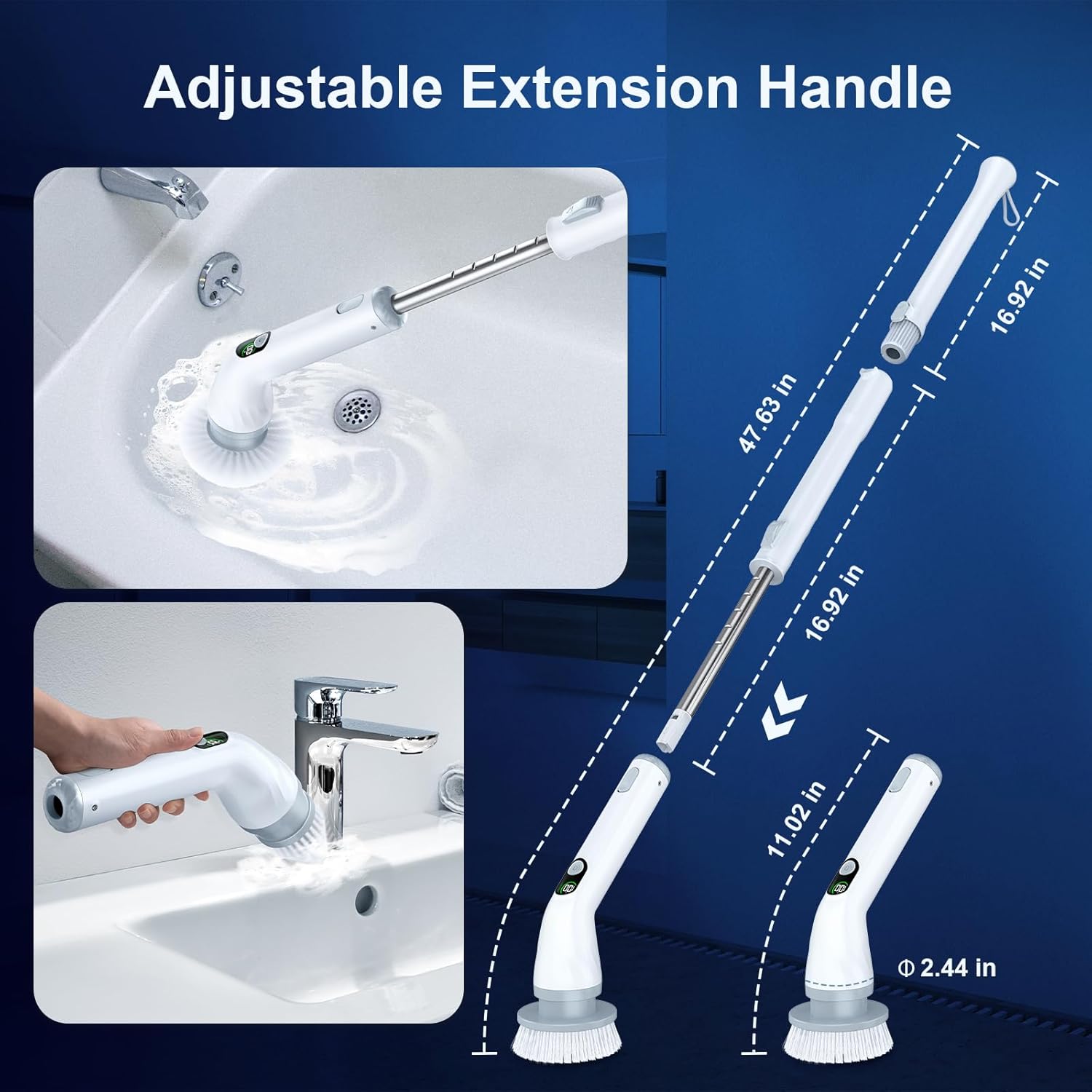
Figure 3.4: Details of the adjustable extension handle for versatile cleaning.

Figure 3.5: Key features: adjustable extension, Type-C charging, and LED display.
4. Setup and Assembly
- Initial Charge: Before first use, fully charge the scrubber using the provided USB-C cable. The LED display will indicate charging status and battery level. A full charge is recommended to preserve battery life. (Note: No adapter is included).
- Attach Brush Head: Select the appropriate brush head for your cleaning task. Align the brush head with the main unit's rotating shaft and push firmly until it snaps securely into place.
- Assemble Handle (Optional): For extended reach, insert the extension tube(s) into the main handle and the base unit. Ensure they click into place. To detach, press the release button and pull apart. The handle can be configured for short (handheld), medium, or long reach.

Figure 4.1: Easy installation steps for brush heads and handle assembly.
5. Operating Instructions
- Power On/Off: Press the power button on the handle to turn the scrubber on. Press it again to turn it off.
- Select Speed: The scrubber has two speeds. Press the power button once for the default speed (350 RPM). Press it again to switch to the higher speed (450 RPM). The LED display may indicate the current speed mode.
- Apply Cleaning Solution: For best results, apply your preferred cleaning solution directly to the surface to be cleaned or to the brush head.
- Begin Cleaning: Gently press the rotating brush head against the surface and move it in a controlled manner. Allow the scrubber to do the work; excessive pressure is not necessary and may reduce battery life or cleaning effectiveness.
- Change Brush Heads: To change a brush head, turn off the scrubber, then pull the brush head firmly to detach it. Snap the new brush head into place.
Recommended Brush Head Applications:
- Large Flat Brush: Ideal for large flat surfaces like floors, tiles, and bathtubs.
- Dome Brush: Suitable for curved surfaces such as sinks and toilets.
- Corner Brush: Designed for grout lines, corners, and tight crevices.
- Sponge Brush: Gentle cleaning for delicate surfaces like furniture or mirrors.
- Chenille Cloth / Cleaning Cloth: For polishing or light cleaning on windows and car surfaces.

Figure 5.1: Examples of brush head usage for various bathroom and floor surfaces.

Figure 5.2: Additional examples of brush head usage for windows, furniture, and car surfaces.
6. Maintenance and Care
- Cleaning the Scrubber: After each use, remove the brush head and rinse it thoroughly under running water. The main unit can be rinsed directly under a faucet due to its IPX7 waterproof rating.
- Ensure Charging Port Seal: Always ensure the rubber seal on the USB-C charging port is fully closed before rinsing the unit to prevent water ingress.
- Drying: Allow all components to air dry completely before storing.
- Storage: Store the scrubber and its accessories in a cool, dry place, away from direct sunlight and extreme temperatures.
- Battery Care: To prolong battery life, avoid fully discharging the battery frequently. Recharge when the battery level is low, as indicated by the LED display.
7. Troubleshooting
- Scrubber not turning on:
- Check battery level on the LED display. Recharge if necessary.
- Ensure the power button is pressed firmly.
- Brush head not spinning or spinning slowly:
- Check battery level and recharge.
- Ensure the brush head is securely attached.
- Avoid applying excessive pressure, which can slow down the motor.
- Reduced cleaning performance:
- Ensure the correct brush head is used for the surface.
- Consider using a stronger cleaning solution.
- The brush head bristles may be worn; replace if necessary.
- Water entering charging port:
- Immediately turn off the device and allow it to dry completely.
- Ensure the rubber seal is properly seated and fully closed before any contact with water.
8. Specifications
| Feature | Specification |
|---|---|
| Brand | LABIGO |
| Model Number | KS-2630 |
| Color | Bluish White |
| Handle Material | Metal and ABS |
| Product Dimensions | 17.52"L x 5.91"W x 5.51"H |
| Material | Acrylonitrile Butadiene Styrene (ABS) |
| Item Weight | 3.3 pounds |
| Battery Capacity | 2500 mAh |
| Rotation Speed (Low) | 350 RPM |
| Rotation Speed (High) | 450 RPM |
| Waterproof Rating | IPX7 |
| Charging Port | USB-C |
9. Safety Information
- Keep the device out of reach of children and pets.
- Do not use the scrubber on sensitive surfaces that may be scratched or damaged by abrasive cleaning. Test on an inconspicuous area first.
- Ensure the charging port is completely dry and the rubber seal is closed before charging or exposing to water.
- Do not disassemble or attempt to repair the device yourself. Contact customer support for assistance.
- Use only the provided USB-C cable for charging.
- Avoid using harsh or corrosive cleaning agents that may damage the device or surfaces.
10. Warranty and Support
LABIGO products come with a standard manufacturer's warranty. For specific warranty terms and conditions, please refer to the warranty card included in your package or visit the official LABIGO website. If you encounter any issues or have questions regarding your LABIGO Electric Spin Scrubber LA4 Pro, please contact LABIGO customer support for assistance. Contact information can typically be found on the product packaging or the brand's official website.
Related documentsKS-2630


Ask a question about this manual
Ask about setup, troubleshooting, compatibility, parts, safety, or missing instructions. Manuals+ will review the question and use this page’s manual context to help answer it.